

Have you wondered if you can see who is looking at your TikTok? Maybe you suspect that someone is stalking you on TikTok and want to know for sure or similar cases.

Fortunately, TikTok has the “Profile View History” and “Post View History” functions that allow you to see who has viewed your profile or posts. So yes, you can see who is looking at your TikTok.
However, there are some important things you need to know about this feature: how to use it, how to enable and disable it, and which users it is intended for. In this article, I’ll explain everything you need to know about viewing your TikTok audience. Let’s dive right in.
Table of Contents
How to See Who Views Your TikTok Profile
TikTok allows you to see which users have viewed your profile with the “Profile View History” feature. However, TikTok says: “You must be at least 16 years old and have less than 5,000 followers to use this feature.”
If you meet TikTok’s requirements for this feature and want to see who is viewing your TikTok profile, you can enable it by following the steps below.
1. Launch TikTok on your smartphone.
2. Click the Profile option at the bottom-right corner of the TikTok app.
3. Next, click the footprint icon in the top-right corner of your profile page.

4. On the Profile views page, click Turn on and you should see people who viewed your profile.
However, it’s important to note that only TikTok accounts that have enabled this feature and have viewed your profile within the last 30 days will appear in the Profile View History.
Moreover, TikTok users that enabled the Profile View History feature on their accounts, will be able to see you when you visit their profile, provided your Profile View feature is still enabled.
Additionally, once you activate the Profile View History feature, TikTok replaces the footprint icon on your profile page with notifications indicating your recent profile viewers.
How to Disable Profile View History on TikTok
If you don’t want other TikTok users to see when you view their profile, and you have no interest in seeing who is viewing your profile, you can disable the “Profile View History” feature by:
1. Launch the TikTok app on your smartphone and click the Profile icon at the bottom-right corner.
2. Click the footprint icon in the top-right corner of your profile page – the icon is replaced with the profile picture of the user who recently checked your profile.
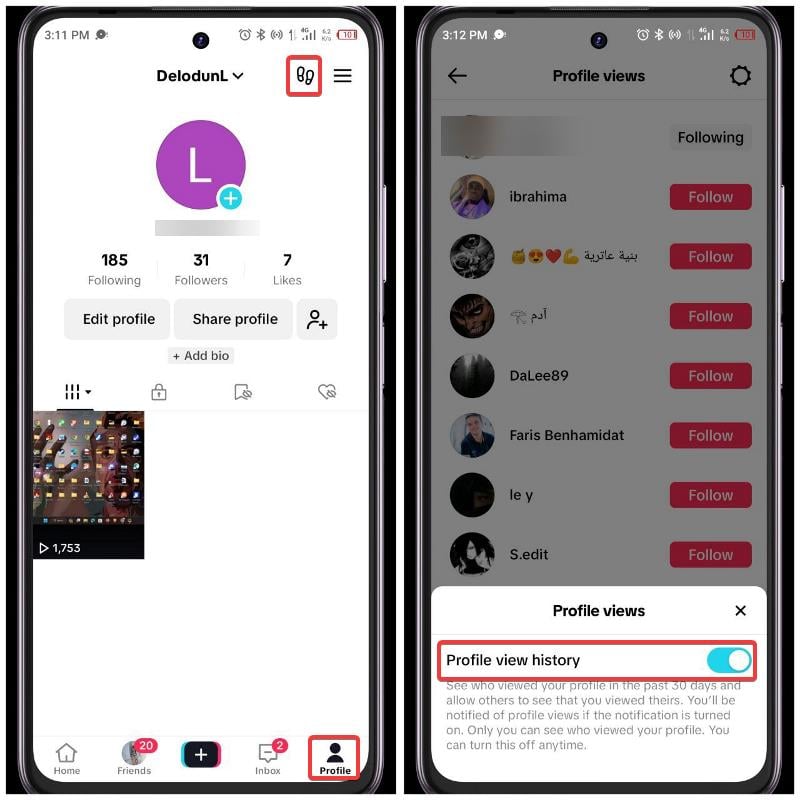
3. Next, click the gear icon at the top-right corner and toggle off Profile view history.
How to See Who Views Your TikTok Post
You can also see who is viewing your TikTok posts by enabling the Post View History feature, provided the viewers have also enabled it in their account settings. Find out how to enable it here:
1. Launch TikTok on your device and click the Profile menu at the bottom-left corner.
2. On the profile page, click the hamburger icon, then select Settings and privacy.
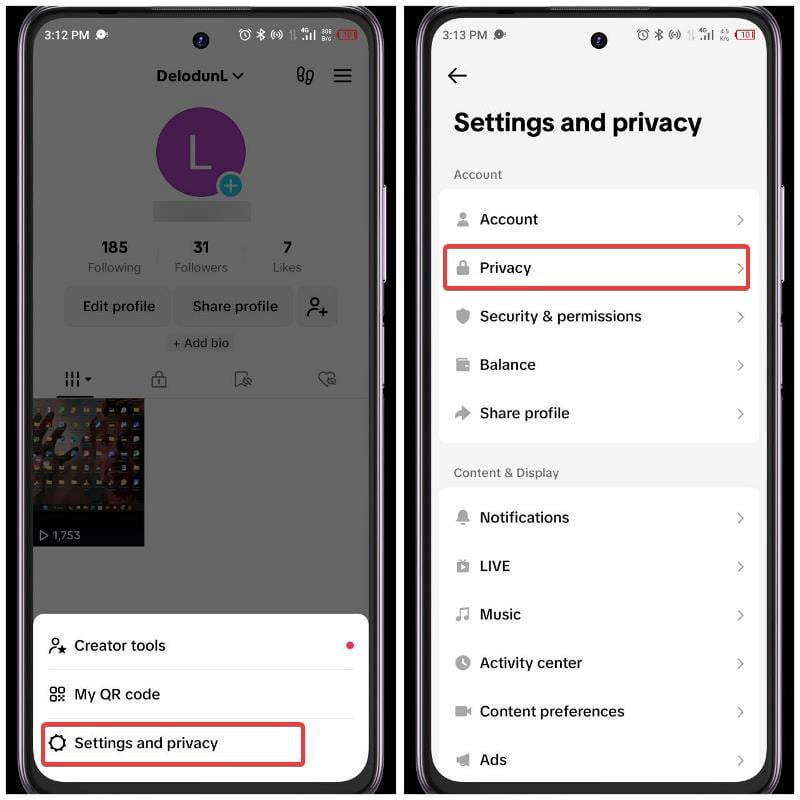
3. Select Privacy on the resulting page.
4. Next, navigate to Post views and select it.
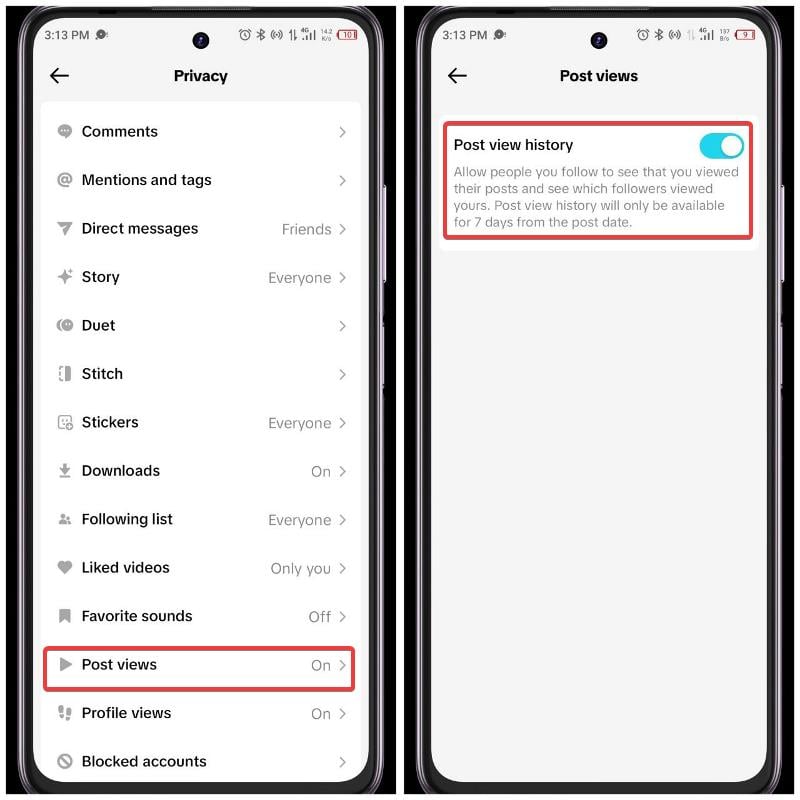
5. Toggle on the slider next to Post view history and you’ll be able to see followers that view your post.
To see who has viewed your post, open the post and tap on the views. Within the Views tab, you’ll find a list of users who have viewed the post and have opted to reveal their identity in their account settings.
How to Disable Post View History on TikTok
If you don’t want other people to see it when you view their post and you have no interest keeping track of the individual viewing you posts, you can disable the Post view history feature using the steps below:
1. Open TikTok on your device and click the Profile menu.
2. Click the hamburger icon on the top-right corner of the profile page and select Settings and privacy.
3. Select Privacy on the settings page.
4. Now, go to Post views and click it.
5. Toggle off the slider next to Post view history and you’ll be able to see followers that view your post.
Final Thoughts
TikTok made it optional to see who views your profile and posts. As such, if you need the feature you can turn it on and disable it if you don’t need it anymore. Also, you should know that turning on the feature will allow other users to see you in their post history. This article has provided the guide for everything you need about the feature, hopefully that helps you
FAQs about TikTok Views
1. Can you see exactly who viewed your TikTok?
Yes you can see exactly who viewed your TikTok. However, that’s only possible when the person allows that in their account settings you’ve also enabled the profile view and post view feature on your account as well.
2. Why can’t I enable the Profile view history feature
If you can’t enable the Profile view history feature, it may be because you are running an outdated TikTok app. Also, TikTok mentioned that the feature is only for those that have lower than 5000 followers and are above 16 years of age.
3. Can someone see if I viewed their TikTok profile if mine is off?
No, none one can see if you view their TikTok profile if the feature is turned of in your accounts settings.
4. How do you stop people from knowing you viewed their TikTok?
If you don’t want people to know you viewed their TikTok, you should disable the Profile view history and Post view history features. The guide to do that has been provided in the earlier part of this post.
Further Reading:
- How to Watch TikTok Videos Without App [3 Ways]
- 3 Ways to Automatically Change Wallpapers on iPhone
- TikTok Song Finder: How to Find Songs Used in TikTok Videos
- Best WhatsApp Stickers – Funny, Memes, Animated, and More Best Stickers for WhatsApp

