

Quick Answer
Tiktok now offers an official way to side-load the app on Android. For iOS check the video tutorial below. You can visit tiktok.com/download link. Alternatively, you can use a VPN to connect to a region where TikTok is available and then change your App Store or Play Store region. Create a new Apple ID or Google account linked to the desired region. You can also access TikTok via its website using a VPN.
TikTok has had a whirlwind of the last few weeks. After the US’s apex court withheld the law to ban TikTok, the ban came into effect on Saturday. Users started experiencing an error message, “Sorry, TikTok isn’t available right now,” when they tried to log in to the app. However, as soon as Donald Trump took charge as the President of the US, the services were restored. Currently, if you still have the TikTok app installed on your iPhone or Android phone, you can once again access TikTok in the US without any issues. However, the app is not available on Apple’s App Store or Android’s Play Store.

So, users who deleted the TikTok app from their devices, thinking that the app will not see the light of day anytime soon, are still in trouble. Fortunately, there are multiple ways you can follow to download TikTok until it returns to the App Store and Play Store. Note that the methods aren’t straightforward, and you need to follow each step carefully to get the TikTok app back on your phone. Let’s jump right into it.
How to download TikTok app?
We're enhancing ways for our community to continue using TikTok by making Android Package Kits available at https://t.co/JoNVqKpnrS so that our U.S. Android users can download our app and create, discover, and connect on TikTok.
More information at our Help Center:…
— TikTok Policy (@TikTokPolicy) February 8, 2025
Update: Tiktok now officially offers a way to side-load apps on Android. You can visit https://tiktok.com/download link and download the app. Since iOS doesn’t offer a straightforward way to side-load apps, users can still use it on the browser. However, you can still restore TikTok to iOS using several third-party methods. For iOS, you can watch the video below.

Here are the different methods that will help you redownload the TikTok app on your iPhone or Android device:
For Apple devices
1. Change your App Store region
- Choose the best VPN app and install it on your iPhone. We have a list of the best VPN apps that you can get for your iPhone. Connect to a server where TikTok is available.
- Open the iPhone Settings app.

- At the very top of the Settings app page, tap on your name to access your Apple Account Settings.

- Tap on Media and Purchases.

- Select View Account.
- Here, you need to change your country or region by tapping on Country/Region. Apple may warn you about adding a new payment method for the new country. You can do that later by tapping None.

- Select the new country where TikTok is still working, such as Singapore or Canada. You will be asked to provide a billing address for the new country (to which you can add anything).
- After the region is changed, you can go ahead to the App Store download TikTok on your phone, and start using it.
2. Create a new App Store account
- Connect to your preferred VPN service in a country where TikTok is available.
- Sign out of your current Apple ID from your device by tapping on your name at the top of the Settings app.
- Then, navigate down and tap Sign Out. Make sure that you remember the credentials for your main account.

- Once you have signed out, go back to the Settings page, and at the top, tap on Sign in to your iPhone.

- Tap on Don’t have an Apple ID or forgot it? option.

- Select Create a Free Apple ID.
- Enter your phone number, which can be from any country. It is just for verification.
- Ensure that the VPN is still connected to the country where TikTok is available, and when asked for a country during account setup, choose the same country as the VPN.
- For payment methods, you can choose None.
- After your new account is created, open the App Store, sign in with your new credentials, and download TikTok without restrictions.
The second method of creating a new Apple account is much easier compared to the method of changing your country or region in an already signed-in account because you can use that account only for TikTok.
For Android
1. Change the region on the Play Store
- Connect to a VPN server where TikTok is available.
- Open the Google Play Store and click on your profile image.
- Select Settings.
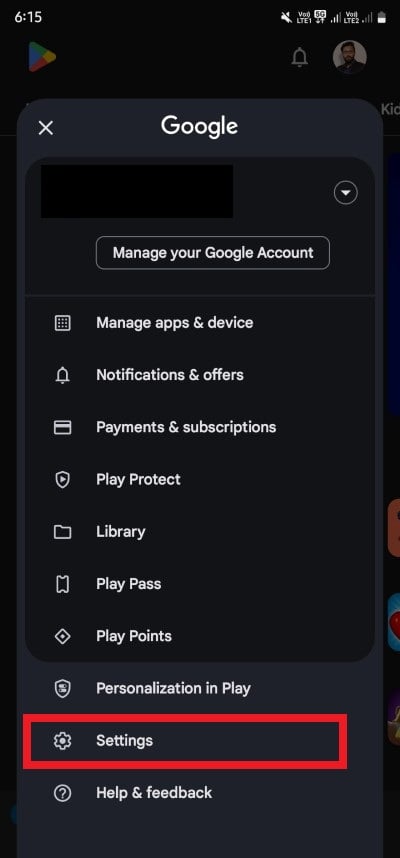
- Head over to General > Account and device preferences > Country and profiles.

- Choose the country you want to switch to.
- Complete the required process.
- Open the Google Play Store, download TikTok, and enjoy.
2. Create a new Google account
- Use a VPN app to connect to a server in a different region.
- Open the Play Store and log out of your current account.
- Select the option to create a new account.
- After you have created a new account, open Play Store and sign in with the newly created account.
- Download TikTok without any restrictions.
Use a browser (For both iOS and Android)
- Open your favorite VPN on your smartphone or PC and connect to the country where it is available.
- Launch any browser of your liking and visit the TikTok.com website.
- Enter your login ID and password to enjoy TikTok.
Using a web browser may let you access TikTok without any restrictions, but make sure that the VPN server is connected to a country where it is still available, like Canada, Singapore, Vietnam, etc.
When will TikTok be back on the App Store or Play Store?
As of now, there is no information on when the TikTok app will be back on the App Store or Play Store. Those who have the app can enjoy the services uninterrupted; however, those who have deleted them have the above-mentioned methods to access TikTok. If you wish to stop using TikTok or, as a precautionary measure, want to download all of your TikTok videos, you can check out our guide that explains the best method to bulk download TikTok videos. We also have a guide that will walk you through the steps to know who viewed your TikTok videos and profile. If you don’t want your liked videos getting recommended to your followers, then you can apply the solutions mentioned in our guide to hide liked videos on TikTok.
Updates to this post: We have added Tiktok app download links for Android and video guide on how to install it on iOS.

