Instagram is undoubtedly one of the most widely used social media platforms. More than 2 billion people worldwide use this app. It has become an integral part of its users’ lives, as they undoubtedly spend at least a few minutes on it every day.

You can have two types of accounts on this platform: private and public.
While not everyone can access a private account, this is possible with a public account. If you have a public Instagram account and don’t want anyone to stalk your profile, there are certain ways you can check your Instagram profile views. Read to the end to find out these options!
Table of Contents
Different ways to check who views your Instagram profile
You can check the views on your Instagram account in different ways. There is no easy way to simply find out the username or account details of someone who has “visited” your Instagram profile. However, if they have seen your stories, reacted to certain media, etc., you can certainly find out their account username as well. Here are a few methods you can use to check the views on your profile:
How to check your Instagram stories views
Checking the views of your Instagram stories is one of the easiest ways to determine who has seen your Instagram profile. If someone has viewed your Stories, there’s a good chance they’ve also viewed your entire profile.

To check this, open your Instagram account and then click on the “Your Story” option at the top left. This will show whether you have uploaded a story or not. Don’t forget that you need to have uploaded a story to be able to access the statistics. Now simply swipe up to see the list of people who have viewed your Instagram stories.
How to check if someone has seen your Instagram highlights
While checking views via Instagram Stories is one of the easiest methods, it also has some drawbacks. Stories are only available for the first 24 hours and then disappear from the profile. However, this is where Highlights come into play. If you have Instagram Highlights in your account, you can still access the list of people who have seen these highlights after 24 hours. Checking this is easy.
Go to your profile page, click on one of the highlights whose views you want to see and then swipe up. You can check the usernames of the accounts that have seen these highlights.

How to use Business profile insights to check account views
Before we continue with the actual steps, let’s make it clear that your account must be a “business account” and not a normal account. If you don’t have a business account yet, follow these steps to convert your account. Rest assured that these steps won’t affect your existing account details. If you already have a business account, you can skip the following content and go straight to the steps for the account views.
Related Read: How to Hide Active Status on Instagram
How to convert a normal Instagram account into a Business account
The Instagram business account is designed to provide users with a more detailed analysis of interactions and reach. You should also bear in mind that your private account will become public as soon as you convert it into a business account. So if you have a private Instagram account, you should refrain from taking this step.
If you still want to convert your account into a business account, you can find the exact steps here.
- First, go to your personal account page by clicking on your profile icon in the bottom bar.
- Now click on the “Menu” option or the three lines at the top right of the page.
- Click on “Settings and privacy.”
- On this page, scroll down and click on “Account type and tools.”
- Now click on ‘Switch to a professional account.”
- Follow all the instructions on the screen and when you’re done, you’ve successfully converted your personal Instagram account to a business account.
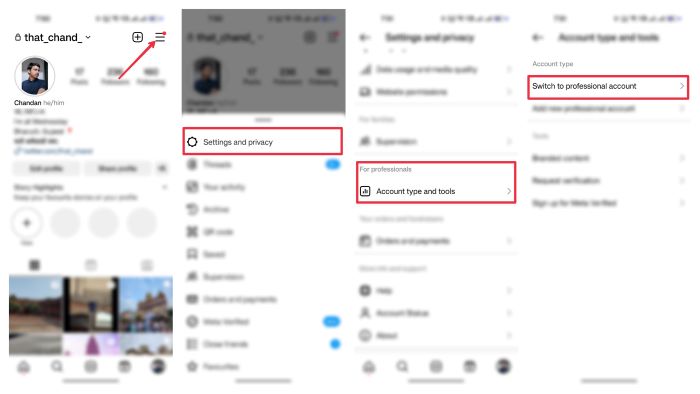
Now that you have successfully converted your personal Instagram account to a business account, you can access the detailed statistics of your Instagram account. You can now view detailed statistics about your account’s interactions and views. Let’s take a look.
How to check detailed stats from an Instagram business account
Verifying insights from professional accounts is pretty easy. Just go to your profile page and there you will find a new option called “Professional Dashboard” Just click on it and you can see the detailed insights of your Instagram account. You can easily view stats such as the number of accounts reached, the total number of followers, the number of content shared, the number of accounts engaging with your profile, etc.

FAQs about tracking viewers of Instagram account
1. Is there any other method to track viewers of my Instagram account?
At the moment, there is no other method you can use to track the account that visited your profile or find out details about it. Many apps on the internet claim to provide you with the data of the accounts that interact with or visit your Instagram handle. We recommend that you stay away from these apps as they all use your login details and are not secure. Regardless of their claimed reliability, they don’t work, and most of them simply show random and fake data.
2. Can I check the views on my Instagram story after 24 hours?
Yes, you can check views on Instagram story even after 24 hours. To check the views of your Instagram story after 24 hours, you first need to convert it into a highlight. To do this, go to your profile page, click on the “+” symbol in the Highlights column and select the story whose views you want to see. Once the story has been added to your highlights, you can go back, click on the highlight and then swipe up to see who has seen the stories.
3. If someone visits my profile without interacting in any way, such as with stories or posts, can I still access their account information?
If they have only visited your account and haven’t viewed or interacted with any stories or posts, it’s impossible to obtain their data. In this case, however, you’d be safe if you made your account private. A private account cannot normally be accessed and the user will first need permission from the account owner to follow them and check their profile.
4. Is it possible to track profile visitors through Instagram Insights?
Nope. Instagram Insights, which provides analytics for business accounts, does not reveal the identity of users who view your profile. There are also no other ways to find out details about visitors.
5. Is it safe to use third-party websites that claim to reveal profile viewer information?
We strongly advise against using third-party websites or apps that claim to reveal who is viewing your Instagram profile. These services usually pose a serious threat to the security and privacy of your account. Instagram’s Terms of Service prohibit the use of such applications. Many of these third-party tools require access to your account credentials, which can misuse or even jeopardize your personal data. Follow Instagram’s official features and guidelines to keep your account secure and protect your privacy.