

ChatGPT has taken the world by storm. In just five days after its launch, it had 1 million users. In January 2023, two months after launch, ChatGPT’s user base had grown by 9900% and reached 100 million active users.
It is considered one of the most important technological changes, similar to the internet and the iPhone. The chatbot also gained several revolutionary features for the future of the internet and AI. Two notable advances are ChatGPT plugins and the ability to create custom GPT models.

ChatGPT plugins are special software components that extend the capabilities of the ChatGPT model. With a plugin, ChatGPT can, for example, obtain real-time data from external sources, perform certain calculations, or interact with third-party services and APIs.
Another important feature is the ability to create and train custom GPT. With Custom GPT, premium users of ChatGPT can create and train their GPTs. You can train them with your own data for a specific task. In the future, there will be a GPT store, similar to an app store, where you can see and use the custom GPTs that others have created.
In this post, you’ll learn how to create your own GPTs and train them with your data. We’ve also shown you how to create a custom math GPT from scratch. When you’re ready, let’s get started.
Table of Contents
How to Build Your Own Custom GPT in ChatGPT
But here’s the thing – OpenAI has paused new signups for the premium plan. So, if you’re already a Premium member, you can get started creating your custom ChatGPT. If not, you’ll have to wait a little longer.
But don’t worry! As soon as ChatGPT offers Premium subscriptions again, you can sign up and get started. Keep an eye on our social media channels for any news, or we’ll post an update directly below this post. Stay tuned!
How to create custom GPT in chatGPT
- Visit https://chat.openai.com/ and click on Explore in the sidebar.

- Click on the Create a GPT

- Here, you can see the development interface. On the left tab, you can give instructions to the chat by using the simple natural launcher commands. On the right side, you can see a preview of the model.
How to Configure the ChatGPT Model
You can also configure GPT. This allows you to edit names, descriptions, and instructions. The configuration also allows you to add or remove conversation starters, add your data to training, and more. Learn how to configure it here.
- Click on the Configure Tab to configure your ChatGPT model
- You can give it a name, add a description of the model, Add an introduction like What the model has to do, and more.
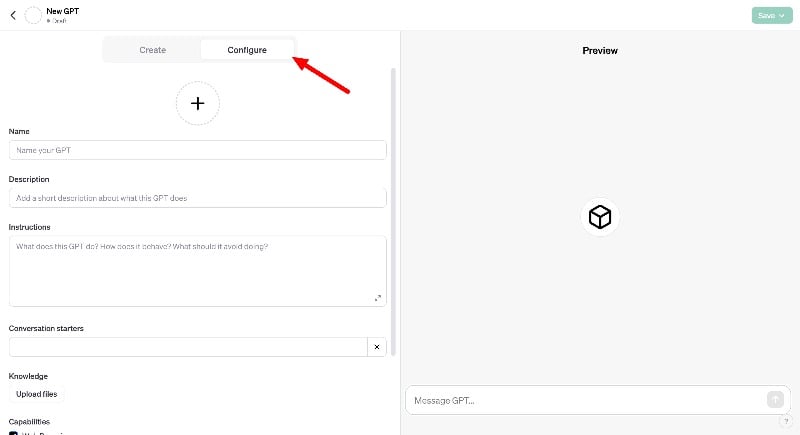
- You can also add the Conversation starters. Conversation starters are simple questions or topics that help begin a chat, making connecting and talking easier. At the time of writing (December 2023), you can add up to two conversation starters.

How to Configure ChatGPT Capabilities
You can also select the ChatGPT capabilities. Each capability makes ChatGPT a versatile tool, whether you are searching for information, creating images, or working with computer code. You can activate individual capabilities or all three at once. Here’s what each capability can do.
Web Browsing: With web browsing, ChatGPT can search the Internet and find the latest information. This is useful if you are looking for facts, breaking news, or specific details that ChatGPT may not yet know. This is ideal for researchers, students, and anyone who needs up-to-date information.
DALL-E Image Generation: DALL-E is a cool tool that allows ChatGPT to generate AI images. You tell it what you want to see, e.g., a “cat riding a bike in space,” and DALL-E creates the image for you. This is fantastic for artists, designers, or anyone who needs a bot to generate images.
Code Interpreter: If you want to develop a bot that works with code, this code interpreter can help you debug or improve your code. This is especially helpful for students, programmers, or anyone interested in coding.
How to edit ChatGPT capabilities:
- Scroll down the “Configure” tab, and under the “Skills” tab, enable all skills for a better experience.

Train ChatGPT with the custom data
You can train ChatGPT with custom data. You can insert the data manually and ask GPT to remember or upload data files and train your model. There is no strict limit to the amount of data you can use. You can upload small files or large data sets to improve accuracy and training.

- On the Configure tab, click on the Upload Files option.
- Currently, you can upload Comma-separated values (CSV), Tab-separated values (TSV), Microsoft Excel workbook (XLSX), JavaScript Object Notation (JSON), JSON Lines (JSONL), Images, and PDF data types.
Related Read: 4 Ways to Use ChatGPT-4 for Free
ChatGPT Actions and How to Add One
If you define actions in a custom ChatGPT, you can teach it to perform certain tasks, such as adding, changing, or deleting information (these operations are called CRUD). The actions of the chatbot help the bot to connect to other services via the API.
Adding actions is the most advanced part of developing a custom GPT. It requires some programming knowledge. You need to understand how APIs work, how to communicate with them, and how to use JSON schema to give ChatGPT instructions.
How to add action to custom GPT

- To add actions to your custom ChatGPT, such as using APIs (APIs are like messengers that let different software communicate with each other. You should know how the API you want to use works. Scroll down in the Configure tab and click on “Create new action” under the “Actions” tab.

- Select the schema format and write instructions in the JSON schema to tell your ChatGPT exactly what to do with the API. For example, you could instruct it to retrieve data from a weather API and then use that data to answer questions about the weather.
- You need to connect the API to your ChatGPT. This means that you need to set up access keys or authentication so that your ChatGPT can communicate securely with the API.
Publish Your ChatGPT Model

ChatGPT offers various publishing options to save and publish your individual GPT model. Here are the different options and what they mean.
- Only me: If you choose this option, your customized ChatGPT model will remain private. This means that only you can access and use this model. This is good for testing or personal use if you don’t want to share your model with others yet.
- Only people with a link: This option allows you to share your custom ChatGPT model with specific people. Only those who have the link you specify will be able to access the model.
- Public: If you select this option, your ChatGPT model will be accessible to everyone. This is ideal if you want to share your work with the whole world or if the model can be helpful for many people.
Let’s Create a Math Problem Solver Custom GPT Together
By now, you may already know how to create custom GPT models in chatGPT. Now, let’s create a custom Math Problem Solver chatGPT to better understand how everything works. Let’s start with the creation. This process is simple, and all you need is a chatGPT subscription.
- Visit chat.openai.com and click on the Explore tab
- Click on the Create Custom GPT button on the top.

- Now, give instructions on what the GPT model should do. In this case, we are developing a math solver for children in grades 1-5. You can ask the GPT model to create step-by-step solutions to math problems for children in grades 1-5. You can also add instructions such as ‘the solutions should be clear and easy for children to understand.’ You can click on the arrow to send the instructions.

- The bot will then automatically name the model for you based on your request. If you don’t like the name, you can rename it. The bot will also create a profile picture for the bot. You can create a new picture with the instructions to upload your picture. To upload, click on the clip icon and select your profile picture; ask the bot to use it as the profile picture.

- Make sure you have the perfect picture with the dimensions 100×100 pixels. Otherwise, your profile will not be aligned correctly.

- Now, the chatbot is almost ready. You can save it by clicking on the “Save” button in the top right corner of the screen. You can save it as private or public.
- Suppose you want to configure the bot. Go to the Configure tab. Here, you can edit the description of the name and specify what the bot can do. You can also edit the conversation starters. I keep the default values. That’s it.
- Scroll down and enable all three chatbot features if the user wants to browse the web and upload a file as a math problem.
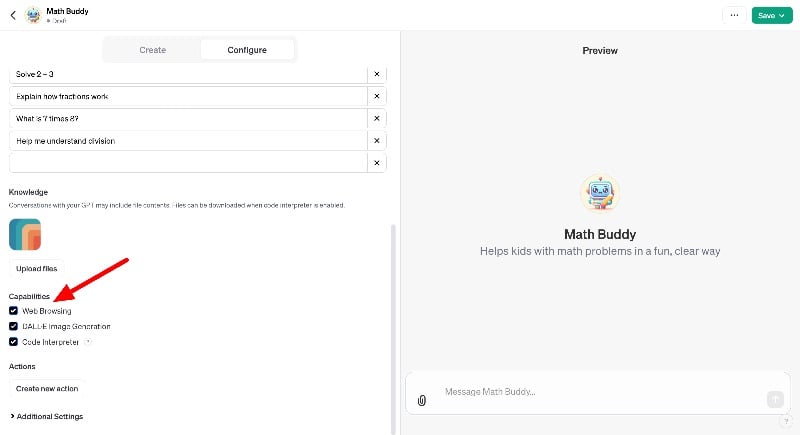
- You can also upload your data for training. In this case, your chatbot is sufficient to answer mathematical solutions. That’s it. Your math solver chatbot is ready to rock.
How to Delete Your Custom ChatGPT Model
You can edit or delete your custom ChatGPT model. Here is how
- Click on the explore tab in the sidebar
- Here, you can see all the custom GPTs you have built
- Click the Edit button to edit, click the three-dot menu, and tap Delete GPT to delete.

Related Read: 15 Best Custom GPTs for Everyone
Building Custom GPT Made Easy
People already use ChatGPT for many different things. With the new custom GPTs, anyone with a ChatGPT subscription can now create their own GPT and train it with their data. And the best part? It’s really easy to do. You can use simple, everyday language to create and train it. I hope you find this beginner’s guide helpful. If you have any questions or problems when creating the bot, feel free to leave a comment; we’ll be happy to help.
FAQs on Building Custom GPTs
1. How difficult is it to create a custom GPT model?
You can train and create a simple custom GPT model using natural language. However, you need technical expertise to create a collection of GPT models connected to different services and databases.
2. Can custom GPT models be scaled for large audiences?
You don’t need to scale GPTs for large audiences. Custom GPTs are available within the chatGPT. All users of the chatGPT can access your public custom GPT.
3. What resources are required to build a custom GPT for ChatGPT?
To create a simple custom GPT, you need a ChatGPT Premium subscription. However, to create a comprehensive GPT that connects to a website and database, you may need an API, a live database to store data, and more to create a custom Chat GPT model.
4. What are the cost implications of developing a custom GPT model?
At the time of writing, creating a custom GPT is free for all ChatGPT Premium users. The premium subscription for chatGPT costs $20 per month.
5. What are the capabilities of custom GPT models?
ChatGPT has several cool features that are useful for different types of users. Keep in mind that your chatbot model can perform all of these functions, even if it has been trained for specific purposes.
- Answering Questions: ChatGPT can answer all kinds of questions, from simple questions like “How high is the highest mountain? ” to more complex questions like “How does a rocket work? ” This is great for students, the curious, or anyone who wants to know something quickly.
- Conversation: With ChatGPT, you can talk about almost anything. Whether you’re bored, need advice, or want to talk about your day, you can chat with ChatGPT.
- Writing and Editing Help: ChatGPT can also help you write an essay and compose an email. It can also help you correct spelling or grammar mistakes. This is super useful for students, writers, or anyone who needs help with writing.
- Learning and Tutoring: ChatGPT can help you with your homework and teach you about various subjects. ChatGPT can be your tutor if you’re struggling with homework or want to learn something new. Ideal for students.
- Programming Help: ChatGPT can help you solve programming problems or explain programming concepts. This is handy for students, new programmers, or even experienced developers who need a quick tip.
- Playing Games: ChatGPT can play text-based games or puzzles with you. This is fun for anyone looking for a quick brain teaser or an entertainment bot that you can create.
- Language Translation: ChatGPT can translate between different languages. This is useful for travelers, language learners, or anyone who needs a quick translation.

