

Quick Answer
Home Contents (iOS), Warranty Keeper (Android, iOS), and MrReceipt (Android & iOS) are three of the best options with helpful features for tracking product warranties. You can create your warranty tracker using any to-do list app or Notion. These alternative methods work better than standalone apps, offering advanced features and more flexibility.
It’s that time of the year to service the air conditioner and gear up for scorching summer. Everything was good until I realized that the warranty on my AC had expired two weeks ago, just before I wanted to book a free service offered by the brand. We requested the brand authorities for the free service, but they denied it.

We also have another air conditioner that has two months of warranty left. However, the biggest problem is finding a way to its warranty. In addition, in most cases, neither the brand nor the service provider reminds you about the end of the warranty period. This happens especially with non-smart devices like large appliances in our homes. This can result in unexpected expenses and losing all the benefits available during the warranty period.
Thankfully, plenty of apps can help you easily track your warranty. Using these apps, you can set alerts for upcoming warranty expirations, back up all your warranty information, and export the data if needed.
However, most of the warranty tracker apps I tested had issues and did not meet my expectations. Several apps didn’t work showed errors during sign-up and froze after using them. I managed to find a few of the best ones. But still, they had minor issues. So, I created my warranty tracker app, which is better than most apps.
In this post, I will guide you through creating your warranty tracker app, and I’ve also listed the three best apps if you want a quick solution.
Table of Contents
How to Track Product Warranties Using Mobile Apps
Sl No | Method | How to Track | Platforms |
|---|---|---|---|
1 | To-Do List Apps | Use a simple to-do list app to set reminders for warranty expirations manually. | Android / iPhone / Web |
2 | Notion | Use Notion with a warranty tracking template to manage and set reminders for warranties. | Android / iPhone / Web |
3 | Home Contents | Track up to 25 warranties for free, add photos and details, no notifications, export data to PDF, sync with iCloud or WiFi. | iPhone |
4 | Warranty Keeper | Add unlimited warranties, upload receipt photos, set push notifications for expirations, export data, and create cloud backup. | Android / iPhone |
5 | MrReceipt | Scan and store receipts, track warranty periods, no individual notifications, export data, and cloud sync. | Android / iPhone |
Set Reminders Using Any To-Do List
If you want a simple setup, you can use a simple to-do list app to remind you of your warranty and keep track of all your products. To-do list apps have reminders where you can set notifications for any event. In this case, you can use them to set reminders for your warranty expiration. However, the downside of this method is you must manually enter the end date to remind yourself.
The positive side of to-do list apps with reminders is that they work perfectly fine, are free to use, and you can set unlimited warranty reminders using them. In addition, you can customize the reminders the way you want. Most apps allow you to set reminders for different intervals.
You can choose any app from the to-do list options. In this case, I am using Ticktick List, available for both Android and iPhone.
How to use the To-Do app as a warranty tracker:
- Step 1: Download and install the TickTick app. (Android & iOS)
- Step 2: Open the TickTick app and sign in or create a new account.
- Step 3: Tap the “+” button to create a new task.
- Step 4: Enter the task name, e.g., “AC Warranty Expiry.”

- Step 5: Tap on the calendar icon to add a warranty due date and time.
- Step 6: Now, set the date and time for the warranty expiration reminder.
- Step 7: Tap “Save” to save the task with the reminder.
- Step 8: Repeat the process for each product you want to track.
- Step 9: Check your tasks list to see all the set reminders.
Set Up Complete Warranty Management Using Notion
I am a big fan of Notion. If you have read my previous app recommendations, I recommend Notion for most of my app suggestions because it can replace any app for better use. Thankfully, Notion works perfectly as a warranty tracker app. I was able to find free Notion templates built for warranty tracking. Shout out to the creator (Denis Bondarev) for this free template. You can also create your Notion template. Here is what the Notion warranty tracker can do:
- Maintain a centralized database of all your warranties, including purchase date, warranty period, product information, and more.
- Add detailed information for each product, such as serial numbers, model numbers, purchase location, and warranty terms.
- Get reminded of upcoming warranty expirations.
- Backup and sync data across multiple devices.
- Export your warranty data to formats like CSV and more.
How to Use Notion as a Warranty Tracker App
- Step 1: Download the Notion app on your smartphone. (Android and iOS)
- Step 2: Visit this link and purchase the Notion warranty template on Gumroad for free. You can also duplicate the template by clicking on this link.
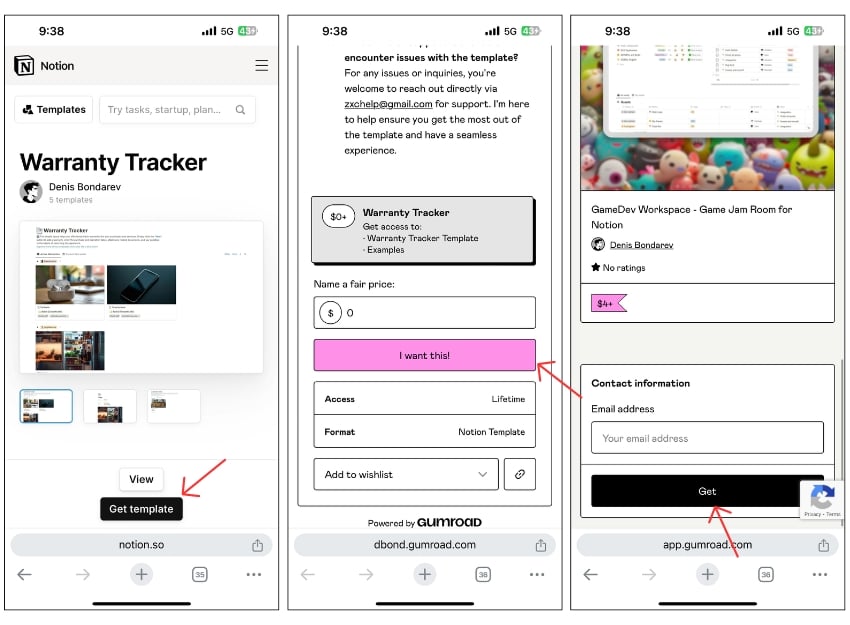
- Step 3: Click on the Get template, enter the fair price tap on I want this enter your email, and click on Get.
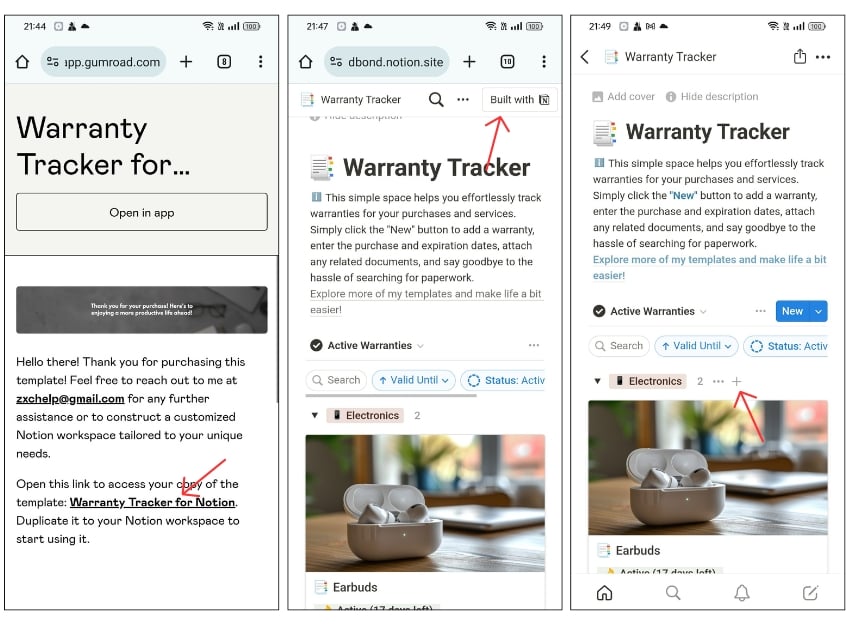
- Step 4: You will receive an email with the template download link. Open the email and click on View template.
- Step 5: Now click on the Warranty Tracker for Notion link.
- Step 6: It will open the template, Now, tap on the Built with Notion on the top right.
- Step 7: Now login with your Notion account on the web. This template will be added to your notion app.
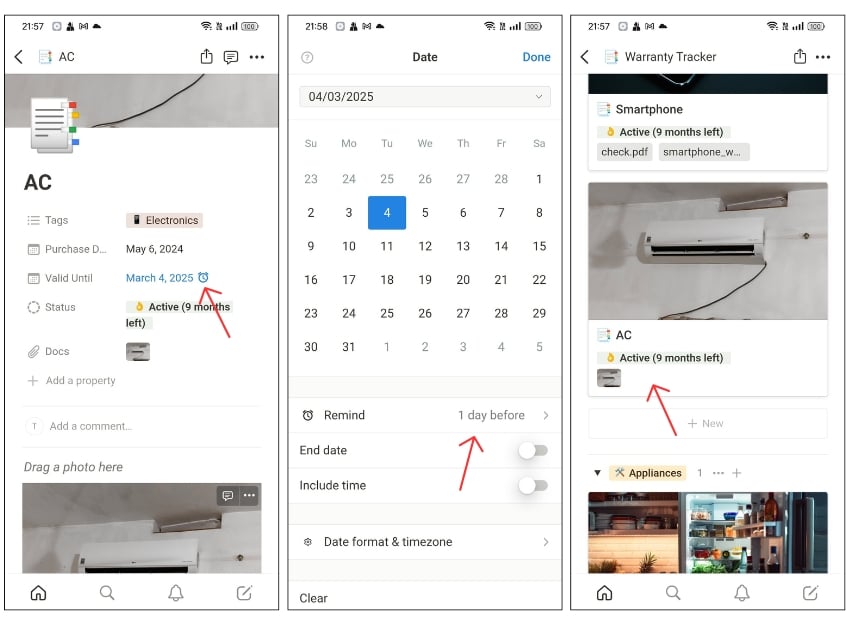
- Step 8: Now open the template on your notion app and click on the plus to track the warranty for a new device.
Best Warranty Tracker apps for Android and iPhone
Creating a Notion tracker can be overwhelming for some people. Considering the limitations of using a to-do list app as a warranty tracker, here are the three best apps I found after testing several options:
Home Contents (iOS)
Highlights:
- Price: Free, $5.99 unlocks all features.
- Warranty Entries: 25 free entries, unlimited with purchase.
- Receipt and Barcode Scanning: Photos and PDF receipts, Barcode scanning.
- Notifications and Reminders: No.
- Export Data: You can create PDF reports.
- Backup Data: Create a backup and sync with iCloud.
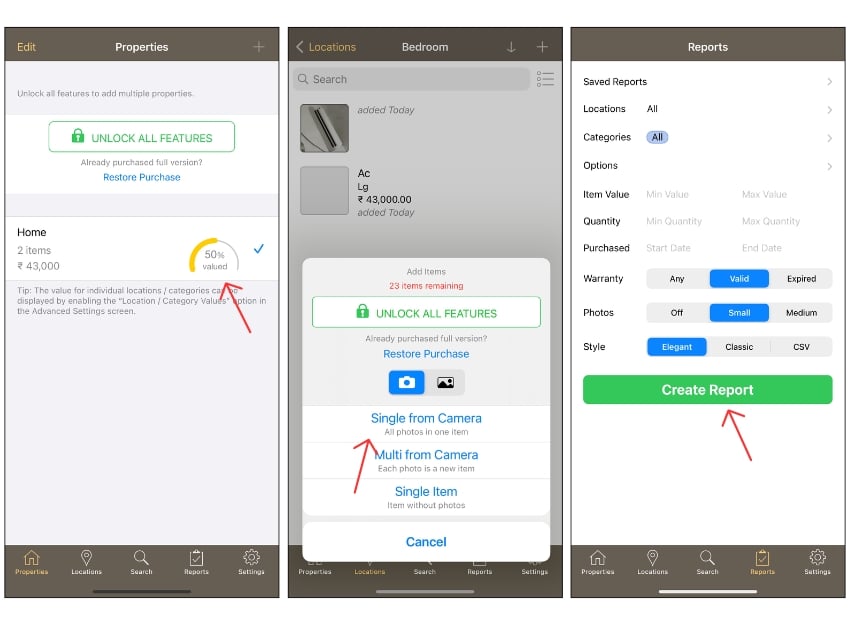
Home Contents is the best app out of almost everything I have tested. First, there are no issues while creating or using an app. Second, the user experience is good, better than most apps. Plus, there are plenty of helpful features.
You can use the app to track the warranty of different products. You can track the warranty of 25 products in the free version. You can add devices to the app.
The app offers several options for making it easier to enter product information including receipts, a barcode scanner, and more. However, the biggest downside of the app is it doesn’t have notification support. You have to open the app and check for the warranty period manually.
- Easy to use with a good user experience.
- Track up to 25 warranties for free.
- Allows adding photos and PDF receipts.
- Supports data export to create PDF reports.
- Syncs with iCloud or WiFi for backup.
- Limited to 25 entries in the free version.
- No notifications or reminders for warranty expirations.
Warranty keeper (Android, iOS)

- Price: Free.
- Warranty Entries: Unlimited entries.
- Receipt and Barcode Scanning: Upload purchase proof with photos.
- Notifications and Reminders: Yes, push notifications for warranty expirations.
- Export Data: Export data to your email.
- Backup Data: Stores all your information and links to your account.
After testing several Android warranty apps, I found Warranty Keeper to be the best for Android users. The reason is simple: it doesn’t have bugs and works great. The app is simple, even more straightforward than the Home Contents app for iOS.
You can add your devices and track your warranty based on the categories. You can also add purchase data, warranty period, item image, and notes, if any, and save the item in the app.
You can also set the notification to remind you about the end of the warranty period. You can keep track of the warranty of all your devices in a single place. The app is also free, You can enter unlimited entries with no advertisements or annoying push notifications.
- Free with unlimited warranty entries.
- Allows uploading purchase proof with photos.
- Provides push notifications for warranty expirations.
- Supports data export.
- Creates backups in the cloud.
- Basic user interface compared to other apps.
- The app is slow and takes too long to load the contents.
Update: The app is also available for iOS now.
MrReceipt (Android & iOS)
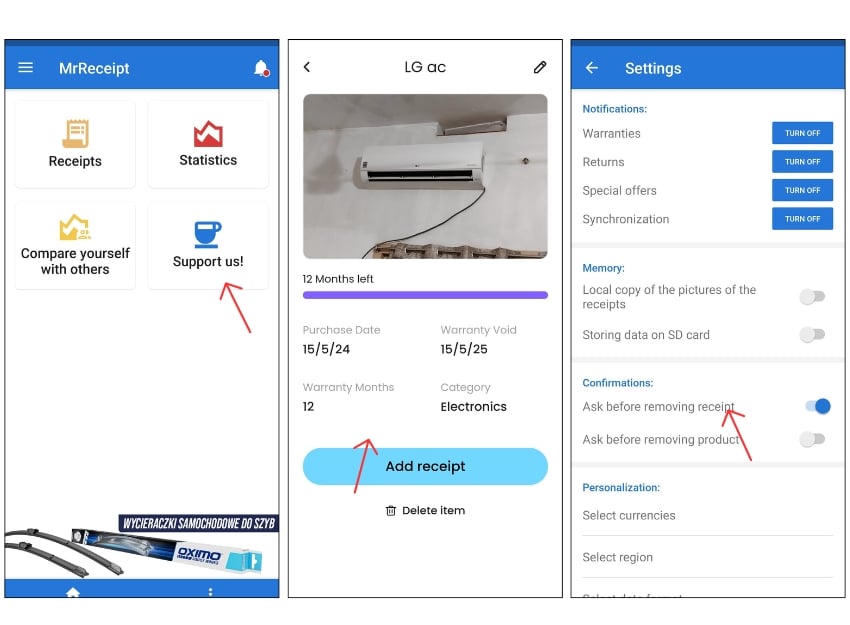
- Price: Free.
- Warranty Entries: Unlimited entries.
- Receipt and Barcode Scanning: Scan and store receipts.
- Notifications and Reminders: Set category notifications.
- Export Data: Supports data export.
- Backup Data: Yes
MrReceipt is another favorite app of mine that offers comprehensive ways to track the warranty of your appliances. However, there is one issue with the app: it doesn’t allow you to manually enter a device’s data. You need to scan the receipt of your purchased devices and add them to the app.
The app allows you to track warranty and return periods and keep track of all your devices in one place. It doesn’t allow you to set notifications and warranty reminders for individual products; however, you can set category notifications from the app settings. The user experience could be better, but I had no issues using the app. The app is free.
In addition to these features, you can monitor your online shopping expenditure by sending all your receipts to the custom email ID. Compare your expenses with others and get an average budget spending, detailed statistics on your products, and more.
- Free with unlimited warranty entries.
- Can scan and store receipts.
- Supports data export.
- No warranty expirations notifications for individual products.
- Requires scanning receipts to add devices.
- User experience could be improved.
Stay on Top of Warranty Expirations
Those are the best apps for tracking product warranties. For complete warranty tracker management, I suggest using Notion. You can also use a to-do list app for simple reminders. Warranty tracker apps are also a good choice, but they have issues. If you have any suggestions or problems with using any method, let me know in the comments.
FAQs about Best Warranty Tracker Apps
Do these apps provide notifications for upcoming warranty expirations?
Both the Warranty Tracker and Mr. Receipt come with support for push notifications. If you are using a to-do list or Notion tracker, you can manually add reminders for each entry.
Is it possible to export my warranty data from these apps?
You can export warranty data from these apps including the Ticktick to-do list. Most apps allow you to export data in PDF, CSV, and more.
What happens to my warranty data if I switch phones or devices?
You can back up your data. Each app requires you to create an account. You can sign in with the same account on another device and retrieve all your data.
How often should I update my warranty information in the app?
It depends on your warranty period. Generally, most devices have fixed warranty periods. If you extend the warranty, you can update it in the app.

