

In Summary
- Following the success of the Watch 2, OnePlus has added a new Wear OS smartwatch to its wearable lineup.
- Called OnePlus Watch 2R, the watch is a sub-$200/₹20,000 price offering and OnePlus’ first “R” offering in the smartwatch space.
- With it, OnePlus has cut some corners—compared to the OnePlus Watch 2—to make it more affordable. Let’s find out if these changes make the Watch 2R a true value-for-money offering or a compromised one lost in the pursuit of a lower price.
Following the success of the Watch 2, OnePlus has launched a new Wear OS smartwatch to assert its place in the sub-Rs 20,000 price bracket. It’s called Watch 2R, and it’s the company’s first “R” offering in the smartwatch space.

The “R” designation here aligns with OnePlus’ smartphone strategy, and with it, the company aims to bring the best of its premium offerings, like the OnePlus Watch 2, to a more affordable price point. However, this reduced price comes at the cost of a few changes.
What are these changes, and do they make the Watch 2R a true value-for-money offering or a compromised one lost in the pursuit of a lower price? Let’s find out in this OnePlus Watch 2R review.
Table of Contents
OnePlus Watch 2R: Design
The OnePlus Watch 2R features a circular dial design, similar to its elder sibling, the OnePlus Watch 2. As a fan of traditional watches, I was instantly drawn in by this design the moment I unboxed the watch—and I still like the look of it on my wrist. That said, OnePlus offers the Watch 2R in just one size, so those with smaller wrists may find it unwieldy.
You get two buttons along the right side of the case on the Watch 2R. The top button gives you quick access to all the apps on the watch, whereas the bottom one is a dedicated action button for accessing various fitness tracking modes on the watch. Although you can rotate the top button, it’s still a push-style button, like the other, and doesn’t serve as a digital crown that you can use for scrolling through menus or lists.

What’s nice about these buttons is that they’re customizable. The top button supports three actions: single press, double press, and long press, whereas the bottom one supports two: single press and double press. You can assign them your preferred actions using the O Health companion app.
The Watch 2R also has a speaker grille and a microphone. They’re located at the bottom of the case, on the left and right side, respectively, and allow you to take calls directly on the wrist. The speakers get sufficiently loud, so you can comfortably take calls unless you’re in noisy surroundings.
As for the build, OnePlus has opted for an aluminum alloy as its choice of material for the Watch 2R’s case. The switch to aluminum on the Watch 2R—compared to the use of stainless steel on the Watch 2—is one of the major differences between the two watches. While it makes the Watch 2R less premium-looking than the Watch 2 and comes at the cost of losing the MIL-STD-810H certification, it’s what has helped OnePlus keep the Watch 2R’s price down.
Not only that, but the use of aluminum on the Watch 2R also makes it lighter, allowing for a more comfortable wearing experience. Compared to the Watch 2, which comes in at 49 g without the straps and 80g coupled with the straps, the Watch 2R weighs significantly less at 37 g and 59 g, respectively. Considering it already has large dimensions, this is a welcome change since it makes the Watch 2R more suitable for everyday use. Speaking of which, you get an IP68 rating on the watch, so you won’t have to worry when wearing it in the rain or swimming pool.

The OnePlus Watch 2R comes in two colorways: Forest Green and Gunmetal Gray. My review unit comes in the latter. While I don’t dislike it, I prefer the look of Gunmetal Gray. Depending on what color you opt for, you get a color-matching strap for the watch. The strap is silicone and has a stainless steel pin buckle. It’s soft and flexible, and there’s a smooth finish on the underside that allows for a snug and comfortable fit on the wrist. You can easily swap out the strap and replace it with any 22mm third-party strap if you feel like personalizing the watch. Be sure to take the color of the dial markings into account if you have the Forest Green version for a better match.
OnePlus Watch 2R: Display
The Watch 2R’s display is another area where OnePlus has cut corners to bring down the price. While it sports the same 1.43-inch circular display with a 60Hz refresh rate and 466×466 pixels screen resolution as its expensive sibling, it only gets glass protection for the display, unlike the Watch 2, which uses sapphire crystal, bringing down its durability significantly.
The display glass is flat, with numbers and markers imprinted on the periphery of its bezel. Although some may like the look of it, I’m not a fan, and it’s for this reason that I’d pick the OnePlus Watch 2R in the Gunmetal Gray colorway if I had to get it for myself, as it blends well with the dial markings.

When talking about using the display, I see that it’s quite vibrant and sharp. It gets plenty bright, too, so using it outdoors on a sunny day isn’t an issue. The responsiveness is also on-point, which makes everything from navigating the interface to typing a quick reply—with both taps and swipe typing—a pleasant experience.
Another thing I like about the Watch 2R’s display is that the auto-brightness feature on it works really well, which is something that can’t be said about many smartwatches. It adjusts to your surroundings nicely and gets sufficiently dim in low light to prevent hurting your eyes. That said, the brightness in the always-on display mode is one area where I had issues on a bright sunny day. While I could easily read the text on the screen with some watch faces, there was barely anything visible on others.
OnePlus Watch 2R: Performance
What made the OnePlus Watch 2 special and allowed it to offer solid performance was its dual-processor approach, or as OnePlus likes to call it, Dual-Engine Architecture. OnePlus has adhered to the proven formula for the Watch 2R to replicate the same experience.

For those unfamiliar with the system, the dual-engine architecture employs two processors on the watch, running two separate operating systems and switching between them based on the task it needs to perform. Of the two processors, the first is essentially a low-powered chip called BES2700. It runs RTOS (Real Time Operating System) and is always on, handling all the basic tasks running on the watch, including health and fitness tracking. Then, there’s the Snapdragon W5 processor. This is the main chip of the watch that runs Wear OS 4 and does all the heavy lifting, like running apps.
The dual-engine architecture approach helps OnePlus offer good battery life on the Watch 2R, which is one area where many feature-rich smartwatches struggle while providing full smartwatch functionality. In my everyday use, it performed really well for me on the watch; the handoff and switch happen seamlessly, and you don’t notice any stutter, lag, or performance drop. Similarly, both operating systems feel smooth to use and have fairly quick animations.
OnePlus offers 2GB of RAM and 32GB of storage on the Watch 2R. The onboard storage lets you load up plenty of watch faces and third-party apps on the watch to customize it or make it more functional. It’s also useful if you plan on downloading songs for offline access. Keep in mind, though, that not all music apps are available on Wear OS. For instance, Apple Music isn’t available on the platform, so I had to make do with Spotify instead.
OnePlus Watch 2R: Features
OnePlus packs plenty of health and fitness tracking features on the Watch 2R and lets you track over 100 kinds of workouts, including various sports.
My favorite of all, aside from running, is badminton. Once enabled, the mode records a bunch of useful data in your session, such as top swinging speed, longest rally, and classification of shots (backhand, forehand, overhand, and underhand). You can look into this data in the OHealth app to analyze your games superficially.
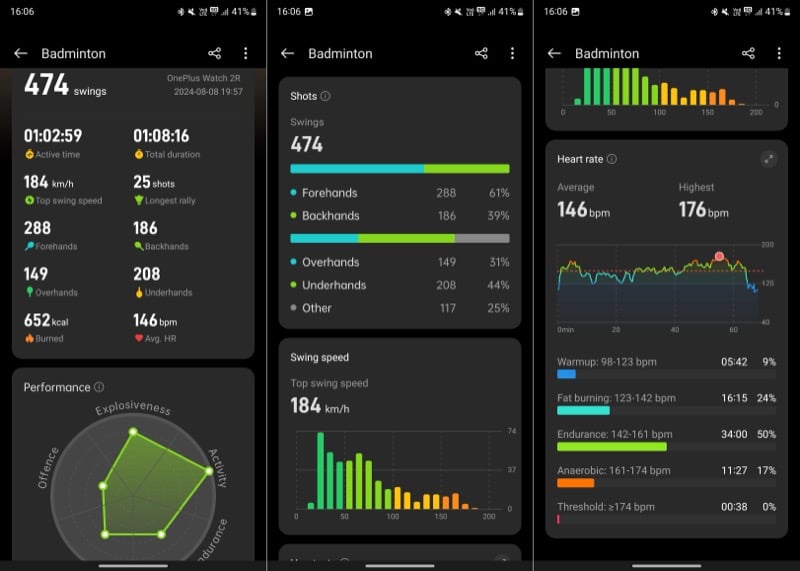
While you need to turn on the badminton mode manually on the watch to track your sessions (you can add the badminton mode in the Arcs watch face for quick access), the same isn’t the case for basic workouts like walking or running. Simply enable the auto-workout detection feature for each workout from the OHealth app to get the Watch 2R to start tracking them automatically. I enabled it for the run and walk workouts on my watch, and it did a good job of detecting and tracking them for me.
As for running, the dual-frequency GPS on the OnePlus Watch 2R really makes the difference. Not only does it aid in establishing the connection, but it also lets you track your route more accurately, making the Watch 2R a great companion for hikes or treks.
Coming to basics, the OnePlus Watch 2R can help track heart rate, steps, blood oxygen saturation, calories burnt, stress, and sleep. Aside from stress, the other metrics seemed fairly accurate to me; for some reason, the watch kept showing stress below, which seems odd in my case. I used the Watch 2R alongside my Apple Watch SE (2nd Gen) and Fitbit Charge 5, and the readings were very similar.
The watch also performs really well when it comes to sleep tracking. It manages to get sleep timings right most of the time and measures and breaks down your sleep duration into different sleep cycles—light, deep, and REM—to help you analyze your sleep. The watch can even record naps, which is nice. Similarly, it can also help assess the risk of breathing problems and inform you about various vital signs during your sleep. However, it misses out on some health-tracking features, so you can’t use it to take ECG, monitor skin temperature monitoring, or measure body composition.

The OnePlus Watch 2R also supports Fast Pair, enabling you to pair it instantly with an Android phone, and it works like a charm. Once done, you can then use the companion app, OHealth, to access all its features along with all your health and fitness data on your phone.
The app doesn’t have the most appealing interface, but it works fine and does a good job of showcasing data, so even someone new to health and fitness tracking can make sense of it. You can also use the app to change various watch settings, manage notifications, configure tiles, download apps, and apply and customize watch faces.
All in all, the Watch 2R is a good health and fitness companion unless you want deeper insights for detailed analysis.
OnePlus Watch 2R: Battery
The OnePlus Watch 2R packs a 500mAh battery, the same as the OnePlus Watch 2. OnePlus claims the battery can last up to 100 hours in Smart Mode, 48 hours with heavy use, and about 12 days in Power Saver Mode on a single charge.

I found OnePlus’ 48-hour usage claim accurate in my testing. I’d get almost three days of battery life with moderately heavy use, which is quite good. My usage typically included tracking badminton sessions, checking/replying to notifications, tracking sleep, and occasionally taking some calls in addition to the usual. Mind you, I also had some power-hungry features, such as always-on-display and a couple of sleep-tracking options, enabled on my watch throughout, which makes the battery life even more impressive.
While I couldn’t track the 12-day battery claim in Power Saver Mode, I did use it on my watch twice with less than 10% battery left—both times at night—and I got through the next day until 2 PM easily with some charge still left.
When the battery ran low, the 7.5W VOOC fast charger, bundled with the watch, came in handy. It charged the watch from ~5% to 100% in under an hour. While this isn’t the fastest charging speed on a smartwatch, it’s still pretty quick, given the price. In other words, it’s enough that if you use your watch for sleep tracking, you’d still be able to fully charge it in the morning as you get ready to leave for work.
OnePlus Watch 2R Review Verdict: Should You Buy it?
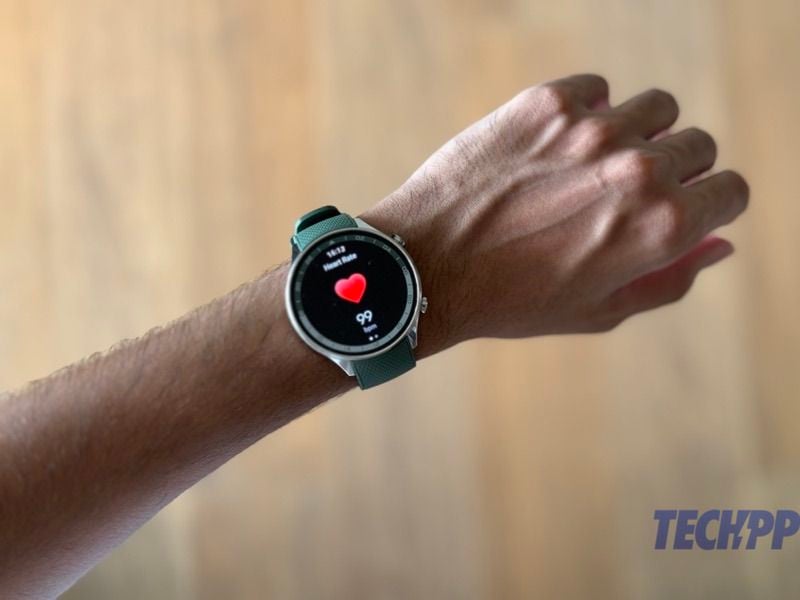
Priced at $199.99 /Rs 17,999, the OnePlus Watch 2R gets plenty of things right, which makes it an enticing Wear OS offering in the Indian market under Rs 20,000. Despite cutting some corners, the watch still looks nice, is a smooth performer, provides decent health and fitness tracking for most people, and has a stellar battery life (with fast charging support).
That said, there are some shortcomings. For one, the Watch 2R is available in just one size, so those with smaller wrists may need to look at other options. Then, it lacks some important health-tracking features that have become standard in many smartwatches today. And finally, the OHealth app doesn’t offer a comprehensive view of your health data, so it can’t serve those who’re into serious health tracking.
As such, whether or not you should buy the OnePlus Watch 2R boils down to what you plan on using it for. If it’s casual health and fitness tracking, the Watch 2R is a great pick with its traditional look and long-lasting battery. But if you want a smartwatch that’s your perfect health and fitness companion, you can find better options in the market.
- Lightweight (despite its size)
- Good software experience
- Smooth performance
- Stellar battery life
- Fast charging
- Dual-band GPS
- Plenty of sports modes
- Mostly accurate health tracking
- No LTE connectivity
- Only available in one size
- Lacks some health tracking features
| Build & Design |
|
| Performance |
|
| Software |
|
| Features |
|
| Battery |
|
|
SUMMARY
The OnePlus Watch 2R is an affordable OnePlus Watch 2 that cuts some corners in favor of affordability. Let's find out if these changes make the Watch 2R a true value-for-money offering or a compromised one lost in the pursuit of a lower price in this OnePlus Watch 2R review. |
4.2
|

