

Quick Answer
Discord’s new Ignore feature lets you mute someone’s messages and notifications without them knowing, unlike blocking, which is obvious. Ignored users can still message you, but their messages stay hidden. You also get a warning if they join a call. It’s a discreet way to avoid unwanted interactions while keeping things smooth in your Discord community.
In this world of social media, it is quite common to come across a person who can get on your nerves. Especially on platforms such as Discord, where you connect to a server or a community to enjoy gaming sessions or casual chatting with friends. However, there are instances when the person nudging you is someone you cannot hurt, so blocking isn’t an option as it would warn them about the same. To tackle this issue, Discord has launched a new feature called “Ignore,” which does exactly what it says.

Instead of blocking someone, which can sometimes feel like a harsh move, Discord’s Ignore feature will not only stop all the messages or notifications from the irritating person, but it won’t even let them know that you have ignored them on Discord. In this guide, we will share with you all the details you need to know about the Discord Ignore feature.
Table of Contents
What is the Discord Ignore feature?
Discord introduced the Ignore feature for those who would like to take a break from specific users on the platform that are irritating or not of any interest to them. The new Discord Ignore feature joins the already existing Blocking and Muting features available on the platform. Here are the benefits if you choose the Discord Ignore feature:
- Hides new messages from that person.
- Direct messages they send to you will be hidden.
- Any type of notification from the person will be blocked.
- If that person joins a video or voice call, Discord will show you a warning.
- Profile and activity will be hidden as well.
The best thing about the Discord Ignore feature is that they won’t know that you have ignored them. Meaning that they can continue to send you messages, view your profile, and interact with others normally. Unlike blocking, where the person knows that you have blocked them, the Ignore feature is a ninja way of keeping a sane mind without anyone knowing on Discord.
How to use the Discord Ignore feature?
1. On PC
- Launch Discord.
- Right-click on the user’s profile picture and choose Ignore from the list of options that appear.
- Click on Ignore to confirm your action.

Now, whenever you try to access the ignored person’s profile, Discord will show you a warning saying that you have ignored the person. Even if you access their profile, the person will remain ignored and will be notified of any of your activities. A “You ignored them” status message will appear on the user’s profile.
2. On Mobile
- Open the Discord mobile app on your Android or iOS device.
- Tap on the target user’s profile picture.
- Tap on the 3-dot menu icon at the top-right corner and choose Ignore option.
- Select Ignore again to confirm your action.

In an attempt to keep the environment safe for users, especially teens, Discord shows a list of options, including the Ignore option, when the platform detects potentially inappropriate messages. Users can then choose from ignore, block, report, contact crisis text line, and take a break options to deal with the unwanted messages.
How to access the ignored accounts list?
1. On PC
- Launch Discord or visit the website on a web browser.
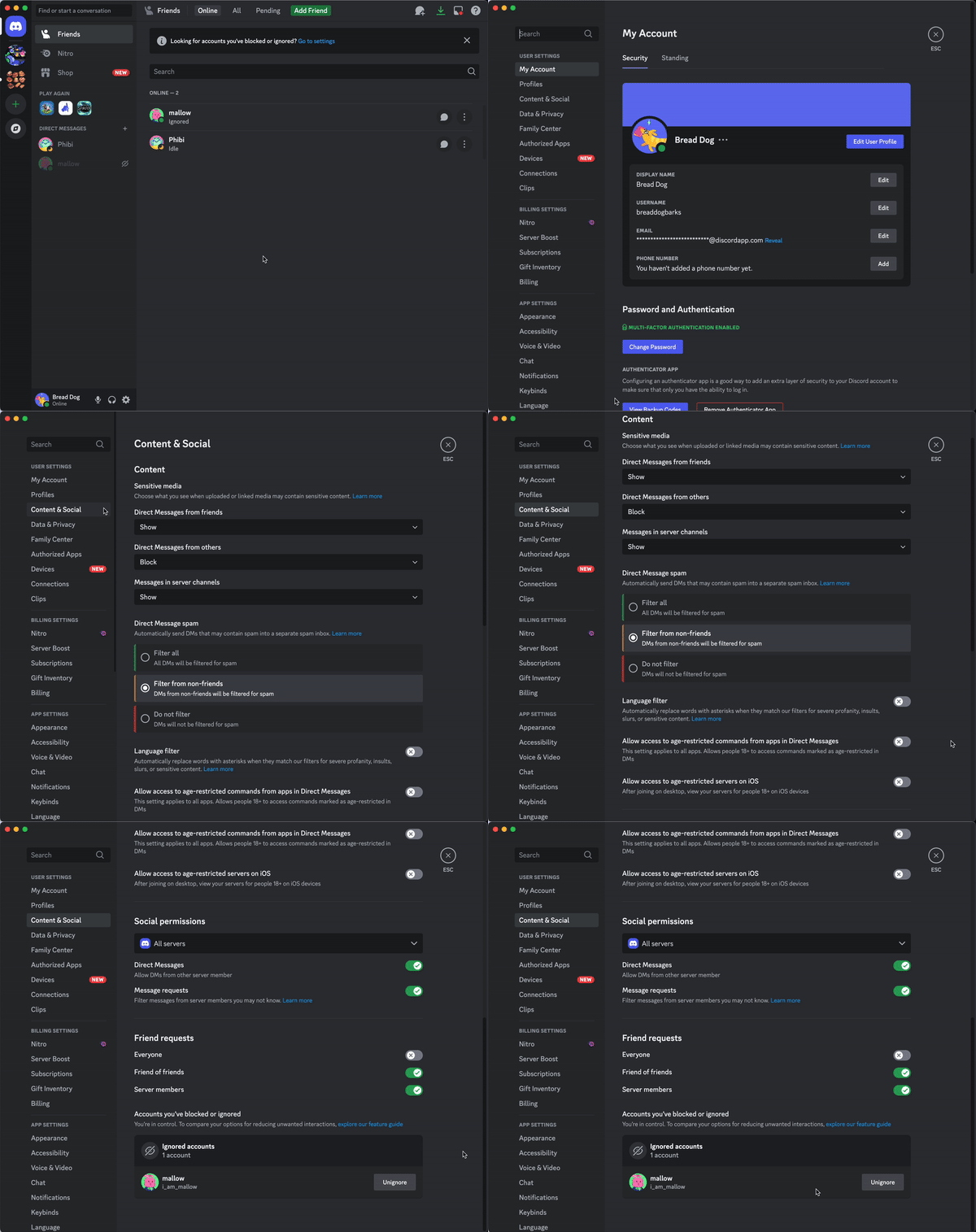
- Click on User Settings.
- Select Content & Social.
- Scroll down, and under the Accounts you’ve blocked & ignored section, you will see a list of all accounts that you have ignored.
2. On mobile
- In the Discord mobile app, tap on your profile picture in the bottom-right corner.
- Tap the cogwheel icon in the upper-right corner.
- Head over to Settings > Content & Social.
- Scroll down, and under the Accounts you’ve blocked & ignored section, you can tap on Ignored to see the accounts.

How to un-ignore accounts on Discord?
There are days when you are in a forgiving mood or can handle any sort of “balderdash” thrown at you. In such a case, you may want to un-ignore the person. You can do that from different places:
- From friends list: Right–click on the ignored person’s avatar and select Unignore.

- From the profile: Head over to the ignored person’s profile, click on the 3-dot menu icon, and choose Unignore. Alternatively, you can click the Unignore button next to the “You ignored them” status message.

- From the ignored accounts list: Head over to User Settings > Content & Social, scroll down, and under “Accounts you’ve blocked & ignored list” click on Unignore next to the user name.

Stay safe and avoid unwanted clutter
Discord pushed this new Ignore option as a part of Safer Internet Day 2025. No one will be able to detect that you have ignored them on the platform. You can also view their messages and profile. If you love Discord and/or have joined servers where you interact with people who speak different languages, then you should check out our guide, which explains how you can translate Discord messages. You can also watch a movie or web series with your friends in real-time even though they are apart by using the Discord Watch Party feature.

