

Quick Answer
To add and use Gemini Extensions on Android, open the Gemini app, tap the Profile icon, and select Extensions. Toggle the switch for the extensions you need. Some, like Google Workspace or Spotify, require account linking. Once enabled, these extensions let Gemini interact with apps like Gmail, Maps, YouTube, and more for enhanced AI-powered tasks.
Google introduced the Gemini app for Android devices many months back to give users AI capabilities. Like how ChatGPT has introduced plugins for additional capabilities, Google has added extensions to the Gemini app on Android.

The extensions provide additional capabilities to the Gemini app and help you find information or do tasks with ease. Let’s see how to add or enable Gemini extensions on Android.
Extensions Available on the Gemini App on Android
Currently, a limited number of extensions are available on the Gemini app. They are:
- For productivity, it has a Google Workspace extension
- For communication, Messages, Phone, and WhatsApp extensions are available
- Google Home, Utilities extensions can help with Device Control
- For Travel, it has Google Flights, Google Hotels, and Google Maps extensions
- For Media streaming, it has Spotify, YouTube, and YouTube Music
- To Learn, the OpenStax extension is available
We can only enable these extensions and use them according to our needs. These limited number of extensions can enable the Gemini app to interact with various services and help you with your tasks.
How to Enable Gemini Extensions on Android
To enable an extension on the Gemini app, tap on the Profile icon at the top-right of the Gemini app and select Extensions.

Then, find the extensions you want to enable and toggle the button beside them.
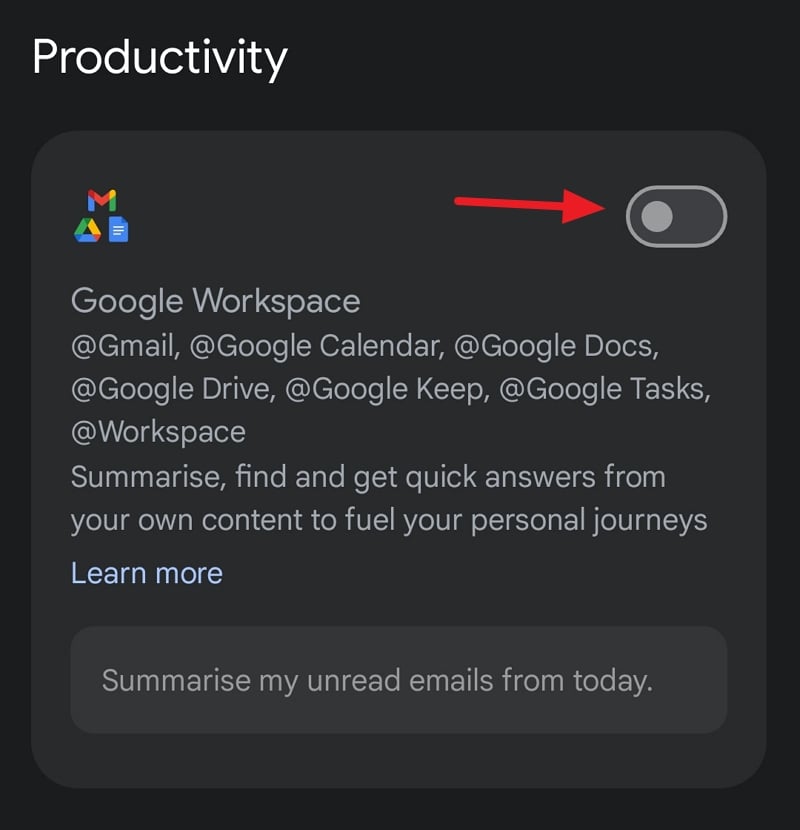
Some extensions like Google Workspace, YouTube, Spotify, etc. need you to connect their accounts to use them. They will automatically ask you to connect while you enable the extension. When you are done using the extensions, you can simply toggle the button off beside the extensions in the same way to disable them.
Use Gemini Extensions to Use AI for Tasks
Gemini is a large language model that does not need separate extensions. All it needs is the ability to interact with other apps on your Android device. These abilities are enabled with extensions. Google Workspace lets Gemini interact with Google products like Gmail, Google Calendar, Google Docs, Google Drive, etc. Enabling the Spotify extension lets you play songs with the Gemini app or Google Assistant, which is powered by Gemini.

