

Quick Answer
You can use Gemini Deep Research for free by signing into the Gemini website or app, selecting Deep Research, and entering your query. It analyzes thousands of web pages, applies reasoning, and generates a detailed report. Available on desktop and mobile in 140 countries, it allows up to 10 free reports per account. Ensure your app is updated for access.
ChatGPT has changed the world. The web is not immune to it. Starting with Microsoft, all search engines started introducing AI features to search. Microsoft has enabled the Copilot app on Windows devices and made the app widely available for other operating systems.
To increase the competition, Google followed Microsoft’s lead by introducing AI overviews to search and releasing the Gemini app exclusively to use its AI models. Microsoft has recently enabled the Think Deeper feature for free for all users.
Google has now made the Deep Research model free for all users. Let’s see how we can get well-researched and detailed answers.
Table of Contents
What Is Gemini Deep Research
What would you do when you want to make an important decision, like buying a house, switching careers, etc? When you plan on taking such huge leaps, you research a lot, find some options, apply reasoning to them, and get some answers out of it. In general, the whole process consumes many days or active hours.
In the end, we may not be sure that we will come up with a solid final answer for the important decision we need to make. Here comes Gemini Deep Research from Google.
When you input something like “What kind of skills do I need to bet on for AI to not replace me in the future?” or some query that you give a lot of research and thought hours, Gemini Deep Research will plan, research from thousands of web pages related to your query, apply reasoning, and give you a detailed report that you can go through and decide.
It cuts the extremely laborious hours with the Deep Research future and gives you a chance to apply your mind to important things. The Deep Research breaks down your query, researches it, and reports to you all about it.
To give users a better experience with Gemini Deep Research, Google uses its Gemini models like 2.0 Flash Thinking, Google Search, and other web technologies. These all work together to give you a deeply researched report.
Gemini Deep Research was launched in December 2024 for Gemini Advanced users. It is currently available for all on Desktops and mobiles in 140 countries, serving more than 45 languages.
The latest 2.0 Flash Thinking (experimental) model helped Google launch its Deep Research feature for all.
How to Use Gemini Deep Research on Desktop
Using Deep Research on Windows, Mac, or other operating systems is a no-brainer. Open a web browser and visit the Gemini website. Sign in with your Google account. Click the drop-down icon beside Gemini on the Google Gemini website and select Deep Research from the options.
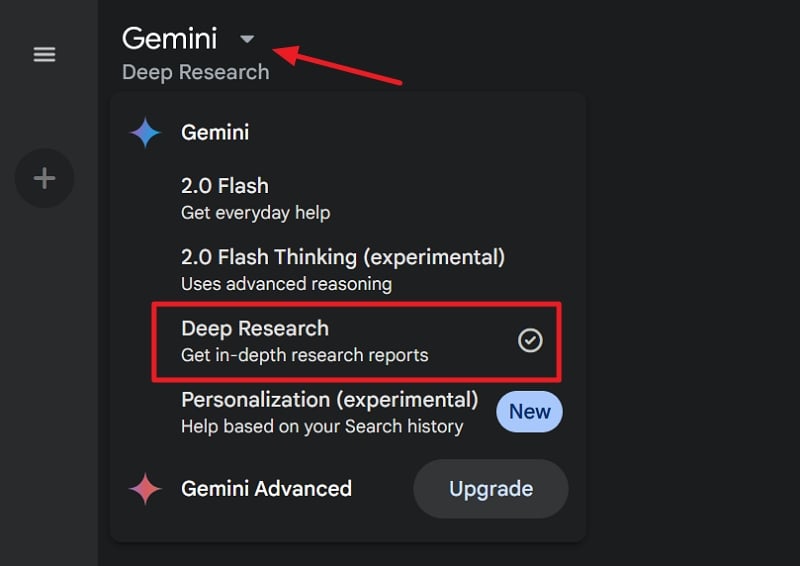
Then, enter your query, which needs deep research and a lot of reasoning. Gemini will show an outline of how it will proceed with the research and generate a report. If you are okay with the suggested plan, click Start research.
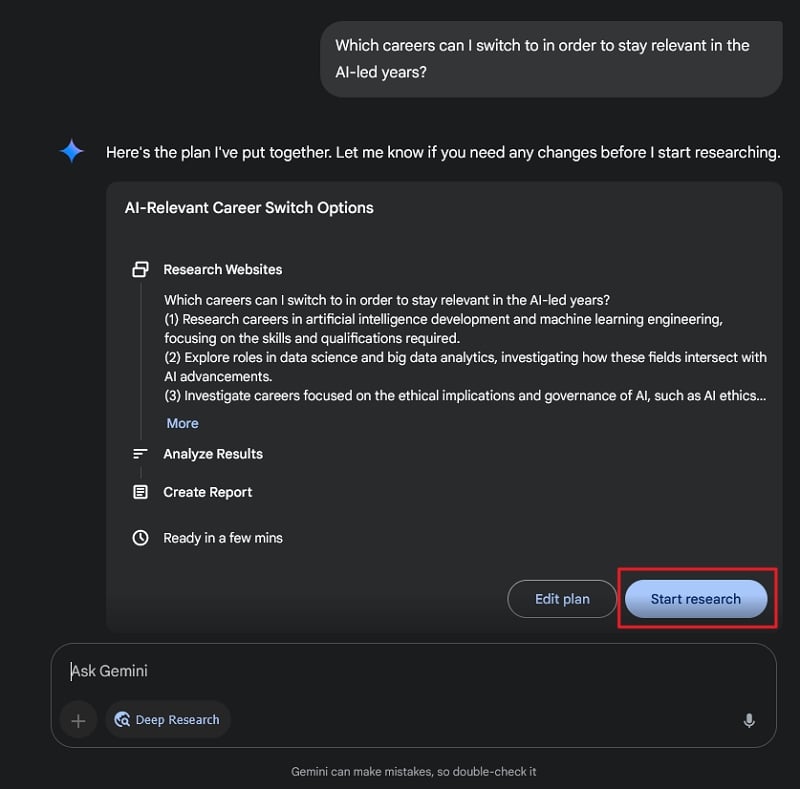
To make any changes to the plan, click Edit plan and input your changes. It will take a few minutes to complete the deep research and generate a report. It analyzes thousands of web pages related to your query, applies reasoning with its Flash Thinking model, and shows you a report. If you have installed the Gemini app on your mobile and signed in with the same account you used on your desktop, you will see a notification when the report is ready.
The report consists of all the suggestions, thinking, and logic that have gone into it. You will also find the list of web pages along with their links in the report at the bottom.
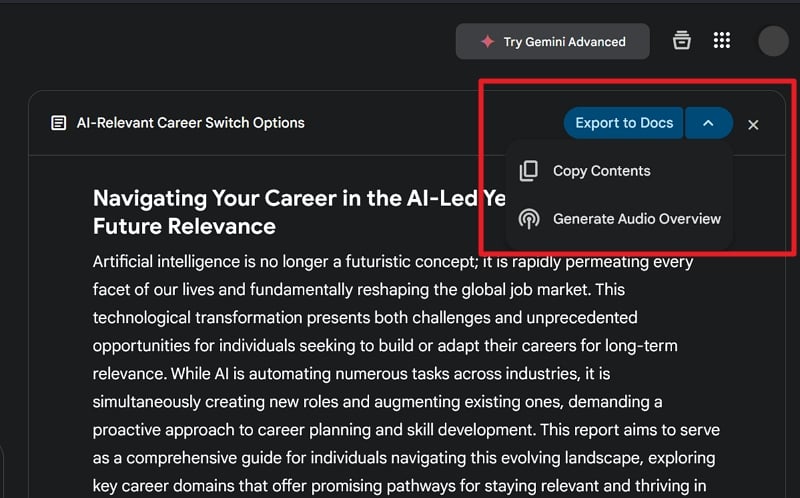
To save the report to Google Docs, click Export to Docs. To generate an audio overview, click the drop-down beside Export to Docs and select Generate Audio Overview.
How to Use Gemini Deep Research on Android and iOS
To get started, install the Google Gemini app from the Google Play Store on Android or the App Store on iOS devices. Then, sign in with your Google account. Tap on the models under Gemini on the Gemini homepage and select Deep Research. Then, enter your query and proceed with researching by selecting Start research.
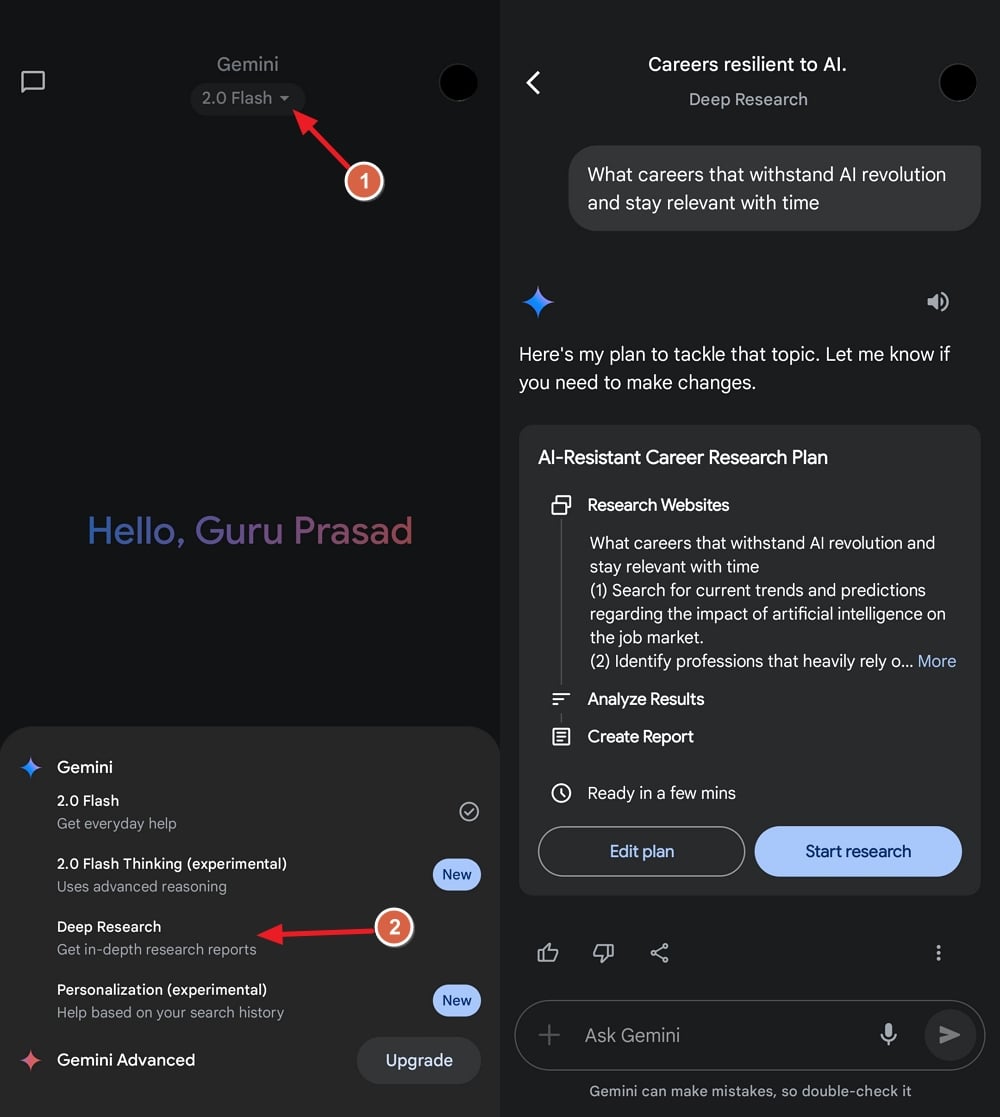
If you need to make any changes, click Edit plan. While Gemini Deep Research does its work based on your query, you can switch to other apps and do your work. You’ll see a notification after the report is generated.
Why Am I Not Seeing the Deep Research Model on Gemini?
Google has made Gemini Deep Research available for all for free. If you do not see the Deep Research model, you must update your mobile device’s Gemini app. If you do not see the Deep Research feature on a web browser, make sure you are signed in with your Google account. The latest app and signing in with a Google account opens up access to newer models on Gemini.
How Much Does Gemini Deep Research Cost?
Gemini Deep Research is available for all users for free. Earlier, it was only available to Gemini Advanced users, but with the latest enhancements in the Flash Thinking models, Google made it free for all. Just sign in with your Google account and use the feature.
Do In-Depth Research With Gemini Deep Research
Research is crucial in making important decisions. But it takes a lot of hours or days just to research. Contemplating the findings and coming to a decision might take another few days. You can cut all the time with the Gemini Deep Research model and focus on the important thing, the decision-making, by having all the needed data and reports in your hand.

