

Quick Answer
Samsung Internet Browser offers better customization, enhanced privacy features like smart anti-tracking, supports extensions like ad blockers, and improves video playback with background play and floating players. It also integrates seamlessly with Samsung Pass for secure password management, making it a compelling alternative to Google Chrome.
Samsung sells millions of phones every year and also gives its native apps a huge user base to explore and use. However, being a Samsung Galaxy user for over a decade, I can vouch for all the other several thousand that you might usually skip using the Samsung Internet Browser. The first thing that you might do with your newest Samsung Galaxy phone could be to remove the native apps, including the Samsung Internet Browser, and install Google Chrome.

Yes, billions across platforms use Google Chrome, and its easy-to-use UI and performance are what make us want to use it, but Samsung Internet Browser has much more to offer than Chrome. This is something I discovered when I switched from Google Chrome to Samsung Internet Browser. I am enjoying using Samsung Browser so much that not only have I uninstalled Google Chrome, but I also got the hang of Samsung’s native browser on my Galaxy S25 Ultra. Here are a few reasons why Samsung Internet Browser is better than Google Chrome.
Table of Contents
History of Samsung Internet Browser
You shouldn’t go by the name and think that Samsung Internet Browser is an exclusive app for Samsung Galaxy phones. However, that wasn’t the case since its inception when it debuted in 2012. Samsung kept the Internet Browser app exclusive to its devices and later opened the gates to everyone in 2017. Interestingly, it wasn’t a Chromium-based browser in its early days but was released based on other options such as WebKit, Gecko, and Blink.
Later, Samsung opted for Chromium as it was fast, reliable, and offered better compatibility with web standards. The first iteration of the Samsung Internet Browser based on Chromium was bundled with the Galaxy S4. According to the latest StatCounter data, Chrome has a strong 67.26% market share in mobile internet browsers, whereas Samsung Internet Browser has a 3.69% market share.
During its initial days, it was just not it and not worth recommending to anyone. But over the years, Samsung has put in a lot of work, and now I can vouch for it, having kept my Galaxy S24 Ultra and S25 Ultra Google Chrome-free.
Why use Samsung Internet Browser over Google Chrome?
Better customization options
Google Chrome’s strength is the UI that it offers, which is clean and minimal. However, as much as you like the clean UI, the lack of customization options makes it limiting. The Google Chrome browser offers almost the same UI across all platforms. But the same UI isn’t optimal for every device. On mobile phones, reaching the address bar or the new tab button is quite difficult on Google Chrome. Navigating sites also becomes cumbersome due to the top-heavy menus on Google Chrome.

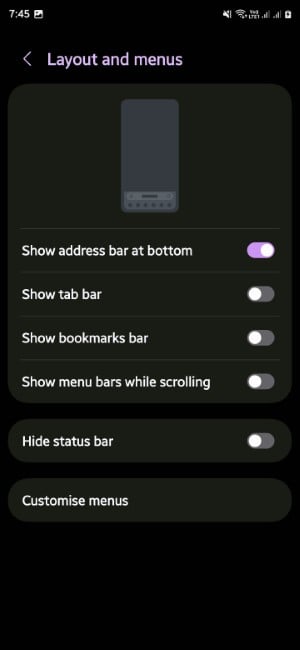
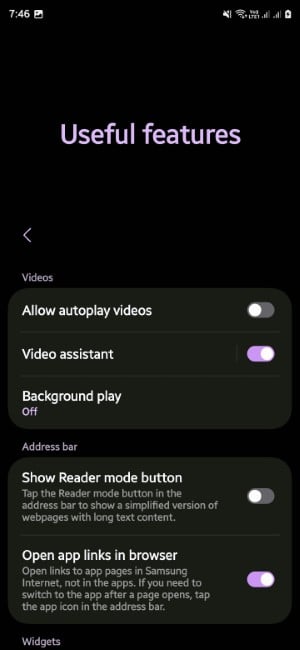
On the other hand, the Samsung browser lets you choose whether you would like to have the bookmarks bar, the address bar, and other elements within your finger’s reach. You can choose to bring the search bar, bookmarks bar, and even the Settings menu to the bottom. It may not be that significant on smaller phones, but it does come in quite handy when using larger phones or tablets.
Plus, you can choose options such as dark mode, change the text size and background play, and enable the extra menu items for quick access to useful tools. Overall, the level of customization Samsung Internet Browser offers is just a notch above Google Chrome.
Get useful features through extensions
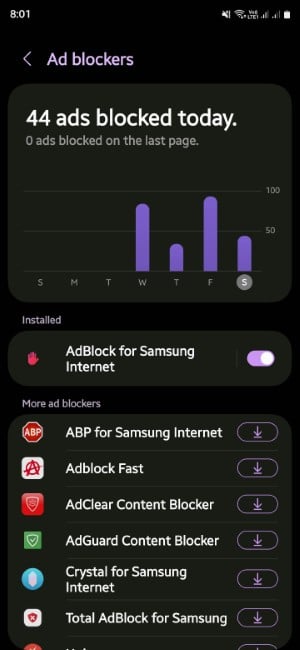
Extensions are quite useful if you wish to expand the list of features on your browser. While Google Chrome on the desktop offers a plethora of extensions, the mobile version, on the other hand, doesn’t offer one at all. This is where Samsung Internet Browser takes the points again. Yes, the collection of extensions that Samsung offers isn’t that much, and they are a handful, but they are good enough to get your job done.
The most important extension one would want to install on their browser, i.e., the ad blocker, is available on the Samsung Internet Browser. You can access it by tapping the hamburger menu>Add-ons>Ad blocker. Apart from that, you also get extensions for subtitles and AI and translation features. Overall, it has what you would want at the base level from a web browser.
Enhanced privacy and security
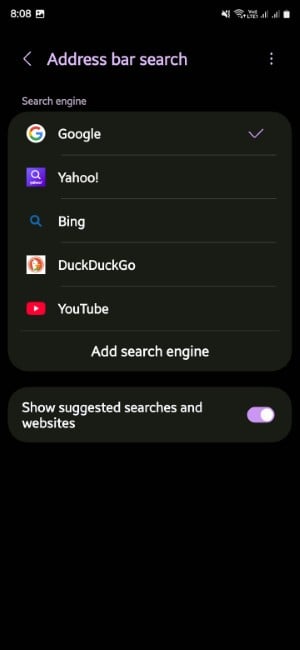
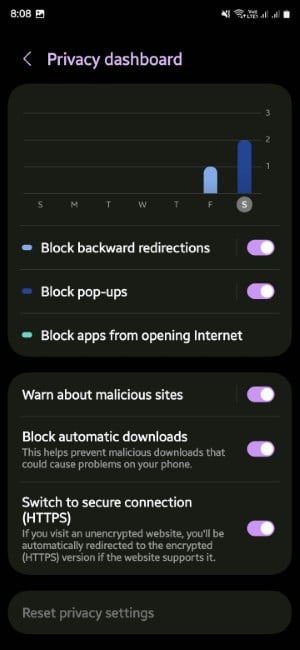
Google isn’t a name that could be taken in the same line when talking about privacy and security. We all know that as soon as we start using Google or any of its related products, our data is getting compromised. However, the Samsung Internet Browser, although not 100%, tries to address the growing concern of internet users’ privacy and security.
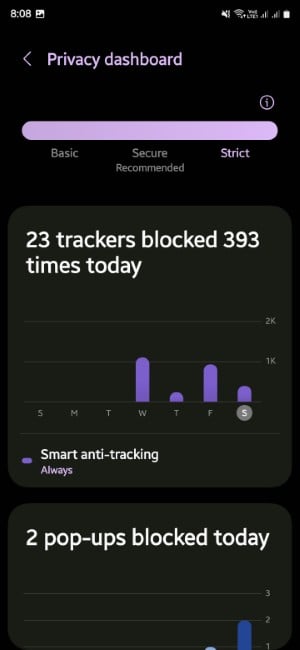
Some of the notable features include the smart anti-tracking that blocks tracking cookies, warns of any malicious site before you visit them, and also allows you to use third-party search engines such as DuckDuckGo or other privacy-focused ones to ensure you are not being tracked.
Enhanced password management
Samsung Internet Browser is also a step ahead when it comes to password management. It seamlessly integrates with Samsung Pass, provided that both apps are updated to their latest version. Whenever you visit a website that deals in email and passwords, you will be prompted to store those credentials in Samsung Pass safely. Samsung Pass offers an encrypted vault, which can be protected using biometrics (facial recognition or fingerprints).
Samsung Pass can also be used to fill out the information automatically across websites and apps. The only edge that Google Password Manager has is that it is available on Google Chrome, meaning it works across devices and platforms.
Better video playback features
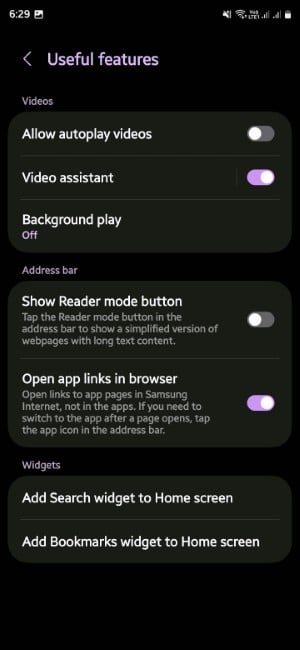
Watching videos with the Samsung Internet Browser is a great experience. It lets you play YouTube videos in the background, which means you can play videos even after turning off your screen. Also, it offers a video assistant, meaning you get to view the video in a floating mini-player while you can continue visiting other websites. You get quick controls on top of the video player to control settings such as speed adjustments, full screen, and playback settings. On the other hand, Google Chrome simply plays the video, and as soon as you visit a different website, it stops playing. Plus, there isn’t any option such as background play, etc.
Other features

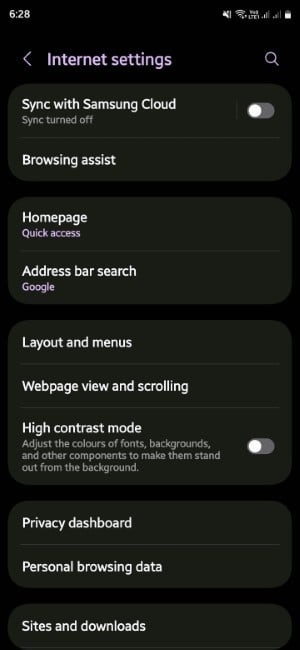
Samsung Internet browser allows you to change the website fonts quite easily, giving you full freedom on how you would like to view a website. This could also come in handy in situations on websites with broken fonts or fonts that are not easily understandable. The High Contrast Mode is another mode of accessibility that gives the Samsung Internet Browser an edge.
Samsung’s browser also offers better tab management and, above all, a better Incognito browsing experience. You can easily protect your private tabs behind fingerprint authentication. It also prevents screenshots from being taken on private tabs. Dark mode implementation is also better in Samsung Browser than in Google Chrome. Reader Mode is another option that lets you go through your content distraction-free. Google Chrome has a similar feature, but it is buried under experimental features.
Downloading files on the Samsung browser is another great experience. You can rename the files before saving, choose custom storage locations, and more.
Not perfect, but it deserves a try
Of course, it depends on personal preferences and which browser or app you would want to use on your mobile. However, since I was a hardcore user of Google Chrome across all of my devices, switching to Samsung Browser made me realize that there are some different and better options out there. We just need to give it a little time to explore the benefits.

