

Quick Answer
Google removed support for uBlock Origin with Manifest V3, but you can still bring it back on Chrome by enabling specific Chrome Flags (M137, M138, legacy manifest options) and disabling MV2 deprecation flags, then loading uBlock Origin manually from its GitHub build. Otherwise, use uBlock Origin Lite or switch to Firefox.
Advertisements are the primary source of income for most websites and major tech companies. You will encounter ads when using apps, websites, or while watching YouTube videos. While these ads generate revenue for tech companies, they are annoying for users. No one wants to let ads disrupt their viewing experience. For that, people make use of ad blockers. The Chrome Store used to offer one powerful adblocker called uBlock Origin. However, last year, Google introduced some changes to the Google Chrome browser, which eventually led to the end of the uBlock Origin adblocker. The AdBlocker supported the Manifest V2 extension framework, but as Google switched over to Manifest V3, the support for uBlock Origin ended.
While there are a bunch of other adblockers available on the Chrome Store, they either don’t perform their job well, or aren’t as good as uBlock Origin. Fortunately, there is a workaround that can help restore uBlock Origin on Google Chrome even with the restrictions in place. Let’s jump right into it.
Why did Google block uBlock Origin?
First things first, ad blockers were hurting the revenue for browsers such as Google Chrome. Using ad blockers, people were able to easily watch content on YouTube and websites without any interruptions. However, as Google Chrome switched to Manifest V3, it introduced new changes on how extensions would interact with web content. Since uBlock Origin relies heavily on the webRequest API to block unwanted content. But since Manifest V3 has a limited webRequest API, extensions are required to use the new declarativeNetRequest API. It has some pre-defined rules but lacks the dynamic capabilities that uBlock Origin requires.
uBlock Origin can still be used on Firefox, or people can continue using the uBlock Origin Lite on Google Chrome, which is based on Manifest V3. Blocking ads powerfully on Chrome is still not possible, at least officially. Also, according to Bleeping Computer, uBlock Origin still works on Google Chrome v133.0.6943.127. The uBlock Origin is a powerful adblocker as it allows power users to customize their filtering rules, and block not only ads, but trackers, malicious websites, and even block JavaScript selectively.
Also, it is very important to note that to bask in the success that uBlock Origin got, there are several fake ad blockers available on the Chrome Web Store, mimicking uBlock Origin. We would advise you to stay away from such fake ad blockers; one such example is this extension. If you want the official thing, you can get the uBlock Origin Lite.
How to get back uBlock Origin on Google Chrome?
Here are the steps that you can follow to restore uBlock Origin on Google Chrome, even with Manifest V3.
- Open Google Chrome.
- In the address bar, type chrome://flags and press Enter to open the Chrome Flags page.
- In the search box, type Temporarily unexpired M137 and Temporarily unexpired M138 flags. You will see that both flags are listed on the first page as soon as you land on the Chrome Flags page itself.
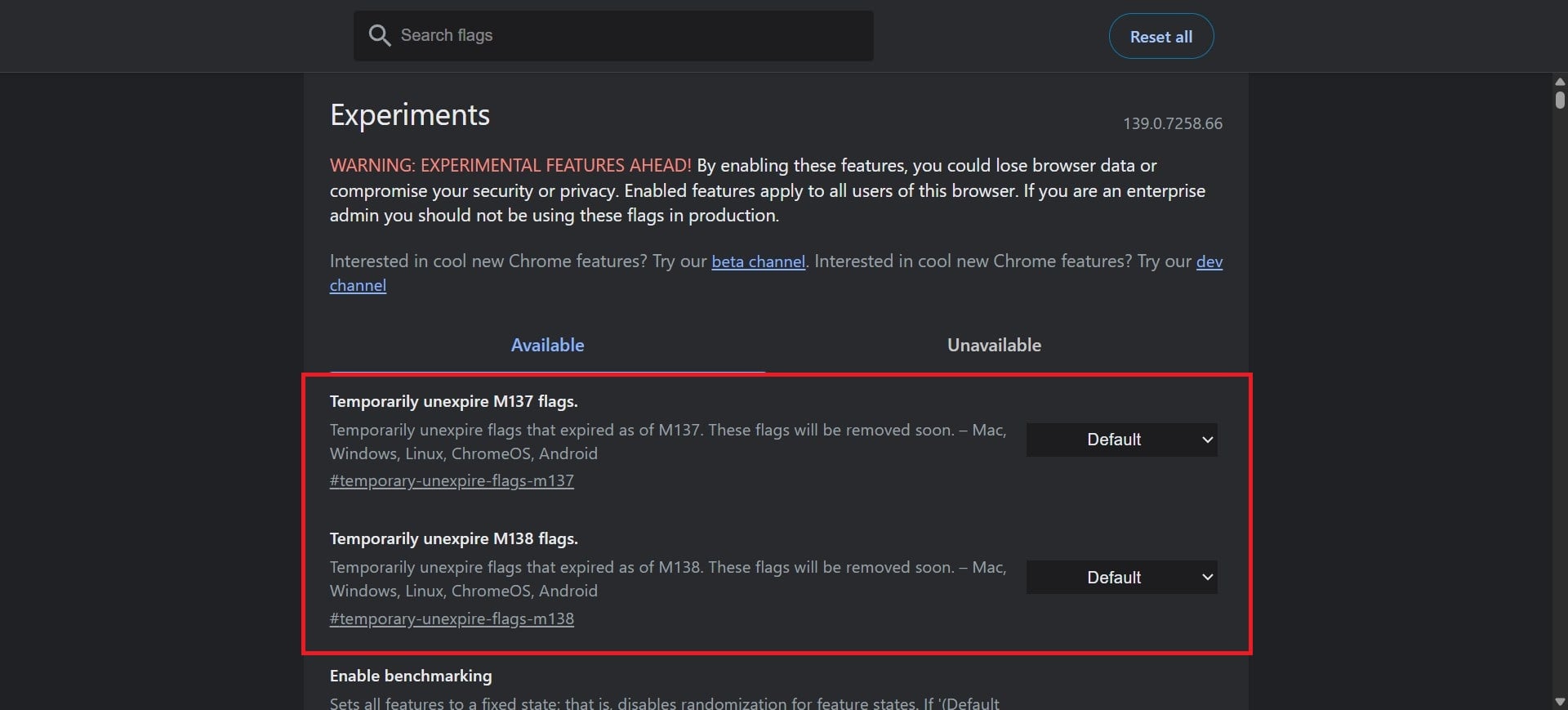
- You need to set both the Temporarily unexpired M137 and Temporarily unexpired M138 flags to Enabled, from their corresponding menu on the right. Enabling these two extensions will allow you to access old Chrome settings.
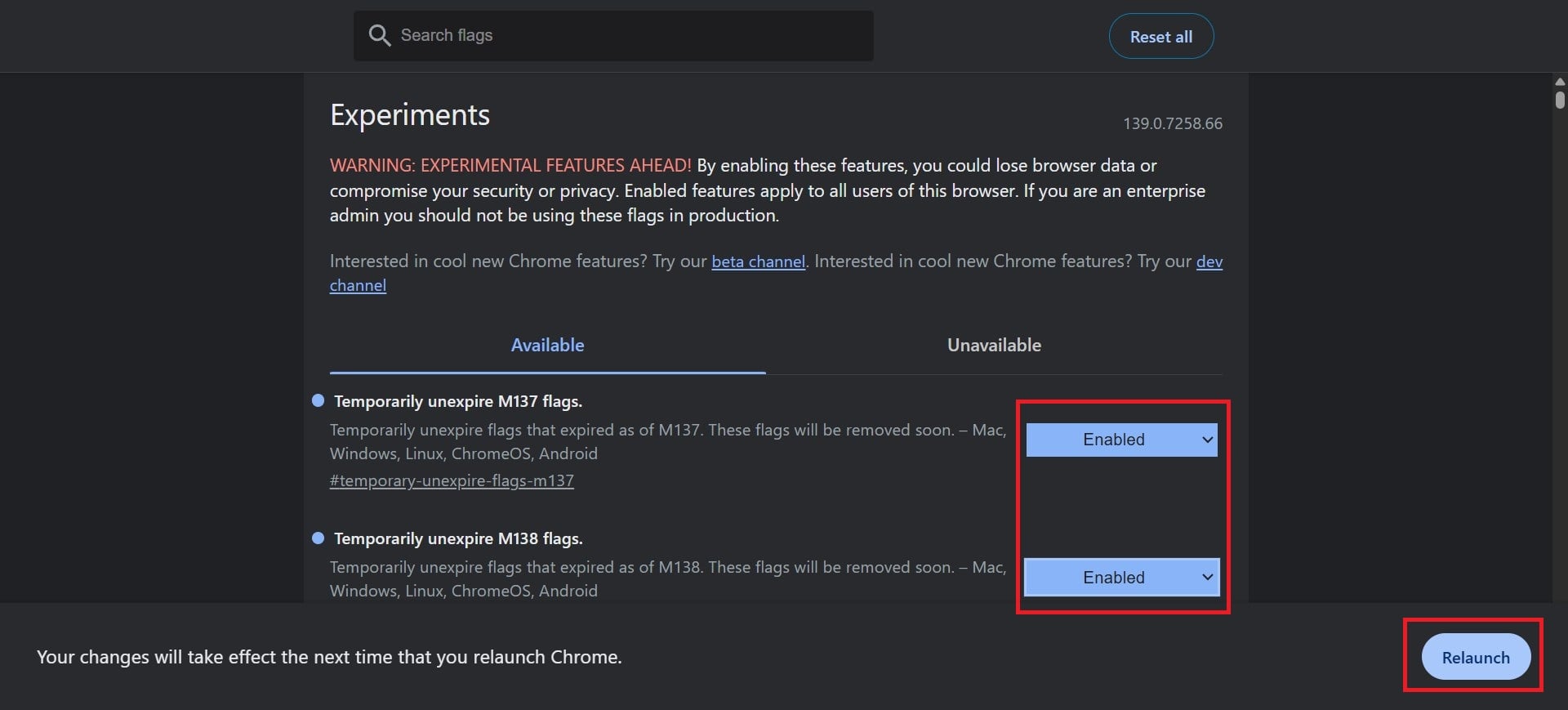
- Then hit the Relaunch button to restart Google Chrome.
- In the Chrome Flags page, you need to search for Allow legacy extension manifest versions and set it to Enabled. This will keep Google from using the old system running, i.e., the Manifest V2 framework.
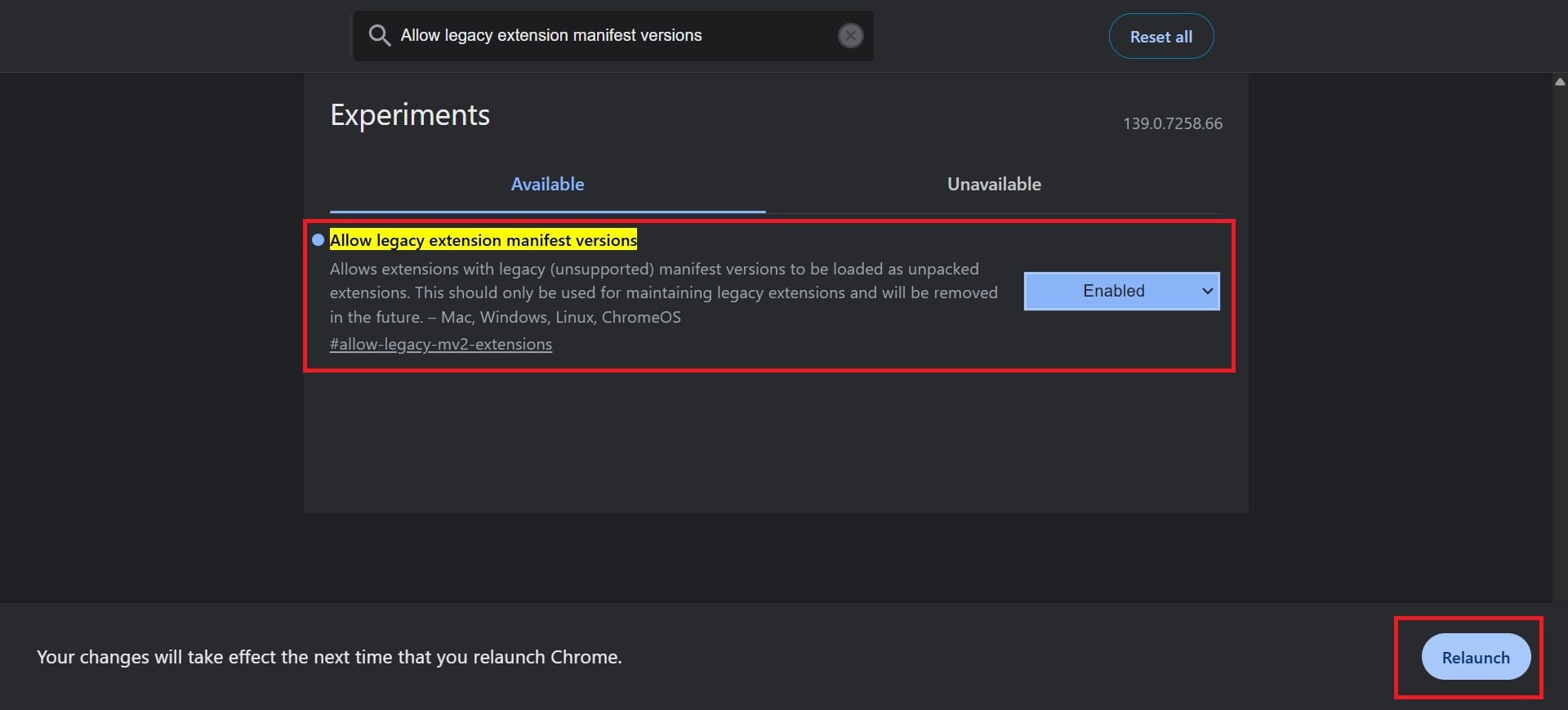
- Again, hit the Relaunch button.
- Head over to the Chrome Flags page again, and type MV2.
- Now, you need to set the three flags below to Disable.
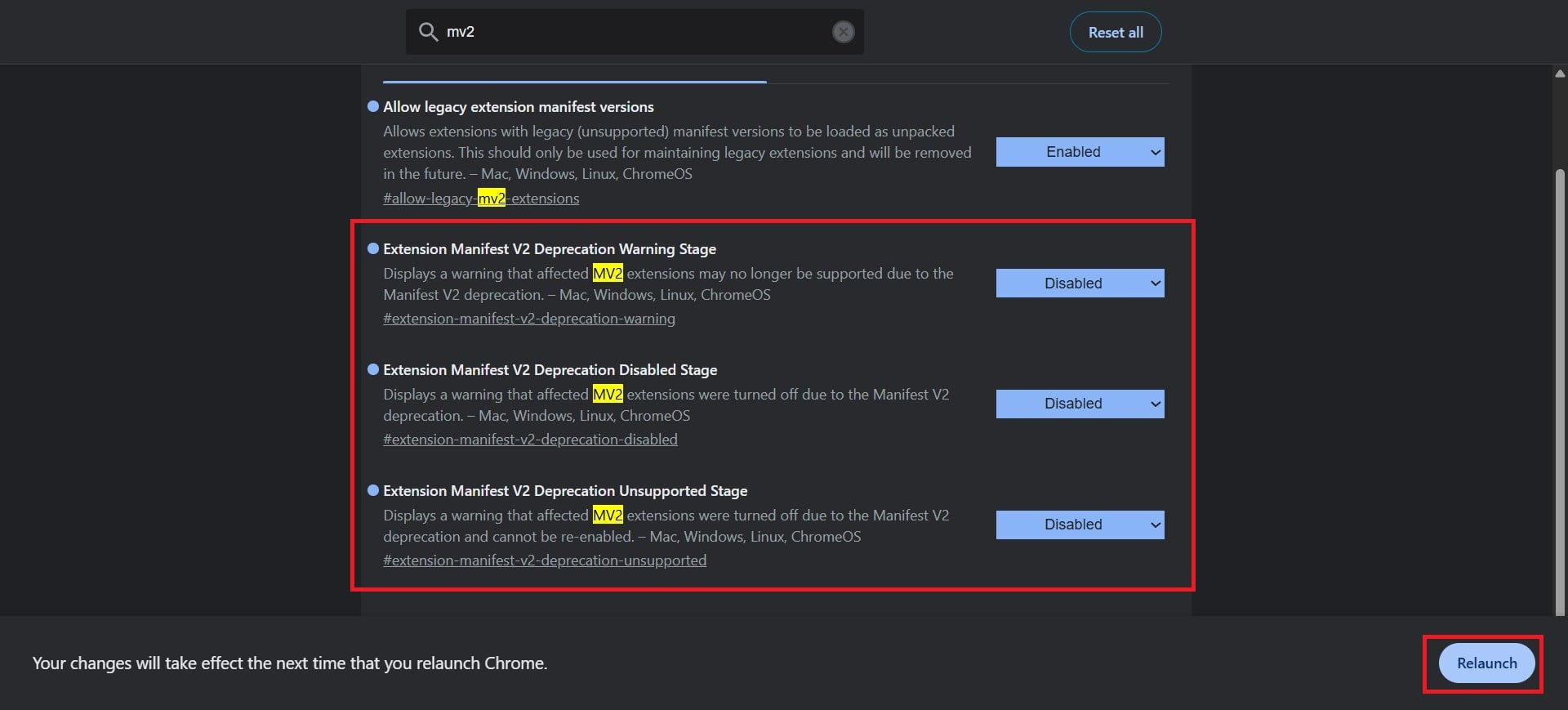
- Extension Manifest V2 Deprecation Warning Stage
- Extension Manifest V2 Deprecation Disabled Stage
- Extension Manifest V2 Deprecation Unsupported Stage
- Relaunch Google Chrome.
- Now, head over to the uBlock Origin’s official GitHub page.
- Download the chromium.zip file under the Assets section.
- Extract the contents of the file.
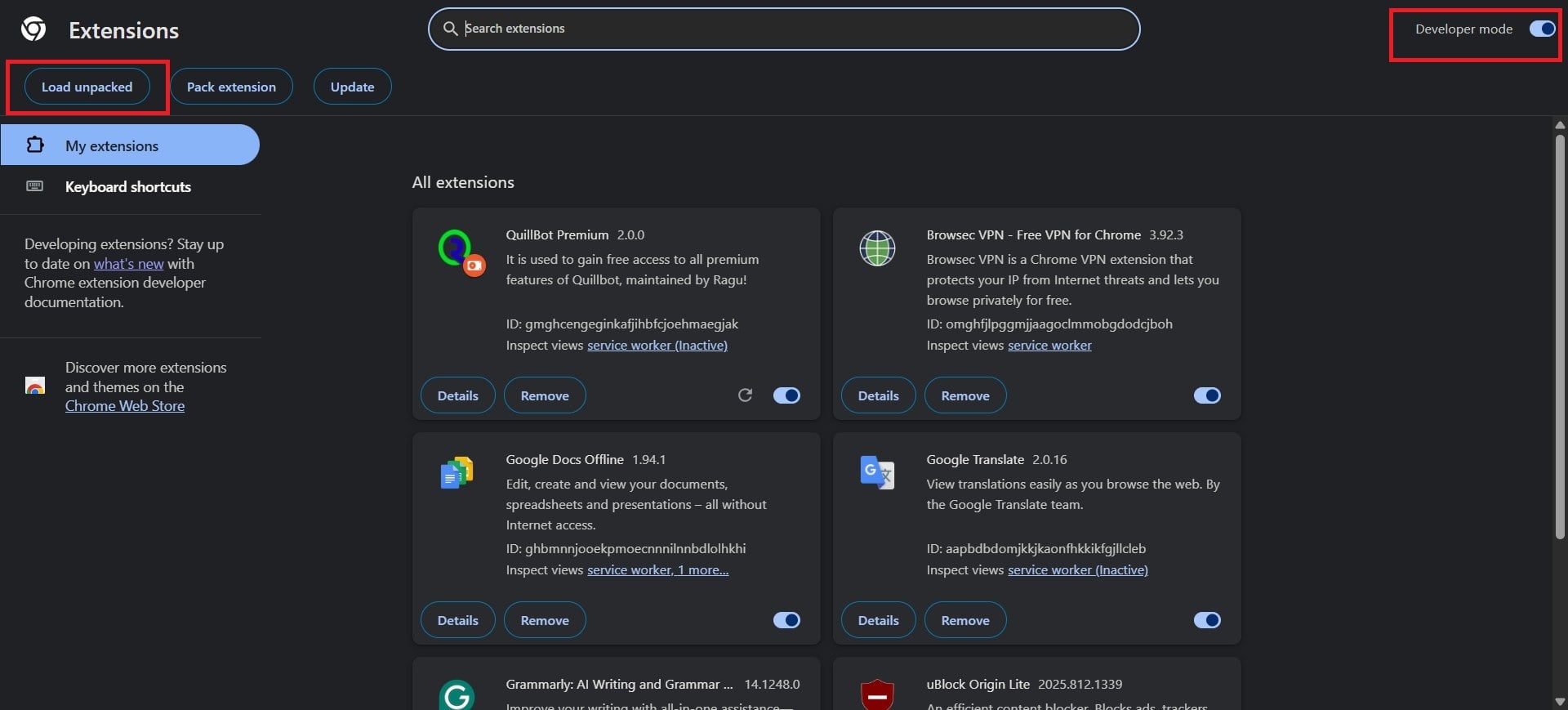
- Launch Google Chrome and open the Extensions menu by heading over to the 3-dot menu icon > Extensions > Manage Extensions.
- Click on Load Unpacked, and select the unzipped folder.
- That’s it! You now have uBlock Origin on your Google Chrome.
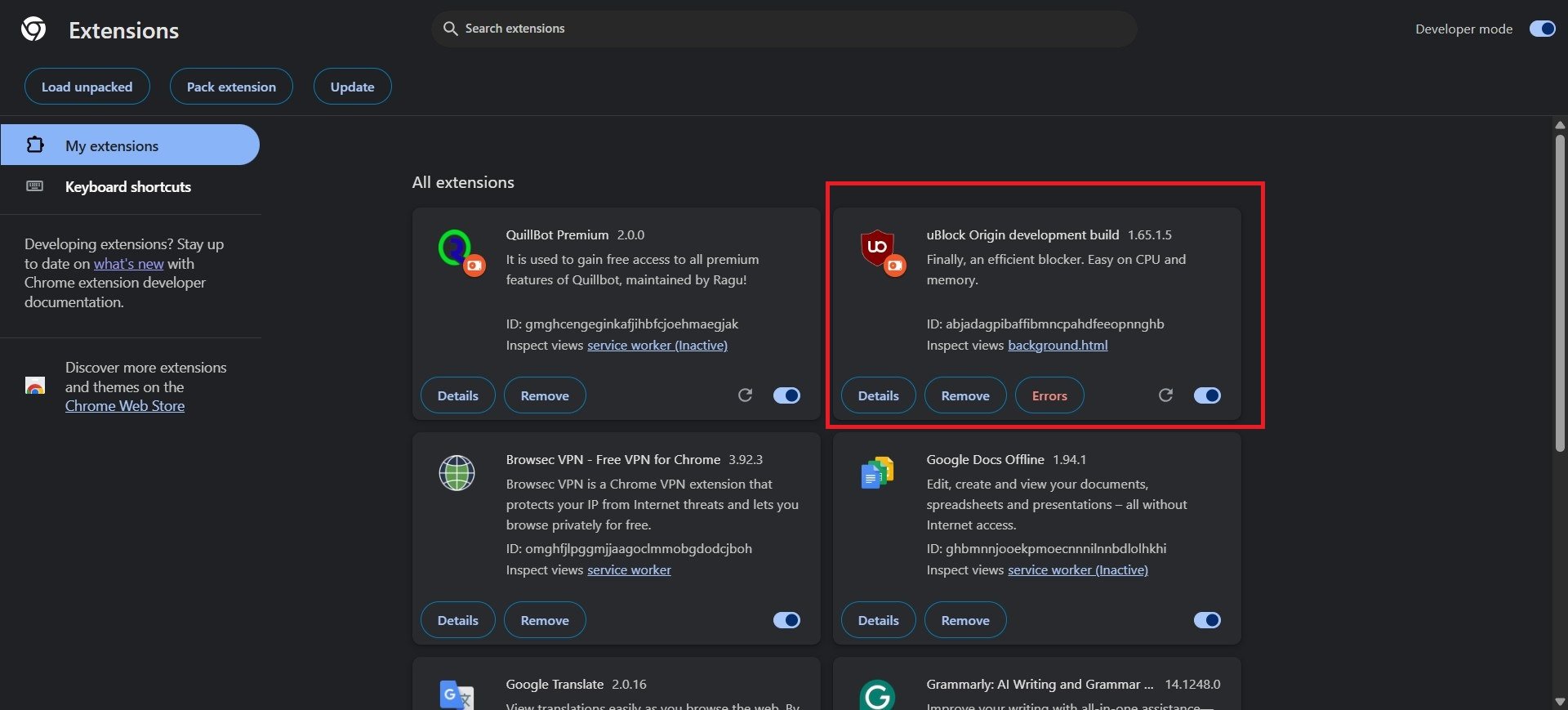
Bring back uBlock Origin
The above simple trick will let you use the uBlock Origin extension on Google Chrome. Do note that the complete version of this extension lets you add more filters, suitable for power users. However, if you think this is too much of a hassle, then you can switch from Google Chrome to a different browser. There are a lot of privacy-focused and lightweight browsers that you can try, and you will find more feature-loaded ones compared to Google Chrome.

