

Quick Answer
To begin unlocking YouTube videos, visit the CroxyProxy website on your favorite browser, enter the YouTube URL in the text field provided on the homepage, and click on “Go” or “Browse”. CroxyProxy acts as a bridge that allows you to bypass any blocks or filters imposed on YouTube. It is safe as long as you know where you’re clicking.
YouTube is the main source of viewing video content for billions across the globe. It is a known fact that not all content is available in every region. The content available for one region isn’t necessarily available for other regions. Google has to follow certain guidelines for each region on what content should be accessible on YouTube for a specific region and what should be banned. Such geographical constraints are essential because of the demographic difference. However, that also means that certain content that could be valuable for viewers and is available in one region is blocked in another.

In such cases, internet users use VPN or proxy services to bypass the restrictions on accessing popular sites and content on a particular platform, like YouTube. CroxyProxy has quickly emerged as one of the best solutions for viewing prohibited content and is a popular YouTube unblocking tool.
In this guide, we explain what CroxyProxy YouTube is and how you can use it.
Table of Contents
What is CroxyProxy YouTube?

CroxyProxy YouTube is an online proxy tool that allows you to access restricted content on YouTube quickly. The videos that deal with geographical constraints can be accessed using CroxyProxy YouTube. Not just videos, you can also access YouTube channels and playlists without any restrictions using the proxy tool. CroxyProxy is designed in such a way that it acts as an intermediary between your device and the website to let you visit and view what you want.
It can not only let you access geo-restricted content on YouTube, but you can also use CroxyProxy YouTube to gain access to the platform if it is locked within your school or workplace.
The process of working with CroxyProxy YouTube is simple. It re-routes your traffic via proxy servers across the world. When you use CroxyProxy to visit YouTube, the platform sees the masked IP address rather than your actual IP address, similar to using a VPN (Virtual Proxy Network). The whole process of fetching the restricted video is done by CroxyProxy on your behalf, which creates an impression that you aren’t using the platform directly.
How to use CroxyProxy YouTube?
CroxyProxy is incredibly user-friendly, and below are the few steps that you need to follow to use it.
- Visit the CroxyProxy website on any of your favorite web browsers.
- From the Quick Links option, select YouTube. This will unblock YouTube and you can watch any video without the need to sign in.

- If you wish to watch a specific video, then you need to copy the URL of the YouTube video that is restricted in your country.
- Go back to the CroxyProxy website, paste the link into the blank URL field, and press Go.
- The video will start loading and you can watch the video uninterrupted.
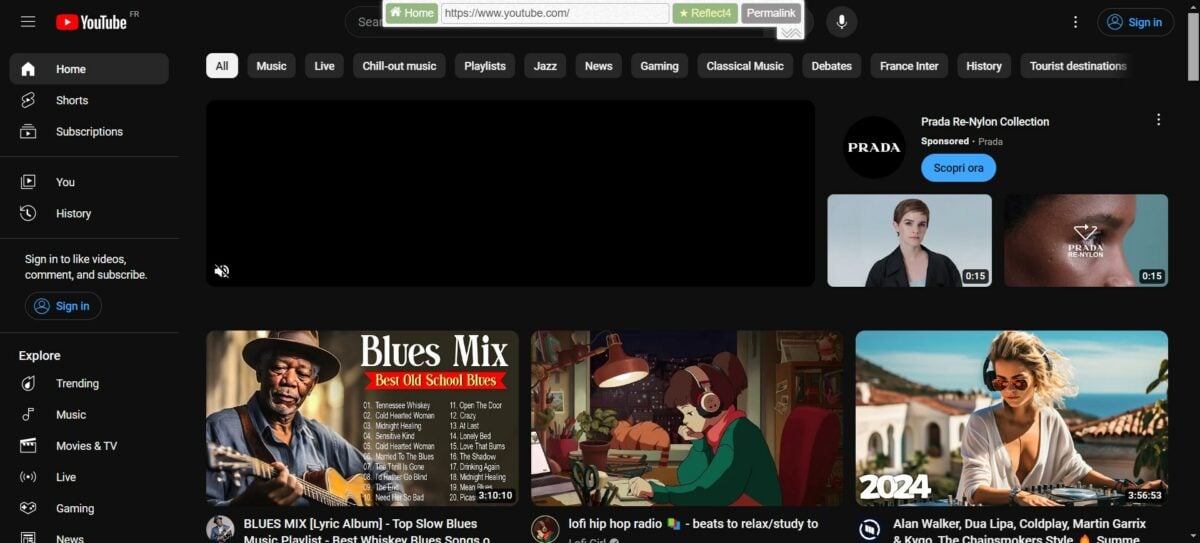
Do note that if the video is not loading or has buffering issues, then you can apply one of the solutions mentioned in our guide. Otherwise, we would suggest you disable any VPN or ad blockers if you are using one.
Troubleshooting issues with CroxyProxy
While CroxyProxy is a great proxy server online that lets you bypass content on platforms such as YouTube and many other popular websites, there are a few issues that you may come across. Below, we have mentioned some along with their solutions:
- If you are getting the video playback in low quality, then you should wait a bit for the bandwidth to settle down. If that doesn’t work, then switch servers for better quality.
- YouTube may sometimes not load with CroxyProxy. In such a case, then you should clear the browser cache and reload the browser to fix the problem.
- If the videos fail to load, then check if the ad blocker is disabled or you are not running any VPN.
What are the benefits of using CroxyProxy YouTube?
There are multiple advantages to using the robust proxy service CroxyProxy YouTube. Below are some of the benefits of using it.
- Easy access: To use CroxyProxy YouTube is fairly easy and doesn’t require much of your time. The online video-watching experience is also smooth as there are no delays or interruptions.
- Secure website: The website offers enhanced protection of user data. The only data that you will be sharing with the website is proxy information.
- No software required: CroxyProxy is a website, so there is no hassle to download and install software and then watch content from YouTube.
- Bypass geographical content: There are no geographical restrictions, meaning you can bypass content from any region without any limitation based on your location.
- Extension support: CroxyProxy is not only available as a website, but you can also download the appropriate extension for supported popular browsers. So, there is no compatibility issues.
- No paywall: There is no need to pay to use the CroxyProxy YouTube service. Moreover, you don’t even need to register to view restricted content.
Are there any drawbacks with CroxyProxy?
Yes, not everything is hunky-dory with CroxyProxy. End of the day, it’s a proxy service and hence comes with some disadvantages:
- Slow Speed: Depending on how far away the proxy servers are from your location, you may experience slow speeds when using CroxyProxy. The effect is even more pronounced if your own internet connection is unreliable.
- Limited Support: It’s quite possible that the platform doesn’t support all of YouTube’s features, such as displaying subtitles or captions for the videos.
- Security and Privacy: As it’s a proxy service, you’re exposed to a public IP address of a third party, which can sometimes be insecure. So be careful.
Unblock videos on YouTube and watch unrestricted
CroxyProxy is a great way to watch geo-restricted videos on YouTube. However, it may not work properly, and several errors may occur. In such a case, a simple alternative would be to use a VPN. You can select among any of the best free VPN services from our guide, connect to a server in a different location, and enjoy the content on YouTube uninterrupted.
FAQs about CroxyProxy YouTube
Can you choose a server location on CroxyProxy YouTube?
If you use CroxyProxy YouTube for free, you do not have the option to change the server location. However, if you opt for the premium membership, which will cost you €3.50/month plus VAT, you have the option to choose a faster server in Germany, the UK, Spain, the US, Canada, or Israel. There are a few other benefits too, such as full HD video playback, no proxy service ads, no file size limit, and priority support.
Are there any limitations to using CroxyProxy YouTube?
No, there are no restrictions on the use of CroxyProxy YouTube, even if you use the free version. You can also use it on mobile phones, tablets, and all other devices that support web browsers.

