

Quick Answer
Google is testing a new storage policy that reduces the free storage offered with new Google accounts from 15GB to 5GB and requires users to add a phone number to their account to unlock the full 15GB storage. If you’re experiencing this with your newly created Google account and don’t want to share your phone number, you should consider Mega Cloud, which is an excellent alternative to Drive that offers 20GB of free storage, among other things.
Google has been offering 15GB of free storage to Gmail users since 2013. This storage is shared across Gmail, Drive, and Photos, and anything you save, upload, or back up eats into it. However, the free Gmail plan is about to change for new users.
According to a report from Android Authority, Google is testing a new storage policy that reduces the free storage offered to new Gmail users from 15GB to 5GB. Those who want to unlock additional storage will need to link their phone number with their account. Google’s idea behind this is simple: limit having to offer 15GB to everyone — since many users have been creating new Google accounts to get free 15GB of storage — and get more users to subscribe to a paid Google One storage tier.
Although Google hasn’t stated when this rule comes into effect for everyone, if you’re already seeing the reduced storage on a new account you just created, or you’re looking to create a new Google account to back up your data to Drive, you may want to look at other services. Among the various cloud storage services available, Mega Cloud stands out as a solid alternative to Google Drive.
Table of Contents
Mega Cloud is a Google Drive Alternative You May Have Already Heard Of
Mega is one of the popular cloud storage services, known for its strong focus on privacy and security. You may have already come across Mega if you searched for the best cloud storage services. For those unaware, Mega is the name of the company that provides cloud storage — and not the service itself. The service is actually called Mega Cloud, and it’s one of the many services in the Mega ecosystem, which comprises Mega VPN, Mega Pass, and Mega Chat.
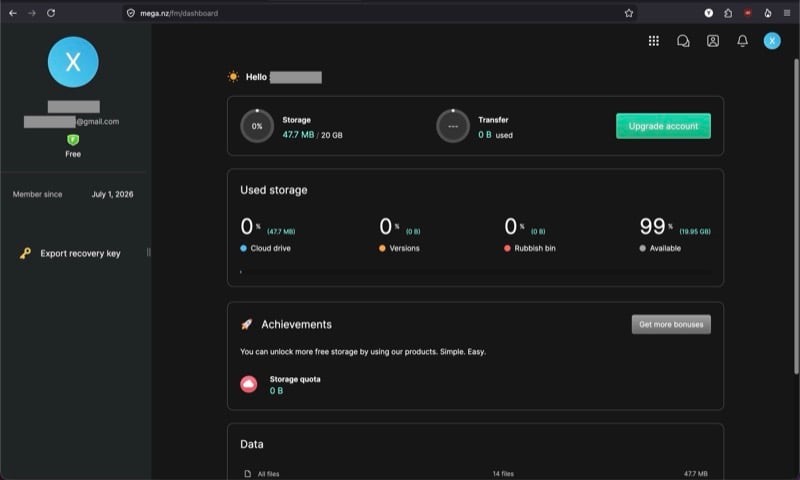
Mega Cloud is an encrypted cloud storage and file-sharing service that lets you store and share files online securely. Its biggest selling point? Zero-knowledge encryption, which encrypts files on the device before uploading them to the cloud. Mega claims this prevents anyone, including itself, from reading these files.
Just like Google Drive, Mega Cloud offers both free and paid plans. But unlike Google, which sells the paid plans through Google One subscriptions, you can purchase Mega Cloud plans directly. Another aspect that separates the two services is their free plan storage allowance. While Google has long offered 15GB and is expected to cut it to 5GB for users who don’t have their phone number linked to their account, Mega offers a generous 20GB of storage with the Cloud’s free plan.
What Makes Mega Cloud Better Than Google Drive?
Mega Cloud and Google Drive are essentially cloud storage services, but there are plenty of differences that separate the two — some go in favor of one service while others go in favor of the other. Here’s what makes Mega’s cloud storage service does better than Google’s.
Mega Cloud’s Free Plan Offers More Storage Without Requiring a Phone Number
The biggest reason to switch to Mega Cloud is its generous free plan, which offers 20GB of free storage without requiring you to link your phone number. This is significantly more storage than the reduced 5GB allowance that Google is testing for new users. And spread across multiple accounts, it’s enough space if you just want to back up some media, files, and documents. Those who need more storage can upgrade to a paid plan. In contrast, you get 5GB on Microsoft OneDrive, 2GB on Dropbox, and 10GB on Box.
It’s also worth noting that, with Mega Cloud, you’re in complete control over what takes up your storage space. This isn’t the case with your Google account storage, though, since it’s shared by Gmail, alongside Drive and Photos. As such, if you receive lots of emails with large attachments, that can take up a significant chunk of the storage and fill it up more quickly.
You Get E2E Encryption By Default
Another compelling reason to switch to Mega Cloud is its end-to-end encrypted, zero-knowledge storage architecture. Unlike Google, which encrypts files in transit and at rest while retaining the encryption key, Mega encrypts files locally on your device before sending them to its servers. Because of this, the company doesn’t have access to the unencrypted master keys required to decrypt your files.
Similarly, individual file keys are encrypted before being stored on Mega’s servers to limit who can view the contents of your files. This makes Mega Cloud better suited for storing personal files and documents.
You Aren’t Locked-In to an Ecosystem
Mega Cloud is strictly a cloud storage service. It isn’t like Drive, which is a part of Google’s productivity suite, comprising services like Gmail, Docs, Sheets, Photos, and Meet. This means your data on Mega Cloud isn’t directly tied to any service, so you aren’t stuck in an ecosystem and can easily switch platforms whenever you want, without having to worry about looking for alternatives to the services you currently use and moving your data over to new services.
Ecosystem independence is also nice if you prefer self-hosted solutions or privacy-focused applications, since you don’t have to use the services that your storage provider offers.
There’s Less AI Integration
Google is pushing AI features across most of its apps and services. Not only does this require increased integration among various services, but it also demands access to more user data; it’s what enables features like smart search, document suggestions, and AI-assisted summaries.
Mega takes a different approach. While it, too, has some AI features, they aren’t forced upon you. Additionally, because files are encrypted before being sent to the servers, they can’t be analyzed and used for AI features. If you hate your data being used by AI, you’ll feel right at home with Mega Cloud.
Mega Cloud Offers Granular Sharing Controls
Google Drive lets you share items with others using a link. But when it comes to sharing controls, you get limited options on the free plan. You can restrict access to only those with a Google account, specify roles, and limit who can download the shared items.
On the other hand, Mega Cloud does things a bit differently. While it also puts some of the best features behind a paywall, its free plan does get you a few extras. For one, there’s key splitting, which prevents anyone from accessing your shared item, even if they get hold of the link. You need to send the recipient a separate text-based decryption key privately, so they can open and view the contents inside your link.
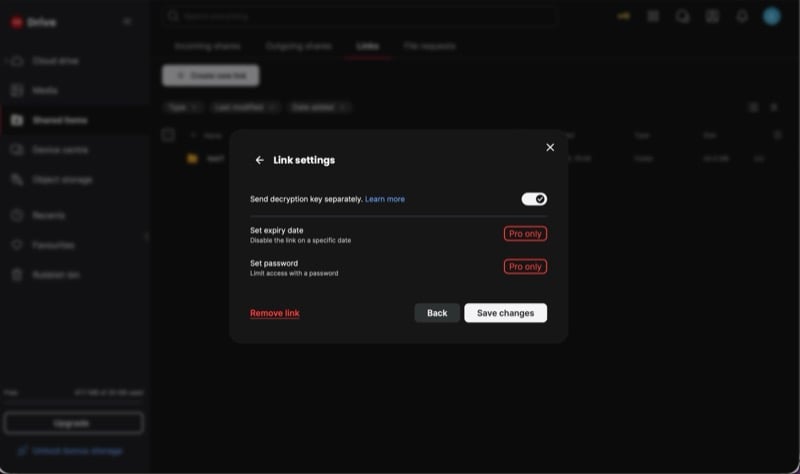
Then, there’s full-link deactivation. As the name implies, this feature lets you instantly kill any link you’ve created for an item in Mega Cloud with a single click. Another sharing control feature is the ability to configure full access permission for a shared folder. This is useful when you want to revoke or grant the recipient permissions to reshare the folder with others.
Finally, there’s Megadrop, which lets you allow anyone, including those without a Mega account, to securely upload files directly to your Mega Cloud storage. You may find it useful if you’re, say, a video editor and want others on your team to share clips with you.
You May Miss Some Google Drive Features After Switching to Mega Cloud
While there are several compelling reasons to switch from Google Drive to Mega Cloud, you may miss some of the features from Drive after the switch. Things like in-app file searching, OCR, real-time collaboration, and seamless app integration with other Google services are unmatched.
Mega is available on all major desktop and mobile platforms. You can also access its web version in a browser, as well as download its browser extension for quick and easy access to your cloud storage.

