Transcription tools are very practical nowadays. They are especially useful for students who need notes from lectures, for professionals who need notes from meetings, or for anyone who wants to convert speech into text quickly. These tools save you time and ensure that you don’t miss any important details. A really good tool for this is Notta AI.

Notta AI offers features like real-time transcription, file transcription, web page transcription, AI Summarizer, and more. Let’s take a look at what Notta AI offers and why it might be the best choice for your transcription needs.
Table of Contents
Features to Look for when Choosing the Best Online Transcriber Tool
Before you delve into the features of a Notta AI, you should know what to look for in an online tool that converts your voice to text. Look for “must-have” features like accuracy, speed, language support, and “nice-to-have” features like integration, customer support, and more.
- Accuracy: How well can the tool understand the audio data and convert it correctly into text? Accuracy is especially important if you’re working for a professional file.
- Speed: How quickly can the tool convert the audio to text.
- Ease of Use: How easy is it to use the tool. It should be easy to upload audio and get the text without any confusion.
- Language Support: The tool should work with the languages people need, such as English, Spanish, or others.
- Price: Check the tool’s free and professional offerings.
- Formats Supported: The tool should be able to work with different types of audio files, such as MP3 or WAV.
- Editing Features: After the audio file has been converted to text, it’s helpful if you can easily correct or change the text.
- Privacy and Security: People want their audio files and text to remain private and secure.
- Integration: The ability to work with other tools or apps, such as word processors or email.
- Customer Support: Good help and support if there are problems or questions.
Features of Notta.AI
Real-time Transcription

Real-time transcription on Notta AI converts your speech into text in real-time. As you speak, the tool converts your voice into text. You can start the recording and speak. The tool converts the sound to text in real-time. You can pause and resume the recording, add notes, set different timestamps, and much more.
Notta supports transcription in 104 different languages. This multi-language support is ideal for people who work with different languages, such as translators, international business people or students learning a new language. It’s also helpful for anyone who wants to transcribe audio or video content in languages other than their own.
File Transcription

With the File Transcription in Notta AI, you can convert audio files to text in a click. You can upload the audio file and convert it to text. This makes learning or repeating information easier because you can read through the important parts instead of listening to the whole thing again. We used sample audio for testing, and the tool captured it with 100% accuracy (you can see the results in the image above).

Notta supports various file formats for both importing and exporting options. You can upload audio and video files to Notta for transcription. Supported formats include audio files: WAV, MP3, M4A, CAF, WMA, and AIFF—video files: AVI, RMVB, FLV, MP4, MOV, and WMV. With Notta AI, you can also download text and audio in various formats. You can export the files to text formats such as TXT, DOCX, PDF, EXCEL (.XLSX), SRT and audio files as MP3.
Note that Notta AI has certain limits on the size of files you can upload for transcription. The maximum size for audio files is 1 GB or 5 hours in length. For video files, the maximum size is slightly larger and is up to 10 GB or 5 hours in length.
Online Meeting Transcription

Notta AI’s online meeting transcription feature helps you to convert your meetings into text. Suppose you’re in a meeting on Zoom or another online platform. Notta writes down everything that is said in the meeting.
You need to link the tool to your meeting. You can paste the invitation link, and the Notta bot will join and start transcribing your notes. This is useful for people in business or education who have a lot of online meetings and don’t want to miss any important information. It’s as if the transcript is created automatically so you can focus more on the discussion instead of taking notes.
Chrome Web Page Transcription

Chrome Web Page Transcription is another useful feature in the Chrome browser. It records the sound of websites you are on. So if you’re watching a YouTube video, podcast, or online class, Notta can convert the audio to text in real-time.
This feature is ideal for learners and students using online resources. Instead of listening to long videos or lectures, you can read the content, which can be quicker and easier for revision and learning. You can add the Notta AI extension to Google Chrome and start recording.
Collaborative Workspace

A Collaborative Workspace on Notta AI lets your team work together online. Here, everyone can share files, write down ideas, and keep track of what still needs to be done in one place. The workspace displays your workspace name and email address and offers a quick file search, a dashboard for an overview of activities, and file management options. It also integrates with your Google Calendar or Microsoft Teams for meeting schedules, offers device management, a recycle bin for deleting and restoring files, supports contacts, and a platform for sharing ideas.
With Notta AI, team workspace owners can invite members and assign them roles such as admin or member, depending on their tasks and access level. Group management features help organize members by department or team, and department folders can be created for better data organization. This structured approach makes it easier for different team members to work together efficiently.
Notta AI offers options to download, share, and integrate your logs into other platforms, such as Salesforce and Notion. The tool also allows teams to integrate and share transcripts, seamlessly improving workflow efficiency. The team workspace in Notta has no storage space limit, so you can store as many recordings and transcripts as you need without worrying about running out of space. Notta AI also offers cloud storage for your recordings and transcripts.
AI Summarizer

The AI Summarizer in Notta AI takes a long conversation and creates a summary of it. This is useful for people who take part in a lot of meetings or discussions and need to know the most important points quickly without having to go through everything that has been said. It’s ideal for busy professionals such as managers or team leaders who can save time by reading summaries instead of listening to hours of recordings. This tool helps to focus on the most important points and make quick decisions.
Data Privacy
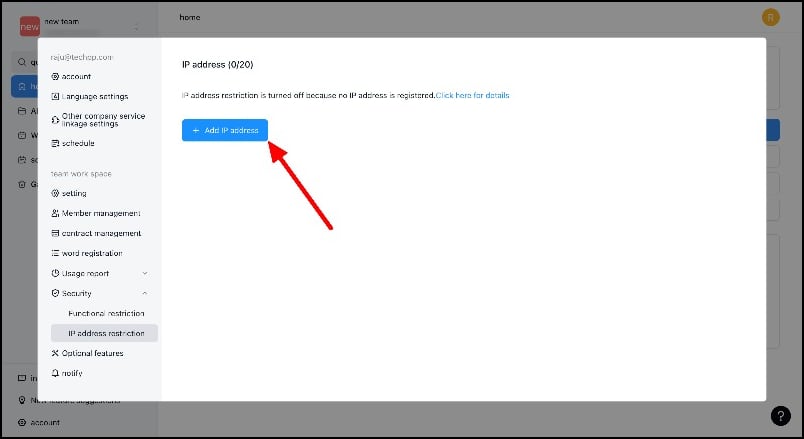
Notta AI uses various security standards to protect user data and transcriptions in the tool. The tool allows you to control who can see your transcriptions, keeping your data private. The tool also keeps detailed logs of who accesses your data, so you have a good overview of everything related to security. If you’re using Notta for business, you can also restrict access to specific IP addresses, ensuring that only the right people have access to your workspace.
Notta.AI Pricing

Notta has four types of memberships for users: Notta Free and Notta Pro, Bussiness, and Enterprise. With the Basic version, you can use some of Notta’s features. This is ideal if you’re just starting out or don’t need all the advanced features. This is particularly suitable for students or people who only need transcription services occasionally.
The Pro, Business, and Enterprise versions, on the other hand, give you access to all of Notta’s features. This is ideal for professionals or anyone who regularly needs advanced transcription and summarization features, such as journalists, researchers, or business people who need to transcribe a lot of meetings or interviews. You can find more detailed information on the prices and services of the individual memberships on the Notta AI pricing page.
Wrapping Up
To summarize, Notta offers a number of helpful features that make converting speech to text easy and efficient. Whether you want to convert your spoken words to text in real-time, transcribe audio files, capture every word in online meetings, convert website audio to text, or quickly summarize long conversations, Notta has everything you need. With options for beginners and professionals, it covers a wide range of needs, from students and casual users to professionals and heavy users. Notta AI is available on the web and as an Android and iPhone app.