

Instagram is not only a social media platform where casual users connect with their friends and family members or share their life happenings, but it is also a very effective marketing and business tool. Engagement is the holy grail for any business or influencer on Instagram, as more likes, shares, and comments will help anyone expand their social media presence. While there are a lot of tools that you can use to satisfy that need, Instagram also offers you the option to add quiz stickers to your stories.

Instagram Quiz Stickers were introduced in 2019, and they allow users to engage with their followers by asking them multiple-choice questions. This has proven to be a great way for celebrities, influencers and businesses on Instagram to cleverly engage their audience. In this guide, we’ll show you how to use Instagram quiz stickers to engage with your followers. Let’s dive in.
Table of Contents
How can I add an Instagram quiz sticker to my story?
Adding an Instagram quiz sticker to your story is rather easy, and it involves some steps that are mentioned below. For this guide, we are using the Instagram app on an Android smartphone.
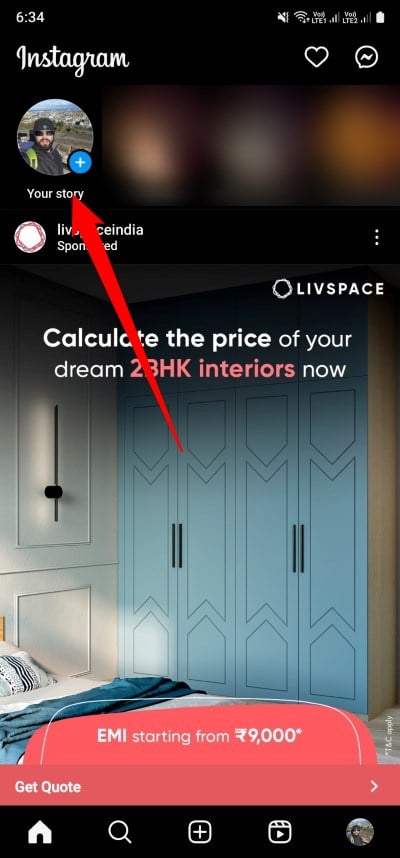
- Launch the Instagram app on your smartphone.
- Tap on the Your story icon located at the top-left corner of the page.
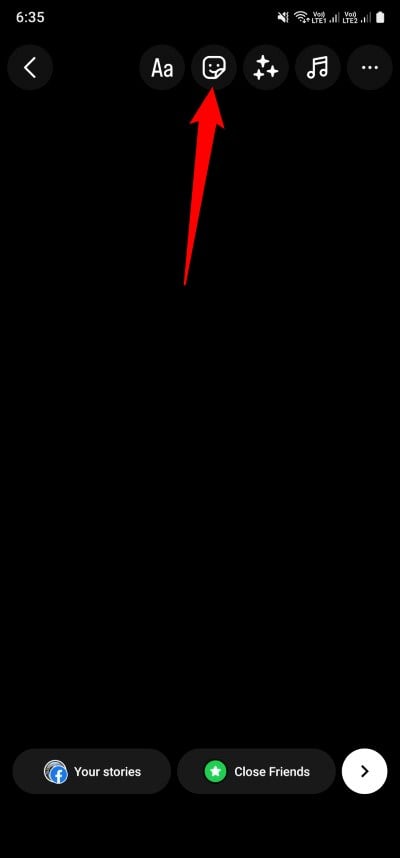
- Take a picture or cover the camera lens to click an entirely black picture.
- Tap on the sticker icon in the top-right, which looks like a square with a smiley face inside of it.
- In the sticker menu, scroll down until you find the Quiz icon and tap on it. Otherwise, you can also search for it.

- Type your question and your answers in the appropriate fields. Here are some important things you should keep in mind while creating a quiz:
- The question character limit is 52
- The answer character limit is 45
- Once you have entered the question and the answers, the option to enter more answers will appear.
- Tap on the correct answer, which will turn green.

Now you can post the Instagram quiz in your Story. Once the story is live, your followers can view it and tap their answers. If they tap on the correct answer, the answer will remain green; otherwise, the wrong answer will be highlighted in red. There are a whole range of customization options for the Instagram quiz sticker, which we explain in more detail below.
Related Read: How to View Instagram Stories Anonymously on All Platforms
How can I customize the Instagram quiz sticker?
There are several options to stand out in every Instagram quiz you post to your story. Customization makes each quiz stand out from the rest.
- To change the color of the Instagram quiz, tap on the quiz and then tap on the color picker on the top.

- If you don’t like the background color of your story, you can tap on the blank area to exit edit mode. Tap on the 3-dot icon at the top right and select Draw. Pick any color from the bottom and tap on the color picker. Press and hold the blank area to change the color of your Instagram story.


- If you don’t want a colored background on your Instagram quiz, then you can add your image as well. For that, tap on the sticker icon at the top, scroll down, and select add image icon. From the camera roll select your image and adjust it accordingly.

- You also have the option to add music, GIFs, location, etc. to your Instagram quiz.

Once you are done customizing your quiz, you can post it on your Instagram story just like a regular story. You can also check the results of the quiz that you have posted on your Instagram story. Follow the steps below to check the results.
Check the results of your Instagram quiz
Once you have posted your Instagram quiz on your story and you have seen reactions to it after keeping it there for some time, it is time for the actual output, the result. You can check how many of your users guessed the right answer and how many were wrong. To check the results, follow the steps below:
- Tap on the Your story option in the home section of the Instagram app. If you have multiple stories posted, skip through them until you reach your Instagram quiz story.
- Swipe up on your Instagram quiz story to check the results. You can see the number of times an option was selected, along with the full list of people who viewed the quiz.

The results are a good indicator of how many people have interacted with the quiz you posted on Instagram. This gives you an idea of how many of your followers are interested in engaging with your content. Even if you have 100 million followers and your posts only get around 100,000 likes, you can easily see that most of them are just following you for the sake of following.
What are some of the benefits of posting an Instagram quiz?
In the above lines, we have already mentioned how Instagram quizzes can help increase your audience’s engagement if you are a business or an influencer. Some of them are listed below:
- Increase engagement with your content: If you are using Instagram just for sharing your life stories, then you can also make use of Instagram quizzes to engage your followers with your content.
- Help your followers know you better: You can share Instagram quizzes and ask your followers questions about yourself to understand how many of them know you and also let others know more about you.
- Run promotions: You can also run new campaigns and product launches and promote any offer or deal that you have received for others to avail of.
- Educate others about your business: Instagram quizzes are a fun way to let your followers or other people know what your business is all about. This way, you are letting your customers and potential customers know you are also there in the market.
FAQs about Instagram quiz stickers
1. Is the Instagram quiz sticker the same as the poll and questions sticker?
In short, the answer is no. You should not confuse the Instagram quiz sticker with the poll or question sticker available on the platform. With the question sticker, you can ask your followers to ask you any questions they want to ask. With the poll sticker, on the other hand, you can start a poll where there is no single correct answer, but any choice can be made, and depending on the number of votes for a particular option, you can decide the fate of your question.
2. How many answer options can I provide in the quiz sticker?
You can give your audience a total of four answer options for the question you have asked. If you start entering the answers one by one in the answer field, you will automatically be given the opportunity to enter two more after the second option.
3. Can I change the answer to the quiz?
Unfortunately, once you have selected the answer to your quiz, you will not be able to change or edit it once the story is live. You should therefore make sure that you have selected the correct answer to save yourself any embarrassment.

