

Quick Answer
Instagram doesn’t notify you when someone unfollows you, but you can see who unfollowed you by checking a list of people who are not following you back using tools like Comparetwolists. Additionally, you can use third-party apps to track unfollowers, such as Followmeter, but those apps are not totally reliable.
Do you want to know who unfollowed you on Instagram? Many Instagram users place importance on their follower count and like to keep track of it, especially if they notice a decline. They might want to understand why they’re losing followers or decide to unfollow those who are no longer following them.

Although Instagram notifies you when someone follows you, it does not alert you when someone unfollows you, making it difficult to keep track of who has unfollowed you. Some third-party apps claim to help with this, but many are ineffective and may even pose a risk to your account.
In the following sections, I will share my most recommended and safest method for tracking who has unfollowed you on Instagram, as well as review the third-party apps I’ve tested and how to use them for this purpose. Before diving into that, let’s discuss why you might want to know who has unfollowed you on Instagram.
Table of Contents
Why Check Who Unfollowed You on Instagram?
While it may seem unnecessary to some, there are times when you want to check who has unfollowed you on Instagram. This can be useful for cleaning up your following list by removing those who no longer follow you, especially if they unfollowed you after you followed them and don’t offer valuable content or interactions.
Additionally, knowing who unfollowed you allows you to reach out and ask for feedback or attempt to win back your followers. These are some of the reasons why people choose to find out who has unfollowed them on Instagram.
How Do I Check Who Unfollowed Me on Instagram?
You can manually check who unfollowed you on Instagram by reviewing the profiles of those you suspect. If they still follow you, the “Follows you” tag will appear on their profile.
Alternatively, if you don’t have specific individuals in mind, you can manually compare your followers list with your following list to identify who has unfollowed you.
However, these methods can be tedious, especially if you have many followers.
Another approach you can use is downloading your Instagram data and using a comparison tool to identify differences between your followers and following lists. This method will be discussed in detail below.
Method 1: Compare Your Instagram Followers and Following Data
Instagram allows you to download your data, including their followers and following lists. This enables you to identify who has unfollowed or isn’t following you. To request your following and follower list on Instagram:
- Open the Instagram app and go to your profile.
- Click the three-line icon in the top-right corner and select Your activity.
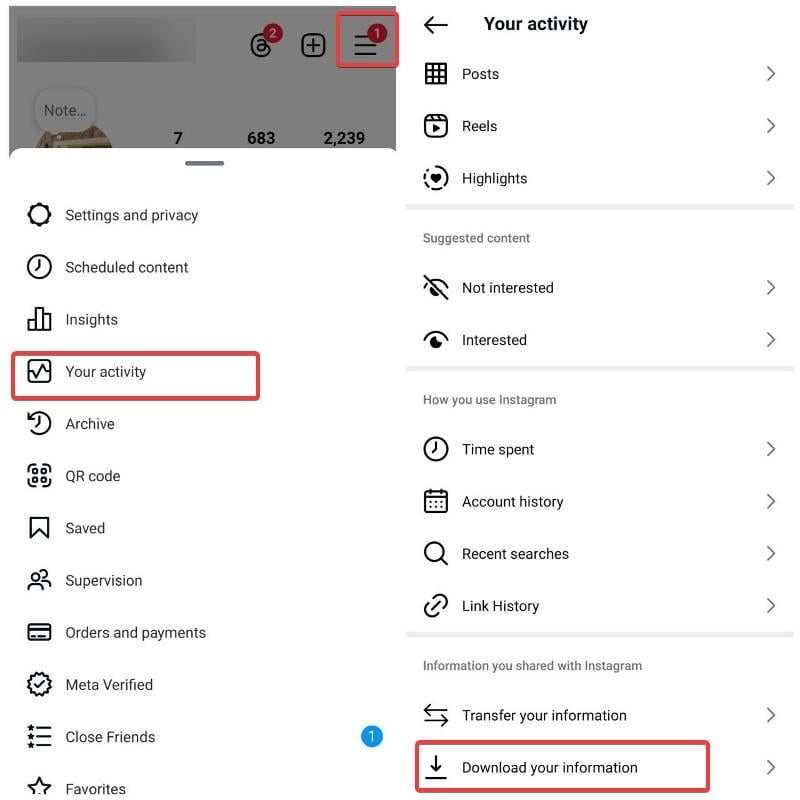
- Navigate to Download your information and click on it.
- Choose Download or transfer information, select your Instagram profile, and click Next.
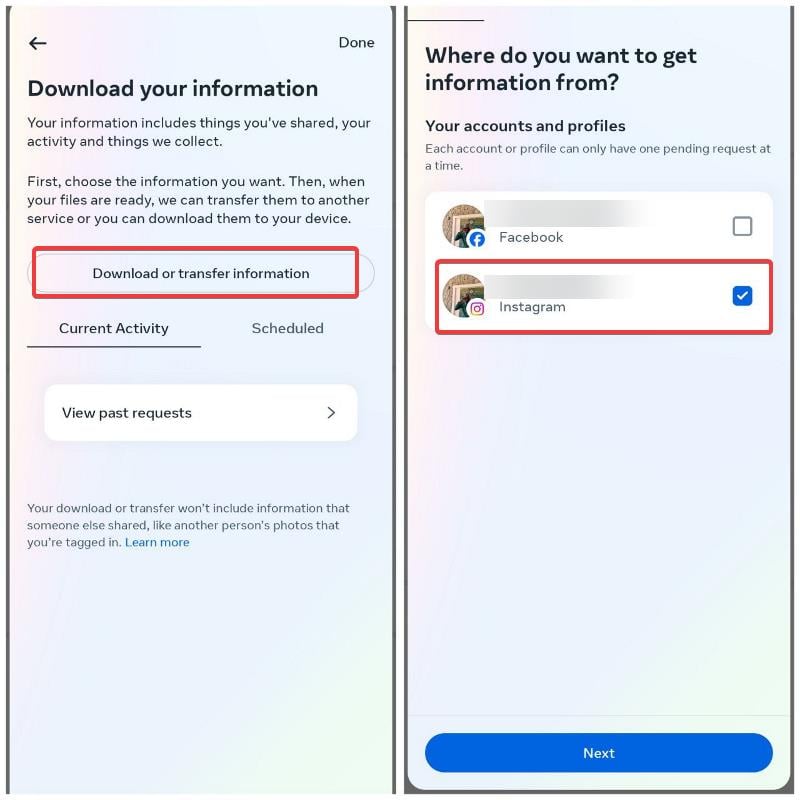
- Select Some of your information, then choose Followers and following under the Connections section, and click Next.

- Select Download to device and click Next.
- Set the date range to All time, choose the email to receive the data, set the format to HTML, and click Create files.
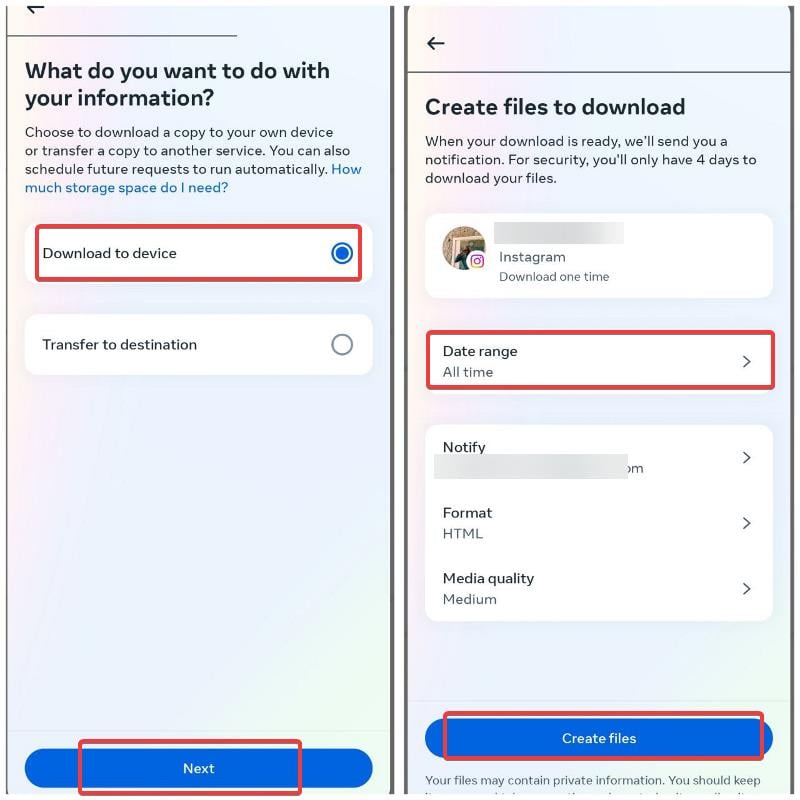
The data was sent to my email in less than five minutes, so you should receive yours shortly. Once you have the data, follow these steps:
- Download the followers and following lists sent to your email by Instagram and open the connections folder.
- Open the following subfolder first and copy the list of people you’re following, including the dates.
- Open the CompareTwoLists platform in your browser and paste your following list into the List A box.

- Return to the connections folder from Instagram and open the followers’ subfolder.
- Copy the followers list and paste it into the List B box on CompareTwoLists.
- Check the box for Remove Instagram dates under the lists on the CompareTwoLists site, then click Compare lists.
- The usernames under the Only in List A box are users who do not follow you on Instagram.
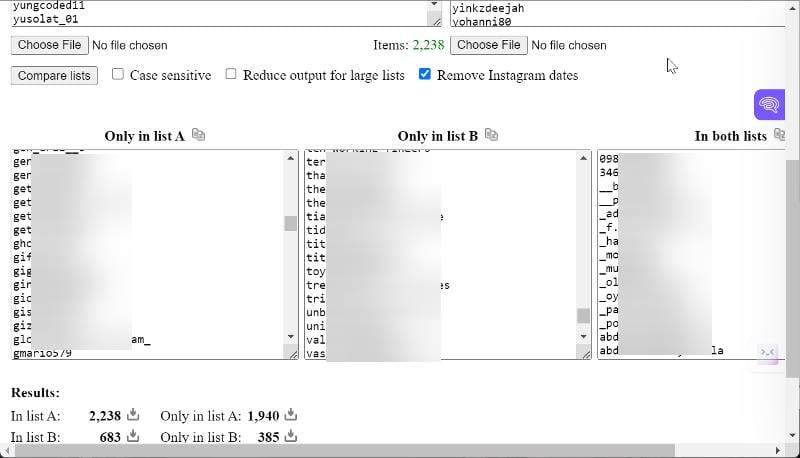
You can copy the usernames to Google Sheets to keep a record, reach out to them individually, or decide to unfollow them as you prefer.
Also See: How to See Who Blocked You on Instagram
Method 2: Use a Third-Party App
Some third-party apps let you track your Instagram activities, including followers and users who unfollow you. This might seem like the best way to check who unfollowed you on Instagram, but there are some drawbacks. The main issue is privacy. These apps require you to log in with your Instagram username and password, which isn’t safe and could compromise your account. That’s why it’s generally not recommended.
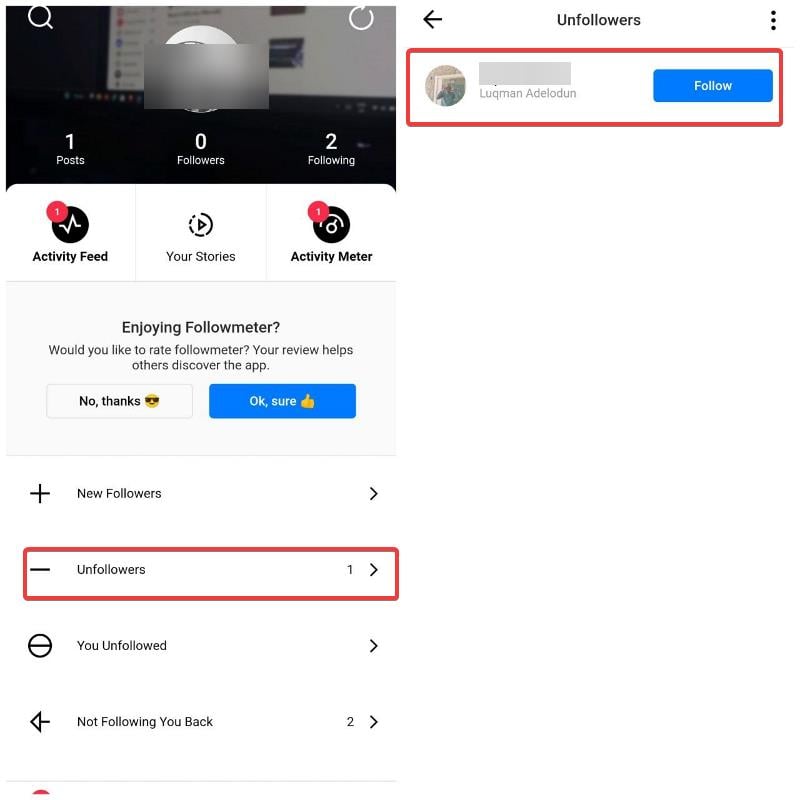
Followmeter (Android / iPhone) is an app that lets you know who unfollowed you, and I tested it for this piece. Just be aware that the security of these apps isn’t foolproof. Also, these apps are frequently cracked down on by Instagram’s API, which is why many of them don’t last long.
Final Thoughts
You should know that while Instagram itself doesn’t offer a native option to track users who unfollow you, you can still do it using the methods discussed in this article. You can manually compare your followers and following lists using a list comparison tool, which is safe but can be tedious. Alternatively, you can use a third-party app, though their reliability and security can be questionable. Each of these approaches has been discussed extensively in this article to make them easier to use.
FAQs – Check Who Unfollowed You on Instagram
Which app can I use to check unfollowed me on Instagram?
Followmeter is currently one of the most effective apps for checking who unfollowed you on Instagram. However, it’s important to note that this app requires your login credentials, which may pose a security risk to your account.
Do unfollow apps break IG ToS?
Yes, using third-party apps to track users who unfollow you on Instagram violates Instagram's Terms of Service. This is because these apps use automated processes to access Instagram’s services or extract data, which Instagram does not permit.
Further Reading:
- How to See Instagram Memories
- 7 Ways to Fix Instagram Music Not Working
- 10 Ways to Fix Instagram Stories Not Showing on Your Feed

