

Quick Answer
You can’t sign up for Telegram without a number entirely, but you can avoid your personal one in four ways: use a virtual number (like Google Voice), a temporary/burner number, a disposable SMS website, or Telegram’s Fragment anonymous numbers for added privacy.
If you want to sign up for Telegram without a phone number, you have more options than you might think. Telegram has crossed 1 billion monthly active users worldwide, and while the app requires phone verification by default, you don’t have to use your real SIM card to get through it.

Some people want to keep their personal number private. Others simply don’t have a SIM card available at the time of signup. Whatever your reason, Telegram officially supports anonymous sign-up through fragment numbers, and there are other reliable methods to create a Telegram account without sharing your real number. We tested all three methods in this guide, so you’ll know exactly what to expect before you start.
Table of Contents
How To Sign Up for Telegram Without a Phone Number or Sim
Sl No | Method | Benefits | Cons |
|---|---|---|---|
1 | Using Fragment Number | Official Telegram method. It keeps your real number private and secure. | Costs $16 or 9 TON tokens. It only works for Telegram. |
2 | Sign up using temporary disposable Number | Quick, free, and easy to get. Great for temporary sign-ups. | Numbers are temporary and public. Less secure, and not for sensitive info. |
3 | Apps (e.g., Google Voice, TextNow) | Reliable and user-friendly. You can manage multiple numbers. More permanent. | You must link a real number for setup.(Note: Google Voice is US/Canada only). |
4 | Sign up using eSIM virtual number | Uses real carrier-based numbers, more reliable than disposable/VoIP, lower ban risk | Requires small fee, needs compatible device |
Using Fragment Number
You can register with Telegram using a fragment number. These are anonymous phone numbers based on the blockchain that you can buy to use with Telegram. They allow you to use Telegram without your real phone number being linked to your account. These blockchain-based anonymous numbers are the only method officially endorsed by Telegram, making them the safest option for anyone who wants a permanent anonymous account.
With a fragment number, you can keep your real phone number secret. This is particularly useful if you’re worried about your privacy or don’t want to share your number. Each fragment number costs $16, or you can pay with 9 TON (The Open Network Tokens), Telegram’s in-house cryptocurrency. Some premium numbers can be more expensive.
How to sign up for Telegram using Fragment number
- Download the Tonkeeper app. The app is available for Android and iPhone.
- Create and set up a TON wallet in the Tonkeeper app.

- Use the Tonkeeper app to connect to Fragment. Go to the Browse tab, scroll down, and select Fragment under the NFT section. Click on the Connect TON button and scan a QR code with your phone.
- Now go to the Numbers section on Fragment to buy an anonymous phone number and place a bid for a phone number that will be auctioned.
- Once you have received your anonymous phone number from Fragment, open Telegram, tap on Country, and select the Anonymous numbers option. Then use your Fragment phone number to verify your Telegram account.

We tested this method and the full process, from setting up the TON wallet to receiving the Fragment number and completing Telegram verification, took roughly 10 minutes. The verification code appeared inside the Telegram app automatically once the anonymous number was entered.
Sign Up Using a Temporary Disposable Number
Many websites offer free disposable cell phone numbers, sometimes called burner numbers, that you can use for online SMS verification without a real SIM card. You can use these numbers for various online services, for example, to sign up for Telegram. These websites work by providing a short-term phone number, often for a few minutes or hours, that receives texts or calls.
This service is handy if you’re looking for a free alternative Telegram sign-up method. Keep in mind that these numbers are temporary and are only useful for account setup or verification. Also, keep in mind that these numbers are publicly accessible and therefore not suitable for sensitive information.
There are many websites where you can get a disposable phone number, such as FreePhoneNum.com. This website offers a list of free throwaway numbers. You can choose any number from the list. When you select a number, you can click on it to see all the text messages that have been sent to that number, including the Telegram verification texts.
- Open your web browser and go to FreePhoneNum.com or visit Receivefreesms.com if you are outside the US. You can use a phone number from almost any country to sign up for a Telegram account. Telegram supports international phone numbers when you set up your account.

- Select your country. Browse the list of available disposable numbers on the website and select one.
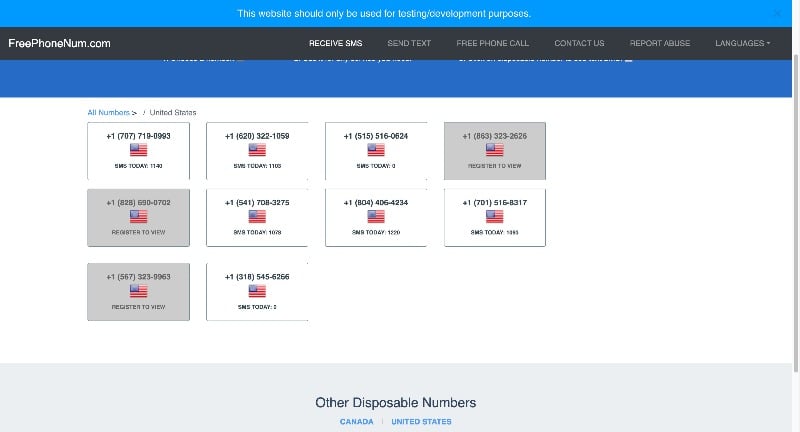
- Now open the Telegram app and start the Telegram sign-up process. Enter your chosen disposable number on the website when asked for a phone number.
- Go back to the website and click on the number you have selected. Here you’ll find the SMS with the Telegram verification code.
- Enter this verification code in the Telegram app to complete your registration.
In our testing, numbers from FreePhoneNum.com received the Telegram verification code within 2 to 3 minutes. We found that some numbers had already been used for multiple accounts, which can delay the message or cause it not to arrive at all. If a number doesn’t work, try a different one from the list.
Use Virtual Phone Numbers
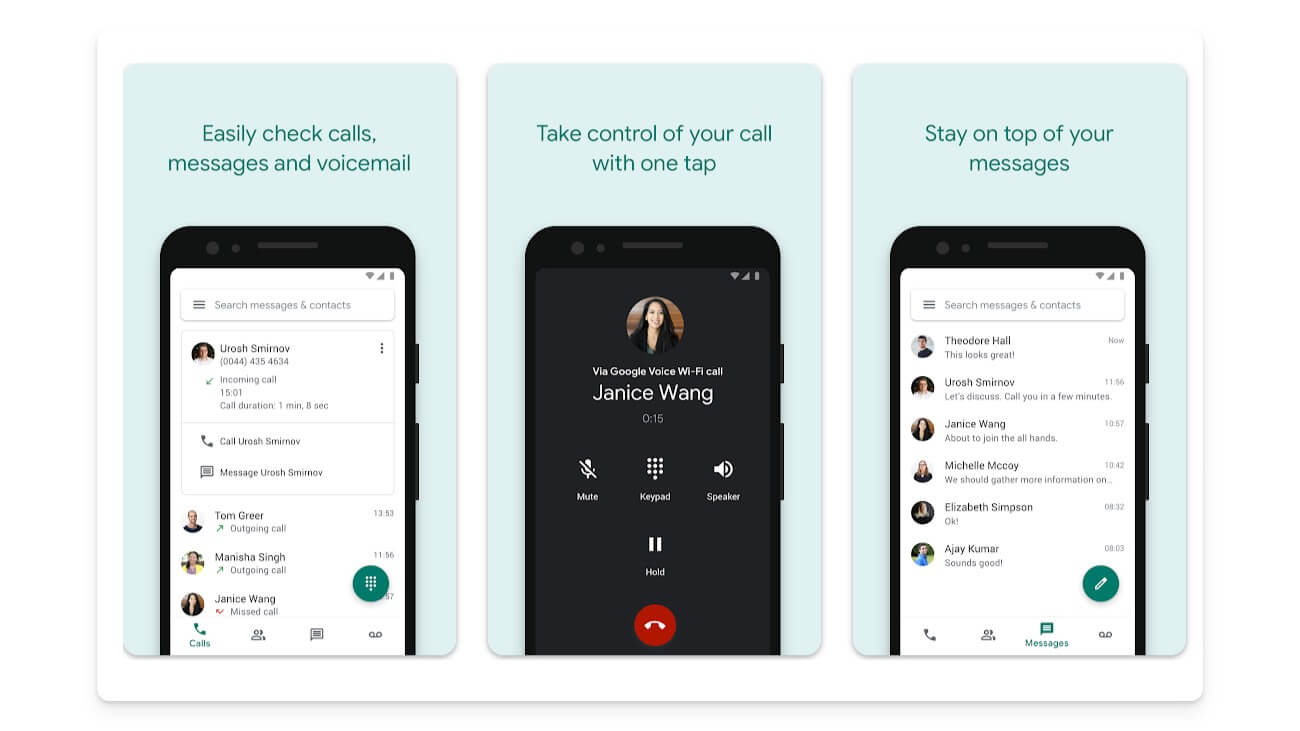
You can create a virtual phone number and use it to sign up for Telegram. Many apps offer virtual phone numbers through VoIP services, which route calls and texts over the internet instead of a traditional carrier network. Popular choices include Google Voice, TextNow, Hushed, Sideline, and many more. In this case, let’s use Google Voice to sign up for Telegram.
Google Voice provides you with a phone number that you can use for Telegram and other purposes. It is a reliable and widely used service that offers more stability and a range of features compared to other options.
This makes it a good choice if you are looking for a permanent solution. Please note that Google Voice is only available in the US and Canada. The number you get from Google Voice only works in these two countries. So if you are outside the US or Canada, you can use alternative apps like options like Text Now or Hushed.
How to use Google Voice and sign up for Telegram
- Download Google Voice on your smartphone: Android and iPhone. You can also go to the Google Voice website and sign up.
- Open the app and sign up with your Google account. Google Voice offers you a selection of numbers. Choose the number that suits you.
- You need to link a real phone number to set up Google Voice. This number isn’t shared with Telegram; it’s only used for setup.
- Open Telegram, start the sign-up process, and enter the Google Voice number when asked for a phone number.
- You’ll receive a confirmation code for your Google Voice number from Telegram. Check your Google Voice account for the code.
- Use this code to complete the setup of your Telegram account.
We tested this on a US Google account. The Telegram verification code appeared in the Google Voice inbox within 30 seconds. Note that the code arrives as a message inside the Google Voice app, not as a regular SMS on your phone.
Sign Up Using an eSIM Virtual Number
eSIM virtual number services have grown significantly in the past couple of years. Several providers now offer real carrier-based numbers alongside their eSIM data plans. Unlike free disposable numbers, these numbers run on actual mobile networks rather than VoIP infrastructure, which makes them far more reliable for Telegram verification and much less likely to trigger a ban.
Services like eSIM Plus let you rent a real mobile number for a small one-time fee. We tested this method using eSIM Plus, and the Telegram verification code arrived within 20 seconds.
How to sign up for Telegram using an eSIM virtual number:
- Download the eSIM Plus app (available for Android and iPhone) or visit their website
- Create an account using your email address
- Browse available numbers by country and choose one that supports SMS verification
- Top up your account balance (numbers typically cost $1 to $5 for one-time use)
- Open Telegram, start the sign-up process, and enter your eSIM Plus number
- Go back to the eSIM Plus app to copy the Telegram verification code
- Enter the code in Telegram to complete registration
| Fragment Number | Disposable Number | Google Voice | eSIM Virtual Number | |
|---|---|---|---|---|
| Cost | ~$16 | Free | Free | $1 to $5 |
| Reliability | Very High | Low | High | High |
| Ban Risk | Very Low | High | Medium | Low |
| Permanence | Permanent | Temporary | Permanent | One-time |
| Best For | Long-term privacy | Quick verification | US/Canada users | Non-US users |
The Downsides of Using an Alternative Number for Telegram Sign-Up
Using alternative numbers to sign up for Telegram might be the better decision if you’re worried about your privacy, but it also comes with some drawbacks like security issues, reliability, and more. Here are the most common issues you should be aware of.
- Account Recovery Issues: It can be difficult to regain access to your Telegram account if you’ve lost access to the alternate number.
- Security Concerns: Publicly available disposable numbers can lead to the security of your account being breached. This can be dangerous, even if you use it for sensitive purposes.
- Service Reliability: Alternative numbers, especially free throwaway numbers, can be unreliable and affect the verification codes.
- Potential Rule Violations: Using alternative numbers may violate Telegram’s terms of service.
- Telegram Ban Risk: Telegram actively flags accounts created with known VoIP numbers and free disposable number ranges. If your number is flagged, your account can be restricted or permanently banned without warning. See the ban risk section below for how to reduce this risk. If your account does get banned, you can submit an appeal at recover.telegram.org
What to Do If the Verification Code Does Not Arrive
If you’re trying to sign up for Telegram without a phone number and the verification SMS isn’t showing up, here are the most common fixes for each method.
For disposable numbers:
- The number may have already been used for too many Telegram signups. Try a different number from the list.
- Wait 2 to 3 minutes. Free SMS services can be slow to update.
- Try a number from a different country. Telegram supports international numbers for registration.
For Google Voice:
- Make sure you’re checking the Google Voice inbox directly, not your regular SMS app.
- Google Voice only works in the US and Canada. If your IP address shows a different region, Telegram may not deliver the code. Using a US VPN can help.
- Check that the Google Voice number is fully activated and linked to your Google account before entering it in Telegram.
For Fragment numbers:
- Double-check that you selected Anonymous Number in the Telegram country picker, not a regular country code.
- Make sure your TON wallet has enough balance to complete the number purchase.
General fix for all methods:
If no code arrives within 3 minutes, tap Resend Code on the Telegram verification screen. Telegram will then offer to call you with the code instead of sending an SMS. If your alternative number supports calls, this works as a reliable backup. You can also check out our guide on fixing no SIM card errors if your device is having trouble receiving any verification codes.
How to Hide Your Phone Number on Telegram
Once you’ve signed up, this is one of the first settings you should change. By default, Telegram may show your registered number to contacts who have it saved in their phone. If you want to keep your number completely private, here’s how to lock it down.
- Open Telegram and go to Settings
- Tap Privacy and Security
- Under the Privacy section, tap Phone Number
- Set Who can see my phone number to Nobody
- Set Who can find me by my number to My Contacts or Nobody
This setting works whether you signed up with a real number, a Fragment anonymous number, or a Google Voice number. If you used a Fragment number, combining this setting with a Telegram username (covered in the next section) makes your account fully private.
Secure Your Telegram Account With Two-Step Verification
This is the most important step to take after you sign up for Telegram without a real number. If you used a disposable or temporary number, you could lose access to that number at any time. Without two-step verification, anyone who gets hold of that number can take over your Telegram account by requesting a new login code.
Two-step verification adds a password on top of the SMS code. Even if someone gets the verification code, they cannot log in without your password. We strongly recommend setting this up before you start using your new account.
How to enable two-step verification on Telegram:
- Open Telegram and go to Settings
- Tap Privacy and Security
- Scroll down and tap Two-Step Verification
- Tap Set Password and create a strong, unique password
- Add a recovery email address so you can reset the password if you forget it
- Confirm and save
Once enabled, every new device login will require both the SMS verification code and your password. This is especially important if you used a free disposable number that anyone else can also access.
How to Add Contacts on Telegram Without Sharing Your Number
After signing up, you might wonder how to connect with people without revealing your number. Telegram’s username feature solves this completely. A username works like a handle (for example, @yourusername) that anyone can use to find and message you without needing your phone number.
How to set up a Telegram username:
- Open Telegram and go to Settings
- Tap on your name or the Edit button at the top
- Scroll to the Username field and type your preferred username
- Save the changes
Once your username is set, share your Telegram link (t.me/yourusername) instead of your phone number. You can use this to join groups, share your contact details publicly, or invite people to channels without exposing your number. This also pairs well with the phone number privacy settings covered above.
Privacy-First Alternatives to Telegram
If the reason you want to sign up for Telegram without a phone number is primarily privacy, it is worth knowing that a few other messaging apps let you skip the phone number entirely.
- Session: Does not require a phone number, email address, or any personal information. You get a randomly generated Session ID at signup. It is the best option for complete anonymity.
- Wire: Lets you register with an email address instead of a phone number, which is a good middle ground if you want a familiar messaging experience with stronger privacy.
- Signal: Still requires a phone number to sign up, similar to Telegram. However, all chats are end-to-end encrypted by default, making it a stronger choice for private one-on-one conversations.
These apps do not replace Telegram for features like bots, channels, and large community groups. But if privacy is your main reason for wanting an anonymous Telegram account, they are worth considering as well.
Which Method Should You Use to Sign Up for Telegram Without a Phone Number?
If you want a permanent anonymous account and privacy is your top priority, go with a Fragment number. It is the only method officially supported by Telegram, your account is far less likely to be flagged, and the one-time cost of around $16 is worth it for long-term use.
If you need a quick, temporary signup and don’t want to spend anything, free disposable numbers get the job done. Just keep in mind that they are public, short-lived, and not suitable for anything sensitive. Your account will also carry a higher ban risk.
If you are in the US or Canada and want a stable, free option, Google Voice is the most reliable no-cost method. It gives you a permanent number you can also use for other services, not just Telegram.
Whichever method you choose, make sure you enable two-step verification right after signup and hide your phone number in the privacy settings. These two steps take less than two minutes and protect your account from being taken over. If you ever decide to switch to your real number later, it’s straightforward to do from within the app. Check out our guide on how to change your mobile number in Telegram for the full steps.
Did this guide help you set up a Telegram account without a phone number? Drop a comment below and let us know which method worked for you, or if you ran into any issues along the way. For more Telegram tips, check out our guides on how to speed up Telegram downloads and how to fix links not opening on Telegram.
FAQs about Using Disposable Phone Numbers on Telegram
Is it safe to use alternative numbers for Telegram?
While it increases privacy, there are also risks. Disposable numbers can be less secure, and if the number is lost or expires, it can be difficult to recover your Telegram account.
Do disposable numbers work for Telegram verification?
Yes, disposable numbers work for Telegram verification. Websites like FreePhoneNum.com offer numbers that can receive Telegram verification text messages.
What happens if my disposable number expires?
If the disposable number expires, you may lose access to your Telegram account, especially if re-verification is required.
Can I switch to my real number on Telegram later?
Yes, you can switch to your real number in the Telegram settings after you have set up your account with an alternative number.
- Open the Telegram app on your smartphone. These steps may vary slightly on Android.
- Go to the main settings. Click on the settings icon in the bottom right corner of the screen.
- Click on the Edit button.
- Now tap on the change phone number and click on the Change phone number
- Enter the alternative number and verify the phone number.
Can Telegram ban you for using a virtual number?
Yes. Telegram flags many VoIP and free disposable numbers as high-risk because they are commonly used to create spam accounts. If your number falls in a blocked range, your account can be restricted or banned shortly after creation. Using a Fragment number or a paid eSIM virtual number significantly reduces this risk compared to free services.
How do I hide my phone number on Telegram after signing up?
Go to Settings > Privacy and Security > Phone Number and set it to Nobody. Also change Who can find me by my number to My Contacts or Nobody. This prevents anyone from seeing or searching for your registered number. Around 2.5 million new users join Telegram every day, which makes securing your account from day one more important than ever.
What is the cheapest way to get a number for Telegram?
Free disposable numbers from sites like FreePhoneNum.com cost nothing but carry the highest ban risk and offer no account security. Paid eSIM virtual numbers from services like eSIM Plus start at around $1 to $3 for a one-time use number. Fragment numbers cost around $16, but they are the only method officially supported by Telegram and the most reliable long-term option.
Can I use a regular eSIM for Telegram registration?
A standard eSIM data plan does not come with a phone number, so it cannot be used directly for Telegram verification. However, eSIM services like eSIM Plus offer virtual numbers as an add-on. These numbers are hosted on real carrier networks rather than VoIP infrastructure, which makes them more reliable for Telegram SMS verification than free disposable numbers.

