

Quick Answer
YouTube Playables is an experimental feature that has been rolled out to select users in eligible countries. Playables are games that you will find on YouTube that you can play directly on the platform. There are more than 75 game titles available under Playables, with more to be added soon. One can play directly on the YouTube platform without needing to install or switch over to another app.
Google’s YouTube is the source of entertainment for millions across the globe. Be it short or long-form videos, there is a video for every taste from different genres on YouTube. Now, in a move to enhance the experience and make YouTube more attractive, Google has introduced YouTube Playables. Apart from content-consuming audiences, Google aims to attract certain gaming audiences to its video-streaming platform.

Playables are games that you will find on YouTube that you can play directly on the platform. There are more than 75 game titles available under Playables, with more to be added soon. Google was testing Playables for YouTube, which started last year, and now it is slowly being made available to users. In this guide, we will give you all the details you need to know about YouTube Playables and how you can play games on YouTube. Let’s dive into it.
What is YouTube Playables?
YouTube Playables offers multiple games from different genres that a user can play directly on the YouTube platform without needing to install or switch over to another app. The feature was announced on May 28 in an official blog after being in the testing phase for over a year. YouTube Playables is now rolling out to more Android, iOS, and web platforms in select regions of the United States, Great Britain, Canada, India, and Australia.
All the 75+ games under YouTube Playabales are free-to-play. Some of the gaming titles include Angry Birds Showdown, Cut The Rope, and Trivia Crack. The games are categorized into Action, Sports, Brain & Puzzle, Arcade, RPG & Strategy, Board & Card, Trivia & Word, and Simulation for easier search. You can also save the game’s progress and your high scores. Notably, it is only available to users who have a YouTube Premium subscription.
To be able to play YouTube Playables, here are the requirements:
- Android
- YouTube app version: 18.33 and higher
Mobile operating systems:
Android S and above
Android O, P, Q, R (only on 64-bit or high memory 32-bit devices)
- YouTube app version: 18.33 and higher
- iOS
- YouTube app version: 18.33 and higher
- Mobile operating systems: iOS 14 and above
- Desktop web
- Browsers: Chrome, Safari, and Firefox
According to Google, Playables is an experimental feature that has been rolled out to select users in eligible countries. Some users may not see Playables on YouTube; however, they can access them through shareable links, but this isn’t true for all games. If you have a YouTube Premium subscription and want to experience YouTube Playables, then you need to follow the steps to gain early access to Playables.
How to Play YouTube Playables?
The process of finding YouTube Playables is fairly easy, and here’s what you need to do:
- Open the YouTube app or website, depending on whether you are using an Android or iOS app or accessing it via your computer on a browser.
- Expand the Explore menu and locate Playables at the bottom.
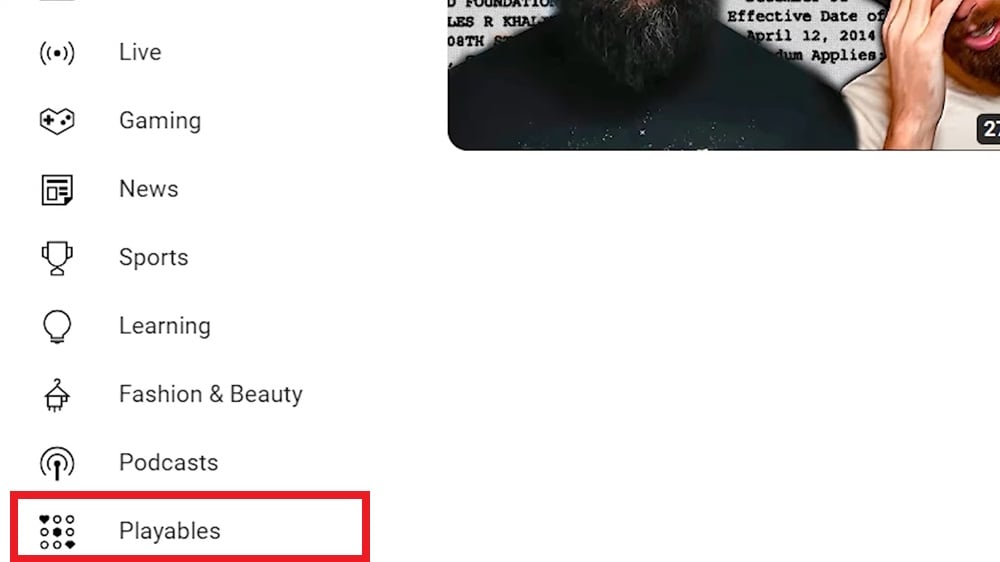
- Tap or click on Playables and you will be shown all the 75+ games you can choose to play.

- Tapping on the three-dot menu icon lets you share the game with your friends.
You can use your keyboard or the touchscreen of your smartphone to play games on YouTube. If you don’t see the Playables option in the Explore menu of YouTube, then you might have to wait a bit for the feature to arrive in your region.
Just another way of sticking to YouTube
YouTube has offered a new way of keeping its audience lured to the platform. This is not the first time that a streaming platform has added games. Netflix has also added multiple games as a part of their regular services. Even Google, YouTube’s parent organization, tried its hand at gaming with Google Stadia, but it was shut down in 2023.

