

Uploading content with some background music is the trend across all social media platforms, including the very popular Instagram. But what if you have created some amazing Instagram post and now want to add background music to it but found out that the Instagram Music option isn’t working? This is a bizarre situation, especially if you regularly post Instagram content and use the Instagram Music feature consistently. Something similar to this is the problem where the Instagram calls feature stops working. Luckily, we have a dedicated on it that will help you resolve the problem.

Thankfully, several different ways can help you fix the Instagram not working problem. Notably, there isn’t a single specific reason as to why the Instagram Music feature isn’t working for you. Applying the below-mentioned solutions, you will be able to troubleshoot the problem and probably fix it for good. Let us dive in.
Table of Contents
How to fix Instagram Music not working
Besides updating the app and clearing the Instagram app cache, there are some advanced solutions we have listed below that will likely help you fix the problem with Instagram Music.
Update the Instagram app
- Open the Google Play Store (or Apple App Store) on your smartphone.
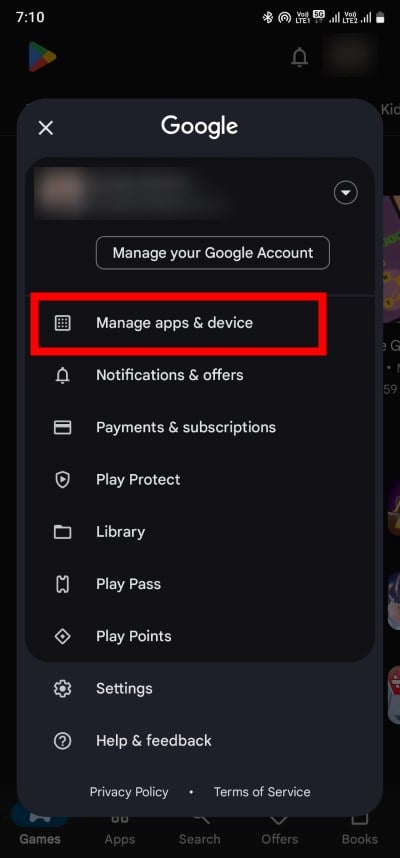
- Tap on your profile icon at the top-right next to the bell icon and select the Manage apps & device option.
- Under the Updates available section, click on See details.

- Check if there is the Instagram app listed, and if yes, then tap on the Update button next to it.
It is very important to keep all apps up-to-date on your smartphone. This ensures that you have all the latest features available to you, and all the glitches are gone as new updates also bring in new bug fixes.
Start a new session by logging in again
There are chances that the current Instagram session where you aren’t able to use Instagram Music has some glitches. This can be easily fixed by simply logging out of the app and then logging in again. Follow the below steps to do this:
- Open the Instagram app.
- Go to your profile.
- Click on the three-horizontal line Menu icon at the top-right corner.

- Select Settings and privacy.

- Scroll down and tap on Log out.

- After logging out successfully, log back in with your Instagram credentials and check if this resolves the issue or not.
Use a VPN
VPN, or Virtual Proxy Network, allows you to mask your IP address to a different location, protects you from hackers, and also lets you access content that is not available in your region. Apps like Instagram track your location and, based on that, give you access to features that are limited to your region. We have a guide that lists the best free VPN services that you can use right now.
Chances are, the Instagram Music option isn’t available in your region. Don’t worry; if that’s the case, then download a VPN app on your smartphone and use it to access Instagram and check if Instagram Music is available for you or not. Do note that you need to connect to a VPN in a region where the Instagram Music feature is available.
Switch to a Personal or Creator account
Due to various reasons, one of which is copyright issues, business accounts are prohibited from using music on their stories. Chances are that you are using a business account, which is why Instagram Music is not working for you. We would suggest you switch over to a personal or creator account. You can do that by following the below steps.
- Open the Instagram app on your phone.
- Go to the Profile page and click on the three-horizontal line Menu icon.
- Select Settings and privacy.
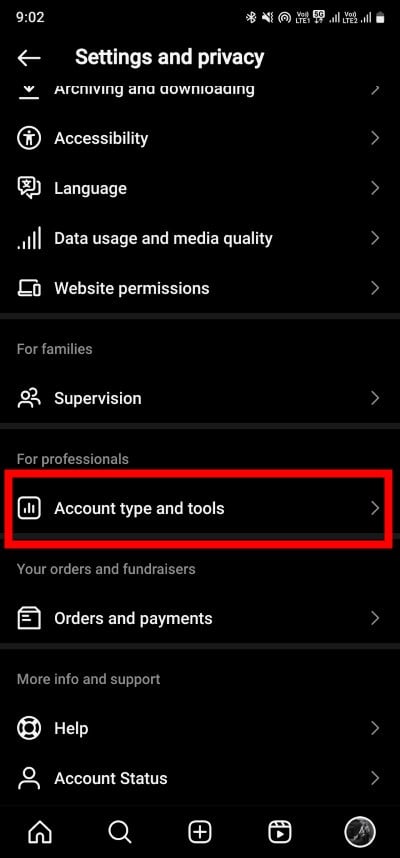
- Scroll down and tap on Account type and tools.
- Select Switch to a personal account if you are using a business or professional account.
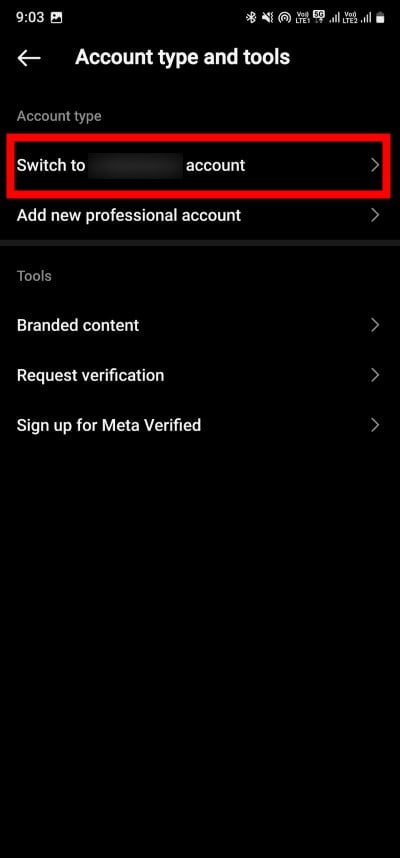
While for some, switching back to a personal account lets them use the Instagram Music feature, for others, the case is the opposite. So, if switching to a personal account doesn’t help you use Instagram Music, then you should try switching to a professional or a creator account. The steps are the same as mentioned above.
Reinstall Instagram
There are chances that some bugs or glitches in the current version of the Instagram app are preventing you from using Instagram Music. This can be easily resolved by reinstalling the app on your phone. Do note that if you go ahead with reinstalling, you will have to login again with your credentials. So, keep them handy.
- Open the App drawer on your smartphone.
- Long-press on the Instagram app and select Uninstall.

- Once the uninstallation completes, launch the Google Play Store (or Apple App Store).
- Search for Instagram and download the app.

- Open the app, login with your credentials, and check if this resolves the issue or not.
iPhone users can uninstall the app in 3 different ways and to reinstall Instagram back, they need to visit the App Store, look for Instagram, and download the app on their smartphones.
Use a different device or account
If the Instagram Music feature is not working for you even after trying all the above methods, then we would suggest you check if the feature is working on a different device. Alternatively, you can also try creating a new Instagram account and then checking if the Instagram Music feature works on it or not.
Switching to a different and, more importantly, new device could help, as they are well capable of using some advanced features, such as Instagram Music. The older devices that you might be using might not be updated with the latest feature, which is why you aren’t able to use the Instagram Music feature.
Contact the Instagram help center
As a last resort, if nothing works, then we would suggest you get in touch with the Instagram support staff. You can do that by visiting this link. Instagram has a dedicated and prompt support service that will help you resolve issues related to the app and its features. If you are unable to find the exact query that matches your issue, then you can write to them following the below-mentioned steps.
- Launch the Instagram app.
- Go to your profile page, tap on the Menu icon, and select Settings and privacy.
- Choose Help.

- Tap on the Report a problem option.

- Select the Report problem without shaking option and then choose Include and Continue.


- Describe your issue and upload relevant media to explain it in more detail.

- After completing your report, hit the Send button.
After you have submitted the report, then Instagram will look into the matter, and if there is a feasible solution available that could help you, they will revert to you with that solution.
Fix the problem and add music to your Stories
The Instagram Music feature lets you create engaging content, as people resonate better with music, and music also adds that emotion to the content that you are creating. You should apply the solutions one by one and hopefully resolve the issue. If you are interested in knowing who is checking you out on Instagram, then read our guide to understand who viewed your Instagram profile. We also have a dedicated guide that will show you how you can see Instagram Memories.
FAQs about Instagram Music
1. Why can’t I find songs on Instagram music?
There is no guarantee that the music of your choice will be available in your region. Although Instagram has a huge database of music to offer, some of the songs may not be available. You can get in touch with the Instagram support team for this.
2. None of the above solutions resolved the problem. What can I do?
Well, if nothing worked, then you should check whether the feature is available in your region or not. If Instagram has yet to release the Instagram Music feature in your region, you cannot do anything but wait.

