

Quick Answer
You can only change your mobile number in the Telegram app. To change it, go to Settings. If you are on iOS, click on the Edit button and tap on the Change Number. On Android, under the account section, click on your Mobile number, then click on the Change Mobile Number. Enter the verification code sent to new mobile number.
Similar to other messaging apps, Telegram uses your mobile number to create your account. If you have a new number and want to update it, you can easily change it in the Telegram app. It is free and works instantly.
Changing your number works slightly differently for Android and iPhone. Before going through the steps, here are a few things you need to know:
- When you change your number on Telegram, all your chat history, contacts, messages, and media will be moved to your new number.
- You must enter a verification code sent to your new mobile number.
- Your mutual contacts will be notified of your new number. You can control who can see your phone number from the privacy settings.
- If you have subscribed to Telegram Premium, it will continue with your new number.
Table of Contents
How to Change Your Mobile Number in Telegram
You can only change your mobile number using the Telegram app on Android, iPhone, and iPad. With the recent update, Telegram has removed the ability to change your mobile number using the web or the desktop Telegram applications on PC and Mac.

On Android
- Open the Telegram app on your Android.
- Click on the hamburger menu located in the left corner of the screen.
- Click on the Settings.

- Under Account, tap on your mobile number.
- Now click on the Change Mobile Number, and you will receive a pop-up; then click on the Change again.
- Now, enter your new mobile number and click on the right arrow.

- Enter the verification code sent to the mobile number. Your number will be changed automatically.
On iPhone
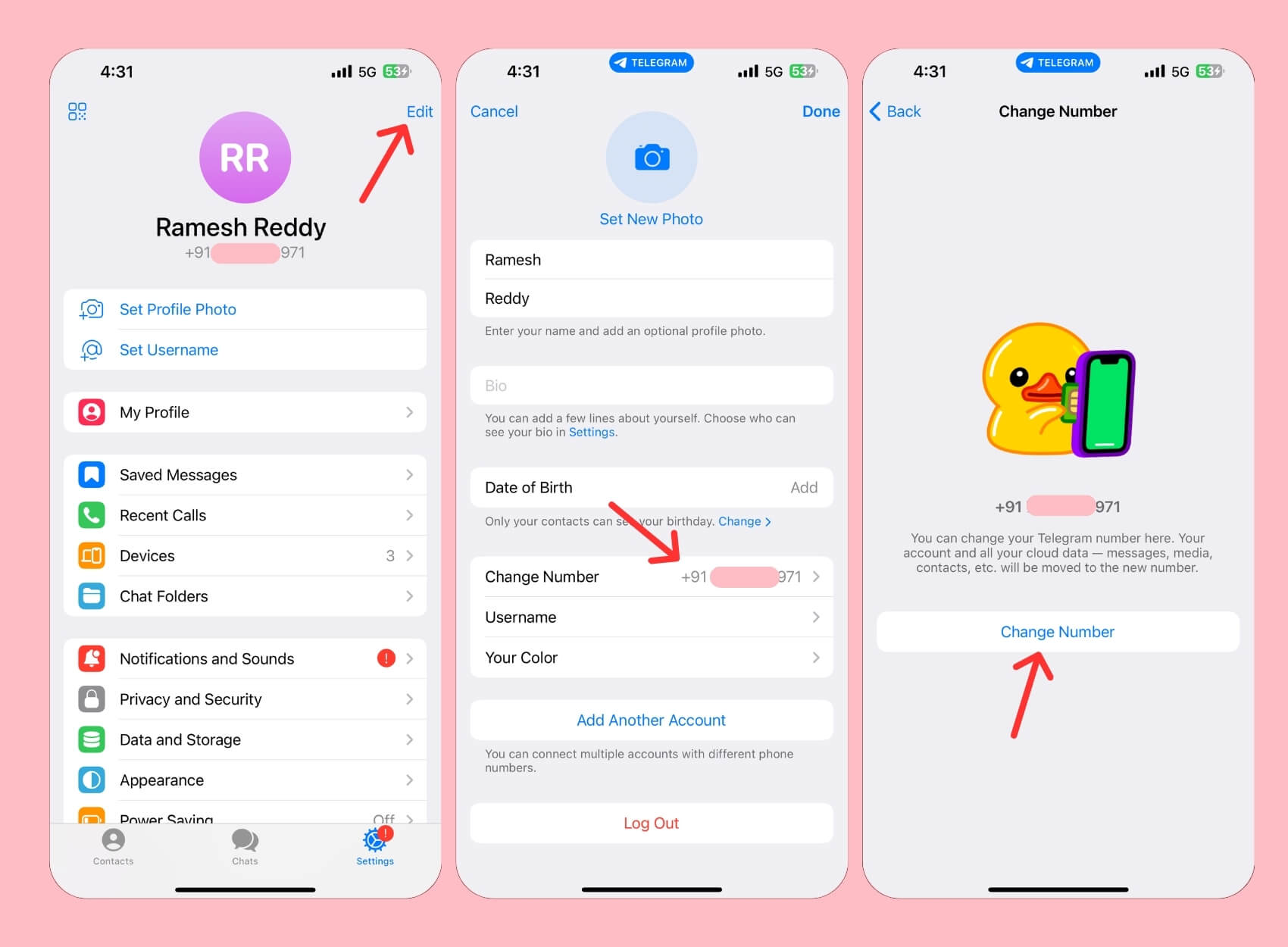
- Click on the Edit button in the top right corner of the screen.
- Scroll down, tap on Change Number, and then click on Change Number again.
- Enter your new mobile number and then click on Continue. Enter the verification code sent to the new mobile number. Your number will be changed.
Also See: 3 Ways to Sign Up for Telegram Without Phone Number or Sim
Change Your Telegram Number in a Few Easy Steps
Those are the two easy methods you can use to change your mobile number on Telegram. Make sure that you are connected to the internet while going through this process. If you face any errors or bugs, restart the app, wait for some time, and then try again.
Remember, Telegram might impose restrictions on your account if you try to change your mobile number frequently. Once you change your mobile number, you will receive a success message on the chat screen confirming that your mobile number has been changed. I hope you find this guide helpful. If you face any issues while changing your mobile number, feel free to comment, and I will be happy to help you.
FAQs on Changing Mobile Number in Telegram
Will my groups and channels be affected by the number change?
Changing your number will not affect your membership in groups and channels. All your account info, including groups and channels, will be moved to the new number.
How often can I change my number on Telegram?
As of now, Telegram doesn't have any limitation on how many times you can change your number on the app. However, frequent changes might lead to account restrictions or suspension, as Telegram may impose restrictions if they find your account suspicious. Telegram doesn't explicitly mention this; it is common for apps to take such measures to maintain security and prevent misuse.
How long does it take for the number change to reflect on all devices?
After changing your mobile number on Telegram, the app will instantly sync your new number across different devices you are signed into. You can start messaging immediately and receive messages from the new number right away.
Can I change my number if I can’t access my old number?
As long as you are logged into your Telegram account, you can change your mobile number in Telegram.

