

Since the launch of ChatGPT, content creators and professionals have not been shy about using this powerful conversational tool to push their ideas forward. While you can use ChatGPT 3.5 for free by signing up on the OpenAI website, ChatGPT 4 requires a Plus subscription. However, we have a guide that explains how to use ChatGPT 4 for free. Check out this guide and also read our guide to understand how to create your own custom GPT using ChatGPT as well as the best custom GPT models to use. But did you know that there are several alternatives to OpenAI’s ChatGPT mobile app?

Yes, and in this guide, we’ll introduce you to some of the best alternatives to the ChatGPT mobile app that you can use to automate tasks, create content, find solutions, answer your questions, and more. Some of the alternatives listed in this guide offer unique features and are better than ChatGPT in some ways. Let’s take a look at this list.
Table of Contents
5 Best ChatGPT Mobile App Alternatives
Some ChatGPT alternatives also come from Microsoft. But other platforms are masters in their niche. Here is a list of the best alternatives to ChatGPT that you can download on your phone.
Microsoft Bing AI
If you wish to enjoy the features of GPT-4 for free, then Microsoft Bing is the app that you should have on your mobile phone. Bing is a free AI tool that is powered by DALL-E 3 for powerful image generation. There is also a chat mode that will help you with content creation, pull web queries, and let you have full-scale conversations based on your doubts.

Microsoft Bing acts like a friend, giving you helpful answers and also recommending further courses of action. Over time, Microsoft Bing has improved with new features. There is an option that allows you to change the tone of the conversation, e.g. More creative, More balanced, or More precise.
You can upload your photo and ask questions about it directly from your smartphone’s library. There are follow-up prompts that you can also get with the Microsoft Bing widgets. You can also ask Microsoft Bing and its powerful GPT-4 to write an email, create an itinerary for your next vacation, design a quiz, optimize your images, translate into multiple languages, and much more.
ChatSonic
ChatSonic is part of the popular AI writing program WriteSonic. The corresponding app is available for Android and is supported by ChatPGT, GPT-3.5, and GPT-4. The best thing about ChatSonic is that it provides the most up-to-date and factual information on current topics by integrating Google search results, which is the only feature that outperforms ChatGPT.

You can give conversation prompts and write your questions to create digital art and paintings. It uses AI models like Stable Diffusion and Dall-E. It acts like a virtual assistant and gives answers to your voice prompts. ChatSonic also remembers your previous discussions and responds accordingly. You can also share your specific answers with your friends and family to exchange ideas with them.
ChatSonic allows you to create a personalized environment. You can create your own avatar and choose the personality you want, such as an English teacher, a fitness instructor, a math teacher and more. This AI chatbot will mimic this avatar and have productive conversations.
Download ChatSonic: Android
Nova
Nova ChatBot and AI Assistant are another popular option if you’re looking beyond ChatGPT’s mobile app. Although it is powered by ChatGPT, it also uses GPT-4 and PaLM 2 to give you the best results for your queries. It is a chatbot suitable for personalized conversations and can be used in over 140 languages. You can convert text to images, enter an image and ask questions about it, ask the AI something and get your answer, etc.
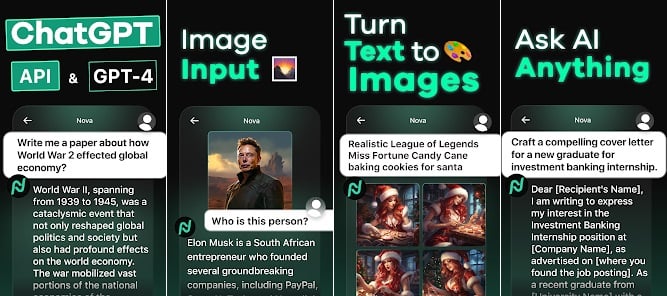
You can explore the possibilities of Nova by opening the app and then switching to the Suggestions tab. Then you can look at the different categories such as entertainment and homework ask your questions and get answers from Nova. There are no limits and you can ask unlimited questions and get answers.
Nova offers cross-platform support and remembers all your previous chats, so the response is more human. You can use Nova as an efficient proofreader, AI writing assistant, chat partner, and for other purposes. To use the premium features, you need to subscribe to a premium plan to access ChatGPT’s AI features.
ChatOn
If you are a content writer and are looking for a companion to help you with the tasks involved, then ChatOn can be your perfect partner. ChatOn offers support for a smart camera that allows you to scan questions and get instant answers. You can write texts, solve a math question, compose an email, create posts for social media, and much more.

ChatGPT doesn’t give you the option to choose the tone, but with ChatOn you can choose a tone from Friendly, Assertive, and Curious and receive responses or create content based on it. Another unique offering of ChatOn is the ability to set the length of the reply to short, medium, or long.
Other features include pinning important messages, sharing replies with friends, creating images from text, etc. You can also go the other way around and convert images to text. There is a voice-to-text function, and the math guru will help you solve difficult math questions.
Download ChatOn: Android | iOS
Microsoft Copilot
Microsoft has a multi-billion dollar investment in OpenAI’s ChatGPT, and having an AI chatbot similar to it is understandable. Microsoft’s Copilot recently arrived for Android and iOS and the interface is similar to ChatGPT. You can use Copilot to ask questions, have conversations, and generate images using DALL-E 3.
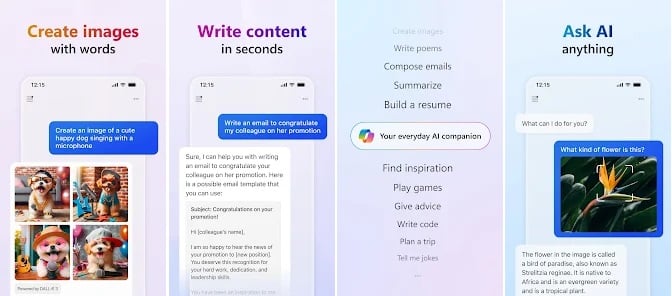
Furthermore, you can summon Copilot to draft your emails, compose stories or poems, help write content and much more. The app is also very capable of translating text into multiple languages and can help you proofread and help your travel, by creating personalized itineraries. Image creation is also phenomenal, and you can generate images with just text prompts, create illustrations based on different designs, and much more.
Download Copilot: Android | iOS
Genie
Another popular ChatGPT mobile app alternative is Genie. It uses two models, namely GPT 3.5, which is accessible with the free plan, and GPT 4, which is available if you buy the premium plan. Genie is excellent when it comes to answering your questions and explaining your concepts. You can also use this AI chatbot to create Instagram captions, a summary for your essay, an attractive title, and much more.

You can upload an image and ask questions about it. Genie can recognize elements in your images and give you information about them. You can also upload PDFs and web links and Genie will help you summarize the key points so you don’t have to scroll through hundreds of pages to understand the topic.
In the Pro version, features such as in-depth image analysis, interactive PDF conversations, detailed questions and answers about web page content, interactive language learning, etc. are available. You can easily set up Geneie and also use it as your assistant to have human-like conversations and write codes.
Look beyond ChatGPT and explore these new AI chatbots
ChatGPT is better at summarizing and generating text requests. However, Google Bard and Bing can help you get answers to your questions that are more factually correct and with up-to-date information. So if you want better answers to your questions and want to use these AI chatbots to get relevant and up-to-date information, then you can look for other options besides ChatGPT. Since Google has not yet released a Bard AI app, we have not listed Google Bard AI in this guide. The other options listed in this guide are great and some even offer you unique features that ChatGPT doesn’t have yet.

