

In Summary
- OnePlus OxygenOS 15 adds many useful features and is lighter and snappier than the previous generation.
- OxygenOS 15 has many helpful AI features, including a glossy UI, monochrome icons on the Settings page, a new rounded design of the Quick settings page, live activities, and lock screen customization inspired by iOS 18.
- OxygenOS 15 beta is rolling to the OnePlus 12 starting October 30, followed by the OnePlus 13 and mid-range Nord series. The stable version rollout is expected early next year, first for flagship devices and then followed by mid-range and budget devices.
OxygenOS is known for being the lighter and smoothest among Android OSes. After merging with ColorOS in 2021, OxygenOS has lost some of its aura of being a light, near-to-stock Android experience. Fortunately, it’s still fluid and faster than many other Android skins.

OnePlus has recently announced its latest OxygenOS 15 update based on Android 15 with plenty of useful changes and new parallel processing for better animations. OxygenOS 15 beta is available starting October 30 and will be available for all Oneplus devices in the coming weeks. Here is a breakdown of Oxygen OS 15 and five new features I liked on the latest version.
Table of Contents
5 Exciting Features You Need to Check Out on Oxygen OS 15
Useful AI Features

While Apple struggles to roll out Apple intelligence to iPhones as promised in iOS 18, Oneplus has already added useful AI features to Oxygen OS 15. They are part of the new Android 15 and are available for everyone with OxygenOS 15.
One feature is a circle to search, which was previously only available to Pixel and later to Samsung devices; the feature is now making its way to OnePlus devices in OxygenOS 15.
To use it, you can press on the home screen and select any element on the screen by circling it, and the results related to the object will show. It is a Google lens, but it is now easier to access. This is very handy, especially if you want to know what’s on the screen without manually uploading the photo to Google to find the information you want.

The OnePlus Global search also gets updated to allow users to search within files. Now, when you search for your file using Global search, it displays real-time results and a preview of the files with the relevant content you are searching for, which is helpful when finding content within the files like documents, screenshots, and more.
It also gets generative AI Writing tools across the OS, especially in the notes, where it can generate new text, rewrite the existing text, and make changes based on your input. With the smart reply, you can use AI to reply to your messages on all popular messaging apps, including WhatsApp, Messenger, and Messenger. Also, Google Assistant will be repaved with more advanced Gemini in the coming days.
The Photos app also gets handy AI editing features on OxygenOS 15. You can use AI tools to sharpen blurry images and the AI eraser to remove unwanted objects. A new AI reflection eraser helps reduce reflections for clearer images and enhances photo details using AI boost for blurry and low-quality images.
Some Oxygen OS 15 AI features (might be limited to flagship devices since they require dedicated NPU support for these features. However, if the features are not on-device and use AI cloud processing, they will likely be available on all OnePlus devices, including the mid-range Nord series and the more affordable CE series.
It would be nice if these cloud models also made their way onto budget devices, especially since most AI is limited to high-end devices. However, using the cloud for AI tasks poses security issues and limitations like speed and latency. We should see how these AI features will perform on future OnePlus devices.
Theft Protection
It also comes with improved security features with support for Google Play and live threat detection, where it monitors app behavior in real time to protect your device and automatically block and notify you about suspicious apps.

Additionally, it introduces anti-theft protection, which was introduced in Android 15, where it automatically locks the phone if any unusual activity is detected. You can also remotely lock your device through Find My Device, which even works offline.
Live Activities of Real-Time Updates

OxygenOS 15 also brings live activities to OnePlus, which the Oneplus calls ‘Fluid Cloud.’ Similar to Apple’s live activities, with Fluid Cloud, apps can show real-time information for specific functions. For example, If you order food from the app, You can track updates, such as when food is prepared, picked up, and delivered, using the Fluid Cloud around the punch hole camera cutout on the top. You can also see live match scores and control music directly without opening the app.
OnePlus goes a step further by allowing the stacking of different live activities from different apps on top of each other, letting you scroll through them to find the latest activities. This can be especially useful, as Apple has described live activities as one of the best uses of the Dynamic Island. On OnePlus devices, the circular punch-hole camera area is used as an equivalent for displaying live activities.
Save Files Easily to Your iPhone
OnePlus is always trying to bridge the gap between sharing files across different OS. The Clipboard app previously allowed you to share files between your PC and mobile phone. OxygenOS 15 lets you share files easily between your Android and iPhone.However, you need to download the OnePlus Connect app on your iPhone for this function to work. After installing the app and completing the certification process, select any file, click Share, and then choose the icon. Still, it is not as seamless as Airdrop. You don’t have to install a separate third-party app and go through all the setup processes on your Oneplus phone.
Multitask and Drag-and-Drop to Other Apps
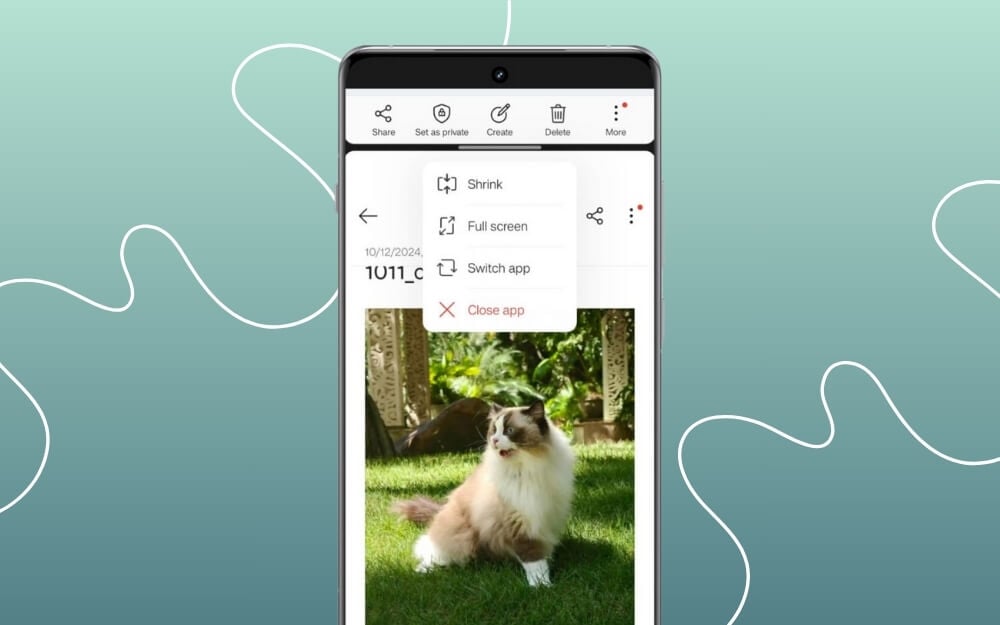
I am a multitasker and often use multiple apps simultaneously, so I appreciate helpful additions that enhance phone multitasking. With OxygenOS 15, OnePlus adds Open Canvas, first introduced on the OnePlus Open foldable smartphone, which lets you use three apps simultaneously while maintaining full window sizes for each app. However, due to size limitations on the candy bar phones, you can only use two apps in split mode, one in full-screen mode and the other overlaid on the top or bottom for easy switching.
You can also use both apps in split mode, drag and drop, to share files between the apps in the overlay mode, which comes in handy for tasks like watching a video while taking notes and more.
More Visual Enhancements

The biggest update to OxygenOS 15 is the parallel processing, which brings more fluid animations when opening apps and switching between them. Instead of processing apps sequentially when you open them, it now uses parallel processing. OxygenOS 15 also feels lighter and faster and is 20% smaller than OxygenOS 14.
Along with the performance improvements, it also comes with a new design. It is now more transparent and glossy across the UI. Starting with the quick settings, you get a full-screen Quick Settings page with more rounded corners, volume and brightness sliders, improved animations, and new icons that are now more vibrant. It also brings advanced lock screen customization, where you can personalize it with various options. This is very similar to iOS, with blur effects on wallpapers, new color styles for data and time, glass textures, and more.

Those are the five handy features I like most in OxygenOS 15, and they also come with other useful improvements. It also comes with a new setup screen, Uniform scrolling in all apps, including third-party, the Ability to scan documents into the Google Wallet app, and New customization options. There is also a little update to the Shelf, adding more customization shelf cards.
OxygenOS 15 Supported Devices and Expected Rollout
OxygenOS 15 is expected to OnePlus 13, which is launching with the Snapdragon 8 Elite on October 31. OnePlus 12 and OnePlus Open, Oneplus Pad 2 are expected to be the first to get the Android 15 update along with OxygenOS 15. The budget devices, including OnePlus Nord 4, OnePlus Nord CE 4, and OnePlus Nord 4 CE Lite, are expected to get the open beta starting in December 2024. The stable version is expected to roll out in early 2025 for the budget devices and before 2025 for all the flagship devices.
OnePlus 11, 11R, 10R, and 10 Pro are also expected to get open beta updates at the end of the year and in early 2025. Here is a list of all OnePlus devices that support OxygenOS 15, along with their expected rollout.
Device | Beta Type | Expected Rollout Date |
|---|---|---|
OnePlus 12 | Open/Closed Beta | October 30, 2024 |
OnePlus 12R | Open Beta | October 30, 2024 |
OnePlus 12R Genshin Impact Edition | Open Beta | October 30, 2024 |
OnePlus Open | Open Beta | November 2024 |
OnePlus Pad 2 | Open Beta | November 2024 |
OnePlus 11 5G | Open Beta | December 2024 |
OnePlus 11R 5G | Open Beta | December 2024 |
OnePlus Nord 4 | Open Beta | December 2024 |
OnePlus Nord CE 4 | Open Beta | December 2024 |
OnePlus Nord CE 4 Lite 5G | Open Beta | December 2024 |
OnePlus Pad | Open Beta | December 2024 |
OnePlus 10 Pro 5G | Open Beta | January 2025 |
OnePlus 10T 5G | Open Beta | January 2025 |
OnePlus Nord 3 5G | Open Beta | January 2025 |
OnePlus 10R 5G | Open Beta | February 2025 |
OnePlus Nord CE 3 5G | Open Beta | February 2025 |
OnePlus Nord CE 3 Lite | Not specified | Expected in early 2025 |
OnePlus Pad Go | Not specified | Expected in early 2025 |
FAQs on OxygenOS 15
Are there any limitations on using AI features on mid-range or older devices?
Some AI features might be limited to flagship smartphones, especially on-device AI features that require a dedicated NPU. We should get more info once we access OxygenOS 15 on budget devices. I have the OnePlus Nord 4, which will get the open beta starting this November. I will test it on my device and check if this device gets all the features of OxygenOS 15, and I will update this post.
Will an update to OxygenOS 15 cause the green line issue on my OnePlus device?
It is normal to be concerned about the green line issue on OnePlus devices, as plenty of OnePlus devices have experienced green lines after updating the smartphone after an update. There is no information on whether updating to OxygenOS 15 will cause a green line issue. We should wait and see real user feedback once the update is widely rolled out. Meanwhile, I highly recommend waiting for the stable updates if you use older OnePlus devices like the 9 or 8 series.

