

In Summary
- ChatGPT has recently gained the ability to schedule task reminders. It is currently available for premium users and can set up 10 active reminders.
- With the help of ChatGPT knowledge, contextual understanding of each task, and various to-do list task principles, you can focus on the most important tasks to drive value.
- While ChatGPT cannot be helpful for all reminders, it can be a game changer for specific tasks, especially for setting goals.
ChatGPT is far from being your AI agent; it is getting closer with helpful feature additions. OpenAI has recently gained the ability to help you set task reminders in ChatGPT. The feature is in beta and available for all premium, plus, and team users. You can use AI to create more personalized tasks than most Todoists currently offer.

With the help of an AI-contextual first approach, you can get more context about each task. Make creating to-do lists more conversational with natural language, personalize them with individual preferences and specific scenarios, and integrate them with other apps’ workflow for advanced task management features.
In this guide, you will learn how to use the tasks feature in ChatGPT and create functions that are more useful than the current to-do list apps, as well as a few limitations of the ChatGPT tasks feature. Here is everything that you should know.
Table of Contents
How To Create Task Reminders in ChatGPT
Currently, ChatGPT task reminders are only available for premium, plus, and Team users of ChatGPT. However, we expect this feature to be rolled out to all ChatGPT users soon.
Today we’re rolling out a beta version of tasks—a new way to ask ChatGPT to do things for you at a future time.
Whether it's one-time reminders or recurring actions, tell ChatGPT what you need and when, and it will automatically take care of it. pic.twitter.com/7lgvsPehHv
— OpenAI (@OpenAI) January 14, 2025
Currently, you can set or schedule up to 10 active task reminders, which is a limitation considering the scope of this feature. We can expect this hard cap limit to be removed in the future. Here is how to create task reminders using ChatGPT:
- Open ChatGPT and click on the model in the top left corner, then select GPT-4o with scheduled tasks.

- Enter the prompt to schedule a task. Using natural language, you can use a general conversational tone along with the task, the time, and the type of task (recurring or one-time).
- For instance, if you want ChatGPT to remind you to drink water every four hours, enter a prompt that says, Remind me to drink water every four hours.

- Click on the three-dot menu once the task is created to edit or pause tasks.

- To view all tasks, click the three-dot menu and select View All Tasks.

- You can also view all tasks by clicking on your profile picture in the top right corner and selecting the Tasks option.

- To delete a task, click on your profile picture, select View Tasks, and view the list of all created tasks. Tap on the task you want to delete, scroll, and click the Delete option to remove that task.
How To Use ChatGPT To Create a Smarter To-Do List
With the contextual understanding and knowledge of ChatGPT, you can use ChatGPT as a personal assistant, helping you create smart to-do lists. ChatGPT can be a great companion and game changer when setting up certain tasks that require research.
Here are four ways you can use ChatGPT to set smarter to-do lists and create actionable ones that add value, help you focus on important tasks, and save time.
Create Tasks Using Natural Conversations
While not all tasks, such as bringing groceries or exercising, require research and assistance, there are some scenarios where task reminders in ChatGPT can come in handy. ChatGPT can offer more context about the task and help you create a personalized to-do list for specific scenarios. For instance, if you want to plan an event for your birthday party for a kid.
In the traditional approach with any Todoist app, you create a static checklist for booking a venue, ordering cakes and invitations, arranging decorations, and bringing the cake. While it can be helpful, since there is research you need to do before, with ChatGPT, you can do all of them in one place.
Although there are some limitations, like ChatGPT doesn’t integrate with most of the apps, and since it is a chatbot, it might not offer the latest information, event details, and other info like event availability, it requires manual research.
However, it can help you improve your experience and gain more insights about tasks with its existing knowledge and the ability to search the internet to find the latest information and ensure you don’t miss any important tasks for the event.

For instance, If you want to plan a birthday party for your 10-year-old kid with a Halloween theme, You can ask ChatGPT something like, Create a birthday party plan for a year with the following theme and create a timeline and reminders. Then ChatGPT provides detailed, theme-based, dynamic solutions, and the best part is you can speak to it anytime using conversation.
If you don’t like a specific task or scenario and want to modify it, you can ask ChatGPT to change it. The best part is that the tasks will also be modified according to your preferences. It helps create event-based and can help you in many situations, like planning your study timetable for your next exam, fitness tracking, motivation, and more.
However, I wouldn’t recommend it as a complete fitness trainer, but you can use it to gain more information and insights to help you follow set exercise routines and try to help you in your fitness journey. You can also use ChatGPT to plan a movie night and other small events, as ChatGPT can offer more insights and help you plan your tasks better.
Create a To-Do List With Various Principles
If you don’t take control of your day, your day will take control; plan to focus on what matters the most –
David Allen. Planning your day gives you more control and lets you focus on the most important tasks. The quality of Todoist is more important than its quantity.
There are plenty of principles and methods like the two-minute rule, Eat the Frog first, the Eisenhower Matrix, the 80/20 rule (also known as Pareto Principle), the Time Blocking principle, Parkinson’s Law, the Pomodoro Technique, the Ivy Lee Method, and also SMART goals, the One Thing, Getting Things Done (GTD), the ABCDE Method, Seinfeld Strategy, Kanban Method, Rule of Three, and many more.
I have been using different principles for the past six months to streamline my tasks and focus on the most important ones with the help of ChatGPT.
While there are more than 20+ principles, here are the five task management principles that will appeal to and can be helpful to most people.
You can also explore other task principles using ChatGPT. Since you don’t need to learn anything, you can ask ChatGPT for a specific principle to create a Todoist based on your preference and focus on essential tasks while saving time and effort.
Use the Pareto Principle and Parkinson’s Law To Prioritise Important Tasks
Using the Pareto Principle, also known as the 80/20 rule. You can focus on tasks that drive more value. The Pareto Principle states that 80% of outcomes come from 20% of efforts, which is a game changer for me when combined with Parkinson’s Law.
This maximizes effort and focuses on essential tasks that add value. While ChatGPT cannot directly divide and find the tasks that yield 80% of the value, it can give a detailed context to help you prioritize based on your needs and preferences.

You can also use the Parkinsons Law, where all the time is allocated for a specific task, meaning work expands to fill the time available for completion.
For example, if you intend to complete a task in just 20 minutes and have one hour available, you will likely take the entire hour instead of finishing it in 20 minutes.
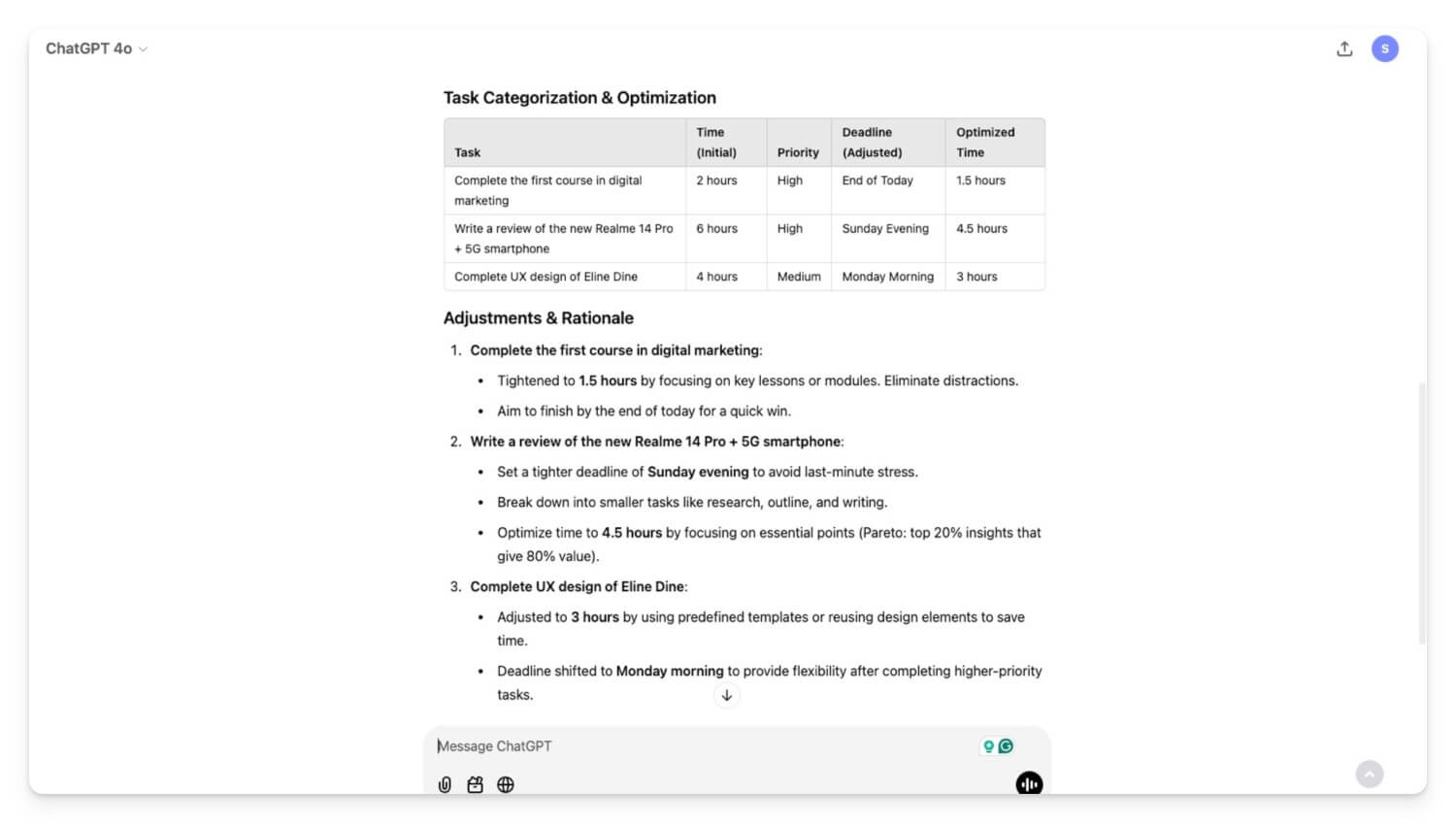
Using this law and the Pareto principle 80/20 rule, you can focus on essential tasks and save time by avoiding unnecessary ones.

You can use ChatGPT to prioritize the 80/20 rule by focusing on key contributors. You set your goal and ask ChatGPT to identify tasks that produce the most results.
While ChatGPT can provide detailed and comprehensive information about your tasks, making decisions entirely based on your tasks is currently impossible. However, based on context, you can focus on high-impact activities that create 80% of the value.
It can help create an action plan to allocate 80% of your time to high-impact activities while automating or minimizing low-impact activities. For example, in simple terms, if you are going for a fitness activity, focus on high-impact activities that create 80% of the results and allocate time using Parkinsons Law.
Use the Eisenhower Matrix To Categorize Tasks
After finding valuable tasks using the Pareto principle and allocating time for each task. You can use the Eisenhower Matrix to categorize tasks into four categories based on urgency and importance.
This is a popular technique for focusing on essential tasks and delegating unimportant tasks to others. This will help you focus on the tasks you need in a day. You can plan this for a week, a month, or a day, depending on your preference.

The Eisenhower Matrix is divided into 4 Quadrants: the first quadrant states urgent and essential tasks you must do. Tasks that are not urgent and important tasks scheduled for later?
You can delegate urgent, not important tasks to other people or not urgent and unnecessary tasks, which you can eliminate.
You can use ChatGPT to create the Eisenhower Matrix. You can list all the tasks you have currently prioritized using various above principles or continue the conversation and ask ChatGPT to create an Eisenhower Matrix.

Set SMART Goals
SMART is an acronym for the task principle, where you can set an actionable, more insightful, measurable course that helps you set specific tasks.
S in SMART stands for Specific, like what you want to accomplish. M in SMART stands for Measurable, which refers to how you will measure the task you create, such as a success matrix. A in SMART stands for Achievable, meaning the task is realistic based on your resources and constraints. R stands for Relevant, such as if the goal is your priority or an objective relevant to your other tasks. T stands for Time-bound, like what is the deadline for achieving these goals.
While the SMART framework is not useful for all simple tasks, it can be a game changer for setting goals—setting up your timetable, learning a new skill, completing a project, or setting milestones like losing weight, staying healthy, and more.
Most of us set unrealistic and untrackable goals, which often leads to confusion. The SMART goal can help you accomplish tasks that are detailed and specific actionable insights.

One of the best examples I have learned in the SMART goals framework is instead of setting a goal that says to read a book for 20 minutes, you can create a task more specific, like ”read five pages of a book today at a particular time”. This provides a more actionable goal to help you track your progress easily.
The SMART feature can be a great addition to Todoist, and this is where ChatGPT can come in handy to help you create tasks easily with this framework. For instance, if I want to make a goal of learning digital marketing in three months, instead of a vague goal like “learn digital marketing in three months, I can use ChatGPT to do the following: give a prompt asking it to help me learn digital marketing in three months using the SMART goal framework.
Finally, Create Reminders for Each Task
Once you have created a comprehensive to-do list, it’s time to add them to your reminders. Since ChatGPT only allows you to add 10 active reminders at once, you have to manually add each reminder for the task to remind you about the task. For more details, refer to the to-do lists for contextual understanding.
I have tried to use the entire table and ChatGPT to create reminders for each task without manually creating them. However, due to its limitations, it fails all the time. You can manually add reminders by providing the following details to ChatGPT. In the prompt, include the task name, date, type, the exact date and time you would like to get a reminder, and the frequency, whether it’s a one-time or a recurring task.

With the help of ChatGPT, you can create contextual to-do lists that are easy to track and measurable and help you focus on the right tasks that add value to your life. However, ChatGPT has some limitations since it is an AI bot and can make mistakes. I highly recommend that you don’t depend entirely on ChatGPT. You can use ChatGPT as a companion to help you create tasks, save time, and provide more context. However, I highly recommend you don’t rely entirely on it for your overall tasks, as it does not have the full context of your intended work.
If you find limitations in the current ChatGPT hard cap of 10 active tasks, you can create functions on ChatGPT and use other alternative Todoist apps to add task reminders on different apps. I hope you find this to-do list task guide on ChatGPT helpful.
If these processes feel overwhelming, I have recently created how to use Notion to create an optimized to-do list, which you can use to create the best tasks on your own. If you have any queries, please comment below, and I am happy to help.

