

Quick Answer
X-Design shows how AI can help businesses build a complete brand identity without design skills or high costs. Using simple text prompts, it can create logos, colors, typography, and brand assets, maintain consistency with brand memory, and edit designs easily through a built-in editor.
Having your own branding for a business is very important, especially if you are starting a new business or managing an existing one, to create your own identity.
The easiest way to get started is by having your own brand design to help customers easily recognize your brand. However, creating a brand is not easy, especially since it involves many connected elements like logo, colors, tone and layout, and you also need to ensure branding is consistent across your business. Many companies spend millions creating logos and brand identities.
Thanks to recent advancements in AI, even small businesses can create their own brand design without spending a hefty amount of money and requiring design expertise.
Many tools have emerged as a design agent over the years. In this guide, you will learn about X-Design AI design agent that offers end-to-end solutions to create branding using AI.
Table of Contents
You Don’t Need Expertise to Create a Brand Identity
One of the biggest advantages of using X-Design AI design agent for your brand design is that you don’t need expertise to create brand designs. For example, the X-Design AI design agent also comes with an AI-generated logo, which lets you generate brand logos without requiring any logo design skills.
You can simply ask an AI agent to generate it for you based on your requirements in natural language. All you need to know is how your business works, your target audience and how people are going to perceive your brand.
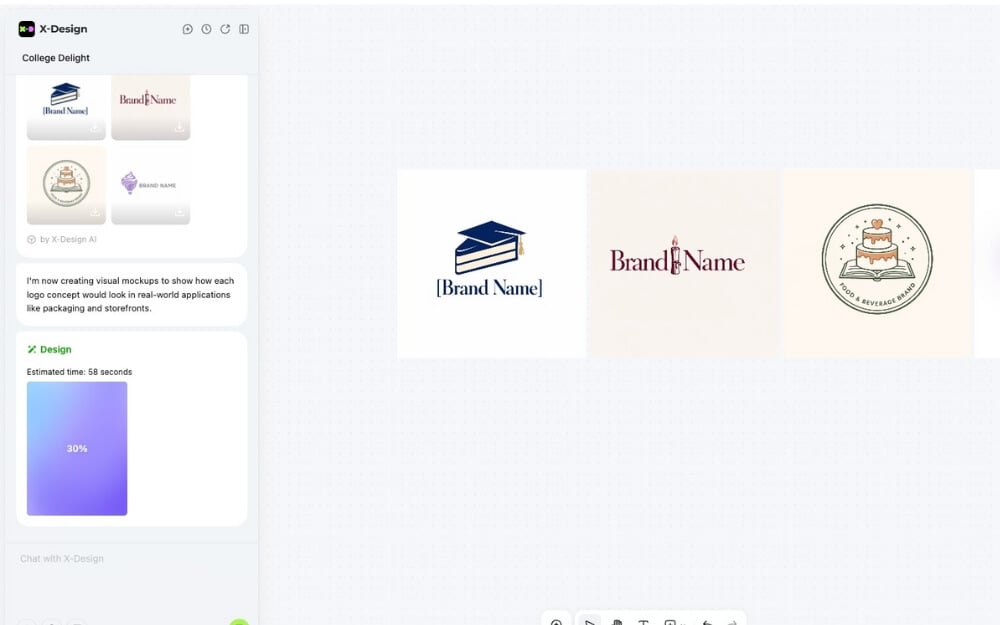
You can simply describe everything about your business with a few references, and X-Design AI design agent will generate a unique branding for your business based on your requirements. And the best part is that you can experiment with multiple brand ideas easily using simple text prompts without thinking about time and money.
For example, if you want to start a cafe that serves coffee and hot meals and want to position it as a premium brand, you can simply describe this to the X-Design AI design agent, and the tool will generate it for you. Whether it’s a logo, your brand’s color palette, typography, illustration style and brand voice, X-Design AI design agent will take care of everything.
X-Design AI design agent offers a similar and easy-to-use interface for designing logos. You get a simple AI chat interface on the left where you can describe your idea and requirements, and once you create your brand, you can edit it with an easy-to-use editor and download it in multiple formats.
Stay Consistent With Brand Memory
One of the big challenges when creating a brand is consistency. Even if your brand has predefined rules, connecting everything and staying consistent with your branding is the hardest part. However, with the X-Design AI design agent, you can do it at no cost using its brand memory. You can simply upload all your brand assets and use them across all your tools.

All you need to do is set rules or even upload a brand kit, and the X-Design AI design agent will remember everything about your brand. It consistently follows the same brand design without deviating.
Whether generating a new logo that acts as the brand’s face or creating new marketing materials that align with your brand, or using the same color palette or typography, it can be done effortlessly, especially without spending too many resources.
Not just that, even if you don’t have branding, you can use the X-Design AI design agent to create it from scratch and use it later for reference.
Editor That Lets You Edit Designs
Most AI logo designers generate logos from text prompts, and to edit them, you need to regenerate the image, which sometimes loses the context and can completely mess up the editing design.
However, with the X-Design AI design agent, you can get access to the editor, which offers a very similar interface to Figma or any other editing tools you have used, allowing you to make corrections. Currently, it also supports pinpoint edits that can pinpoint the exact location and make changes.

Not just that, you can also import images, videos, and add brand assets directly to your logo and make changes as required. You can also invite others as collaborators and make the required changes.
And there is a chat interface on the left that is available anytime to make edits using AI. However, there are some issues with the editor. The editor failed to show the logo multiple times, as you see from the screenshot above. Apart from this, there are no other issues. I hope the X-Design AI design agent team will fix this in the coming days.
Free to Use and Affordable Plans If You Want to Upgrade
Creating branding is an expensive task; first, you need to create your own branding rules and onboard a designer or work with the agency and ensure they are on the same page for consistency. And for small businesses, this can consume a significant amount of resources and time.
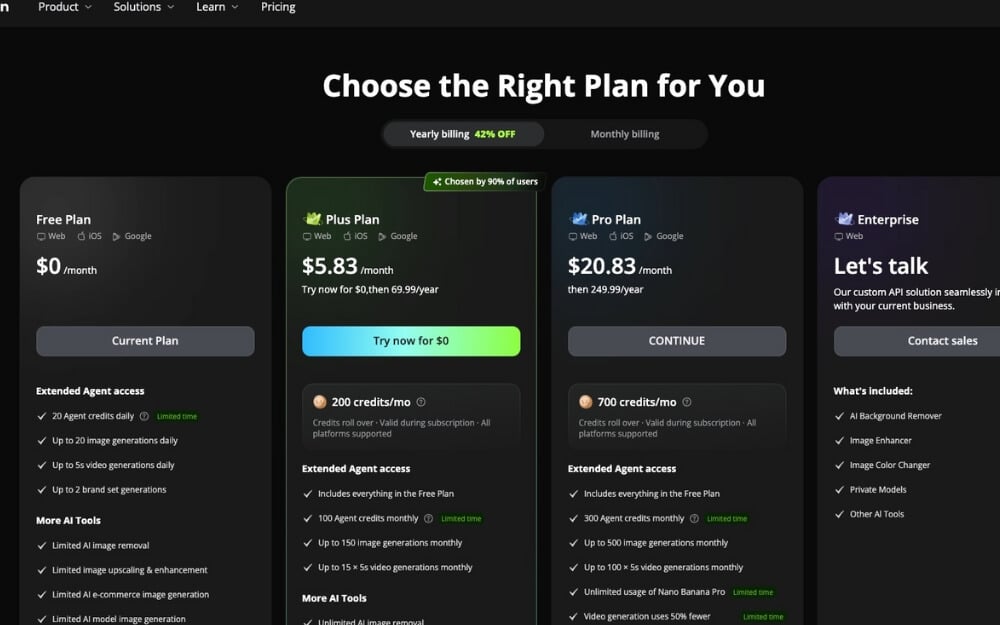
Thanks to the X-Design AI design agent, you can do it for free. The free version offers 2 agent credits daily, which you can use to create your brand logo. And once you are done, you can use it to create marketing content, such as posters, for free.
However, many people worry about the quality of the AI-generated logos. I must admit that AI-generated logos sometimes even beat human designers, especially when considering the time and cost to create those assets.
For example, here are the logos that are completely generated by AI for different small businesses. As you can see, they look like they were designed by professional logo designers.
Design for Every Use Case
Another advantage of X-Design AI design agent is that once you create your own branded assets, you can use them for all your upcoming marketing materials, whether you’re creating social media posts or need to design a poster. The brand kit ensures it is consistent and helps stay consistent in the future.

Even if you want to open a new store, you can simply use your existing brand guidelines to create a new branding for the store without creating it from scratch, saving you a significant amount of time.
The Biggest Downsides of Using AI for Your Brand
While X-Design AI design agent makes it easy to produce high-quality brand designs that are faster, low-cost, and also with low effort, one of the biggest downsides is that sometimes the results can feel generic, especially when branding is all about being original.
However, fortunately, with the right approach, you can create high-quality branding that looks original and professional.
Another downside of using the X-Design AI design agent is that it might lose context and might produce random designs. This is where having a consistent brand design can help you generate high-quality designs that look connected. Here are some of the tips you can use to create high-quality brand designs using AI.
Ensure you precisely mention your requirements while creating your brand. While the AI has expertise to build high-quality designs, to truly deliver the high-quality original results for your brand, you need to specify what exactly your business is, who your targeted users are, and what they want to perceive about your brand. Here are some of the prompts that you can find helpful.
Even if you are not aware of where you can get started, you can simply describe your idea and then tweak the changes without any cost. Once you have created your brand, ask AI to prepare brand guidelines so that you can use them as a reference. You can also use our Logo guidelines to get started.
Download our brand design guidelines
Create Your Brand Design Using AI
Overall, X-Design AI design agent is offering an end-to-end solution for small businesses, or even if you are an existing businesses that want to refresh its brand at an affordable cost. The AI agent, which you can use for free, gives you access to 20 credits in the free plan, which is enough for most people to generate logos and create and design.
X-Design AI currently offers multiple agents, including Logo maker, poster maker, menu designs if you own a food business, and even a product photography AI agent that lets you create product shots without spending a significant amount of resources. I hope you find this guide helpful.

