


What do you do when you come across music you like on Instagram Reels? Just as it is possible to save Instagram Reels videos, it is also possible to download Instagram Reel audio. However, users cannot download Reel audio directly on Instagram because of complex licensing issues; unless you want to save the audio only to your Instagram account for later use.
So this is where the hacks to download Instagram audio come into play. We have put together three proven methods for you to download Reel audio to any of your devices. All you need to do is choose from our three best methods to download audio from Instagram Reels and follow the guide without fail. Stay tuned with us.
3 Ways to Download Instagram Reels Audio as MP3
Looking for the best ways to download reel audio from Instagram? Here are three solid hacks that will let you do it effortlessly on your smartphones and computers.
Sl No | Method | Pros | Cons |
|---|---|---|---|
1 | Online reels downloader | - Easy to use - Can download audio directly to phone or laptop as MP3 | - Not all reel download platforms support downloading Instagram audio - May require copying link and pasting into a separate website |
2 | Convert reels to audio by changing the file extension | - Simple method - Can convert video to audio MP3 if there is only audio in the background of the reel video - No need for additional apps or websites | - Only possible on Android or PC - Requires downloading the reel video beforehand - Not applicable if there is no audio in the background of the reel video |
3 | Extract Reels Audio with Video Editor | - Allows extraction of audio from reel video and addition to another video - Provides flexibility to edit and customize the video with the extracted audio - Can be used if you want to edit the video along with the extracted audio | - Requires downloading a video editing app such as InShot or VN Editor - Additional steps involved in downloading and editing the video - Not suitable for simple audio extraction without editing |
Method 1: Instagram Reels audio download using the online reels downloader
It is possible to download audio from Instagram Reels via some online reels downloaders. Although not all reel download platforms support downloading Instagram audio, there are some, including the Reelsave.app. It’s also very easy to use this website to download audio reels. Just follow this step-by-step guide:
Step 1: Go to Instagram and open the reels whose audio you wish to download. If you saved the reel video previously, go to your Instagram profile and select the three-line menu. Then select Saved to access the reels with the audio you want to download.
Step 2: On the reels video, click on the audio you wish to download at the bottom of the page.
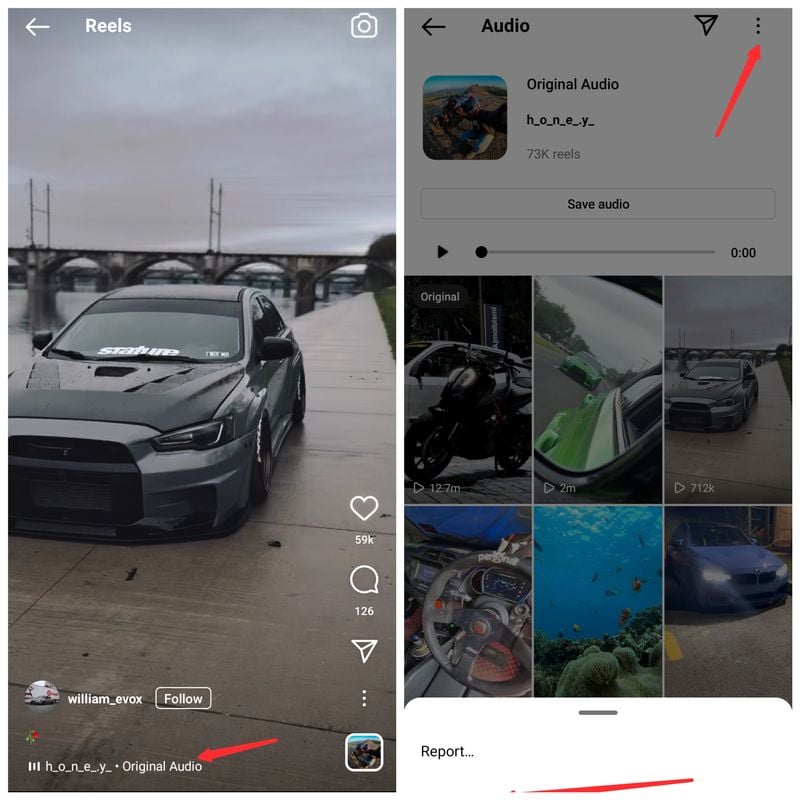
Step 3: You’ll then be taken to the audio page. There, select the three-dot menu and click the Copy link option.
Step 4: With the audio link on your clipboard, visit reelsave.app and paste the link in the box provided.
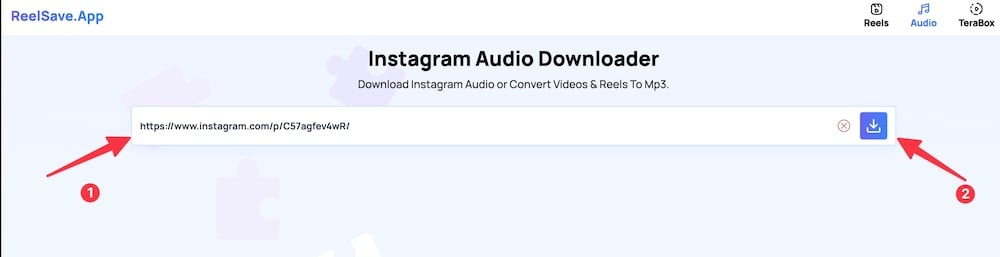
Step 5: Click Download Audio and wait for the audio file to load. Then select the following menu and download the sound to your phone or desktop.

With this method, you can download the audio of the Instagram reel directly to your phone or laptop as MP3. Alternatively, you can check another Instagram audio downloader – InstaVideoSave.net, which works in a similar way and helps with Insta audio download. The premise of all such tools is similar. Using Instagram video to audio downloader, you can convert reels to MP3 and download audio from a reel video.
Method 2: Convert reels to audio by changing the file extension
This hack is an old method of converting video to audio MP3 files and is best recommended when there is only audio in the background of the reel video. Since Instagram reel videos can be downloaded using third-party apps and online downloaders, you can easily convert the video to audio MP3 by changing the file type. However, this method is only possible when using Android or PC, and here is how to do it:
Step 1: Go to Instagram and open the reels video whose audio you want to download
Step 2: Click on the three-dot menu on the right-hand side of the page and select Copy link.
Step 3: These days, Instagram lets you download reels on your device natively. Go ahead and download the reel whose audio you want to download.
Step 4: After downloading the video, go to your file manager and long-press the downloaded video.

Step 5: Click on the three-dot(Menu) at the bottom of your screen and select Rename.
Step 6: Change the extension at the end of the name from .MP4 to .MP3.

With this, you’ll have the video saved as an audio file on your phone. However, some websites and apps convert video to audio, but the method mentioned above is pretty straightforward.
Also See: How to Download Instagram Reels Directly From the App
Method 3: Extract Reels Audio with Video Editor
Another method for Instagram audio download is to extract the audio from a reel video using a video editor. However, you can only use this technique if you want to extract the audio from the video and add it to another video. There are a few applications that you can use to do this. Here you can find out how to do it:
Step 1: Download the Instagram reel video using the first three steps in the previous method.
Step 2: Go to the App Store or Play Store and install InShot on your phone.
Step 3: Open InShot and add the video you want to edit.
Step 4: Select Music and click Tracks.
Step 5: After that, tap Extract Audio from Video and select the reel video you downloaded earlier.
That’s it! Your Instagram audio download is now completed! You can also use the VN Editor app the same way as InShot to download Instagram audio.
Also See: How to Download Instagram Private Reels
How to Save Instagram Reels Audio to Use Later
All of the above methods require you to download or extract the audio to a device in order to insert it into a video. However, you can also do all these tasks directly in the Instagram app.
Follow these steps to manage your video creation directly on Instagram.
Step 1: Go to Instagram and open the reels whose audio you wish to download. If you saved the reel video previously, go to your Instagram profile and select the three-line menu. Then select Saved to access the reels with the audio you want to download.
Step 2: On the reel video, click on the audio you wish to download at the bottom of the page.
Step 3: Open the “Audio” folder and then tap on the audio file to open it. From here, you can tap Use Audio when you’re ready to create your video.
This method is great if you do a lot of brainstorming for your Instagram Reels strategy and want to save multiple audio files to use later.
Instagram Reels Audio Download Made Easy
If you want to download reel audio file as MP3 on your phone, you can use these hacks to do it effortlessly. Also, the step-by-step guide above will help you achieve this without any mistakes. Simply apply one of the methods described in this article, and you’ll be able to enjoy Reels Audio on your smartphone.
FAQs on Downloading Instagram Reels Audio as MP3
Why can't I save audio on Instagram?
Instagram doesn't allow users to save or download audio from it because the platform is basically for you to share videos and pictures. Moreover, they want it all done on the app. Regardless of the limitation, you can save audio and video on your Instagram account to watch later or use the hacks mentioned in the article to download Reels audio.
How do I download Instagram audio reels?
If you are looking for how to download Instagram reels audio, simply follow this guide:
Step 1: Go to Instagram and open Reels
Step 2: Select the audio name at the bottom of the page on the Reels video you want to download audio from.
Step 3: Then click the three-dot menu on the audio page and select Copy link.
Step 4: Afterward, take the link to the platforms discussed in the article and paste it. Wait for the audio to load and click Download.
Can you save a reel to your phone?
Yes, it's very much possible to save reels to your phone using one of the following hacks:
1. Download the Instagram reel using an online reel downloader.
2. Make use of a third-party app.
3. Screen record reel.
Is it possible to extract audio from reels videos?
Yes, you can extract audio from Reels video the same way you can with any type of video. To do this, you need to download a video editing app or use an online platform that allows you to do this on your phone. After that, download the video and add it to the video editor. If you follow the required step, you can extract the audio in the reels and add it to another video.
Can you download audio from Instagram?
No, you cannot download audio from Instagram video from a private profile. Instead, you can use an online Instagram video downloader or audio downloader that allows mp3 conversion for Instagram videos. We have discussed some of those tool in our post here.
How to download Instagram Audio online?
In case you want to download only the audio or music from an Instagram video or a reel, you can use a third-party tool like instavideosave.net or downloadvideosfrom.com. Alternatively, you can download the Insta video and then rename it from .mp4 to .mp3 to use just the audio.
Further Reading:
- 4 Best Methods for Instagram Reels Video Download
- How to View Instagram Stories Anonymously on All Platforms
- How to Reply to a Specific Message on Instagram on Android, iOS and Web
- How to Add Links to Instagram Stories and Gain Traffic
- How to Check if Someone is Logged in to Your Instagram Account?
- How to See Liked Posts on Instagram
- How to Edit a Reel in the Instagram App Using the New Reel Editor

