

ChatGPT took the internet by storm, and now Open AI has added another revolutionary idea to what many are calling the “App Store era” of AI. ChatGPT announced the ChatGPT Store, a marketplace for custom versions of ChatGPT, created by developers using the ChatGPT large language model. These custom GPTs are tailored versions of the ChatGPT model that specialize in a specific area, and each is uniquely designed to perform specific tasks.

In this guide, you’ll learn about the 15 best custom GPTs for ChatGPT. Whether for professional use, learning, entertainment or personal support, these custom GPTs can help you access specialized knowledge, personalized support, fitness and health advice, productivity boosters, and more.
ChatGPT also supports plugins. With plugins, you can enhance the capabilities of the ChatGPT. The Plugin Store and the GPT Store both have to do with extending ChatGPT, but they serve different purposes. In the Plugin Store, you can add additional functions to ChatGPT by installing plugins, e.g. access to certain websites or executing special tasks. In the GPT Store, on the other hand, you can find custom versions of ChatGPT that have been developed by different users or developers to perform specific tasks.
Table of Contents
Best Custom GPTs in ChatGPT
- Consensus: Helps research scientific papers, summarizing studies and articles.
- Books: Offers personalized book recommendations and literary discussions.
- Logo Creator: Designs custom logos based on text prompts.
- Screenshot-To-Code-GPT: Converts screenshots into web code (HTML, CSS, JavaScript).
- Convert Anything: Transform files into different formats.
- Docmaker: Creates documents, presentations, and spreadsheets.
- AI Voice Generator: Generates voices from text for various uses.
- AI Companion: Offers a digital companion for conversation and insights.
- What Should I Watch? : Suggests movies and TV shows based on preferences.
- Techsupport Advisor: Provides tech support and troubleshooting solutions.
- Math Mentor: Offers help with mathematical concepts and problems.
- Bot Sous Chef: Assists in cooking by suggesting recipes based on ingredients.
- Coloring Book Hero: Creates personalized coloring pages.
- Data Analysis: Analyzes data sets and offers insights.
- Resume Builder: Analyze your Resume and Get Feedback.
Consensus – Research Scientific Papers
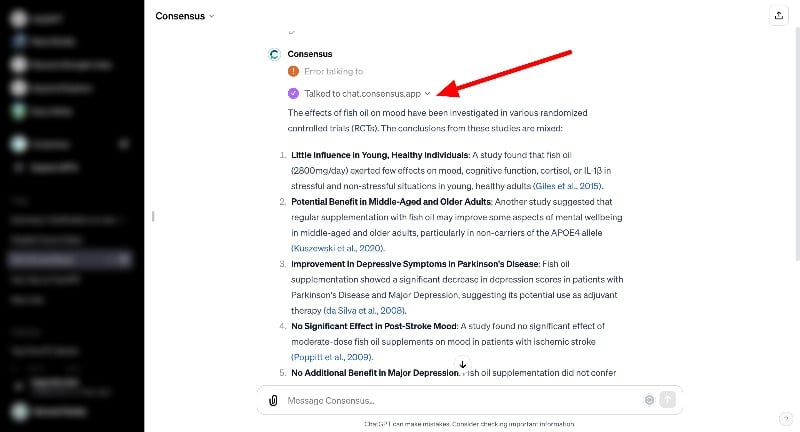
If you are a student or academic professional, you can use the Consensus custom GPT to research scientific papers. With the GPT, you can easily find studies and articles that are relevant to your field of study. It makes your research faster and more efficient. The bot helps you filter out the most important findings from various scientific papers and even supports you in writing content that is scientifically sound.
Using the ChatGPT interface, you can interact with the bot with various scientific research papers. Based on your input, the bot uses the API to find the most relevant studies and break them down for you. It can summarize complex research results in simple terms, help you understand complicated scientific concepts, and help you prepare and write reports.
The bot searches the consensus database, finds papers that match your query, and gives you a summary. You can ask more questions, continue the conversation by retrieving the new data, and much more. At the time of our test, the bot showed an error a few times when searching for the data. However, you can use the simple ChatGPT troubleshooting techniques to fix the issue. The custom GPT tool is free to use. You can access the bot via the “Explore” tab.

Books
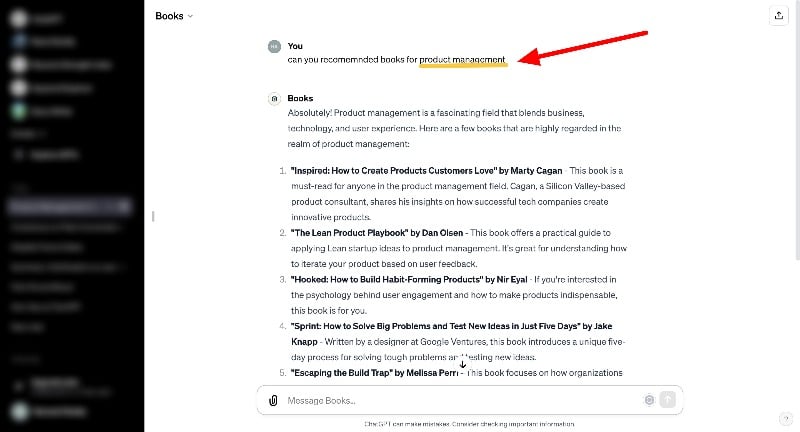
If you’re a bookworm or someone who likes to immerse themselves in the world of literature, the Books custom GPT will give you book recommendations based on your favorite genres, authors, or mood. Whether you’re looking for a classic novel, a modern thriller, or something educational, the bot will help you find the right book.
The bot not only offers random book suggestions but also helps you with literary discussions. It uses its knowledge of genres, authors, and literary trends based on your conversations. The bot also interacts with the book and creates ‘what if’ scenarios with characters from different genres, making the book recommendations more engaging and personalized.
Books custom GPT is completely free. You can easily find it and start exploring a world of books customized just for you. I recently started learning product management and asked the bot for the best books to learn product management. The bot gave me 5 book recommendations on product management, which are the same as the product manager’s recommendations.
The normal chatbot can do this too. However, the bot specializes in giving more personalized book recommendations by suggesting combinations of books with activities, moods, or even food and drinks, current information and trends, interactive literary activities, book quotes and summaries, and much more.
Logo Creator
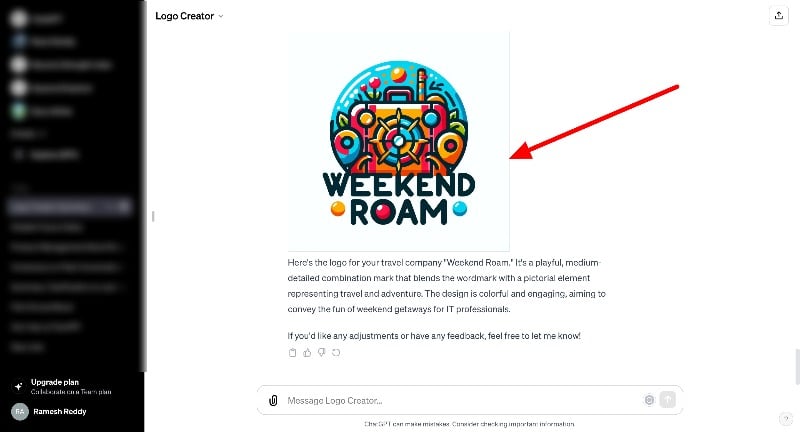
If you’re a logo designer and need to create a cool logo, GPT’s Logo Creator is your tool of choice. This chatbot helps you create logs with simple text inputs on the chatGPT. Whether you are a blogger, a YouTuber, or run a social media page, this tool can help you create a perfect logo that fits your mood.
You can generate logos using the text prompts. The bot takes your ideas and turns them into a real logo. You can keep things simple or show off with a fancy design. It’s just a matter of telling the bot what you want. Before the logo is created, the app asks you questions like: Should the logo be playful, neutral, or serious, or should I use the standard neutral style? How complex should your logo be on a scale of 1 to 10? Do you want to include words in your logo? And finally: What kind of logo do you want?
After giving the necessary instructions, the bot generates a Logo for you. You can download the logo by clicking on the download button. The logo looks AI-generated, but you can modify and provide more detailed information on how it should look like. After multiple prompts, here is how I converted the Logo to look better.

Screenshot-To-Code-GPT
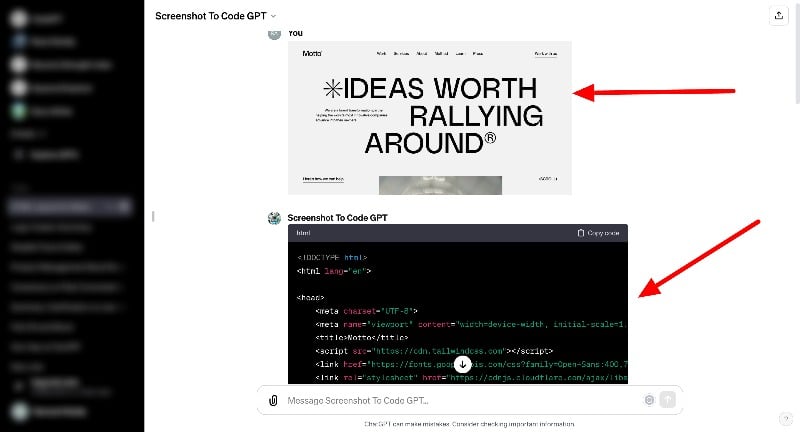
If you are a web developer or a designer, you can use the Screenshot to Code custom GPT to generate web code with a screenshot. The tool turns visual web pages into fully coded pages. By analyzing screenshots, it generates HTML, CSS, and JavaScript for you. You can submit your website designs, Figma designs, or screenshots of the web pages and generate a code. The accuracy is not 100 percent, there are a few things you need to do manually and optimize the code.
You can upload a screenshot of the website or design. The bot will take a few minutes to generate a code for you. You can ask the bot to provide more information and make changes to the code. The bot supports multiple programming languages and you can also ask it to generate code for specific parts of the website. For example: you can ask the bot to generate the code for the navigation menu, the button or anything on the screenshot. You can also make changes to the current website and generate code.
Convert Anything

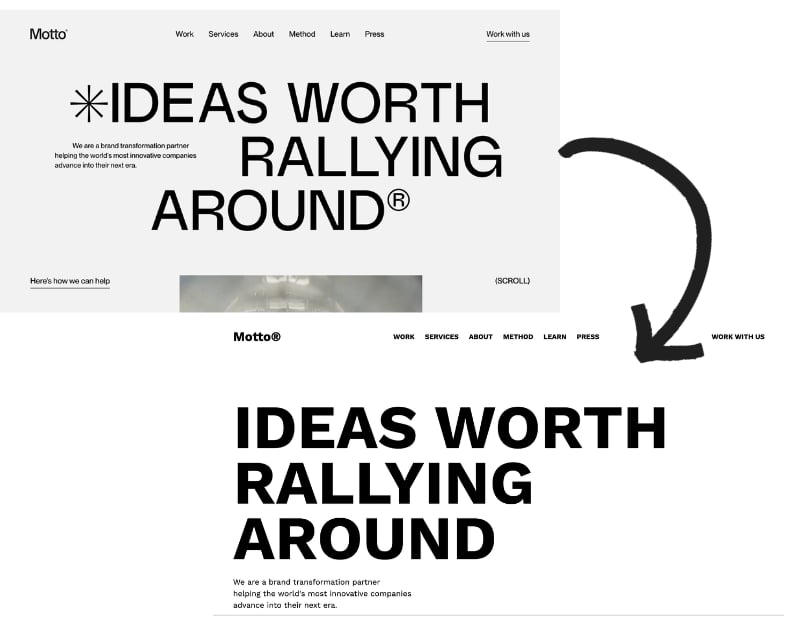
If you use online file converter websites, ConvertAnything is your GPT tool of choice. The tool is helpful for students, professionals, and anyone who needs to convert files quickly. With the tool, you can easily convert files into different formats. Whether it’s documents, images, or audio files, ConvertAnything can convert them all.
You can upload the files to the GPT and specify the desired format. It supports a wide range of formats. The bot can process single files, batch uploads or zipped collections. Once you specify the files and the desired format, ConvertAnything processes them quickly and provides a download link for the converted files. The best part about using this bot to convert files is that you can ask the bot to convert the file to different formats. The bot creates, converts, and generates links for files in different formats without you having to specify the steps.
There is no limit to the number of files you can upload in a single zip file. While there is no set limit, uploading large files can lead to errors as ChatGPT isn’t designed for large files. ConvertAnything is completely free to use. It’s accessible, user-friendly, and a great time-saver for anyone juggling multiple file formats.
Docmaker

If you are a student or academic, you can use Doc Maker custom GPT to create all kinds of documents, presentations, and spreadsheets. Whether it’s diving into research papers or organizing data, Doc Maker helps you generate various documents.
You can generate 1-page documents for short summaries, letters, and more. The custom bot can also create multiple documents by using the “Add” section. You can print the document with an additional action, and the bot can insert an additional section into the document for you.
With the GPT, you can also create presentations (PPTX format) for various purposes, such as business meetings, academic lectures, or personal projects, and spreadsheets (XLSX format) for data analysis, budgeting, project planning, and more. The bot can also help you create professional resumes tailored to your professional goals and experience. If you are a student or professional applying for a job, you can use this bot to customize your resume to meet the requirements of the position.
The bot can generate documents, presentations, spreadsheets and resumes in common formats such as PDF, DOCX, PPTX, XLSX, and CSV. These files can also be exported to Google Drive and OneDrive via aidocmaker.com. The bot can also read files from Google Drive, OneDrive, and other URL-based data sources to collect information or incorporate it into the documents for you. The use of GPT is free of charge. You can access Doc Maker via the “Explore” tab and create professional-quality documents, spreadsheets, and presentations for free.
AI voice Generator
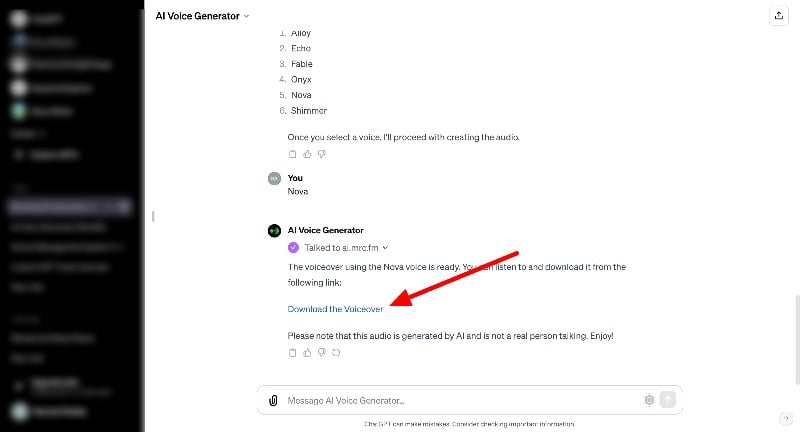
If you are a student or academic, you can use the AI Voice Generator to convert text into audio. You can enter the text in the prompt and it will generate audio for you. The bot offers a variety of voices to choose from, including Alloy, Echo, Fable, Onyx, Nova, and Shimmer.
There is no option to preview the voices beforehand. But each bot has its own sound and style, allowing you to customize your listening experience. Whether it’s a podcast, an audiobook, a scientific paper, or any text, the bot can turn it into spoken word. This is great for auditory learning, presentations, or entertainment.
The best thing about converting speech to text in Chatgpt is the ability to generate scripts or texts instantly with Chatgpt. The bot can also search the internet to find up-to-date information such as news articles or blog posts and speak in a voice of your choice.
Using the bot is simple. You type or paste the text you want to convert; the tool uses advanced AI to create a natural-sounding voice output. You can click on the link to download the voice. The website will redirect you to a voice-over website that you can customize according to your needs. The bot is free to use. You can easily access it, convert text to speech, and improve your learning or professional work at no cost to you.
AI companion

Have you ever thought of having a companion who listens to everything and wants to share everything with you? There are other ways to maintain healthy personal relationships, but having someone you can talk to at any time can be something special. AI companions are becoming more and more popular and AI companion bots are doing the same.
Mia, the AI companion, gives you insight and guidance in your life. You can think of Mia as your voice-controlled AI companion. With Mia, you can dive deep into conversations about your dreams, struggles, and goals. All information is confidential and stays on your ChatGPT account.
To use the GPT, you need to download the Chrome Extension and add it to your extensions. After installing the extension, you can use the ChatGPT prompts to have thoughtful conversations with Mia and explore different aspects of your life. Mia currently supports more than five languages, including English, Chinese, and more.
You can also have voice conversations. You can give voice instructions by tapping the “Talk to Mia” feature. Mia also responds via text and voice output. You can turn off the voice acting, which you should do because the voice is too robotic and it’s a male voice. I mean, we’re used to female voice assistants.
The best thing about it is the chat interface. Similar to messaging platforms, chat interfaces can provide a better experience when you’re talking to Mia. Mia AI is completely free. You can find her on the HeyMia.AI platform, ready to start a transformative journey with you.

What Should I watch?

If you’re someone who loves movies or TV shows, “What should I watch?” custom GPT is your go-to solution for entertainment suggestions. It’s based on your mood, interests, favorite genres, actors, and directors. The GPT can suggest movies and TV shows that you’re likely to like. In addition, the bot also provides up-to-date information on where you can watch the movie, whether it’s streaming on platforms like Netflix, Hulu, or Amazon Prime, or whether it’s available to rent or buy from services like iTunes, Google Play, or YouTube, and more.
The bot also connects to other movie tracking services like Letterbox and suggests movie recommendations for you. The bot can suggest movies and TV shows by genre, such as comedies, thrillers, dramas, romances, horror movies, science fiction or any other genre.
You can also continue the conversation by asking for more information about the movie or show. You can also access short reviews, real-time reviews, sequel stories, story predictions, and fun elements if you’re a movie lover. Interacting with the “What should I watch?” interface is easy too. The bot is free to use.
Techsupport advisor

Techsupport Advisor is a custom chatbot that helps you solve problems with your devices and software. The bot offers step-by-step solutions for simple to complex technical problems. You can ask the GPT model how to fix the printer or how to set up and use your new iPhone and much more.
The bot uses the data provided by OpenAI to help you with solutions. The model has solutions for most problems. However, the model cannot surf the Internet or read local documents.
The technical solutions are based on the knowledge trained until the last update in January 2022. For user-specific or custom data requests, the bot relies on the information you share during your conversation with the bot. Overall, a Tech Support Advisor is the best choice if you want to optimize technical support. The GPT model is free to use. The model only provides support in text format.
Math Mentor

If you’re struggling with math, Math Mentor might be the best choice for you. The GPT is designed to explain math concepts. It provides step-by-step solutions to various math problems. The bot also helps you clear your doubts or questions you have in math.
The GPT model also supports web browsing and the ability to read texts, which can be helpful if you are stuck with a math problem. You can also take a picture and upload it to the model, which will then offer you a simple solution. But that’s not all: the GPT model also supports documents, text-based math problems, and more. The model can also continue the conversation or upload a complete math problem and ask the bot to explain it to you if you are confused at a certain step. The GPT is free to use.
Bot Sous Chef

The next custom ChatGPT model is the Sous chef, which is my favorite. The bots create personalized recipes. If you have a question about a cooking technique or an ingredient. You can specify the ingredients you have and ask the bot to help you cook a specific dish. The bot will give you detailed instructions on how to cook.
When you are satisfied with a dish, the model provides a shopping list you can order on platforms such as Instacart or Amazon Fresh. You can order the ingredients directly on the website. To add to the excitement, you can also generate a picture of the dish and see what it will look like.
The GPT model not only provides an ingredient list and cooking instructions but can also read images and browse links. It can be particularly useful to pull up the ingredient list by looking at a delicious meal online and finding out how to cook the recipe yourself. The accuracy of these steps and ingredient lists will vary depending on the type of food. The GPT model is free to use.
Coloring Book Hero

The Coloring Book Hero, if you want to create coloring books, especially for children. Whether you’re a teacher looking for classroom activities, a parent planning a birthday party, or just having fun coloring, The Bot makes it easy and fun by creating coloring pages from almost any idea you have. It’s a great way to create a storybook.
You can also upload your photos or an entire story and turn them into coloring books. Also, make sure that the coloring pages created with this GPT model are for personal use and not for commercial use. The bot is free to use. You can download the image by clicking on the download button at the top right of each image. You can print the images generated by this bot, create a personal coloring book, and give it as a gift to someone who loves to color.
Related Read: 3 Easy Ways to Edit Images Using ChatGPT
Data Analysis
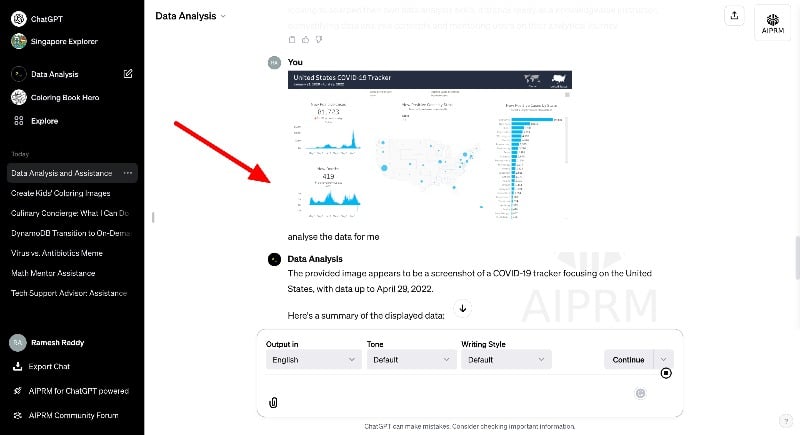
If you are a data analyst or someone who wants to analyze the data. Data analysis custom GPT is the best choice for you. The model helps you create visual representations of data and generate charts and graphs so you can recognize patterns, trends, and outliers.
You can also use the tool to analyze data and extract useful information, identify patterns, or gain insights using natural language processing techniques. The model also provides summaries of large datasets, highlighting key points and important information.
In addition, the custom GPT model can also write and execute Python code to perform complex data analysis and provide insights and recommendations based on the data analysis. The bot is free to use. You can upload the data files and analyze them with simple text prompts.
Resume Builder

Creating a resume can be difficult, especially if you want your resume to sound professional. Most of us seek help from professional resume builders to get feedback on our resume and improve it. With the ChatGPT Resume Builder GPT, you can get feedback on your resume. The best part is that you can ask the bot to suggest changes and also the text to be added to the resume to make it more professional.
You can upload the resume to the bot. The bot supports different file formats. You can upload your CV in PDF or Doc format. The bot analyzes your CV and gives you feedback. This mainly concerns the structure, the way you have structured your CV, what changes you should make and much more. You can also ask the bot and continue the conversion by asking it to suggest the text you want to add to the CV or make other changes. The bot is free to use.
How To Create a Custom GPT

This is the list of the best custom GPTs. You can access these GPTs by tapping on the “Explore” tab on the home screen. Anyone who has a Premium ChatGPT subscription can create their own custom. The best thing about creating custom GPTs on ChatGPT is that you don’t need any technical expertise. You can create models in natural language. Here is a simple step-by-step guide on how to create your custom GPTs. You can sell your custom GPT on the marketplace.
- Visit chat.openai.com and click on explore in the sidebar

- On top, click on the Create a GPT

- You will be taken to the build screen, Here, you can pass the custom instructions to build your own ChatGPT.
- In this case, we are building a custom GPT to recommend the best tourist places in Singapore.
- Based on your prompt, the ChatGPT builder asks you even more questions, such as the name of the chatGPT bot you are building, your profile picture, and more.
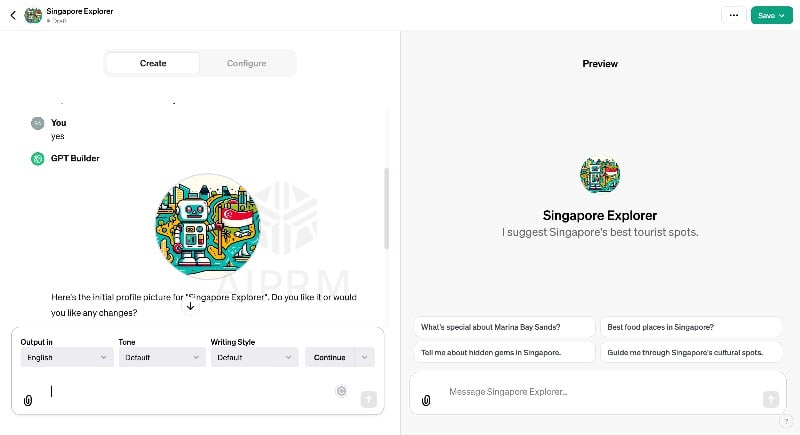
- You can also configure the chatbot to use different GPT models such as Dalle, web, code entrepreneur, and conversation starters, and upload your knowledge to train your custom GPT. Click on the configure tab on the top to configure your chatbot.

- Click on the save to save your custom chatGPT model. You can save the GPT to private or public and share it with anyone with a link.
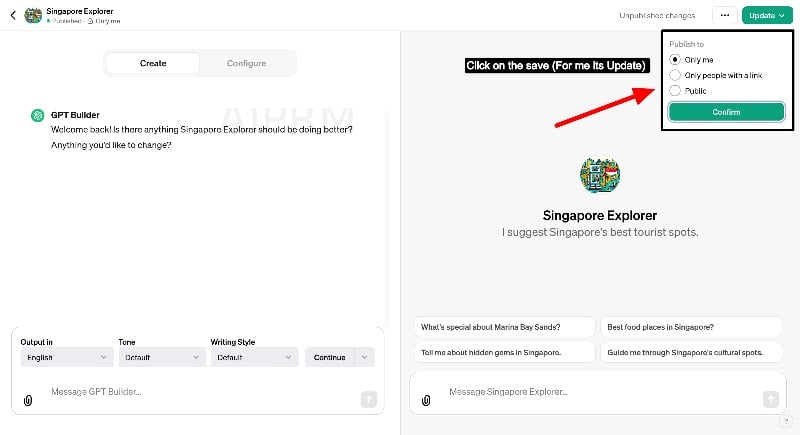
- You can access your custom ChatGPT models from the sidebar on the chat home screen.
FAQs about Best Custom GPTs
1. What is a Custom GPT, and Why is it Important?
With the announcement of the GPT store, Open AI allows anyone to create custom GPTs with simple natural language and publish them to the store. These custom GPT versions are trained with their own data and ChatGPT’s knowledge. These custom GPT versions can add additional features to ChatGPT and can be the next version of the App Store.
2. Can I Build a GPT Without Knowing How to Code?
Yes, you can create a GPT without knowing how to code. You can create a bot by using the graphical interface and training the data with simple human instructions.
3. How Do You Update the GPT Models?
You don’t need to do anything. Currently, there is no way to update the GPTS used from the GPT store. However, if you want to update your own GPT store, click on the “Explore” tab, go to the custom GPT you created, make the desired changes and click on “Update” in the upper right corner of the screen. Your GPT model will now be updated.
4. Are There GPT Models Specific to Certain Industries?
Yes, GPT currently offers individual GPTs in various categories. These include DALLE, Writing, Productivity, Research & Analysis, Programming. Education and Lifestyle. The ChatGPT Store is currently in beta. We can expect more categories in the future.

