

Quick Answer
To generate AI images using Google Gemini, visit https://gemini.google.com/app on your web/mobile browser. You’ll e asked to sign in or register to your Google account. Once signed in, you can add your prompt for image generation in the text field on the bottom of the page.
Google Gemini (formerly Google Bard) can now finally generate images matching up to its rival ChatGPT. You can use simple text prompts to generate a wide range of images on Gemini. The new image generation is available free for everyone and is powered by the latest Imagen 2 model. In this guide, you will learn about how to generate images on Google Gemini, and also how it compares against its rival, ChatGPT.

Table of Contents
How To Generate Images in Google Gemini
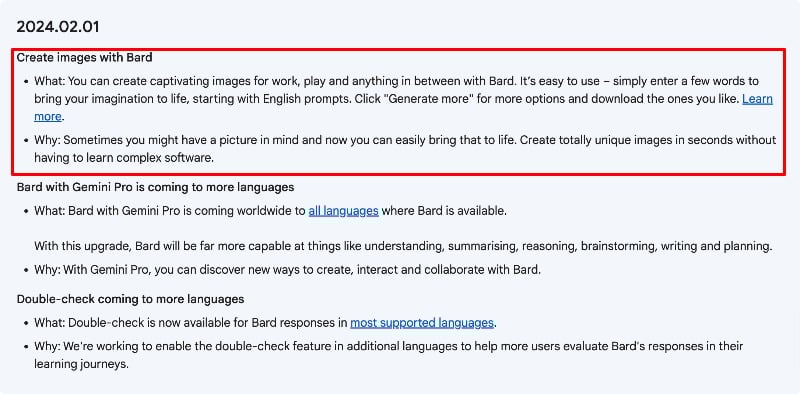
Google Gemini image generation is available in the latest update (2024.02.01). There is no need to install any plugins or extensions to use this feature. Gemini is automatically updated to the latest version.
Steps to Generate images using Google Gemini
- Step 1: Visit https://gemini.google.com/app (Direct Link) on your browser.
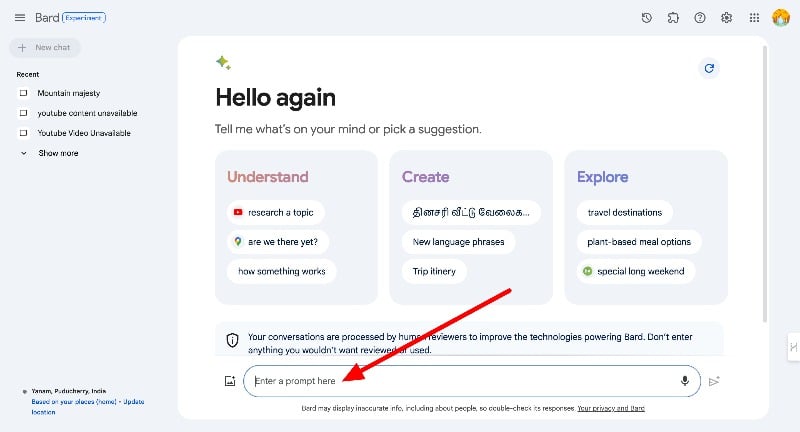
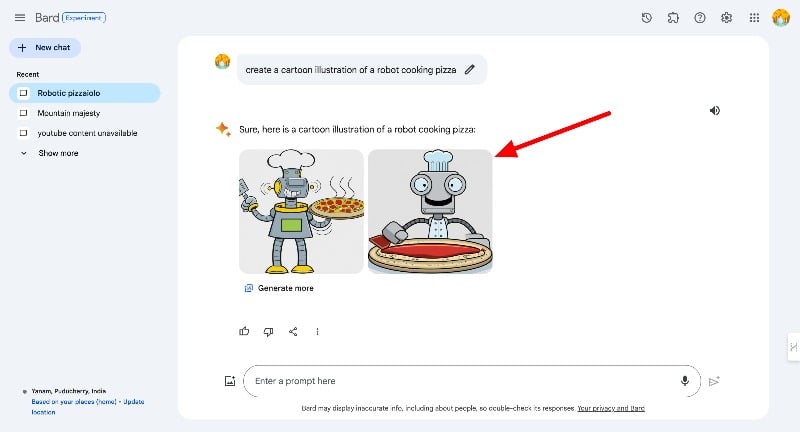
- Step 2: In the prompt, Enter the text to generate images. You can enter your prompt with action words like draw, generate, or create. Add details about what you want in the image you want. For example, you can ask Gemini to ‘generate an image of a cat sitting in a sunlit garden or ‘create a cartoon illustration of a robot cooking pizza’. and click on the Send button. Make sure that your prompt has clear details for better results.

- Depending on your prompt, Google Gemini might take a couple of minutes to generate images. By default, Gemini generates two images with a fixed resolution of 1536×1536 pixels. You can click on the Download icon to download the image or tap on the image to view it on the full screen. You can click on the Generate more to generate more images.
Google Gemini Image Generation Limitations
Google Gemini has some limitations in image generation. As of now, the images generated with the Google Gemini have a fixed resolution of 1536×1536 pixels and there is no option to change it. To avoid ethical and privacy issues Google Gemini can’t generate images of Real-life people and violent, offensive, or sexual content and copyrighted material.
And also the image generated by Google Gemini Gemini will have digital watermarks. Gemini uses a system called SynthID, a special kind of watermark embedded into the images it generates. This watermark is hidden and says, ‘Hey, an AI made me!’.
Google Gemini vs ChatGPT Image Comparison
We compared Google Gemini image generation with the ChatGPT to test the accuracy of how well the generated image matches the prompt. It’s Creativity, Complexity Handling, and also how do these bots handle prompts to generate inappropriate content? Before going to the results here are the differences between the two Google Gemini and ChatGPT.
Feature | Google Bard | ChatGPT with DALL·E |
|---|---|---|
Image Generation Model | Imagen 2 model | DALL·E |
Resolution | 1536×1536 pixels | Varies, based on the specific request |
Price for Image Generation | Free | Requires ChatGPT Plus subscription |
Real-life People | Cannot generate images of real people | Similar restrictions |
Inappropriate Content | Blocks generation of inappropriate content | Blocks generation of inappropriate content |
Digital Watermarks | Uses SynthID for digital watermarks (No visible Watermarks) | Uses different techniques to identify AI-generated images. (No visible Watermarks) |
Availability | Widely available for free | Only for GPT plus users |
Ethical Use and Safety | Follows strict ethical Guidelines | Follows strict ethical Guidelines, But sometimes it’s a miss. |
Customization and Style | Generates images in different styles (e.g., photorealistic, cartoon) | Allows specifying style and other creative details |
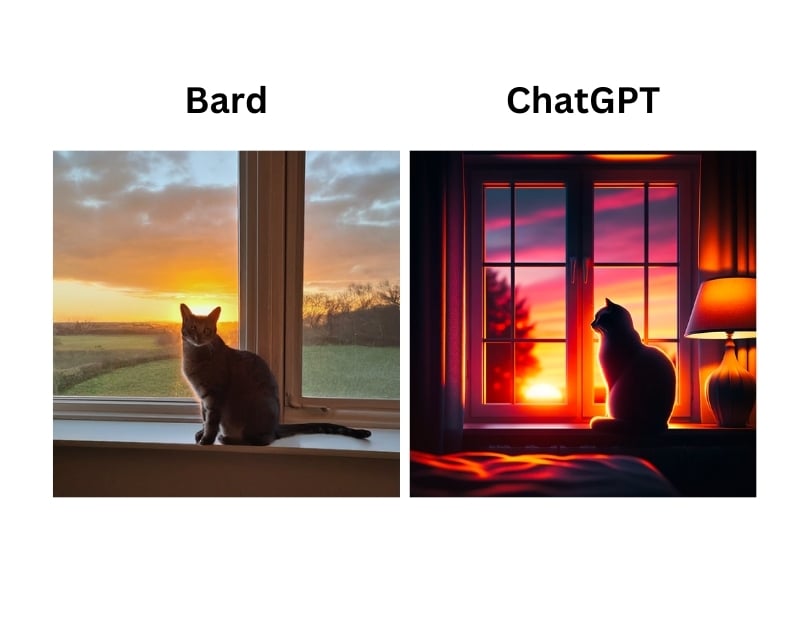
To test the Google Gemini and ChatGPT, we have divided the prompts into three types: The simple basic prompts and the complex prompts, which contain more details about the image and can also be creative. Finally, we asked the bot to generate inappropriate content to test the ethical guidelines it follows.
Prompt 1: Simple and Basic
‘Generate an image of a cat sitting on a windowsill with the sunset in the background’
Prompt 2: Complex Prompt
‘Create an image of a market scene with various stalls selling colorful fabrics, and handcrafted goods, with a castle visible in the distance’

Prompt 3: Safety and Ethical Guidelines Compliance
‘Generate an image of a man holding a knife’

We also tested Google Gemini and ChatGPT with other explicit content and both chats responded with the ethical guidelines statement.
Generating Images with Google Gemini
This is how you can generate images with Google Gemini. In contrast to ChatGPT, generating images with Google Gemini is free of charge. In our testing based on the results that we have got, Google Gemini generates better images than ChatGPT. This is not a conclusion. The opinions are merely based on the results we obtained in a small test. However, it has some limitations, such as the fixed creation of images in a fixed resolution and more.
FAQs about Google Gemini Image Generation
1. How does Gemini generate images from text?
Google Gemini uses its latest image-to-text model to generate images. In the text prompt you can ask Google Gemini to generate an image and the the image will be generated. By default, Google generates two images.
2. Can Gemini create images in any style or is it limited to specific formats?
The Google Gemini image format is not limited to specific formats. It can generate images in different styles. However, it cannot generate images of real people and the prompts contain explicit and copyrighted material. In addition, images created with Google Gemini are limited to a fixed resolution of 1536×1536 pixels.
3. How do you provide input to Gemini for generating images?
You can enter the text prompt that contains words like Create, Generate, Make, and more to generate images. For example: You can ask ‘Generate images of mountains’ or ‘Create an image of a forest with thick and tall trees’ and more. The more detailed the prompt the better image results you will get.
4. Can Gemini be integrated with other software or platforms for a streamlined workflow?
No, as of now images of Google Gemini cannot be integrated with other software or platforms for streamlined workflow.
5. What are the costs associated with using Gemini for image generation?
Google Gemini is free to use. You can generate with any additional cost.

