Telegram is undoubtedly one of the most widely used messaging platforms with a wide range of features. Numerous features and constant new additions have helped it stand out from the crowd. Whenever we think of a messaging platform that gets an overwhelming response, Telegram is the first name that comes to mind.

But have you ever wondered or seen that some accounts suddenly disappear from your feed, or you just can’t message them anymore while chatting? What could be the possible reasons for this? Have they been banned from the platform, removed the app from their device, or decided to deactivate their account? Here’s how you can find out.
Table of Contents
What does it mean to delete a Telegram account?
There are two ways in which a user can delete their Telegram account. One is to uninstall the app, and the other is to deactivate the account completely. In the first step, the user’s account is shown as inactive, but all data is securely retained. In the second case, all personal data, chats, and media are deleted along with the account.
We have described all the possible steps you can take to determine whether the user has simply deleted the account or the app. It is a clear process.
5 Ways to Know if Someone Deleted a Telegram account
Catching a deleted account through “last seen”
If someone has deleted their Telegram application and not the account, then it’s pretty easy to identify it. First of all, open the Telegram app, go to their respective chat, and check the status of “last seen.” If everything, including their account name and profile picture, is visible, and yet their last seen is showing as “last seen a long time ago” then it means that they have deleted their application or are not active for a long time.

Spotting a deleted account from the profile picture
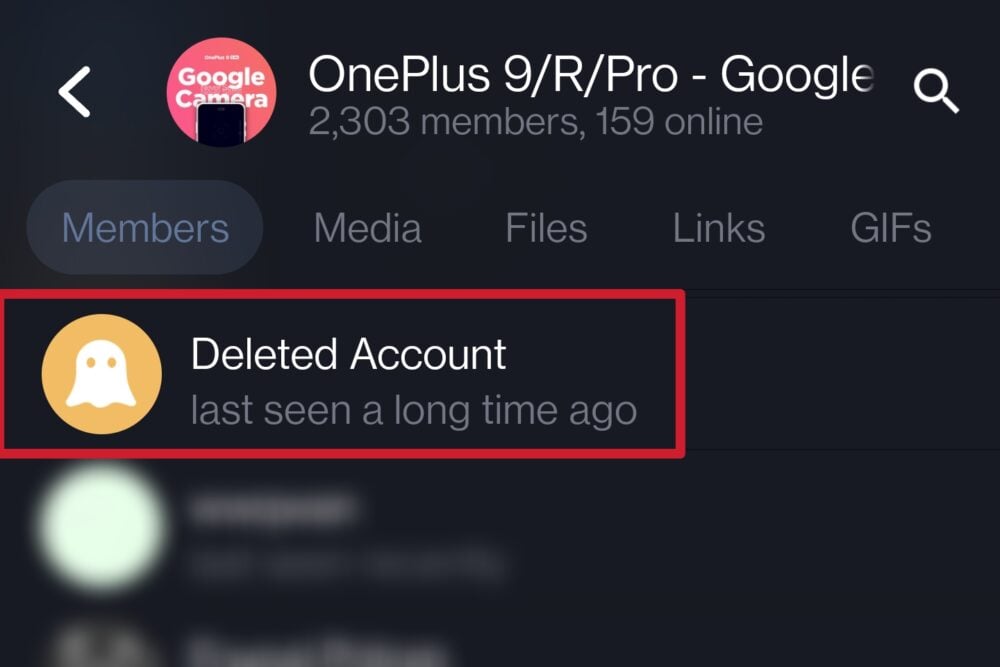
If the person’s profile is deactivated, you can simply go to the user’s chat and check their profile picture. If you see a ghost image there and the username is replaced by “Deleted Account,” this confirms that the following account has been deactivated by the owner.

Inability to send messages to deleted accounts
Moreover, if someone has deleted their Telegram account, then you won’t be able to send any messages to them. However, if they have simply deleted their app and not the account, then you can send the messages without any hurdles. Further, in the case of deactivated accounts, you will get an option to delete chats instead of the chat bar at the bottom. This, too, confirms that the account has been deleted.

Related Read: Two Easy Ways to Delete Telegram Account
Identifying a deleted account through group chat
If you are in a group chat and notice that some previously sent messages are attributed to a deleted account, this means that the person has permanently deleted their account. If you click on the account, a deleted account will appear as a profile picture along with a ghost picture, as mentioned earlier. However, if a group consists of many people, it can be difficult to recognize their messages.
Search result exclusion for deleted and removed account
Last but not least, this is yet another method to identify whether the account has been deleted forever or not. If you search someone’s username on Telegram and it shows “Deleted account” or “No results” in the search result, then it means the searched user has deleted their account from the platform. Moreover, if you can see the account but the last seen is of long time then it means they might have just deleted their app or have not opened it in the recent time.

FAQs about Deleted Telegram Accounts
1. Can one reactivate their account after deleting the account?
No, if you have permanently deleted your account, it is not possible to reactivate it. If you contact the Telegram support team, you may be able to reactivate your account, but this is also very unlikely.
2. Does deleting the Telegram account also clear all the chats and media?
Yes, if you delete your Telegram account, the chats and media of everyone you have been in contact with will also be deleted. In addition, other users will no longer be able to send you chats. They will only be given the option to delete the chat, but nothing else.
3. Is deleting the Telegram app the same as deactivating the account?
The two are different things. Uninstalling the app simply means that the account has not been deactivated, and the user has chosen to delete the account from the app or log out for a while. Deactivating the account, on the other hand, means that it is permanently deleted. No one will then be able to contact the account in any way.