

Emails and OTPs are the most important part of someone’s personal information, which, if compromised, can prove to be pretty fatal for a person’s financial and personal identity. While you can perform various steps to auto-delete OTPs from your phone to safeguard someone else using it for ill purposes, did you know that you can also secure your Gmail account to keep prying eyes away from all your details?
We receive bank statements and personal messages in our email, and we must take certain measures to safeguard them. Gmail is the most used email client across the globe, and it recently added the option to use an animated profile picture. So, in this guide, we will share with you some tips that will help you secure your Gmail account.
Table of Contents
Best Tips to Secure your Gmail account
We have compiled some useful tips that will help you keep your Gmail account secure and avoid personal data loss. Let’s go through each one of the tips in detail, one by one.
Use a strong password
The first thing that you should do is set a strong password for your Gmail account. A strong password doesn’t just mean using a combination of letters, symbols, and numbers, but also the length. To make a defense wall, you should try to have a password that is 16 characters long, including a mix of lowercase letters, numbers, and symbols. Avoid using your date of birth (in letters or numbers), your name, any dictionary words, etc. Moreover, if you have multiple accounts, each one should have a unique and strong password.

Now, the question in your mind would be how you will be able to remember such strong passwords. Well, for that, you can always make use of password managers that store your passwords inside a secure vault. Password managers not only save your passwords and protect them from compromises but also ease the login process by autocompleting and helping you set a strong password by offering you recommendations. Go through our password manager guide, to know more about them and also which is the best one to use.
Turn on 2-step verification
2-Step verification is a nice way to add an extra layer of security to your Gmail account. After the 2FA is set up, you can use your phone and your password to log in to your Gmail account, making it extra difficult for hackers to hack into your account. Here’s how you can turn it on:
- Visit your Google account.
- On the navigation pane, select Security.

- Choose 2-step verification under How you sign in to Google.
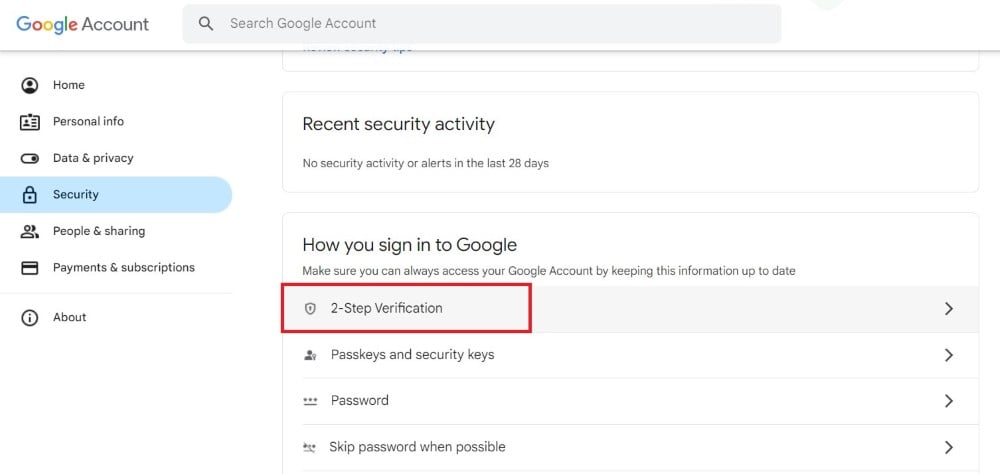
- Select Get Started and follow the on-screen steps to set up 2-step verification.
Also See: How to Sort Gmail by Size
Set up backup contact methods
You might still be using a Gmail account that you created long ago. In those ten years, you might have changed your phone number, abandoned an old email account, etc. It is always a good idea to have a backup contact method set up, which will help you get back your Gmail account in case you get locked out.
Simply head over to this page, and under the section “Ways we can verify it’s you,” select each section, i.e., Recovery phone, Recovery email, and Security question, and update them with the latest information.
Read More: Gmail File Attachment Downloading Problems? Try These 13 Fixes
Manage apps that have access to your Gmail account
We are asked to enter an email address to access certain websites (almost all websites these days). While it could be a necessity to access important websites, you should always remain cautious about which websites are accessing your Gmail account. To remove Gmail account access from websites that you no longer use, you can head over here and click on the service that you don’t use and remove your Gmail account from that website.
Remove extensions that you don’t use
As you install more apps and extensions in your browser, you are given more options to become vulnerable. Even if you are taking all the precautions, if the apps or extensions you are using are not safe, they can give hackers an easy way to steal your data. This is why you should limit the use of apps and extensions or remove unwanted extensions. Besides, if you trust apps and extensions that come from genuine sources.
Prevent opening spam mails
Another way to secure your Gmail account is to avoid opening emails from unknown email addresses. Notably, while it is not possible to avoid every email, what you can do is avoid clicking links from unknown emails. Although Gmail filters emails, it is always better to be extra cautious. Do not open any document that is attached to an email unless it is from a trusted source.
Avoid using public Wi-Fi
You should only use your mobile data connection or trusted Wi-Fi network to access your Gmail account. It would be best if you opted for public Wi-Fi only when you want to handle a task urgently. Unsecure networks can give hackers access to your Gmail easily, and who knows, the public Wi-Fi is set up by hackers themselves.
Stay updated
If you are using Gmail from a web browser, then you should make sure that the browser is up to date. If you use the Gmail app, make sure that you have the latest version. The latest version always brings bug fixes and fixes for vulnerabilities that are fresh and new in the market. You can also use your Gmail login history to check for any suspicious activity. If you see any suspicious activity or a suspicious device logged in with your Gmail account, simply remove it.
Stay safe and secured
There are a lot of other tips that you can follow such as keeping your antivirus updated, your Android phone updated, etc., that will help you secure your Gmail account. If you are getting a prompt that your Gmail storage space is full, then you can apply the solutions in our guide to quickly fix the issue.

