

Quick Answer
To comment anonymously in Facebook groups, the group must allow anonymous posts. You can only comment anonymously on your own posts. Just find your anonymous post, click “comment,” and it will stay anonymous. Only admins, moderators, and Facebook can see your identity. Use the “post anonymously” toggle when creating a new post.
There are times when you can’t afford to lose your anonymity. With social media being pitched as among the most unsafe places online, you can only be cautious enough not to post anything sensitive using your true identity. Thanks to enough instances online, users posting content they shouldn’t have done using their real identity have landed in serious troubles related to their personal and professional lives.

While you can get away with a username that doesn’t reveal anything about you, not all social media apps are built around having a randomly selected username. The best example of this is Facebook. Since most old-school users rock their actual names and profile pictures on Facebook, maintaining anonymity is quintessential, especially in groups where you do not necessarily need to know everyone. Fret not; you can comment anonymously on Facebook groups, and this article outlines how you can do so in the Facebook app and website. Stick along to learn more!
Table of Contents
How to Comment Anonymously on Facebook Groups (Desktop)

To comment anonymously on Facebook Groups via a desktop or PC, here is what you need to do –
- Visit the Facebook website from here.
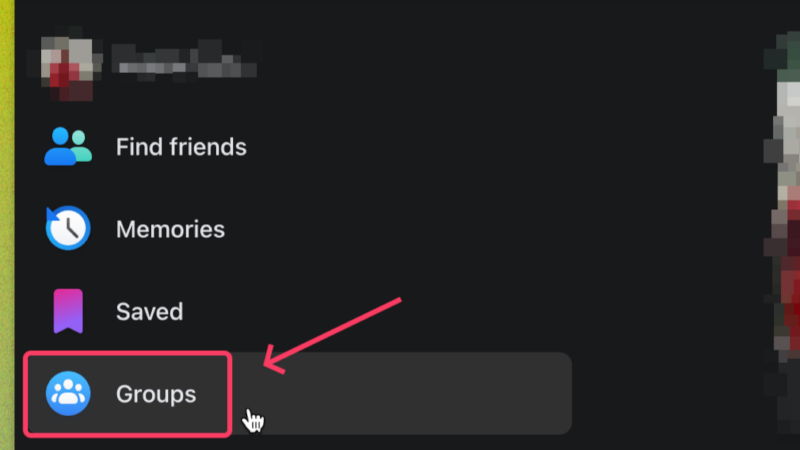
- Select Groups from the left column to access the Facebook groups you are a part of.
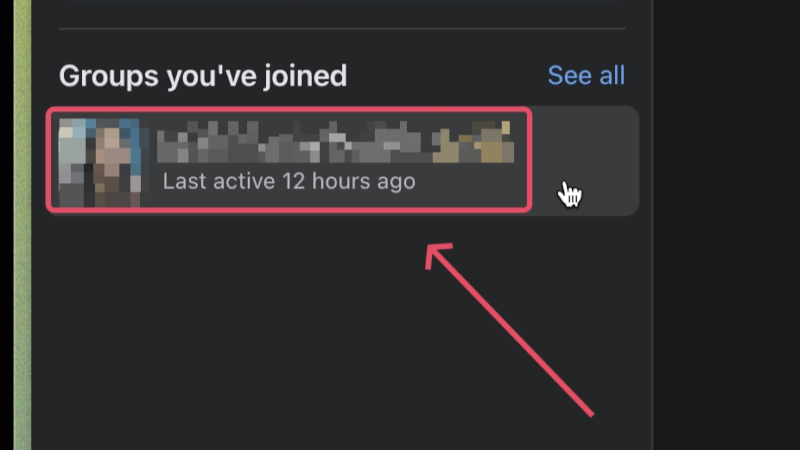
- Under Groups you’ve joined, click on the group you made an anonymous post in and wish to comment under it anonymously.
- Scroll through the group’s feed and find your anonymous post. You can also use the search option in the toolbar to search through your group activity.

- Once you have found your anonymous post, click on the Comment option or the place where it says Write a comment… and start typing your comment.

Image: Reddit
Since you are commenting under your anonymous post, the comment will be automatically registered as anonymous.
How to Comment Anonymously on Facebook Groups (Mobile)
The same rule applies to Facebook’s mobile app, too, for commenting only under your anonymous posts. Here is how you can comment anonymously on Facebook Groups on Facebook’s mobile app –
- Open the Facebook app on your phone.
- Tap on the hamburger menu (☰) and select Groups.
- Open the group with an anonymous post of yours where you wish to comment anonymously.
- Locate your anonymous post, tap on the Comment option under it, and type in your comment. The comment will be automatically flagged as an anonymous comment.

Image credits for the third picture: Make Tech Easier
How to Make an Anonymous Post on Facebook Groups (Desktop)
If you haven’t made an anonymous post in any of the groups you are a part of, you can’t enjoy commenting anonymously. To create an anonymous post on Facebook groups using a Desktop or PC, follow the steps below.
- Visit the Facebook website from here.
- Select Groups from the left column to access the Facebook groups you are a part of.
- Under Groups you’ve joined, click on the group in which you wish to make an anonymous post.
- You should see the option to create a new post right at the beginning of the group feed. Click on Anonymous Post.

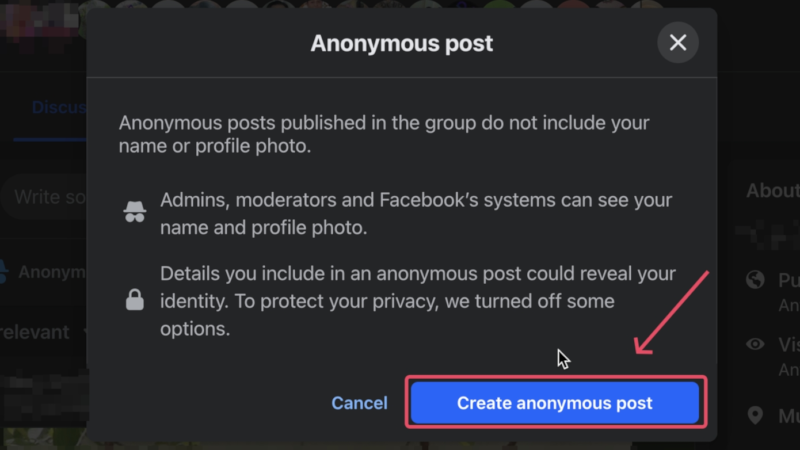
- Read the guidelines and select Create an anonymous post.
- After typing in what you would like to post, ensure that the toggle beside Post anonymously is turned on and click on Submit.
Your post should go live after getting approved by the admin if it’s required by the group you are posting in.
How to Make an Anonymous Post on Facebook Groups (Mobile)
Here is what you need to do to make an anonymous post on Facebook’s mobile app –
- Open the Facebook app on your phone.
- Tap on the hamburger menu (☰) and select Groups.
- Open the group in which you wish to make an anonymous post.
- Tap on the Anonymous Post option and read the guidelines before proceeding.

- Before submitting the post for admin approval, ensure that the toggle beside Post anonymously is turned on.

Things You Should Know About Anonymous Comments
Now that you know how to post anonymous comments, here are a few things you should be aware of –
- Anonymous posts can only be made in groups, not anywhere else.
- Anonymous comments can only be made under your anonymous posts, not anyone else’s.
- Group admins may not allow anonymous posting, so you may be unable to post or comment anonymously in some groups.
- While invisible to other group members, the group’s admins and moderators can view your name and profile picture before they approve your post or comment. This is to ensure the group’s guidelines are being followed.

Image credits: Make Tech Easier - Facebook can also view your anonymous posts and comments to ensure they meet community standards.
- You could lose anonymity if you reveal personal or sensitive information in your posts or comments, so be mindful of what you post. If possible, use made-up names and avoid disclosing specific information.
Comment Anonymously on Facebook Groups is a Challenge
Staying anonymous is an essential part of being on social media. Thankfully, Facebook does allow anonymity to some extent by allowing you to post and comment anonymously. It’s as easy as it gets – just create an anonymous post in a group you are a part of, and the comments you make will also stay anonymous as a whole. While there are a few things you should keep at the back of your head while making an anonymous comment or post, it, for the most part, safeguards your privacy quite effectively.
FAQs about Anonymous Posting on Facebook
Can I post anonymously in any Facebook group?
No, you can only make anonymous posts in the groups you are a part of. Moreover, the group should have anonymous posting enabled by the admins for you to allow doing the same.
Can I comment anonymously under any anonymous post?
No, you cannot comment under others' anonymous posts anonymously. You can only do so under your anonymous posts. The post and comment will be color-matched to let others know the same.
Why isn’t anonymous posting available for me?
If anonymous posting or commenting isn't available for you, it means that the group you are a part of doesn't allow doing so. If you are trying that on the Facebook app, make sure it is running on the latest version. If nothing works, anonymous posting hasn't yet been rolled out for your account.

