

In Summary
- The Xiaomi Pad 7 comes with improved hardware and also a slightly wider design than its predecessors. It also comes with a variant that has a special nano texture display, something that has been seen only on the (way more expensive) iPad Pro in the tablet world.
- As with the Pad 5 and the Pad 6, the tablet not only comes at a very competitive price but is also accompanied by very good and affordable stylus and keyboard accessories.
- At its starting price of Rs 27,999, the Xiaomi Pad 7 is a great option for those who want a tablet that can also slip into the shoes of a notebook without much extra expense. But it faces a lot of competition, most notably from the still-very-good iPad (10th generation)
After a brief fling with notebooks, Xiaomi seems to have put all its eggs into the tablet basket. In the last few years, the brand has been bringing a number of tablets to the Indian market. And the latest in the list is the Xiaomi Pad 7, which, in the best Xiaomi tradition, comes packed with very good specs at a competitive price and also with a number of just as competitively priced accessories to give a productive edge. But will these be enough for it not only to consolidate Xiaomi’s position in the Android tablet market but also to rattle the cage of the mighty iPad?
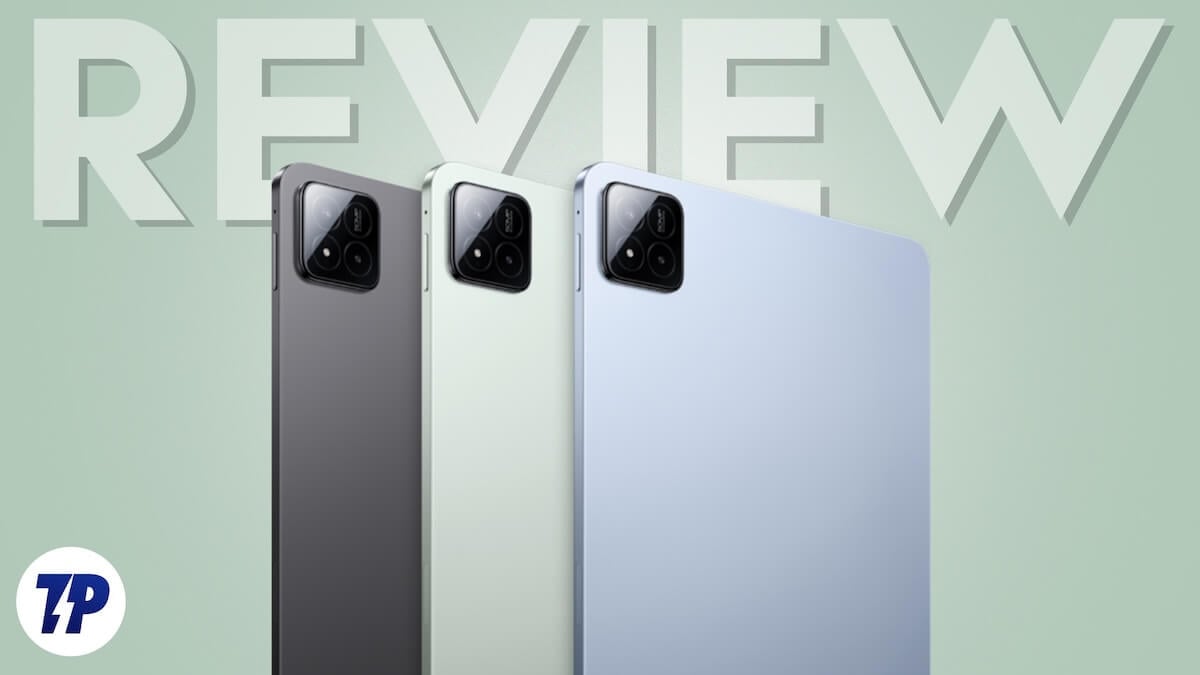
Table of Contents
Xiaomi Pad 13 Design and appearance: Getting squared up for wider application
In terms of design, the Xiaomi Pad 7 might not turn heads at first glance, with its relatively routine flat back with a square camera unit and straight front and sides. However, a closer look will reveal that it has actually moved to a square-ish 3:2 aspect ratio from a more rectangular 16:10 aspect ratio. It is still not as wide as the 4:3 aspect ratio of the iPad (10th Generation), but it is a lot wider than the Xiaomi Pad 6 – 173.4 mm as against 165.2 mm.
In terms of size, the Pad 7 is shorter than the Pad 6, 251.2 mm as against 254 mm, and is also slimmer at 6.2 mm against 6.5 mm, and at 500 grams, is only 10 grams heavier than its predecessor. All in all, you get a tablet with a larger display than its predecessor in a more compact form factor that is just a little heavier.
We got the Mirage Purple variant, which looks grey from a distance but gets shades of purple when viewed from certain angles. The tablet is very sturdily built with Corning Gorilla Glass 3 in front and an aluminum frame and sides. It looks smart and is easy to carry, but it is not really a tablet showstopper.
Xiaomi Pad 7 Tech Specs: Packing in some sensible muscle and a sensational display option

The Xiaomi Pad 7 comes with a spec sheet that is a blend of the premium and mid-segment, a blend that is more suited for solid work than record-breaking benchmarks. And one of its most premium features is its display. Make that “displays,” actually, as the tablet comes with two display options, one which is very good and the other downright sensational (at its price).
The ‘normal’ Xiaomi Pad 7, which we received for review, comes with an impressive 11.2-inch LCD display with a resolution of 2136 x 3200 pixels, a refresh rate of 144 Hz, and a maximum brightness of 800 nits. There is also the option of getting the Xiaomi Pad with a nano texture display, which eliminates most of the reflection and makes the tablet very easy to use even in bright sunlight – a feature that is only seen in the super-premium iPad Pro. We have not used the nano texture display edition of the tablet, but it seems very impressive in demos, although the ‘normal’ display is impressively bright, too. We do not think too many folks actually use their tablets in very brightly lit conditions, but having a nano texture display at this price point is quite an achievement.

The Xiaomi Pad 7 ticks more than adequately other spec boxes, too. The Qualcomm Snapdragon 7+ Gen 3 processor powering it might not come from the flagship Snapdragon 8 series (the Pad 6 had a Snapdragon 870 and the Pad 5 a Snapdragon 860) but is a clear level above the Snapdragon 870 chip on the Xiaomi Pad 6. This is paired with RAM and storage variants of 8 GB/ 128 GB and 12 GB/ 256 GB. While RAM used in both variants is LPDDR5X, the storage in the 8 GB/ 128 GB is UFS 3.1, while the 12 GB/ 256 GB variant gets faster UFS 4.0 – a slightly odd decision, but made to keep the price of the base unit below Rs 30,000, we assume. Incidentally, the nano texture display is available only in the 12 GB/ 256 GB variant, making it pretty much THE spec beast in the lineup.
In camera terms, the Pad 7 comes with a single 13-megapixel rear camera and an 8-megapixel selfie camera, which is placed in the center of the longer side of the tablet. Also on board are quad speakers, support for Dolby Atmos and Hi-Res and Hi-Res Wireless audio, Bluetooth 5.4 connectivity, an infrared port, and Wi-Fi connectivity.
The tablet runs on HyperOS 2 with some tablet-friendly touches on top of Android 15, and keeping it running for a while is the task of an 8,850 mAh battery, which charges at 45W, with a charger in the box, too. All said and done, this is a good spec sheet for the price, although the absence of a fingerprint scanner and 5G are surprising (the Pad 5 and 6 had also missed out on both). Some might be disappointed by the absence of a 3.5 mm audio jack and expandable storage, given that the Redmi Pad Pro launched in 2023 had both, but the Xiaomi Pad 6 had neither of those features, so their absence is not a surprise for us.
Xiaomi Pad 7 keyboard and stylus: Getting into the iPad zone

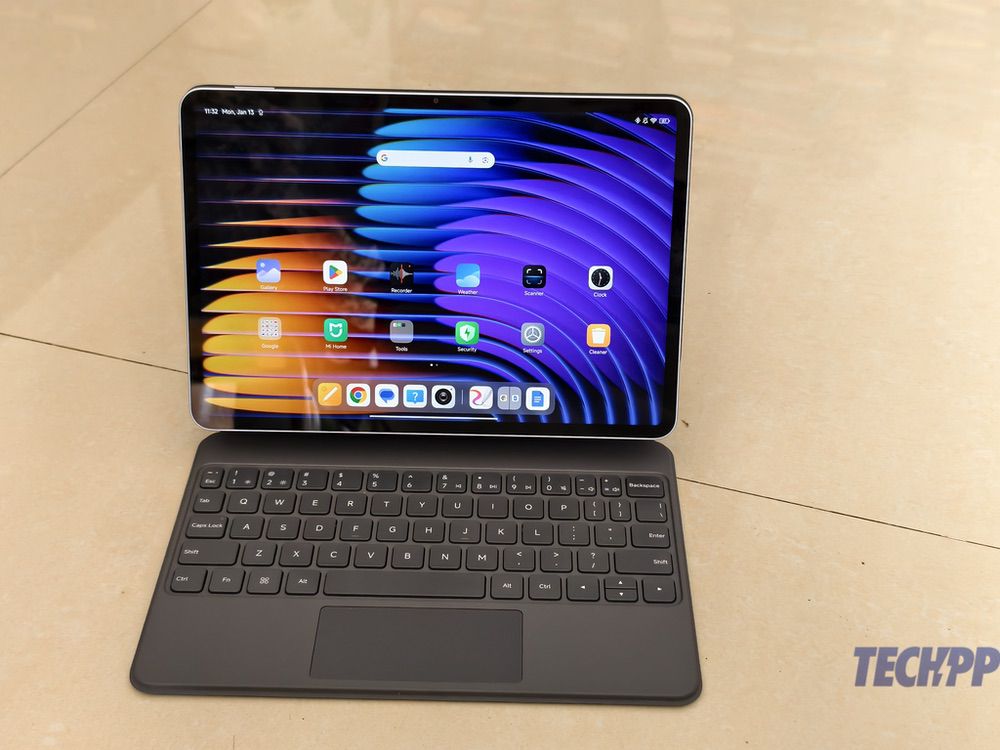
While both the Xiaomi Pad 5 and Pad 6 came with very good stylus and keyboard accessories that could let the tablets be used as makeshift notebooks. These had to be purchased separately but were competitively priced. Xiaomi has taken its productivity accessory game up a notch with the Xiaomi Pad 7, with two keyboard covers (instead of one) and a stylus. Of the two keyboard covers, the Focus Keyboard is easily the more interesting one as it is broadly similar to the Magic Keyboard for the iPad Pro, attaching to the tablet’s back through pogo pins and then letting the tablet ‘float’ above the attached keyboard. You can adjust viewing angles a little, the keyboard is backlit and also has a trackpad. It is heavier than the tablet itself at 589 grams, but it is one of the most innovative keyboards we have seen by an Android tablet manufacturer. Mind you, at Rs 8,999, it is on the expensive side.
Those wanting a keyboard that is lighter to carry physically and also to bear financially can opt for the Xiaomi Pad 7 Keyboard, which is priced at Rs 4,999. It has a single viewing angle and has neither a trackpad nor backlighting, but comes with slightly larger keys and is easier to type on. At 320 grams, it is also relatively lighter. There is also the very versatile Focus Pen stylus, which charges off the side of the tablet (oh, those iPad feels again) and also comes with buttons that let you scroll pages, take screenshots, and even use it as a pointer on the Pad. Of course, it also enables you to draw and write on the tablet to your heart’s content. At Rs 5,999, it is quite a deal for scribblers and sketchers.
Xiaomi Pad 7 performance: A Jack of all tablet trades
The Pad 7, like its predecessors, is marketed not just as a tablet but also as a sub-in for a notebook. And while it performs both roles very well indeed, we think it is at its best as a tablet. The wider display makes it very good to read content on, and while we got the “normal” tablet (not the nano texture one), the display was still impressively bright. It is great to read text and view content on, ranging from films to TV shows. The Snapdragon 7+ Gen 3 chip is not exactly a gaming beast, but tweak the settings a little. Genshin Impact and Call of Duty look wonderful and play smoothly on it, and the very good speakers add to the experience. We were able to run more than a dozen apps and switch easily between them without any problems.
HyperOS 2 on the tablet runs smoothly and comes with very few third-party apps – our unit had Netflix, LinkedIn, and WPS Office. The tablet also comes with some of Xiaomi’s very handy apps, like the very powerful (and seriously underrated) Notes and the stylus-friendly Mi Canvas app. There is also support for split screens and floating windows, as well as a special Workstation mode that lets you use multiple apps on the same screen. It takes a bit of getting used to (you have to tap a set of dots on top of an open app and choose the kind of split-screen arrangement you want), but once you master it, it is great for multitasking. The 144 Hz refresh rate meant we could scroll smoothly without any hitches, and again, the wider display meant more space to view and work with content, although a 12-inch display like the one on the Redmi Pad Pro or the OnePlus Pad 2 would have been even better.
There is some AI wizardry on board, too. You can use Gemini as your default assistant, and there are tools to write, proofread, and summarise notes and mail, as well as change their tone. More features are expected soon, including the ability to create a proper picture from a rough sketch. In a very neat touch, we were able to access our Redmi and Xiaomi phones (we tried the Redmi Note 14 Pro+ and the Xiaomi 14) from the tablet (both devices needed to be logged into the same Xiaomi account) and view content on them and even take calls, which is very handy for those in the Xiaomi ecosystem. That said, we did miss the option of having 5G on the tablet itself, a feature available even on the lower-priced Redmi Pad Pro.
Xiaomi Pad 7 Focus Pen: A good stylus with great battery life

Its wider display also makes the Pad 7 very good for drawing, and the Focus Pen shines in this role. We cannot claim to be anywhere near professional-level artists, but the stylus was impressively sensitive and seemed to have very good palm rejection. Handwriting recognition was very much on point, and again, the slightly square shape of the tablet made it more convenient to write on. We have been told that using the stylus on the nano texture display is an even better experience, with the display giving a feel that’s similar to paper, but we highly recommend the stylus even with the normal display.
The screenshot button and navigation options are very neat, too, and the pointer function can look super cool when you do a presentation on your tablet. The stylus charges off the charging pad on the side of the table,t and its battery life is frankly staggering – we have never had to recharge it once since we started using it more than two weeks ago, and it evidently can go up to 150 hours on a single charge, which makes it great to carry around even without keeping it attached to the tablet (from which it can fall off sometimes).
Xiaomi Pad 7 Focus Keyboard: Adding those notebook feels at a price

We used the Xiaomi Pad 7 with the Magic Keyboard-like Focus Keyboard for more than two weeks, moving the tablet into notebook mode whenever the need to type extensively arose. And our experience was generally a good one. While the Focus Keyboard does make the Pad 7 a lot heavier, it has a very solid feel to it, and the ability to adjust viewing angles easily by just moving the display a little (as you would on a notebook) is a huge plus for anyone who has used a keyboard with a tablet. The slightly elevated tablet also provides a better viewing angle than many of the notebooks we have worked on, as the display is much higher than the keyboard. The keyboard itself is a bit of a mixed bag. While the keys are a little on the smaller side, they have very good travel, and we were able to type at brisk speeds once we got used to the key size. The keys being backlit is very handy in low light conditions, and the fact that the lighting adjusts to the light conditions around you ensures that not too much battery is drained during the process.

There are a few rough edges, though. The trackpad comes with gesture support but is a little too small for us to make the most of it – we actually ended up just reaching out to the tablet to scroll and use gestures. The tablet also ends up being a little too close to the row of number keys right on top of the keyboard, and we often accidentally touched the tablet during our spreadsheet sessions. There was also the occasional case of “ghost key” when a key seemed pressed, and we kept typing out the letter it represented even though we were not touching the keyboard. However, this was resolved by just tapping any key. And unlike the Magic Keyboard, which tends to hit the iPads’ battery, the Focus Keyboard did not seem to have too much of an impact on the battery life of the Pad 7 (we might have lost 30-45 minutes at most).
The big question is: does the Focus Keyboard make the Xiaomi Pad 7 a notebook replacement? Well, if you mainly use your notebook for writing, it definitely does. We would have preferred a larger display and keyboard, a lighter overall package (the Pad 7 and Focus Keyboard together weigh over a kilo), and a lower price tag (you can get very good third-party Bluetooth keyboards at much lower prices), but Xiaomi deserves credit for bringing its own Magic Keyboard variant at a much more affordable price to users. HyperOS is very tablet-friendly now, but those who obsess about security and privacy will miss a fingerprint scanner (there is face unlock, but it is not as secure) – a surprising miss by Xiaomi (and OnePlus, too), given that even basic iPads have the feature.
Xiaomi Pad 7 Pricing: Very competitive indeed…and facing competition

The Xiaomi Pad 7 is available in two RAM and storage variants at these prices:
- 8GB/ 128 GB: Rs 27,999
- 12 GB/ 256 GB: Rs 30,999
You can also get the Pad 7 with a nano-texture display at Rs 32,999 in a single 12 GB / 256 GB display. Given the hype around the nano texture display being similar to the one on the much more expensive iPad Pro, we must confess to finding the tablet featuring it being just Rs 2,000 more than a similarly configured one with a normal display, although we are no experts on component pricing. If anything, the presence of the normal display models seem to detract from the nano texture one, as the price difference between a 12 GB/ 256 GB normal display pad is just Rs 2,000 below that of the nano texture model. This makes the superior display seem similar to a slightly higher RAM/storage version instead of a very significant upgrade that can alter your whole tablet experience, which it can.
The Xiaomi Pad 7 has its hands full as far as competition goes. In fact, one of its closest challengers is its sibling, the Redmi Pad Pro, which comes with a less powerful processor and slower storage and RAM but compensates with a larger (but lower resolution) display, a 3.5 mm audio jack, and expandable storage and even offers 5G connectivity at Rs 26,999.
There is also the Samsung Galaxy Tab S9 FE, which has a smaller display with a lower refresh rate and an Exynos 1380 chip but comes with expandable storage, a bundled S Pen stylus, and even IP68 dust and water resistance at Rs 27,999 (some might even be interested in the larger Plus edition of the tablet, which starts at around Rs 37,999). The OnePlus Pad, with a larger display, a more striking design, a bigger battery with much faster charging, and a decent MediaTek Dimensity 9000 chip, is also retailing now for a price in the vicinity of Rs 31,000. And then there is the still formidable iPad (10th generation), which is now available at Rs 32,000 and also has a number of affordable third-party keyboard and stylus accessories.
Xiaomi Pad 7 Review Verdict: Pad up for this one to play tablet and notebook roles!

It does bring a lot to the tablet table, but unlike its predecessors, the ‘regular’ Xiaomi Pad 7 is not a “no-brainer,” thanks to the very high-profile competition hovering around it. It is, nevertheless, one of the best options for those who want a good Android tablet that can do it all – tab, sketch, type, notebook – without paying too steep a price. Go with a Bluetooth keyboard or the basic keyboard cover (the Focus Keyboard is more cool than useful and is a financial and physical burden) and the Focus Pen, and you have a very good tablet that can also double up as a decent notebook at a price in the region of Rs 40,000. And that is pretty good value for money by any standard.
- Very good display
- Nano texture display option
- Smooth performance
- Tablet-friendly HyperOS 2
- Superb sound
- Works well in notebook mode, too
- Good set of accessories (the stylus is a star)
- No fingerprint scanner
- No 5G variant
- Focus keyboard is heavy (and expensive)
| Design & Appearance |
|
| Software |
|
| Performance |
|
| Keyboard & Stylus |
|
| Price |
|
|
SUMMARY
At its starting price of Rs 27,999, the Xiaomi Pad 7 is a great option for those who want a tablet that can also slip into the shoes of a notebook without much extra expense. But it faces a lot of competition, most notably from the still-very-good iPad (10th generation) |
4.1
|

