

Quick Answer
Nova Launcher is shutting down. If you are looking for the best alternatives, Lawnchair is the best option if you want a clean and pixel-inspired launcher with decent customization options. If you want a fast and lightweight launcher, Hyperion is the one to go for. If you value performance and gesture-driven navigation, Kvaesitso is the best pick. If you want a beginner-friendly launcher that still offers plenty of customization features, Smart Launcher 6 is the best option. Microsoft Launcher is great if you use Microsoft apps, and Octopi is the best for foldable smartphones.
Nova Launcher is a popular and reputable name in the Android launcher world. But its journey is now coming to an end. The launcher was acquired by Branch in 2022 and was then developed by a sole developer. However, in a recent blog post, the founder announced that he is quitting the company and is no longer a part of the Launcher development.
He also revealed that he thought of open-sourcing the app; however, since it was acquired by Branch, he didn’t get permission to do so. As a result, he announced that Nova Launcher development is officially ended, and the Launcher might not receive any future updates, in the worst case, shutting it down completely.
At the time of writing this article, the Nova Launcher website is already down, and it shows a 404 error, meaning the page doesn’t exist anymore; however, the app is still live on the Play Store, and you can download and install but it’s unclear how long the app will remain on the Play Store without an update.
I have been a big fan of Nova Launcher and have even been a prime user in the past. While I don’t use it daily anymore because, as a reviewer, I test smartphone UI, Nova has always been my favorite launcher to date.
If you are still using it and you can continue for now without any issues, however, sooner or later, the app may completely shut down, or it may become outdated and not compatible with the newer Android versions. It is a good idea to start exploring alternatives.
Fortunately, there are plenty of other Nova Launcher alternatives available, and some even better than Nova Launcher, with better animations, faster, and even offering better customization options than Nova Launcher. So, in this guide, you will learn about six such options.
Table of Contents
Best Nova Launcher Alternatives

Sl No | Launcher | Short Description |
|---|---|---|
1 | Smart Launcher 6 | Best option if you want beginner friendly launcher |
2 | Hyperion | Best option if you want fast and light weight launcher |
3 | Lawnchair | Best Alternative to Nova launcher if you want clean Android experience. |
4 | Kvaesitso | Another popular alternative to Nova launcher with gesture-driven navigation and faster performance |
5 | Octopi Launcher | Best launcher for foldable smartphones |
6 | Microsoft Launcher | Best option if you use Microsoft apps |
Smart Launcher 6: New Look With Advanced Customization Options
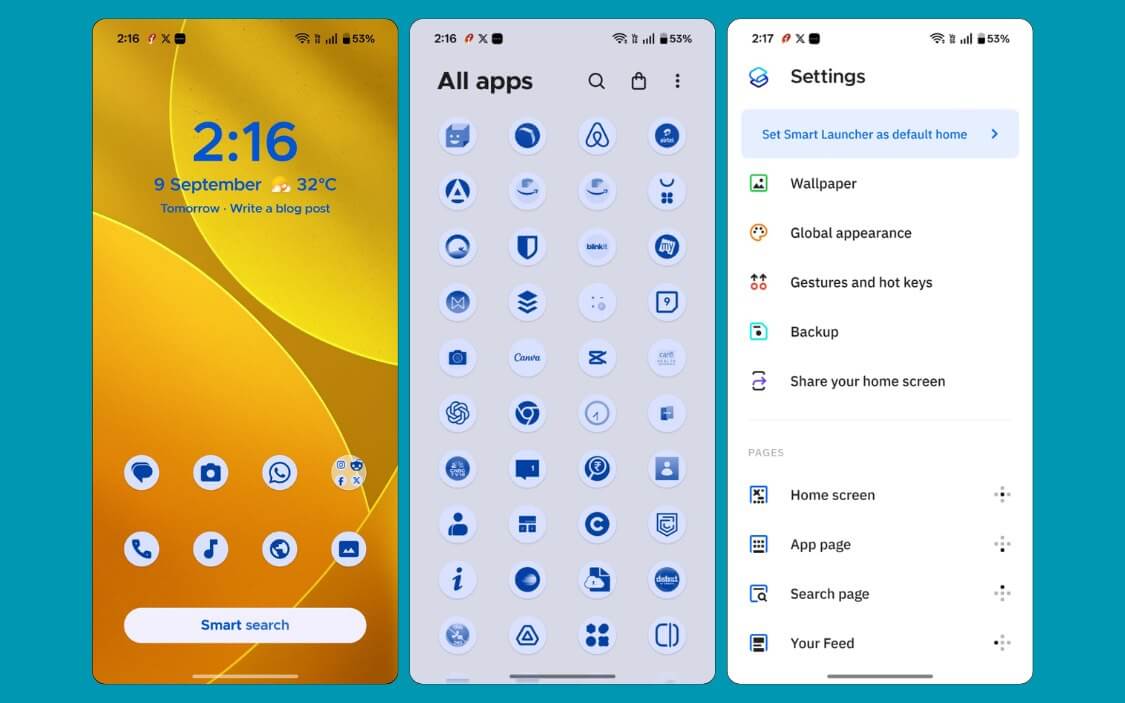
If you want to take a break from the Nova Launcher and want to try something fresh, Smart Launcher 6 is a great option for you. First, it looks very different from the Nova Launcher, with large icons and completely different layouts; however, it is flexible enough to still customize it, making it look like Nova Launcher if you prefer.
Smart Launcher 6 offers all the features similar to Nova Launcher. Most of the settings and complexity are gone with the Smart Launcher 6; everything is streamlined and easy to customize.
You can adjust the icon shapes and size, and even apply the Google Material You theme for the entire launcher. Plus, you can also edit individual page settings, including the ability to set custom grid options, add widgets to the home screen, and even support basic gestures for the free version, making it fairly capable out of the box.
If you want deeper customization options, the pro version unlocks additional customization options such as the ability to set different Shortcuts, add folders to the app drawer, and more.
Pros:
- Feature-rich launcher
- Fast and fluid
- The pop-up widget option is handy for clutter clutter-free experience
- Decent customization features.
Cons:
- Very different from Nova launcher.
- Requires a Pro subscription for advanced features.
Lawnchair Launcher: The Best Alternative to Nova Launcher
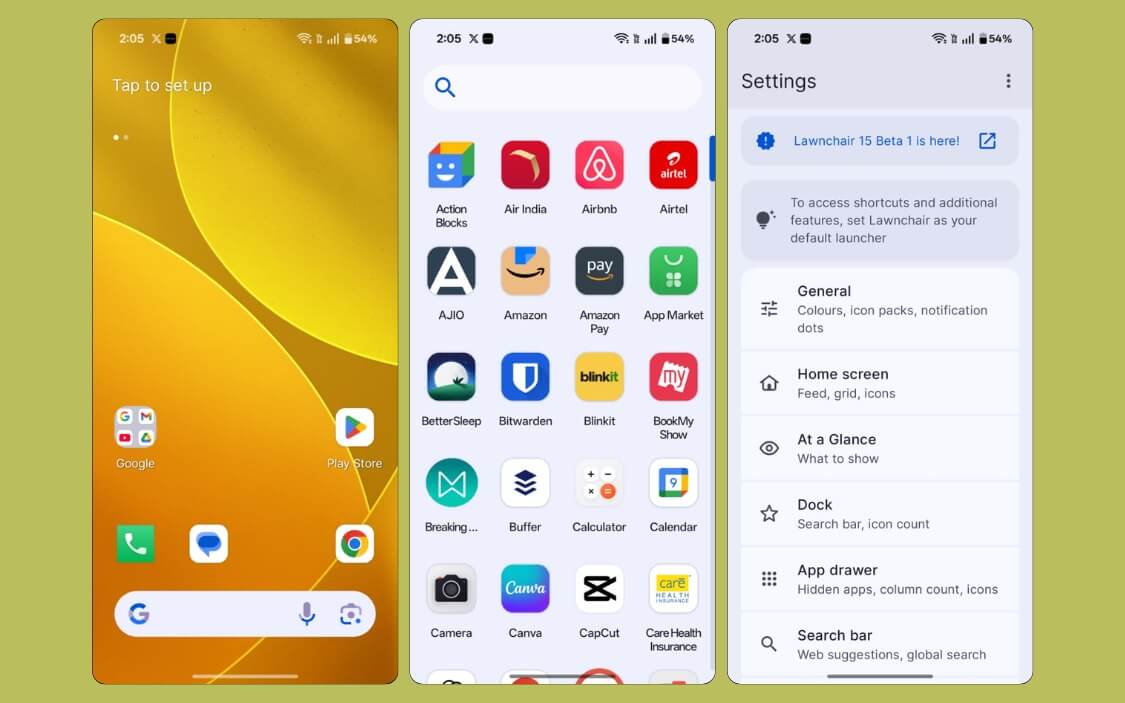
Lawnchair is the best alternative to Nova Launcher if you are looking to get a similar experience. It is the closest alternative to Nova Launcher by offering almost similar look and feel.
The biggest advantage is that it’s open source and free to use. So if you are a Nova Prime, you don’t need to spend on a new launcher again; you can get pro features for free.
If you already use Nova Launcher and want a simple and clean experience, Lawnchair offers a pixel-like experience out of the box. It is also updated with the Material You theme, which is Google’s design language for Android, making it one of the cleanest Android skins in the market.
You also get essentials like drawer and widget support out of the box, and unlike Nova Launcher, you don’t need to tweak any settings since Lawnchair offers a pixel-like experience by default.
The only downside of Lawnchair Launcher is that it doesn’t offer as many highly customizable features as Nova; Nova still leads with more advanced customization features.
However, the Lawnchair is catching up quickly. The recent Lawnchair 15.1 Beta adds most of the customization features that are missing in the previous versions. First, it adds support for gestures. Now, you can assign gestures to open the recent screen and assistants like Google Gemini, which was not available in the previous version.
Version 15 also adds support for app drawer folders and more useful customization options like the ability to set color and corner radius, adding widgets directly onto the dock, and more. The 15.1 is currently in beta, but you can test it out using this link.
Pros:
- Free and open source with no ads
- Closest alternative to the Nova Launcher
- Offers Google Material You design by default.
- Smoother experience
Cons:
- Less customization features compared to Nova launcher.
Hyperion Launcher: For Best Performance
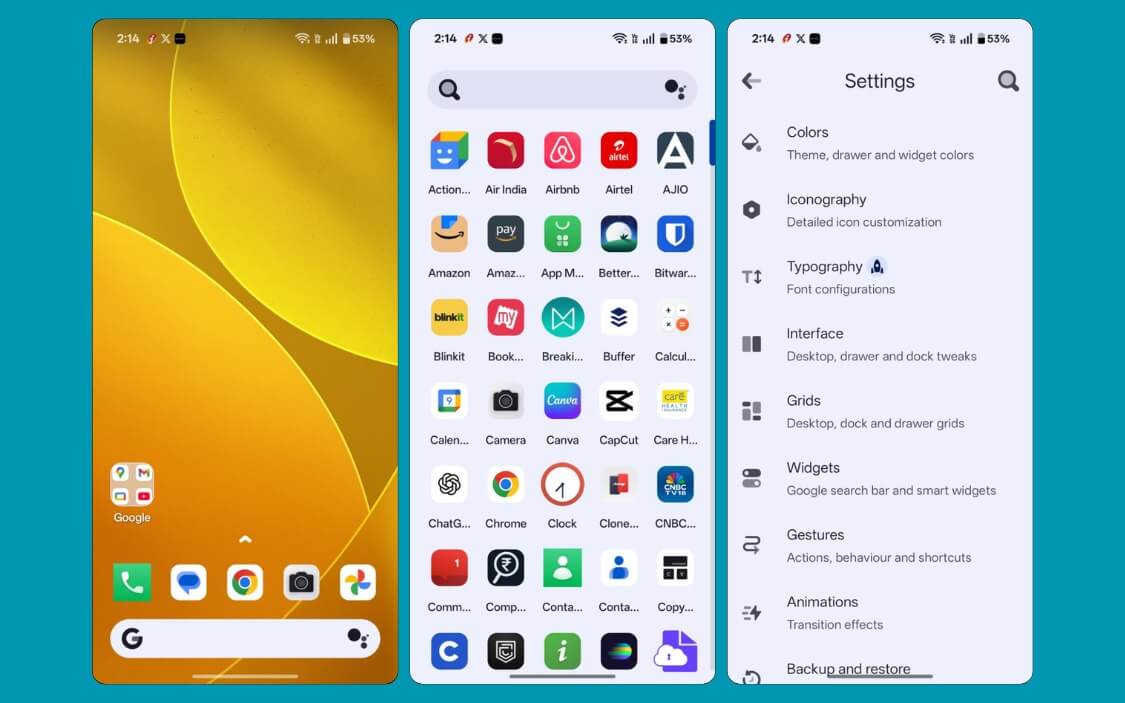
If performance is your top priority, Hyperion Launcher is the one to go for. In fact, it even feels faster than Nova Launcher because of its smooth and fast animation, resulting in an overall smooth experience. Because of this, it also works better on older smartphones with limited resources.
If you are switching from the Nova Launcher, Hyperion Launcher offers enough customization options for you to get a similar experience and a similar-looking interface.
The interface also looks more modern than Nova Launcher by default. However, unlike Lawnchair, Hyperion is not open source, and just like Nova, you need to upgrade to the premium, which is about 2 dollars for the premium upgrade, to unlock features like gestures and font changes.
I also noticed a few bugs and errors while the app was crashing during my usage. Overall, if you want a fast and lightweight launcher that feels smoother than Nova, Hyperion Launcher is the best option.
Pros:
- Offers the best performance
- Great option for entry-level phones.
- Simple and easy to use
- Decent customization features
Cons:
- Not as feature-rich as Nova Launcher.
- A few advanced customization features require a premium.
Kvaesitso: If You Value Performance and Gesture-Driven Navigation
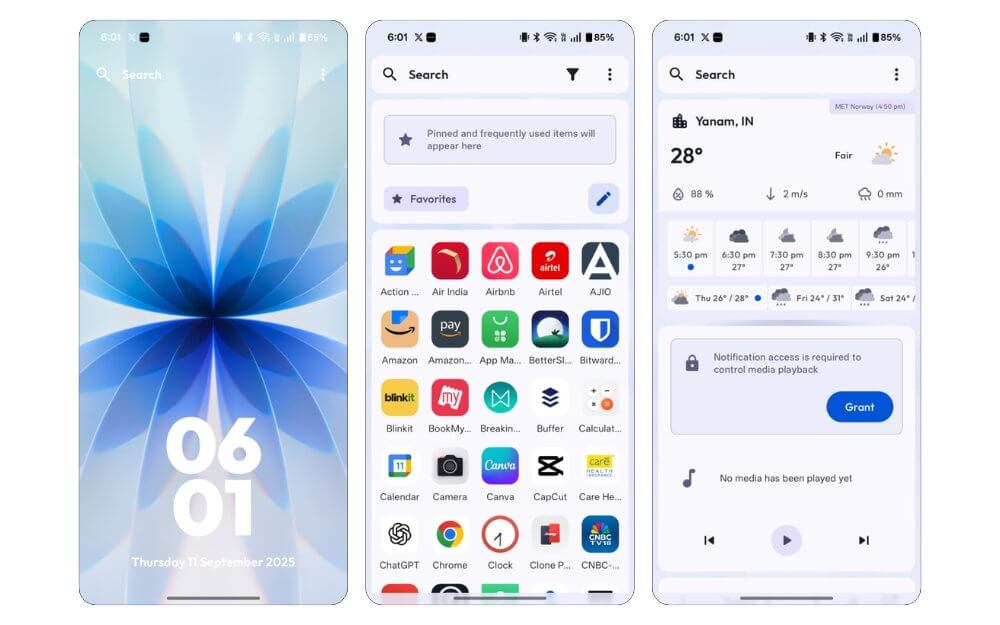
Kvaesitso is the best option if you want if you value performance and customization. However, it is completely different from what Nova and other traditional launchers offer.
Instead of separating the home screen, app drawer, and other screens, Kvaesitso uses a single vertical layout and combines the home screen, widgets, and app drawer, which you can access using simple swipe-up and swipe-down gestures.
Once you get used to the gestures, because of its lightweight design, everything feels faster and instant.
It also comes with powerful customization options. While it doesn’t offer granular customization as Nova, However, it does offer useful options, including the ability to create and add custom labels to the app and organize them, adjust icons’ shape, layout, and more.
Another big plus is that the app is also open source and receives regular updates from the community. However, the app is not available on the Play Store; you need to manually install it from GitHub. I strongly recommend that you download the app from reputable sources since downloading from unverified links could compromise your device security.
Pros
- Fast and fluid
- Decent Customization option
- Single-screen vertical layout feels fresh
- Useful app labels
- Free and open-source with regular updates
Cons
- Requires a learning curve to use the app
- Sometimes shows a black screen when going back to the home screen
- Not available on the Play Store.
Note: If your Google blocks the installation of this app on your device. Go to the Play Store, tap on your profile, then select Google Play Protect. Next, click on the settings icon and turn off Google Play Protect. Now retry installing the app. If you still have any issues, comment below.
Octopi Launcher: Best Nova Launcher Alternative for Foldable Smartphones
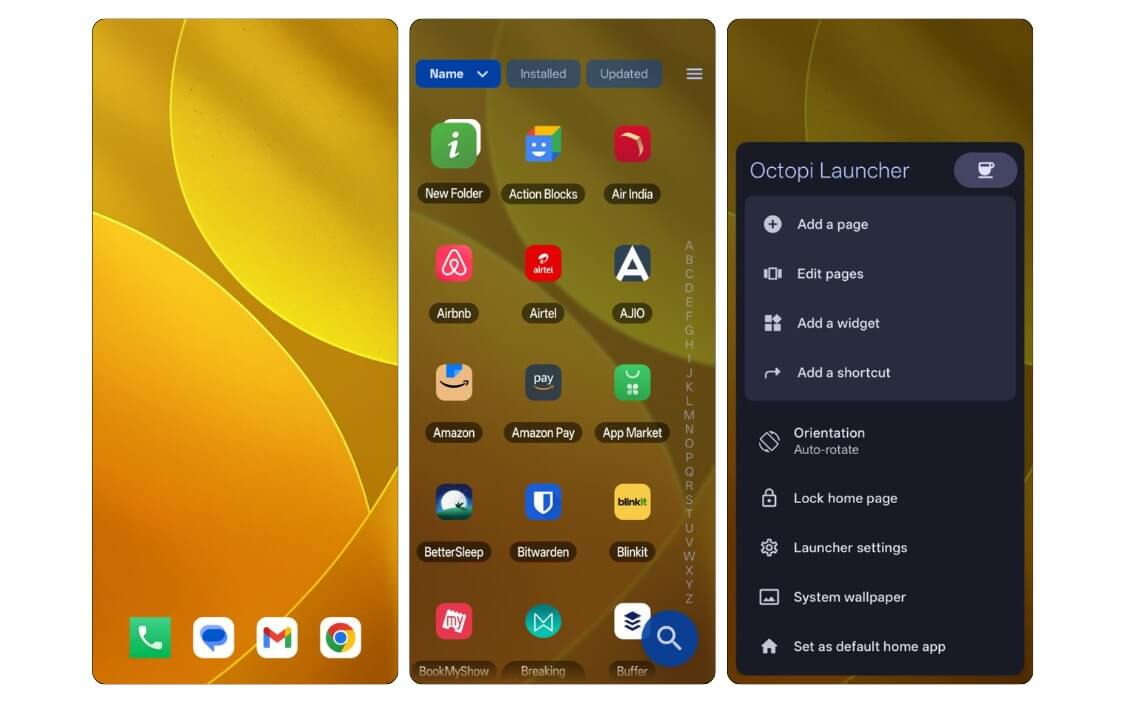
The Octopi wasn’t originally on my list of best alternatives to Nova Launcher, but after seeing it praised on several Reddit threads, I decided to give it a try. Surprisingly, the Launcher is still in beta. So I installed it on my phone, and at first, honestly, I didn’t find it appealing in the beginning, but after digging deeper made sense to me.
First, the biggest USP of this launcher is that it supports different orientations. Octopi lets you create an independent layout. This comes in very handy if you are using a foldable smartphone. You can set two different layouts for the outer and inner screens.
It offers decent customization features to make it closest to making the interface a lot clearer, including removing the dock shadows, adjusting icon sizes and shapes, removing unwanted features, and so all.
It also comes with a few standout features, such as widget stacking, where you can place multiple widgets on top of each other, similar to iOS, and a turbo search feature, which lets you launch the app directly when it matches your search keywords, allowing you to launch the app quickly. It also supports folders for easy organization,
However, since it’s beta, many features are limited; it only offers basic search and limited gesture support.
Pros:
- Best launcher for foldable smartphones
- Offers a smooth and faster experience.
- Useful Customization features.
- Folder support inside the drawer.
Cons:
- Still in beta
- The default setup is not so appealing.
Microsoft Launcher: Free, Reliable Alternative
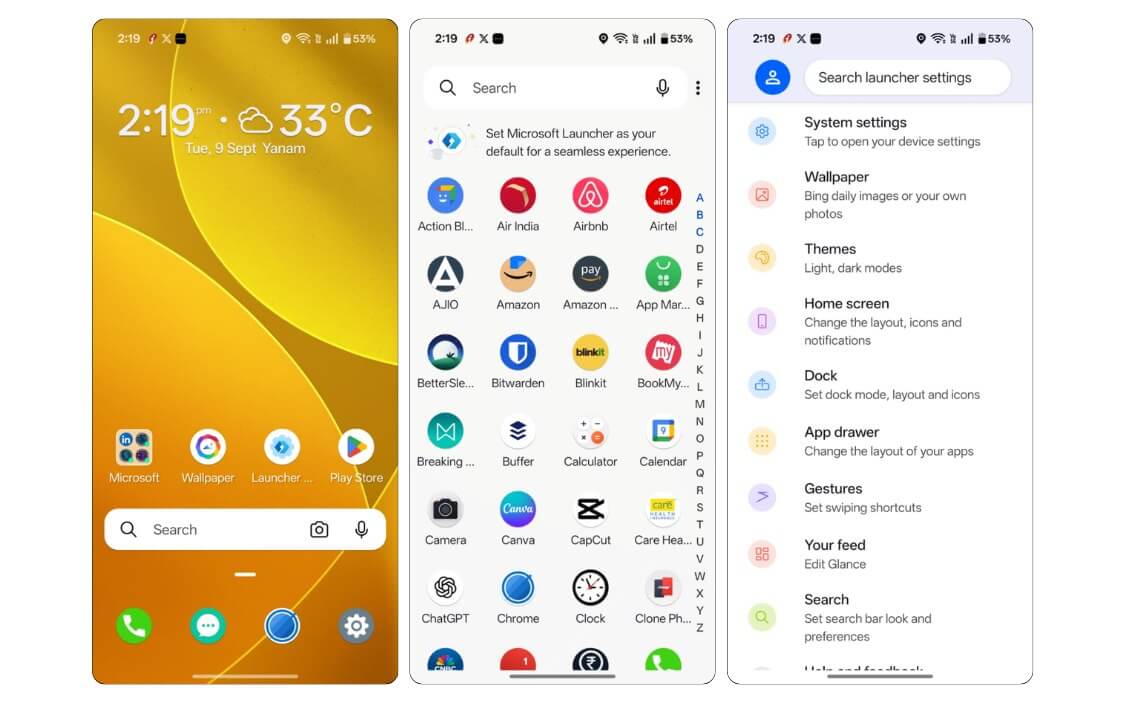
With simple tweaks, Microsoft Launcher can be a solid alternative to Nova Launcher, especially if you are already part of the Microsoft ecosystem.
Since it’s developed by Microsoft, it better integrates with other Microsoft apps. For instance, you can easily share files between your Windows PC and your phone with this launcher, view all your data from apps like Microsoft apps, such as your to-do lists, meeting notes, and calendar events, directly in the launcher feed, creating a mini ecosystem experience.
However, you need to sign in with the same Microsoft account to get these features, and don’t expect it to be a complete Apple ecosystem.
The only downside of Microsoft Launcher is that it comes with a lot of extra features that can make the experience feel cluttered. Fortunately, you do get advanced customizations too, such as being able to change the app icons and size, grid layout, and gesture support, all this for free, but it also comes with unwanted features and options. With the simple setup change,s you can customize it based on your preference.
Pros:
- Free app by Microsoft
- Feature-rich launcher
- Great option if you are already in the Microsoft ecosystem.
Cons:
- You need to customize to get a better experience.
- Fewer organizational features.
Best Alternatives to Nova Launcher
Those are the six best Nova launcher replacements. At the time of writing this article, the app is still live on the Play Store, and it should work on all Android 15 devices without any issues. However, if the development stops, the launch might not be compatible with all future Android versions. Fortunately, you already have the best alternatives to shift if Nova Launcher shuts down.
FAQs about Nova Alternatives
1. Will Nova Launcher Prime users get refunds now that development has ended?
No, since Nova Launcher is still available on the Play Store, users might not get refunds for now
2. Can I transfer my Nova Launcher backup settings to other launchers like Lawnchair or Hyperion?
Currently, there is no option to transfer your Nova launcher settings to other launcher apps. You can manually recreate your setup since most of the Launchers discussed in this post allow you to customize.
3. Which launcher is best for long-term updates and active community support?
Lawnchair, Microsoft Launcher are the two best reliable alternatives and are also updated regularly
4. Do these Nova Launcher alternatives support third-party icon packs and themes?
Yes, most of them support third-party app icon packs. You can go to settings and apply the app icons of your choice
5. Are there any lightweight launchers under 10MB for very low-end Android phones?
Except for Microsoft Launcher and Smart Launcher 6, all other launcher apps should work on low-end Android phones without any issues.

