

Quick Answer
There are plenty of Android launcher apps. After using them, My top picks are, Smart Launcher 6 is the overall best launcher with a clean, efficient, and easy-to-use design. Action Launcher for customization, Niagara for those who prefer a lightweight and minimalistic design. Microsoft Launcher for productivity users with its AI Copilot integration. Additionally, ARC Launcher is for gaming, and Minimalist Launcher is for a minimalistic user interface.
A launcher is an integral part of the Android user interface. It allows you to launch apps, view widgets, customize your home screen, and carry out a range of other tasks easily.

However, the default launcher, which comes as part of the Android skin on most Android smartphones, may not suit you, especially if you enjoy customizing your phone.
In that context, it’s wise to use third-party Android launchers. Simply put, a third-party launcher is an app that replaces the home screen of your Android phone and lets you customize its appearance and behavior without permanently changing the operating system’s behavior.
Below are our picks for the best Android launchers you can use to personalize your Android experience.
Table of Contents
10 Best Android launchers
Sl No | Launcher Name | Best For | Key Features |
|---|---|---|---|
1 | Smart Launcher 6 | Best Overall Launcher | Clean interface, smart app sorting, ultra-immersive mode |
2 | Nova Launcher | Offers Best Customization Features | Custom icon packs, smooth animations, subgrid positioning |
3 | Action Launcher | Most Customizable Launcher | Google Discover, shutters, covers, quick theme |
4 | Niagara Launcher | Best Lightweight Launcher | One-handed use, wave alphabet scrolling, minimal design |
5 | Microsoft Launcher | Best for Productivity | Microsoft services integration, Bing wallpapers, landscape mode |
6 | ARC Gaming Launcher | Top Choice for Gamers | Themes, resource management, quick toggles, system monitoring |
7 | Minimalist Launcher | Perfect for Minimalism Enthusiasts | Simple interface, limited home screen apps, battery widgets |
8 | Square Launcher | Highly Customizable and User-Friendly | Customizable tiles, 3D-style tiles, smooth performance |
9 | AIO Launcher | Best for Information Access | Utilizes screen space for important info, no flashy animations |
10 | BIG Launcher | Ideal for Seniors and Vision Impaired Users | Enlarged UI elements, high contrast color scheme, SOS features |
Smart Launcher 6 – Overall Android Launcher
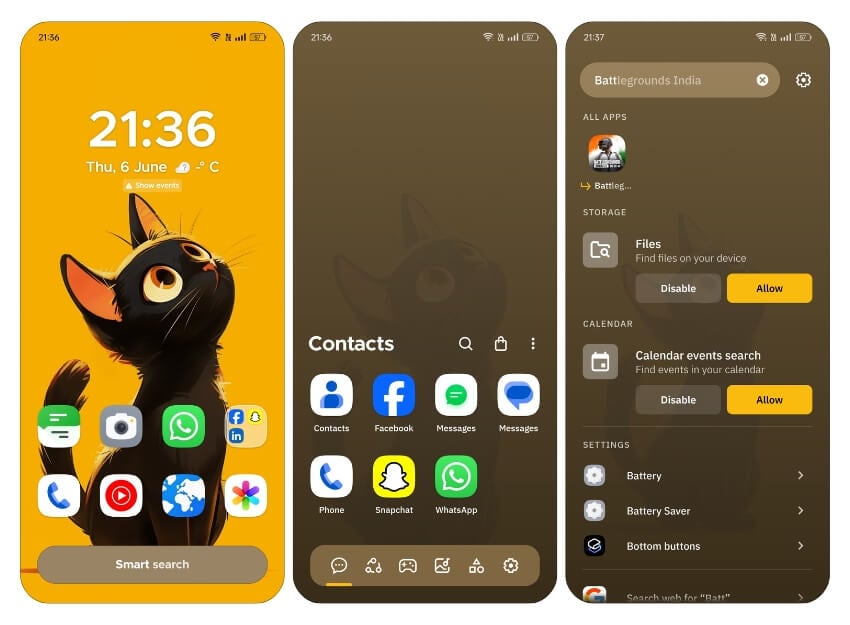
Highlights:
- Price: Free with in-app purchases.
- Key Features: Clean interface, smart app sorting, ultra-immersive mode, gesture, and hotkey configuration.
- Customization Options: Fonts, themes, app drawers, app icons, widgets.
Smart Launcher 6 is one of the current favorites among Android users. It features a pretty clean and straightforward interface that puts all the items you need to interact with more often at the bottom so you can access them quickly and perform day-to-day tasks efficiently.
However, that’s not to say that Smart Launcher 6 lacks functionality. On the contrary, it packs several customization features to help you personalize different elements of your device’s UI, everything from fonts and themes to app drawers, app icons, and widgets. You can also configure gestures and hotkeys to simplify different operations.
Regarding advanced features, Smart Launcher 6 offers an automatic app sorting feature, which keeps your apps organized into categories to save you the hassle of doing it manually. It also has an ultra-immersive mode that maximizes the screen space by hiding the navigation bar.
Similarly, the launcher includes smart search functionality that makes it easier to quickly find items (contacts and apps) or perform various operations, including searching the web. No wonder many people consider it the best launcher for Android.
Bottom Line: Ideal for users looking for a clean, efficient, and easy-to-use launcher with smart app sorting and immersive mode. Perfect for everyday tasks.
Nova Launcher – Simple and Offers Best Customization Features

Highlights:
- Price: Free; Prime version available for $4.99
- Key Features: Custom icon packs, smooth animations, subgrid positioning, backup and restore functionality
- Customization Options: Layout, icons, gestures, animations, themes
Nova Launcher is synonymous with Android customization. It’s one of those launchers that offers you complete control over the appearance and behavior of various UI elements so you can personalize them to your style. Considering its high compatibility, Nova Launcher is the best launcher for Android if you’re into custom icon packs.
Despite being feature-rich, Nova Launcher is still user-friendly and fluid. Animations feel smooth and snappy, even on older Android devices, and settings for different customization options are also easy to find. Plus, if you ever need to switch phones, you have the backup and restore functionality, making migrating your home screen setup and launcher settings much more effortless.
Its subgrid positioning system sets Nova apart from other launchers by giving you precise control over the arrangement of icons and home screen widgets. Besides, suppose you’d like to unlock Nova’s full potential. In that case, you can upgrade to Nova Launcher Prime to get features such as advanced gesture options, app drawer groups, custom icon swipe gestures, and the ability to hide apps from the drawer.
Bottom Line: Great for customization enthusiasts who want full control over their device’s appearance and behavior. Excellent for those who love tweaking their setup. I would suggest to opt for premium for even more better experience.
Action Launcher – Highly Customizable Launcher
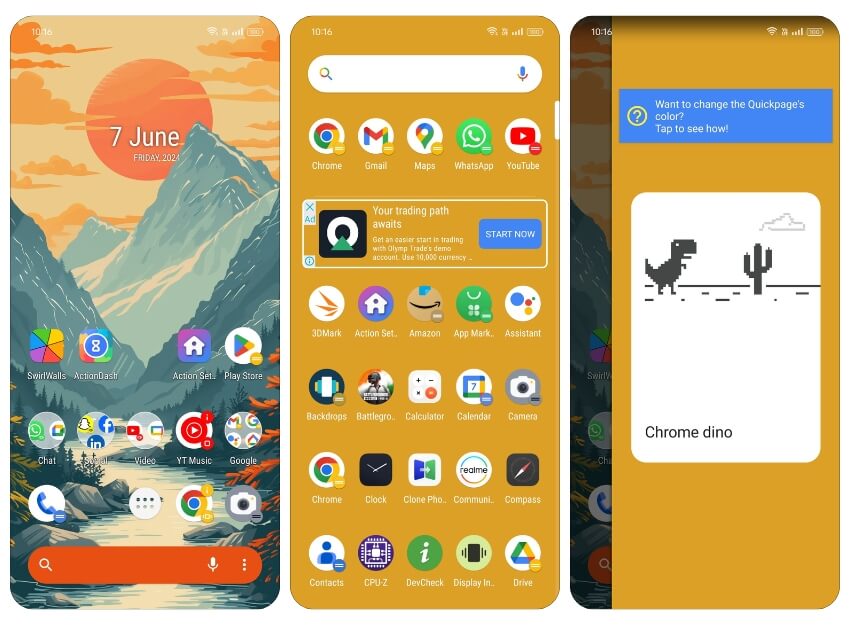
Highlights:
- Price: Free with in-app purchases
- Key Features: Google Discover integration, shutters, covers, quick theme, smart-size icons
- Customization Options: Dock search bar, app icons, folders, gestures
Action Launcher is one of the highly customizable Android launchers on this list. It includes all the basic Android launcher features, from gestures to the drawer, home screen, or dock customization. In addition, it adds plenty of additional features to help you personalize your Android device at a granular level.
Some of Action Launcher’s popular features include app shortcuts, Google Discover integration, smart-size icons, adaptive icons, shutters, covers, and a quick theme. The shutters feature reveals an app’s widget when you swipe on its shortcut to help you preview your inbox, while the covers feature allows you to load apps, open hidden folders, and do more using simple tap and swipe gesture controls.
As for personalizing the appearance, although the options with Action Launcher are not as extensive as Nova, you can customize the look of the dock search bar, app icons, and folders. Plus, adding the quick theme feature ensures that it automatically adjusts the color of home screen elements by matching them with the colors in your wallpaper.
Bottom Line: Best for users looking for deep customization with unique features like shutters and covers. Suitable for those who enjoy a highly personalized interface.
Niagara Launcher – Best Lightweight Android Launcher
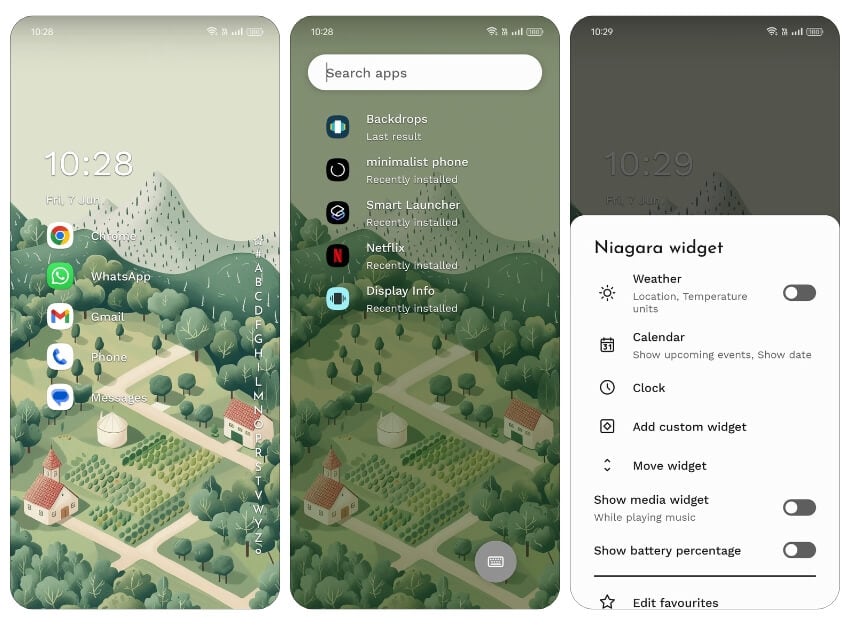
Highlights:
- Price: Free with in-app purchases
- Key Features: One-handed use, wave alphabet scrolling, minimal design, hide bloatware
- Customization Options: App icons, widgets, wallpapers, fonts
Niagara Launcher is another lightweight and minimalist Android launcher. This minimal design is the biggest highlight of the launcher, as it makes different elements on the home screen easily accessible with one hand. So, if you’re using an Android device with a large screen, Niagara can improve its usability and make it easier to access apps and other elements on the screen.
Regarding easy app accessibility, Niagara Launcher also offers wave alphabet scrolling, which lets you scroll through the list of apps by simply dragging your finger over the alphabet list. Similarly, when an incoming message or alert is displayed, its notification pops up automatically so you can access it easily. This approach results in a pretty fluid experience on your device with no lags or jitters in animations/transitions.
Besides, Niagara Launcher gets you all the essential personalization features as any other launcher app to help you personalize app icons, widgets, wallpapers, fonts, etc. You can also choose to hide bloatware/pre-installed apps to declutter your home screen and bring to focus items that matter more. You can get quicker and easier access to your favorite apps. Plus, the app drawer is sorted alphabetically for quick and easy navigation.
Bottom Line: Perfect for users who prefer a minimalistic and lightweight launcher that enhances one-handed use and quick access to apps. Ideal for large-screen devices.
Microsoft Launcher – Best Productivity Launcher

Highlights:
- Price: Free
- Key Features: Integration with Microsoft services, customizable app icons, Bing daily wallpapers, landscape mode
- Customization Options: App icons, themes, widgets, wallpapers
Microsoft Launcher is a productivity-focused Android launcher that puts all your calendar events, to-dos, and notes on the home screen, so you always have things on your schedule right in front of you. If you’re highly dependent on Microsoft accounts (or services) for your work or personal use, this is the best launcher to maximize your device’s functionality.
Similarly, if you use Windows and have configured your news feed with selected resources, you can install Microsoft Launcher on your Android device to get the same news feed. Another exciting feature of the launcher is the ability to use your device in landscape mode.
As for customization options, with Microsoft Launcher, you can customize app icons on your home screen, choose between light and dark themes, and automatically set wallpapers from Bing every day. Plus, you can customize widgets to have a single scrollable page dedicated to all your widgets—instead of a setup where you have them spread out over multiple pages—to improve accessibility.
Bottom Line: Optimal for users who rely on Microsoft services and need a productivity-focused launcher. Great for those who want seamless integration with their work tools. Completely free.
ARC Launcher: Best Choice for Gamers

Highlights:
- Price: Free with ads
- Key Features: Themes, resource management, quick toggles, system monitoring
- Customization Options: Home screen themes, game folders, system toggles
If you are looking for a gaming launcher, ARC Launcher is the best option. The design is built with gamers in mind. It comes with support for different themes that are free to add in case you don’t like the default offering. You can add your favorite games to the home screen for quick access, manage and optimize RAM and CPU, view how many resources are being used by the system, and more.
One of the useful features of the launcher is access to quick toggles like power saver, torch, and more and the app’s ability to display quick toggle information on the home screen, so you don’t need to scroll down to see which WiFi network you are connected to.
However, the biggest downside is the ads. They immediately appear after performing specific actions, such as changing any launcher settings or customizing any elements on the screen, and they occasionally appear when using the phone normally. This can be fine but still frustrating when the ads appear frequently.
Bottom Line: Tailored for gamers looking for quick access to games, system optimization, and gaming-themed customization. Expect some ads but great for quick access to the tools and manage system resources.
Minimalist Launcher: Perfect for Minimalism Enthusiasts
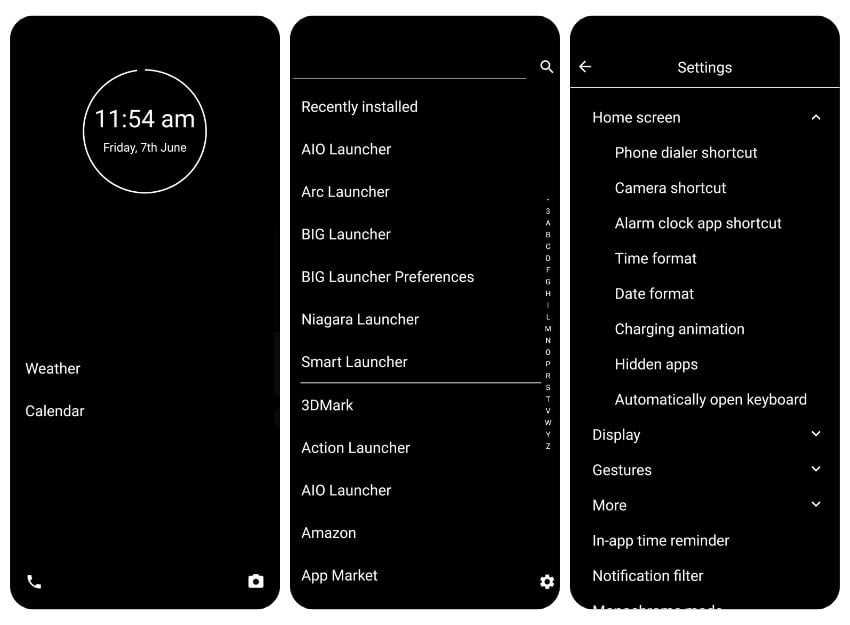
Highlights:
- Price: Free with in-app purchases
- Key Features: Simple interface, limited home screen apps, battery and widget features
- Customization Options: Color options, battery widgets, app shortcuts
Minimalist Launcher is the best option if you are looking for a simple and clutter-free experience. If you haven’t heard of minimalism, it is the art of keeping things simple and focussing on important aspects.
Over the years, smartphones have become major distractions, with most launchers focusing on how many features they can offer. However, Minimalist Launcher focuses on a few features, so much so that you can only add two apps to the home screen in the free version. This limitation is turned into a feature.
Does it affect performance and usability? It depends on how you use the smartphone. There isn’t any issue accessing all the apps by swiping up to the right. It just adds friction, which is the whole concept of the theme. It comes with different color options; for the best experience, choose white or solid black. The battery and widget features allow you to view battery percentage and more.
Bottom Line: Ideal for users seeking a simple, distraction-free launcher with essential features. Best for those who want a digital detox and minimal app clutter.
Square Launcher: Best for Windows Phone Fans
Highlights:
- Price: Free with in-app purchases
- Key Features: Customizable tiles, 3D-style tiles, smooth performance, high level of customization
- Customization Options: Tiles, icons, widgets, tile sizes, colors
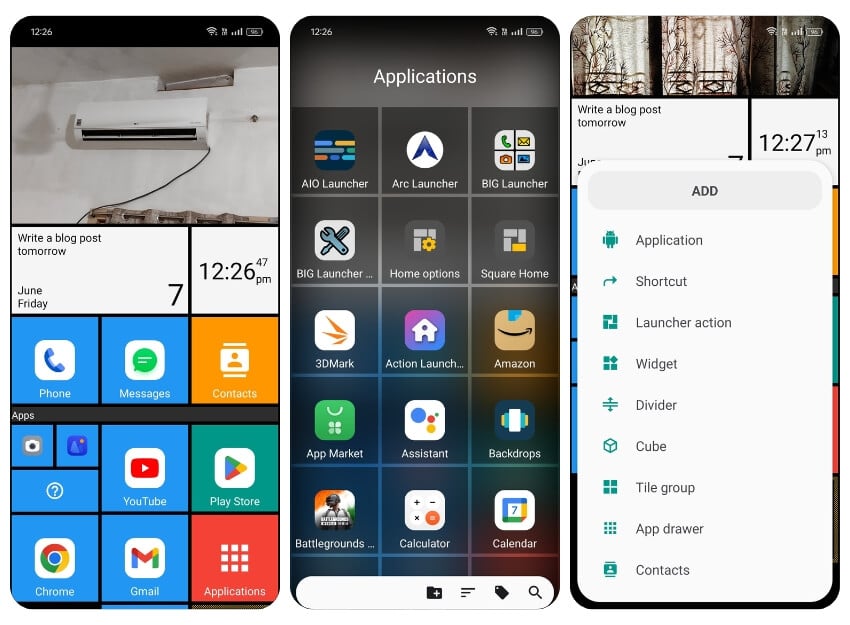
Square is another unique launcher with a different approach to the launcher game. It reminds me of the Windows Phone with square tiles on the home screen. The best part of the app is that you can add apps, shortcuts, contacts, and widgets to the home screen for quick access and organize the tiles the way you want, mimicking the Windows 10 experience.
Swiping the home screen brings up the app drawer, which also follows the square theme. You can add your recent images to the photos and display them on the home screen.
The launcher offers a high level of customization, including the ability to customize the tiles, icons, widgets, and more. Another impressive factor is that the launcher is fast and smooth. I haven’t faced any issues while testing it. I used it for a day and didn’t experience any problems. Generally, with Windows tiles, there can be lags due to many functions happening on the home screen, but this is not the case with this launcher.
Bottom Line: Suitable for users who enjoy a Windows Phone-like experience with customizable tiles and smooth performance. Great for those looking for a unique interface.
AIO Launcher: Best for Information Access

Highlights:
- Price: Free with in-app purchases
- Key Features: Utilizes screen space for important info, no flashy animations, weather, notifications, system monitor
- Customization Options: Information widgets, layout, themes
AIO Launcher is not your average Android launcher. It doesn’t offer the usual stuff (colorful icons, animations, or themes). Still, it utilizes your device’s screen space to show you the most important information, such as weather, notifications, tasks, notes, the latest news (via RSS), system monitor, frequent apps, etc. It’s easily one of the best launchers for Android that we have right now.
Bottom Line: Excellent for users who want quick access to important information on their home screen without flashy animations. Perfect for productivity-focused individuals.
BIG Launcher: Ideal for Seniors and Vision Impaired Users
Highlights:
- Price: Free with in-app purchases
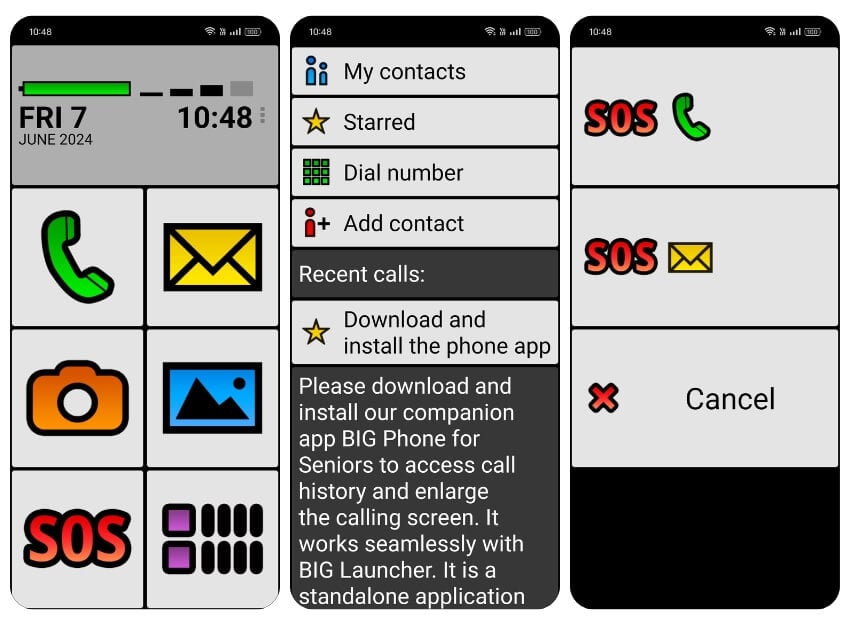
- Key Features: Enlarged UI elements, high contrast color scheme, SOS and speed dial features
- Customization Options: Font sizes, color schemes, contact shortcuts, UI elements
BIG Launcher is an ideal Android launcher for seniors and those with eyesight issues. It increases the size of different UI elements on your Android device to make the content legible and the UI easy to navigate. Similarly, the color scheme uses high contrast to improve readability. Plus, the launcher puts features like SOS and frequent (and speed dial) contacts on the front for easy access.
Bottom Line: Designed for seniors or users with eyesight issues, offering large UI elements and high contrast for better readability. Easy to navigate and use.
Personalize Your Android Experience With Third-Party Launchers
You enjoy the freedom to customize different elements of the interface with Android. So, no matter what Android device you buy (and what skin it runs on top), you can personalize its appearance and behavior to suit your style.
Although this might feel like a block-by-block approach, where you modify different system elements individually, you ultimately need a third-party launcher to apply those changes. The launcher apps listed above should help you do that efficiently.
FAQs About Android Launchers
2. Which Android launcher is the fastest?
Pixel Launcher is the fastest launcher you can install on your Android device. It's lightweight, offers faster animations, and has limited customization options, which doesn't overcomplicate things and makes for a smoother user experience.
3. What is the most customizable Android launcher?
Nova Launcher clearly outweighs other Android launchers in terms of customizability. While some launchers offer a few extra features here and there, the widespread support offered by Nova Launchers gives it a slight edge over all other launchers. Thus, giving its users more control over customizing different elements of their devices' interface.
4. Will Nova Launcher slow down my phone?
Ideally, you shouldn't face any slow-down issues with Nova Launcher whatsoever. But in case you do, it's likely because your Android phone is pretty old and running dated specs. In which case, you must use Nova Launcher with minimum customization, i.e., keep graphics-intensive elements (app icons, widgets, animations, etc.) to a minimum for a smoother experience.
5. What is the best free launcher for Android?
Every launcher app we have recommended above is either free or a freemium app. But we recommend Smart Launcher 5 and Lawnchair 2 as the best free Android launchers for most people considering the unique features which get unlocked even in the free version of the apps. Both are lightweight and don't eat your RAM or deteriorate battery life.
6. Are Android Launchers safe?
Absolutely. Especially if you are installing our above-recommended launcher apps directly from the Google Play Store. Launchers are just a skin to your phone and are just as safe as any other Android apps. Go ahead and install your favorite launcher app for Android without worrying.
7. Which launcher is best for hiding apps?
There are a number of Android launchers that help you hide apps on your phone or tablet. Here are our favorites:
- Poco Launcher
- Microsoft Launcher
- Lawnchair 2
- CPL Launcher
All of these launcher apps help you hide apps for free on Android.
8. What is the fastest Android launcher app?
Honestly, in 2021, any mainstream launcher app will not slow down your Android phone. But in our experience, Microsoft Launcher is the best bet if you are picky on speed and performance. Lawnchair and Nova are easy recommendations too.

