

Quick Answer
Plenty of Fitness Apps allow you to monitor various aspects of your health.MyFitnessPal helps you track your calorie intake and manage your diet. JEFIT lets you exercise at your convenience without gym equipment. Headspace helps you reduce stress through guided meditation. Nike Training Club offers a variety of free workouts led by professionals. Seven is ideal for quick exercises in a busy schedule. Strava keeps you motivated and allows you to compete with others and more.
Health and fitness are priority goals for us in this fast-paced world. It has become much easier to stay fit and track our fitness goals. Thanks to the convenience of technology, we can track our fitness goals on our Android phones.

You can set your fitness goals, track what you eat, how many calories you eat, how many calories you burn through your activities, etc. The Android fitness apps available today can even help you track and plan your sleep schedule.
In the sea of fitness apps available on the Play Store, we have picked out the 10 best fitness apps for Android. Read the full guide and download the app that suits your needs to achieve your goals.
Table of Contents
10 Best Fitness Apps for Android
The following list contains fitness apps for various fitness programs that we generally use. Choose something that suits your needs.
No. | App Name | Features | Price |
|---|---|---|---|
1 | MyFitnessPal | Calorie counter, nutrition tracking, recipes | Free / Premium |
2 | JEFIT | Workout tracking, strength training | Free / Premium |
3 | Headspace | Guided meditation and mindfulness exercises | Free / Premium |
4 | Nike Training Club | Customizable workout plans, video tutorials | Free |
5 | Seven | 7-minute workouts, customizable challenges | Free / Premium |
6 | Strava | GPS tracking, route planning, community features | Free / Premium |
7 | Map My Fitness | GPS tracking, nutrition tracking, challenges | Free / Premium |
8 | Adidas Training | Customizable workout plans, video tutorials | Free / Premium |
9 | MyPlate | Calorie counter, nutrition tracking | Free / Premium |
10 | Google Fit | Activity tracking, goal setting, coaching | Free |
MyFitnessPal
Benefits:
- Log every meal and track your calorie intake to manage your diet effectively.
- Record your physical activities and keep track of the calories you burn.
- Get detailed information about the nutrients in your food.
- Connect with other fitness devices and apps and monitor all your health data in one place.
- Be a part of a community with similar goals, share your experiences, and get support.
- Find healthy recipes and meal ideas that fit into your diet plan.

MyFitnessPal is the first choice if you want to track diet and exercise. It has the largest database of foods and their nutritional values, providing accurate results for over 14 million foods. You can track the foods you eat with calories and the macro and micronutrients in your diet and create custom diet plans tailored to your needs.
You can even track your weight loss or muscle-building goals with personalized recommendations. The app integrates easily with popular fitness wearables from Fitbit and Garmin. With MyFitnessPal’s features, you can get a comprehensive overview of your health and fitness status. It also gained sleep tracking ability, which has been absent from the app for some time.
To further motivate you, MyFitnessPal has an online community with 200 million members to help you find support, share your experience, and join a community with similar goals. One major drawback of the app is it is loaded with information. Initially, you might feel overwhelmed while using the app; this happened to me when I first installed the app.
Pros:
- Comprehensive Food Database.
- Integration with Devices.
- Customizable Goals.
- Community Support.
- Quick Food Entry.
Cons:
- Data can Be overwhelming for a new user.
- Ads in the Free Version.
- Some advanced features require a premium subscription.
JEFIT
Benefits:
- The app offers over 1400 exercises for varied and comprehensive workout options.
- You can customize your workouts based on the equipment you have.
- Log and track your workouts and monitor progress.
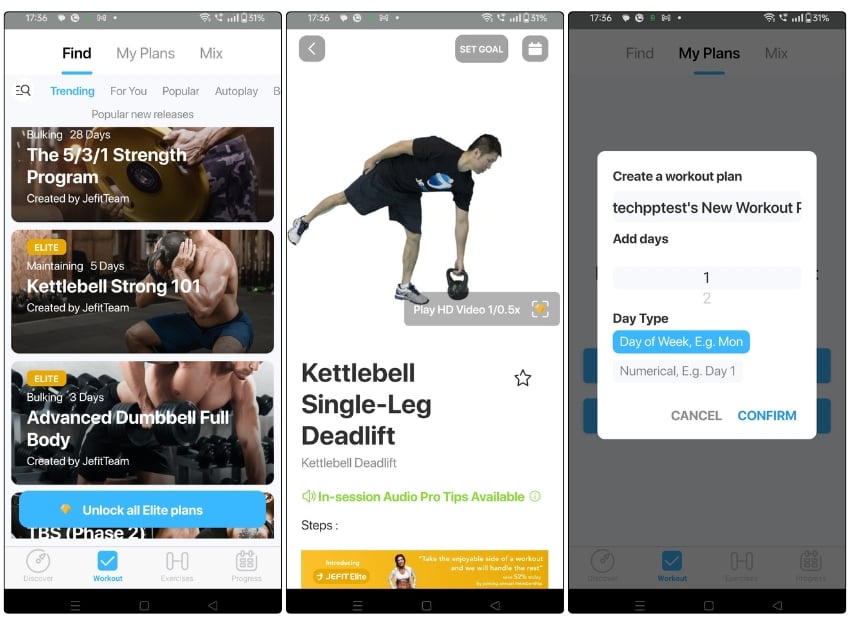
The JEFIT app allows you to track workout routines and exercises and monitor the progress of your regime. The app has a huge database of exercises, clear instructions, and video demonstrations.
You can even create your workout routines by selecting exercises from the database or creating your exercises. Even the JEFIT apps have tools for tracking body stats, understanding muscle recovery rates, and setting target muscles and body measurements.
JEFIT has free and paid plans that you can use depending on your needs. You get a flexible workout planner with a 1400+ exercise library in the free version. The app is only available for Android, on iPhone you can try Sixpack in 30 days or choose the best app from our Best Home Workout Apps list.
Pros:
- Extensive Exercise Database.
- Customizable Workouts.
- Progress Tracking
Cons:
- Ads in Free Version.
- Unimpressive workout previews in the free version.
Headspace
Benefits:
- Offers guided meditations that help with stress management, focus, and exercise meditations.
- Specialized sleep sessions are designed to help you sleep better.
- Allows you to engage in meditation sessions whenever it’s convenient.
- Great for people new to meditation.

It’s not just physical health that matters. Mental health is also an essential aspect of our well-being. To promote and improve our mental health, Headspace is a great app.
Headspace is a meditation and mindfulness app with various guided meditations to help us relieve stress, focus, and sleep better. The app offers different meditation levels, from beginner to advanced, so you do not lose your way on your mindfulness journey.
Headspace offers a 14-day trial period to try out the app. If you like the experience, you can upgrade to a paid plan and continue your fitness regime.
Pros:
- Highly rated app across various platforms.
- Backed by Research.
- Lots of Options.
- Easy for Beginners.
Cons:
- Limited access to the free version.
Nike Training Club
Benefits:
- One of the biggest advantages of NTC is that it is entirely free. You can access over 185 workouts for free.
- Workouts in this app are designed and led by certified trainers and professional athletes.
- Offers a wide range of workout routines covering strength, endurance, yoga, and mobility.
- You can opt for personalized training plans based on your fitness level and goals.

Nike Traning Club is a free fitness app from Nike that offers a wide range of workouts with video tutorials. Everything in the app is planned and performed by professional trainers.
You can customize plans for strength, endurance, and yoga workouts. There are over 190 workouts designed by Nike trainers to help you achieve your fitness goals. The app also offers personalized workout plans based on your goals, such as weight loss or muscle gain.
The Nike Training Club app gives you recommendations based on your fitness level and preferences. You can also connect with friends, share your progress, and participate in challenges to stay motivated and reach your fitness goals.
Nike Training Club is an excellent app if you are looking for a wide range of guided workouts that you can do for free at the gym or at home.
Pros:
- Completely Free.
- Variety of Workouts
- Quality Content.
- User-Friendly Interface.
- Integrates with other health-tracking apps.
Cons:
- Limited Customization.
Download the Nike Training Club
Related Read: 10 Best iPad Yoga Apps
Seven
Benefits:
- Perfect for people with busy schedules.
- You can complete a full workout in just 7 minutes.
- Includes a variety of exercises to choose from.
- Also suitable for beginners or those looking for a quick fitness routine.

Seven is a freemium app with several free and paid workout plans. Seven app is different from other apps mainly because it offers short and high-intensity workouts that can be done in seven minutes without equipment.
The app offers a variety of exercises, including bodyweight, cardio, and yoga exercises. If you have a busy schedule and want to stay fit with your limited time, the Seven app can help.
The Seven app offers challenges and rewards to keep you motivated and track your progress over time. The premium plan for this app unlocks additional content and features to help you with your fitness program.
Pros:
- Quick and effective workouts that fit easily into a busy schedule.
- User-Friendly experience.
Cons:
- Limited Free Content
Strava
Benefits:
- The app uses GPS to record your running and cycling routes.
- Seeing actual routes can bring motivation and a sense of achievement.
- Provides detailed analytics on your activities, such as pace, elevation, and heart rate, so you can monitor your progress.
- You can be part of the community, join challenges, and also compete with other users.
- Set customizable plans to achieve your goals.
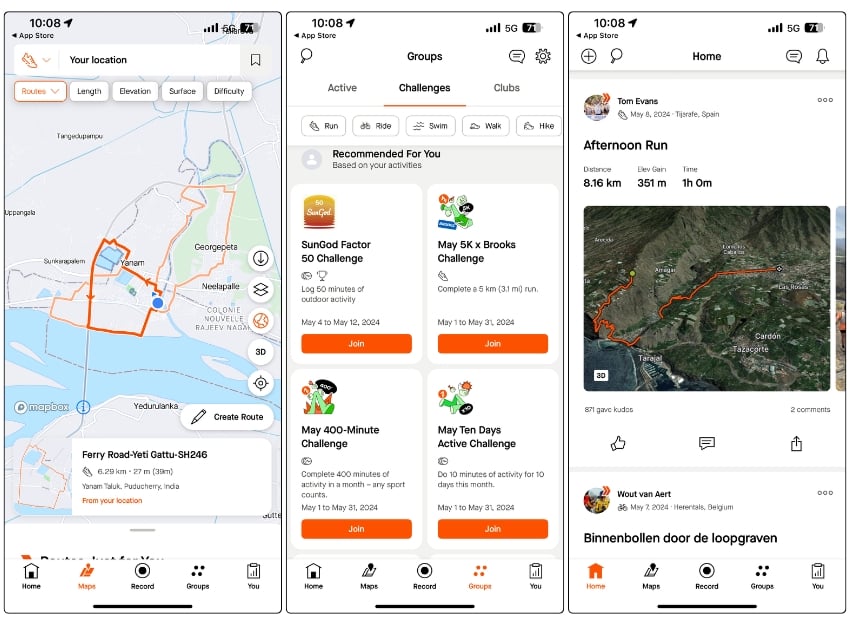
Strava is a unique fitness app that tracks activities like running, hiking, and cycling. It allows users to track distance traveled, time, and speed.
It is a freemium app that offers specific features such as competing with previous records, seeing advanced performance metrics, a workout dashboard, setting custom goals, and analyzing your workouts.
With the free plan, you can record activities, connect with your friends, or join clubs on Strava related to your activities. You can try the premium features for 30 days and then decide whether to subscribe.
Pros:
- Mapping routes brings motivation.
- Strong community aspect.
- Works well with a wide range of fitness trackers and smartwatches
Cons:
- The interface can be overwhelming for new users
- There are concerns about privacy
Map My Fitness
Benefits:
- Log and monitor various physical activities like running, walking, cycling, and gym workouts.
- Like Strava, the app uses GPS to map your routes and track your distance accurately.
- Get real-time audio feedback during workouts.
- You can connect with friends, compare progress, and compete in challenges.

Map My Fitness by Under Armor is another fitness app with great features to help you get and stay fit. It provides smarter training with a variety of data and tips for your routines.
The app offers basic tracking and logging features for running, walking, cycling, and more. You can even set goals, log workouts, and stay on track.
Map My Fitness also offers paid features, including personalized workout plans, live tracking, and advanced metrics. The ads on the free plan disappear with the paid plan.
The app integrates with other fitness apps like Google Fit to comprehensively view your progress.
Pros:
- Visual representation of progress is very helpful.
- Social Connectivity
- Integration with other devices
- User-friendly interface.
Cons:
- Technical glitches are super annoying.
- Limited Free version
Adidas Running
Benefits:
- Offers a variety of structured training plans, guided by experts.
- Record your running routes using GPS.
- Sync health data with various devices and view all your fitness data in one place.
- Share your running achievements with friends and join the app community.
- The app offers detailed statistics and analysis after each run.
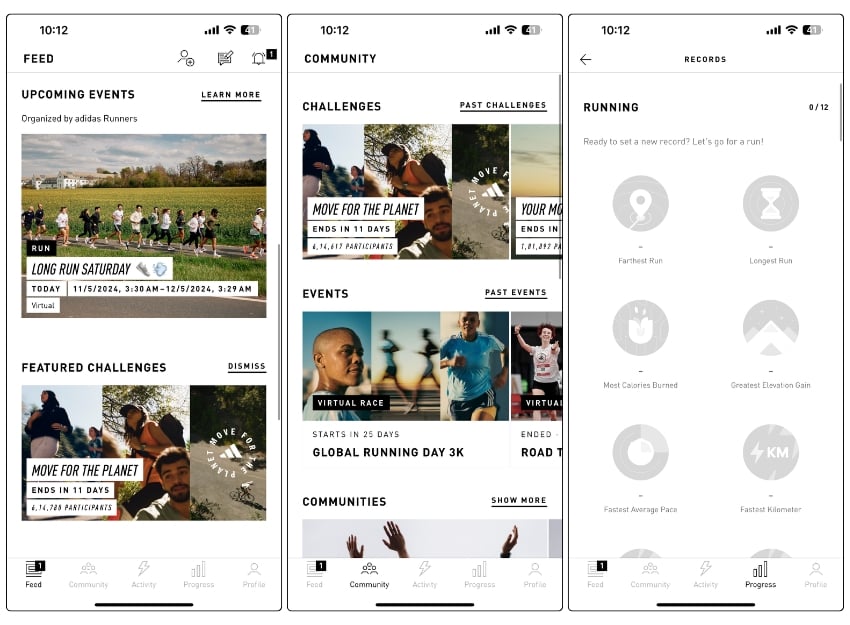
Adidas Running, formerly Runtastic, is another fitness app offering various running training plans. To build your stamina, you can choose from plans ranging from beginner to more advanced.
Everything on Adidas Training is designed and guided by experts. You can trust the workout plans and follow them for the given time to achieve what the plan is meant for.
You can track your workout progress and adjust your plans accordingly. Adidas Training also has other features, such as workout reminders, progress tracking, and features to connect with friends and other users.
The app also integrates easily with other fitness apps like Google Fit and MyFitnessPal. The app offers free and paid plans to get additional features if you like the free version.
Pros:
- Guided by experts
- Comprehensive Tracking
- Customizable Training Plans
- Voice coaching and other videos
Cons:
- Unlike Nike, which is free, Adidas has a premium subscription cost.
Lose it- Calorie Counter
Benefits:
- Log your meals and track your calorie intake.
- Keep an eye on how much protein, fats, and carbs you consume daily.
- Set your weight loss goals and follow a personalized plan offered by the app.
- Record your workout and automatically adjust your calorie budget.
- Create a custom diet plan (Premium only)

Loseit is a calorie-tracking app that helps you lose weight by cutting calories. It provides you with the knowledge of the calories in your food and the number of calories you need to consume to reach your fitness goals.
The app tracks the calories in your food and provides daily nutrition tables and a breakdown of daily calories by fat, protein, and carbohydrates. You can even see net calorie data per day, week, and more to track your progress and set your goal intake.
Use it with other workout apps to track your calorie intake and achieve goals.
Pros:
- User-Friendly Interface
- Comprehensive Food Database.
- Setting a custom diet plan is very helpful (Premium)
- Bar code support to quickly log food.
Cons:
- Most of the features are locked behind a premium subscription.
Google Fit
Benefits:
- Record different physical activities, like walking, running, and cycling; automatically using your phone.
- Measures your heart and respiratory rates using your phone’s camera (on supported devices, currently includes Google Pixel devices).
- You can set specific goals for steps, time, distance, and heart points.
- Import data from other apps and view all your health data in one place.
- The app can provide real-time stats if you have a Wear OS smartwatch.
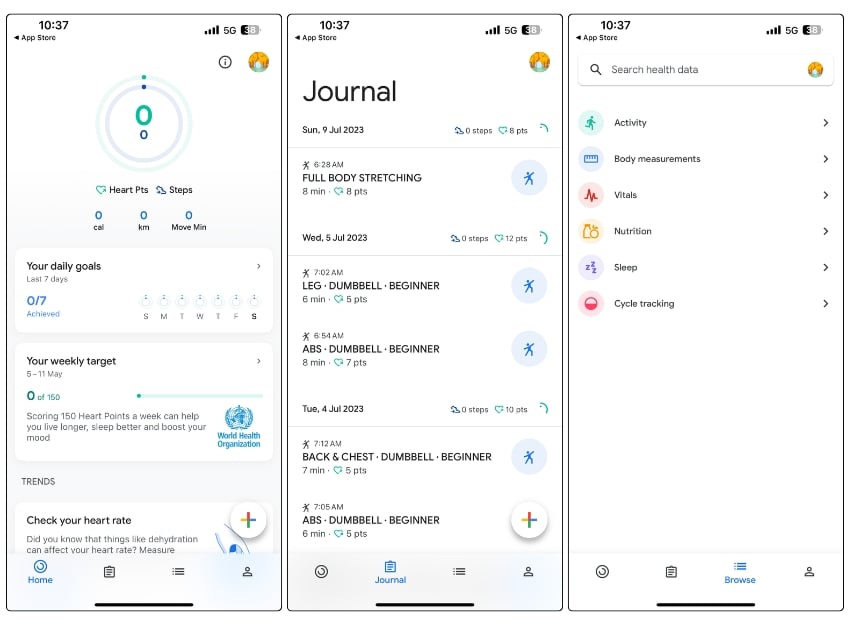
Google Fit is an app designed to help you live a healthier and more active lifestyle. It includes activity goals that can keep you fit and healthy.
In collaboration with the World Health Organization (WHO), Heart Points have been developed for activities that get your heart pumping and positively impact heart and mind health.
Google Fit provides customized coaching and actionable tips based on your health and activity history. It’s much easier to track activities and progress from your Android phone and smartwatch.
One of Google Fit’s biggest pluses is that it integrates with other fitness apps, such as Headspace, Strava, MyFitnessPal, etc.
Pros:
- Also available for iOS devices.
- User-friendly interface.
- Google Fit is completely free.
Cons:
- Limited Diet Tracking.
- Limited support and not a complete replacement of health.
What Do You Look for in a Fitness App?
Not all fitness apps have the same features. But they all have some common features that everyone looks for. Some of the most important features to look for in a fitness app are:
- Tracking capabilities: A good fitness app should be able to track various aspects of a fitness program, such as steps taken, distance traveled, calories taken and burned, heart rate, sleep patterns, etc.
- Progress tracker: If you are participating in a fitness program, you will want to track the program’s progress in the form of charts or graphs. There should be a way to see which areas you are doing well in and which you are not.
- Customization: The fitness app should have features that allow you to set fitness goals, select workouts and fitness levels, and customize settings to suit your fitness needs.
- Wide selection of routines: To be a good fitness app, the app should offer a wide selection of workout routines, courses, exercises, etc. It should offer a variety of fitness activities to cater to individual needs.
- Community support: Staying motivated with a fitness program is difficult. There should be a way to connect with other users and track progress to stay motivated. There should be features to share your successes with others and get support.
- Integration with wearable devices: Wearable devices are a great way to track your fitness goals. A good fitness app should be compatible with popular wearable devices and trackers. They should allow you to sync your data and get accurate tracking.
Best Fitness Apps for Android
There are many great fitness apps to help you plan and track your workout regimes. Some are free, and others are paid. Although they offer different features, you should choose an app to help you achieve your goals and start your regime.
FAQs about Best Fitness Apps for Android

What app is good for fitness?
There are many great fitness apps like Google Fit, MyFitnessPal, Strava, Adidas Training, Nike Training Club, etc. They all have features to help you start your fitness journey and track your metrics.
What is the best app to track activity on Android?
Strava is one of the best apps for tracking various activities like cycling, running, and hiking on Android. You can set goals and compare your progress with the other members by using the community features. Other popular Android activity-tracking apps include Nike Training Club and Google Fit.
Is Google Fit steps accurate?
The accuracy of Google Fit step counts can vary depending on a number of factors, such as the type of wearable device used, the sensitivity of its sensors, and how the device is worn. While Google Fit uses advanced algorithms and sensors to estimate step counts, it may not always be 100% accurate.
In general, Google Fit can provide a reasonably accurate estimate of the number of steps taken, but there may be some degree of error.
Are there any Android fitness apps that don’t require a wearable device?
Yes, there are many fitness apps that don't require a wearable device.
These apps typically use the sensors on your smartphone to track your movement and provide you with information about your physical activity. Here are some examples:
- Google Fit: It can track your steps, distance traveled, and calories burned using your smartphone's sensors.
- Nike Training Club: Nike Training Club is a free app that offers a wide range of workout options, including bodyweight workouts, yoga, and running. You can use the app without a wearable device by manually logging your workouts.
- MyFitnessPal: MyFitnessPal is a popular app for tracking food intake, but it also offers features for tracking physical activity. You can log workouts and track steps using your smartphone's sensors.
- FitOn: FitOn is a free fitness app that offers a variety of workout options, including HIIT, yoga, and strength training. You can use the app without a wearable device by manually logging your workouts.
- Seven: Seven is a free app that offers 7-minute workouts that you can do anywhere without any equipment. The app does not require a wearable device and uses your smartphone's sensors to track your movements.
What are the best Android fitness apps for tracking running?
The best Running apps for Android include:
- Strava: Strava is a free app that is widely used among runners and cyclists. It offers GPS tracking, pace and distance tracking, and personalized coaching. You can also connect with friends and compete with them on leaderboards.
- Nike Run Club: Nike Run Club is a free app that offers audio-guided runs, personalized coaching, and customized training plans. It also offers GPS tracking, pace and distance tracking, and social sharing features.
- Runkeeper: Runkeeper is a free app that offers GPS tracking, audio cues, and personalized training plans. You can also set goals and track your progress over time. It offers a premium subscription for advanced features.
- Runtastic: Runtastic is a free app that offers GPS tracking, audio coaching, and personalized training plans. You can also track your heart rate and connect with friends. It offers a premium subscription for advanced features.
- Endomondo: Endomondo is a free app that offers GPS tracking, audio feedback, and personalized training plans. You can also set goals, track your progress, and connect with friends. It offers a premium subscription for advanced features.
Can Android fitness apps help with weight loss?
Yes, many Android fitness apps can be helpful for weight loss. Apps such as MyFitnessPal and Lose It! allow users to log food intake and track calorie consumption, while apps such as Nike Training Club and Fitbit offer personalized workout plans that can help users burn calories and build muscle.

