

Instagram is one of the most popular social media apps that billions use to share their lives in the form of pictures or videos. While it’s not advisable to spend countless hours on social media apps, if you post regularly on Instagram, it can become like a digital memory book that contains all the important updates of your life and can help you remember a past trip or a precious event. One cool thing about Instagram is the Memories feature, which allows you to take a trip down memory lane.

With Instagram’s Memories feature, you don’t have to scroll through hundreds of your photos. You can simply go to a specific date, revisit the media you shared that day, and relive the moment.
In this guide, we’ll show you how to see Instagram memories. FYI: Facebook already has a similar feature called Memories. Let’s take a look at how you can view Instagram memories.
Table of Contents
How to view Instagram memories?
Navigating through the Instagram settings to get to the Memories feature is pretty simple. Here are the steps you need to follow:
- Launch the Instagram app on your phone.
- Tap the menu icon at the top right and select Archive from the list of options that appear.
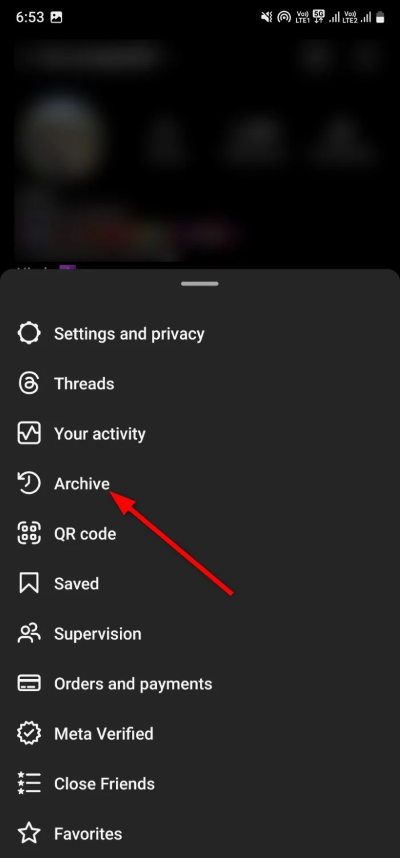
- You’ll see the Memories page, where you can tap the Stories Archive drop-down menu to select Post Archive or Live Archive. Here, you can see what each option shows you:

- Stories archive: This will show you all the Stories you’ve shared on your Instagram profile.
- Posts archive: All posts that you have shared on your profile are displayed here.
- Live archive: All live posts that you have made on your Instagram profile are displayed here.
- If there is a story, post, or live content that you have shared on your Instagram profile in previous years, it will be displayed at the bottom of the Reminders section. The “On this day” reminders, if any, will be displayed immediately.

- If you want to share one of your reminders again, click on the Share button.

By following the steps above, you can easily view all your pictures and relive the moments you shared on your Instagram account a few years ago. But that’s not the only way to find memories. There are also a few other methods, which we’ll introduce below.
1. Check your notifications
While you can simply follow the above steps and view your Instagram memories, Instagram also helps you out by sending you notifications about your memorable moments. You can tap the heart icon, i.e., the Activity option, at the top right before the menu button to view all of your notifications. Scroll through your notifications to check for memories that you may have missed earlier.
2. Visit your profile page
Of course, your Instagram profile page contains all your shared memories on the social media platform. You can simply visit your profile and browse through the treasure trove of your past content. That way, you can check out all the posts you love and want to see.
3. Use the Create a Story feature
You can also use the Create option to post a story on Instagram and view your memories. Here are the steps you need to follow:
- Open your profile page and click on the plus icon at the center.
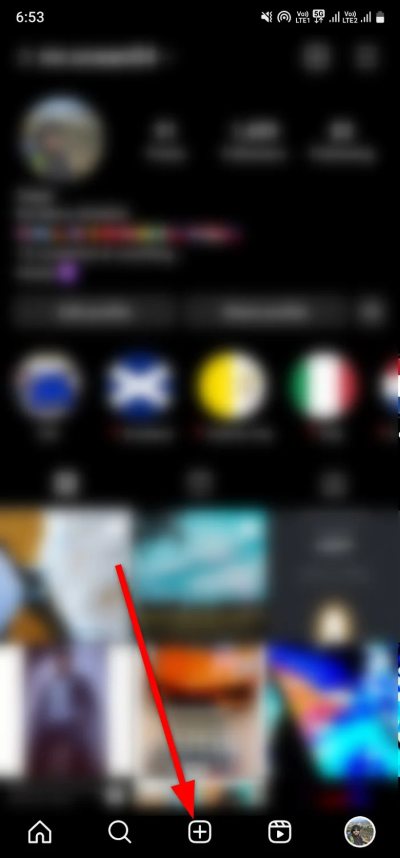
- Select Story to post a story.
- Choose Create from the list of floating options.

- Swipe through the story formats until you see the On This Day option. It is represented by a clock with a counterclockwise arrow.

- Instagram will display all the posts and Stories that you have posted on the same day in previous years.
How to turn on the Instagram Memories feature?
If you are not seeing the Instagram Memories feature, then chances are the option isn’t turned on. There is a way to automatically turn on Instagram Memories or the On This Day feature. Let us discuss the steps involved.
- Go to your Instagram profile page and tap on the menu icon in the top-right corner.
- Select Settings and Privacy from the list of options that appear.

- Scroll down and select Archiving and Downloading under the Your App and Media section.

- Toggle on the Save story to archive option.

If you activate the function as described above, all content that you share via Stories, photos, videos, or Reels will be archived, and you will receive the On This Day Memories notification.
FAQs about the Instagram Memories feature
1. How can I turn off the Instagram Memories feature?
If you don’t want Instagram to show you notifications about the posts you’ve made on the same day in previous years, you can deactivate the Instagram Memories function. To do this, you need to follow the exact same steps described in the “How to turn on the Instagram Memories feature” section of this guide and simply turn the feature off instead of on.
2. Can I share Instagram Memories on Facebook?
Yes, Meta offers cross-platform sharing of stories. You can share your Instagram Memories on Facebook, but first, you need to link your Facebook account to Instagram. Then simply share the story on Instagram and select the Facebook option. As soon as you click the Share button, your friends on Facebook will be able to see your Instagram Memories.
3. Does deleting Instagram delete your archived posts?
If you only delete the Instagram app from your phone or other device, this will not affect the archived posts or even all your posts. However, if you delete your Instagram account, all your posts, including archived posts, will be deleted.
4. Does deleting an archived post also delete the post everywhere?
You can delete all archived posts by going to the archived posts section. However, you should bear in mind that if you delete a post or story from your archive, it will also be deleted from other places where you have shared it, e.g., the highlights.

