

Artificial intelligence, aka AI, is the current buzzword in the market. AI is taking over the tech landscape, and all major companies, including Google, Meta, Apple, Microsoft, etc., are leveraging AI prowess to not only enhance their platforms but also make them much better for their users. Meta recently introduced a feature to its popular social media platform, Instagram, that lets you generate AI backgrounds on Instagram and share them as Stories. If you are looking to enhance various aspects of your images simply, then you should check out our guide that lists down some of the best AI-powered photo editors for Android and iPhone.

Thanks to AI, users need to simply put in a few prompts and let AI do the magic and generate a background. This generative AI background feature on Instagram works brilliantly and lets you replace the background of your image and post it as Stories. In this guide, we will show you how you can generate AI backgrounds on Instagram and post them on Stories. Let us jump right in.
Table of Contents
How does this Instagram AI background generation feature work?
The Instagram AI background feature is known as ‘Backdrop.’ You get access to the Instagram Backdrop AI background generation feature when you upload or create content for your stories. The functionality is similar to multiple AI platforms, such as DALL-E and Midjourney, that let you generate images using a few prompts or descriptions. As of February 2024, the feature is only live for Instagram users in the US. However, Meta is planning to introduce it to more regions in the coming days.
The workings of this feature are simple. You need to upload a photo from your phone, tap the AI Backdrop icon, let AI analyze your image, and give you the different parts that you can remove or keep on your photo. Then, you need to enter a prompt; for example, replace the background with buildings and let AI work its magic.
AI images generated using the feature would be marked to avoid potential misuse. Also, users need to understand that text prompts used to generate AI images aren’t always accurate or appropriate. So, you may need to generate AI images using prompts a few times. Finally, and more importantly, you need to accept Meta’s terms, which give the company the right to use photos you upload to improve its AI system.
How do you generate AI backgrounds on Instagram using the Backdrop feature?
Now that we have learned, in short, how the Instagram backdrop AI backgrounds generation feature works, let us go through the steps that you need to follow to use the feature.
- Launch the Instagram app on your phone.
- Snap a new photo or upload it from your gallery to an Instagram Story post. It would be better if you uploaded an image that doesn’t take up the entire screen, as it will help AI generate the background more cleanly.
- In the Story editing screen, you will see the new AI Backdrop feature icon next to the resize text (Aa) and stickers button. If you don’t see the icon, then we would suggest you update the app to the latest version.

- After clicking the icon, it will analyze the image, process the photo, and automatically highlight the different parts of it. You can then select the parts that you would like to keep when generating a new backdrop using the AI backgrounds feature on Instagram.
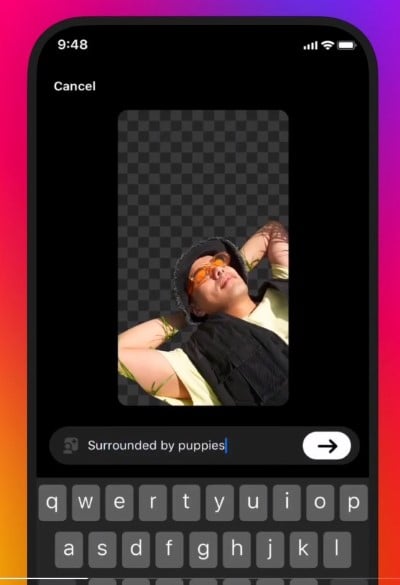
- Once you have selected the parts that you would like to keep, you will see an option to enter the prompt to generate AI backgrounds. Enter the prompt, for example, in the below screenshot, ‘Surrounded by puppies‘. After this, tap on the Send button.
- The AI background will be generated, and if you are satisfied with it, then you can go ahead and edit the photo as you would usually do for other posts. Then, you can share the photo, and it will appear in your Instagram Stories.

That’s it! You have generated AI backgrounds on Instagram using a few prompts. Before publishing the post, you can always tweak the prompt to generate the AI backgrounds that match your liking. We would suggest you enter a simple and elaborate prompt for the AI to understand better. Moreover, there is no limitation on how many different parts you can select in your image and replace them with an AI-generated background. If you don’t like the output, you can tap on the redo button to generate a better image.
As already mentioned, the AI-generated image will have a logo ‘Try it’ at the bottom of the screen that will let your friends use the same prompt. Drag the slider to the bottom of the image if you wish to remove it.
A few things to keep in mind when using the Instagram AI background generation feature:
- The AI background generation may not always be accurate.
- The text prompts must follow Instagram’s Community Guidelines and Terms of Use.
- Be careful about the personal information that you share in your text prompts, such as name, address, phone number, etc. We would suggest avoiding using any of your personal information in the text prompt.
- Meta will collect the data for your AI image generation.
FAQs about using the AI background generation feature Backdrop on Instagram
1. Why can’t I use AI backdrop on Instagram?
If you can’t see the Instagram Backdrop icon on the Stories editing page, then it could be because the feature isn’t available in your region. Besides, the feature is available with the latest update, so you may want to check if you are running the latest version of the app or not. For some, clearing the Instagram app cache has also helped.
2. Can I upload AI images on Instagram?
Yes. You can use the Backdrop feature to generate AI backgrounds on Instagram, or you can also make use of third-party AI image generation apps that we have listed in one of our guides to generate AI images from your Android or iPhone and share them across social media platforms such as Instagram.

