

An Apple Gift Card is a way to make payments for your purchases from Apple, be it at an Apple Store, Apple Online Store, or the App Store. It’s available in different types—each serving a different purpose.

However, among these types, the App Store & iTunes Gift Card is the most prevalent among Apple users; in fact, it’s the one people refer to more often when they talk about Apple Gift Cards. You can receive this card as a gift from someone or buy one for someone or personal use.
Here’s everything you need to know about using an Apple Gift Card in India, including where to buy it and how to redeem it on an iPhone, iPad, or Mac.
Table of Contents
Where Can Buy an Apple Gift Card in India?
Apple has partnered with the following merchants in India to sell Apple Gift Cards:
- Amazon India
- Amazon Pay
- Flipkart
- Paytm
- PhonePe
You can purchase an Apple Gift Card from any of these merchants in various denominations based on your requirements. Simply go to a merchant’s website or app and search for Apple Gift Card. On certain apps, like PhonePe, for instance, you’ll have to dive deeper into the menu to find an option to purchase an Apple Gift Card. Find the gift card with your desired denomination and purchase it using your preferred mode of payment.

Tap on your Apple Gift Card purchase in your transaction history. This will open your App Store Code, which is essentially a 16-digit code that you can redeem on your App Store purchases.
How to Redeem an Apple Gift Card
It’s pretty easy to redeem an Apple Gift Card. But before you do that, it’s important to note that Apple Gift Cards are region-specific, so you can’t redeem an Apple Gift Card bought from the US in India or vice-versa. It’s something to be mindful of, especially if you’re sending or receiving an Apple Gift Card as a gift to/from someone outside India.
With that out of the way, follow the steps below, depending on your device, to redeem your Apple Gift Card.
Redeem an Apple Gift Card on an iPhone or iPad
Apple lets you redeem your Apple Gift Card on an iPhone or iPad from the App Store. Here’s what the process looks like:
- Open the App Store app on your iPhone or iPad.
- Tap the profile icon in the top-right corner and log in to your Apple ID if you haven’t already.
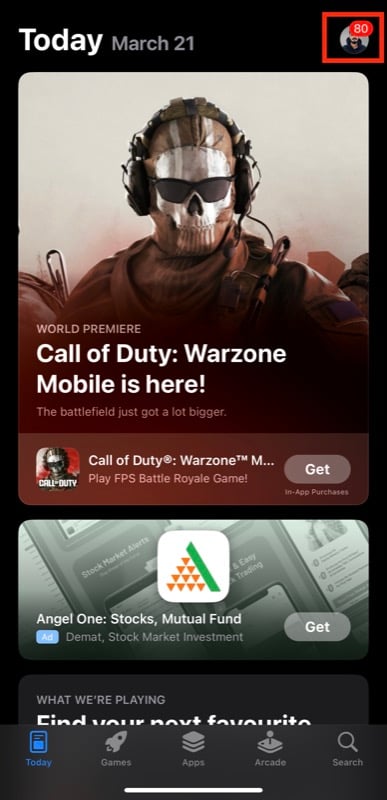
- On the Account page, tap Redeem Gift Card or Code.

- If your Apple Gift Card is a physical card, you can redeem it by scanning. Hit the Use Camera button to open the iPhone camera, place the card on the table (with the code facing upward), and point your iPhone to it to perform the scan.

- Alternatively, if you’re having trouble scanning the card or have a digital Apple Gift Card, you can enter the code manually. Tap You can also enter your code manually, enter the 16-digit code from your gift card, and hit Redeem.

Related Read: How to Make Tap-to-Pay Payments Without UPI Apps in India
Redeem an Apple Gift Card on a Mac
Just like on an iPhone or iPad, redeeming an Apple Gift Card on a Mac also involves using the App Store. However, the steps you need to follow are slightly different.
- Launch the App Store on your Mac.
- Click the profile icon in the bottom-left corner.

- On the Account page, click on Redeem Gift Card.

- If your Apple Gift Card is a physical one, you can scan it. Click on the Use Camera button to open your Mac’s camera and bring the Apple Gift Card in front of the camera (with the code facing the camera) to scan it.
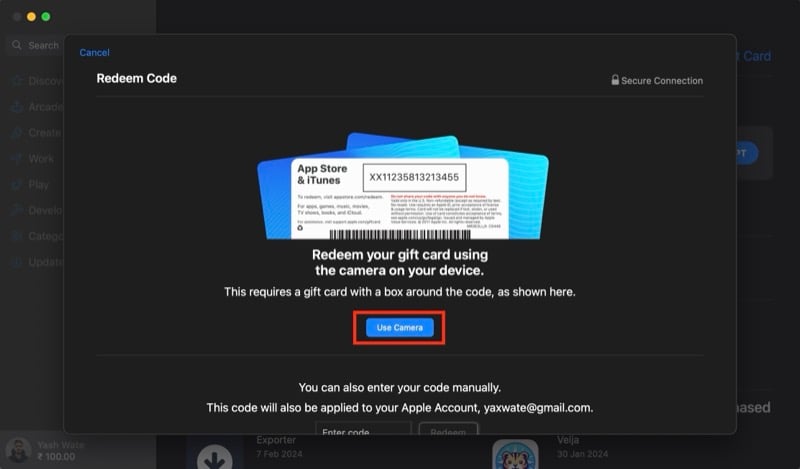
- Alternatively, you can enter the code manually if you have a digital Apple Gift Card or scanning doesn’t work. Simply type the 16-digit gift card code in the text box on the App Store and click the Redeem button.

How to Check Your Apple Account Balance
As soon as you redeem an Apple Gift Card, an amount equivalent to the card’s worth is automatically added to your Apple Account balance (linked to your Apple ID). You can check it in the App Store on your iPhone and Mac using the steps below.
Check Apple Account Balance on an iPhone or iPad
- Open the App Store.
- Go to the Account page.
- Look for the Credit text under your account details, and you’ll see an amount next to it, indicating the balance in your Apple account.
Check Apple Account Balance on a Mac
- Head to the Account page on the App Store.
- Click on Account Settings and enter your Apple ID password to authenticate.
- Scroll down to the Apple Account section, and here you’ll see your Apple ID balance.
What Can You Buy With an Apple Gift Card?
With the value of your Apple Gift Card redeemed and added to your Apple Account balance, you can use the same to pay for any of the following:
- Buying apps and games or paying for their in-app purchases
- Buying music, films, books, audiobooks, and more from the iTunes Store, Apple TV app, or Apple Books
- Paying for iCloud+ subscription
- Paying for Apple Music, Apple Arcade, or Apple TV+ subscriptions
- Paying for subscriptions in third-party apps from the App Store
Keep in mind that you can’t use your Apple Account balance to send gifts or gift cards. Similarly, while you can set up recurring payments for various subscriptions with your Apple Account balance, there could be some exceptions.
Other Apple Gift Cards Also Exist
The App Store & iTunes Gift Card is just one of the Apple Gift Cards available in India. Apple also offers two more cards in India: the Apple Gift Card and the Apple Store Gift Card.
The Apple Gift Card is a generic one. You can use it for everything, be it buying Apple products and accessories or paying for app/game purchases and subscriptions. On the other hand, the Apple Store Gift Card is store-specific, and you can use it to buy products and accessories at an Apple Store or Apple’s Online Store.
With multiple types of Apple Gift Cards available in the country, it’s important to know or identify the type of Apple Gift Card you have when redeeming to get the most out of it.

