

Quick Answer
Windows 11 widgets streamline your workflow by offering quick access to tools and info—no need to open apps. Top picks include Outlook Calendar (view/add events), Sports (scores/leagues via MSN), To Do (tasks & My Day), Focus Session (start DND timers), Phone Link (notifications), Memodown (sticky notes), and MagicPods (AirPods battery/status).
Widgets in Windows 11 give you quick access to valuable information or useful tools from various apps and services installed on your computer. They’re tiled to the widgets board, which you can access by hovering over the Taskbar icon or using the Windows+W keyboard shortcut.
Microsoft bundles a bunch of widgets in Windows 11. But you can also install third-party widgets from the Microsoft Store to put other important updates or relevant information you need to keep up with every day a glance away.
Here are some of the best Windows 11 widgets we recommend you should have on your widgets board. Refer to our guide on customizing Windows 11 widgets to learn how to add, remove, and pin widgets to the widgets board on your computer. We also have a guide on disabling Windows 11 widgets.
Table of Contents
Our Choice for the Best Windows 11 Widgets
Outlook Calendar
If you use an Outlook account and need to check your calendar multiple times a day, the Outlook Calendar widget should be the first one you add to your widgets board. Not only does the widget give you a quick look at your upcoming events, but it also lets you add new events to the calendar—without needing to open the app.

The Outlook Calendar supports multiple calendars, so you can choose which ones you want to see based on your preference. Depending on how many calendars you select, you can also choose the widget size to accommodate information accordingly.
Sports
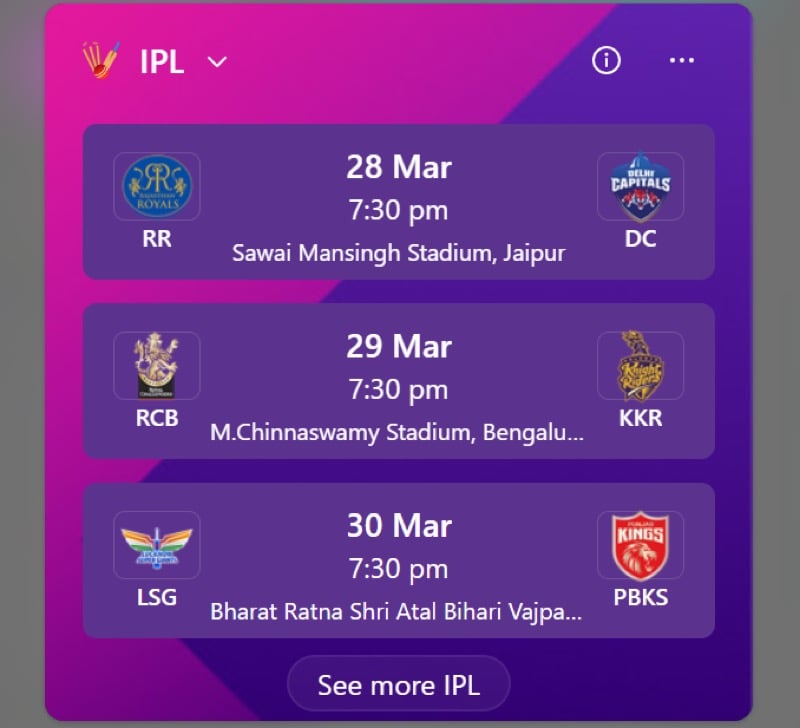
The Sports widget is a great way to keep up with all the latest updates from your favorite sports and teams on your Windows 11 PC. It supports many major leagues across different sports around the world, including Premium League, Bundesliga, ICC, and IPL. You can even mark leagues (and your favorite teams in them) as favorites to view their latest updates.
All the information the Sports widget pulls up is from MSN. You can choose to view this information in three widget sizes: small, medium, and large, all of which show different numbers of events at once. When you want to read more about a fixture, click on a game to open it directly on the MSN website.
To Do

If you use Microsoft’s To Do app to manage your everyday tasks, you can add its widget to the widgets board on your PC to quickly check your to-dos and create new ones effortlessly. The To Do widget offers two views: Tasks and My Day, which you can switch between using a dropdown button to see all your tasks or the tasks for a specific day, respectively.
Once you’re done with a task, you can mark it as complete in To Do from the widget itself. Or click on it to open it in To Do, where you can modify it or perform more actions.
Additionally, you can click the plus (+) button in the top-right corner to create a new task. If a task requires special attention, you can click the star button next to it in the widget to mark it as important.
Focus Session

Focus is a Windows 11 feature that can help reduce distractions on your PC so you can focus on work better. It works by turning on Do Not Disturb and hiding elements like app badges and notifications, among other things.
Although you can turn on Focus from the Settings app, putting its widget on the widgets board allows for easy access and lets you start a Focus session (anywhere from 10 to 240 minutes) without going into the app.
At any time, if you want to tweak your system’s behavior when it’s in a Focus session, go to Focus Settings under Settings. Once here, you can personalize the settings according to your preference.
Phone Link
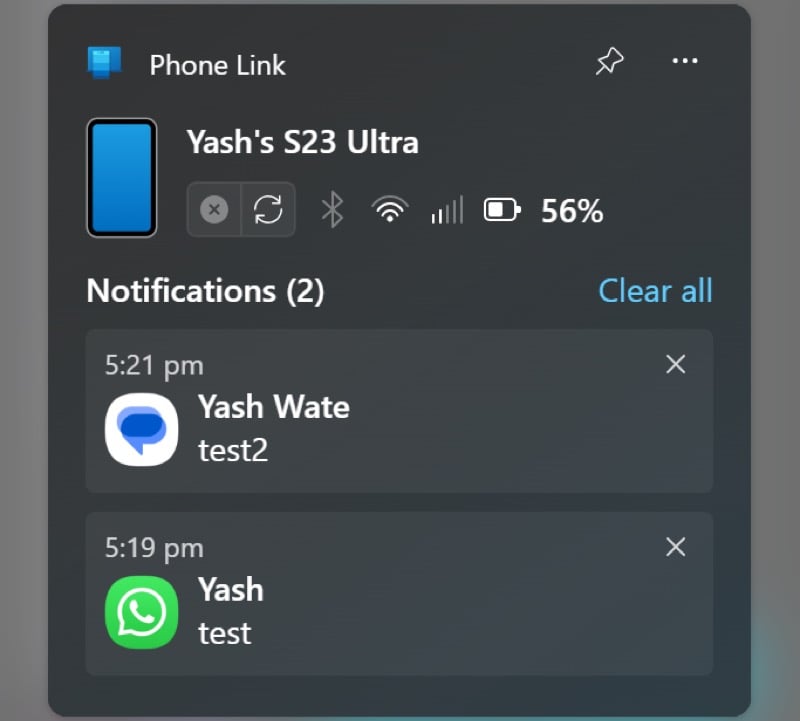
Phone Link is a Windows app that lets you use your Android or iOS device on your PC. While you can head into the Phone Link app to check for new notifications, adding the Phone Link widget to the widgets board allows you to check and reply to incoming notifications faster.
Once you’ve connected to a device, the Phone Link shows you the device’s name, connection status (with a refresh icon to reestablish a lost connection), battery percentage, and Wi-Fi, Bluetooth, and Cellular Data status. All the new notifications will appear below this information, and you can click on them to open in Phone Link, where you can perform various operations.
Memodown

Memodown is a Windows 11 widget that lets you create memos and tile them onto a widget on your widget board. That way, you can access the memo any time you want.
The widget displays your memos as soon as you create one in the Memodown app. You can scroll the memos by clicking the arrow icons to the left or right of the memo card.
Memodown is available in three widget sizes: small, medium, and large. It’s a paid app, but there’s a free trial available that you can use to assess the app and find out if it serves your needs.
MagicPods
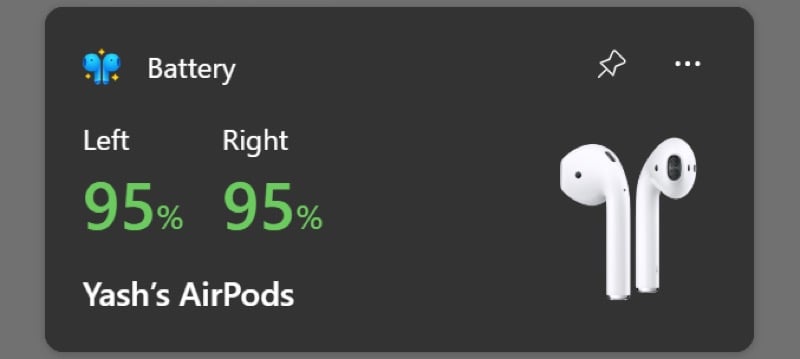
If you use AirPods with your Windows PC, MagicPods can help elevate your user experience. Once you add its widget to your widgets board, you can effortlessly check the battery levels of each AirPod along with the charging case right on the desktop.
However, MagicPods’ usefulness doesn’t end there. In addition to offering a widget, MagicPods—being a full-fledged app—packs several useful features, such as auto-connect, auto-play/pause, customizable battery notification, ear detection, and more, to give you a better experience of using AirPods on a Windows PC.
MagicPods offers a free trial. But if you like the app, you can purchase it from the Microsoft Store.
Widgets Board Isn’t Just About Widgets
Setting up the widgets board on your Windows 11 can save you the time and effort you otherwise have to put in to go into apps to check information or perform operations. Of course, widgets aren’t meant to help you with everything, and you’d still want to go into the app for many things, but they reduce the need to do so for basic operations, which is nice.
Besides widgets, the widgets board also showcases all the latest news and updates around the world. You can personalize your personal feed to add relevant sources and remove undesired ones.

