

Quick Answer
Locked Facebook profile and cover photos prioritize privacy, but certain methods, like using “Inspect Elements,” basic Facebook mode, or legitimate requests, may provide access. Always respect privacy and seek consent.
Facebook is a place that lets us connect with our friends and family members, share memories, and express ourselves. While today’s generation is slightly more inclined towards other platforms such as Instagram and Snapchat, Facebook has its place among users. Since privacy is one of the major concerns for people, especially with Meta-owned platforms, Facebook did introduce the feature to lock profiles. When someone locks their profile, their content, including their photos and posts, becomes hidden and cannot be accessed by anyone unless they are on their friend’s list.
But what if you are curious and want to know what your old friend has been up to, or you want to know what someone is hiding behind their locked profile? Well, in this modern world, there are so many ways that you can view a locked Facebook profile and cover photo, which is exactly what we are going to discuss in this guide. Let’s jump right into it.
Table of Contents
What happens when someone locks their Facebook profile?
Facebook offers the option to lock profiles to protect user privacy and data. When you see a lock icon in someone’s profile, this means that the person has chosen to lock their profile and only show what they want to show to the general public who are not on their friend list. Here are the things that get locked after locking a Facebook profile:
- Full view of their profile photo and cover photo.
- All the photos and posts on their profile.
- The stories.
- New posts and photos.
Also, any post or photo that you have shared in the past to the Public gets changed to Friends, making it accessible only to your friends. It also enables the Profile review and tag review functionality. Additionally, only a portion of your About section is visible to everyone.
How to view locked Facebook profiles?
There is not just one, but multiple ways you can not only access but also view someone’s profile photo and cover photo even though their Facebook profile is locked.
Use the Inspect Elements option
You can view locked Facebook profile photos or cover photos using the Inspect Elements option in the Google Chrome browser. The process, though complicated, yields great results and also doesn’t need any third-party app installation.
- Launch the Google Chrome browser.
- Open the Facebook profile of the person whose profile and cover photos you want to view.
- Right-click on a blank space in the browser and select Inspect.

- Click on the Sources tab in the Inspect Elements console.

- On the left sidebar, you need to expand the elements that start with “scontent.” You will see multiple folders inside the element, which you need to expand in order to access the locked Facebook profile or cover photos. If lucky, you may also see the photos that the user has posted on his profile.

- To view the Facebook profile photo, you can right-click on the person’s profile photo and select Inspect.
- Open the content source that starts with https://scontent-bom in a new tab to view the locked profile photo.
Use an online Facebook profile picture viewer
If you search for a Facebook profile picture viewer, you will find multiple options. However, it is quite annoying to locate the one that works perfectly well.
- Visit this website on your favorite web browser.
- Copy the Facebook profile link of the target user and paste it into the blank field of the above-mentioned website.

- Verify that you are not a robot and hit the Get Profile Picture button. You will see the profile image of the locked profile.
There is another website called Dinona Facebook Profile Picture Viewer. Although the website offered us locked profile pictures in HD quality, there were some instances where the website did not load the image at all.
Use the Basic version of Facebook
An effective trick to view someone’s locked Facebook profile image is to simply use the Basic version of the platform, which can be done via smartphone. Follow the steps below to use this method:
- Open the browser on your smartphone and log in with your Facebook account.
- Search for the locked Facebook profile.
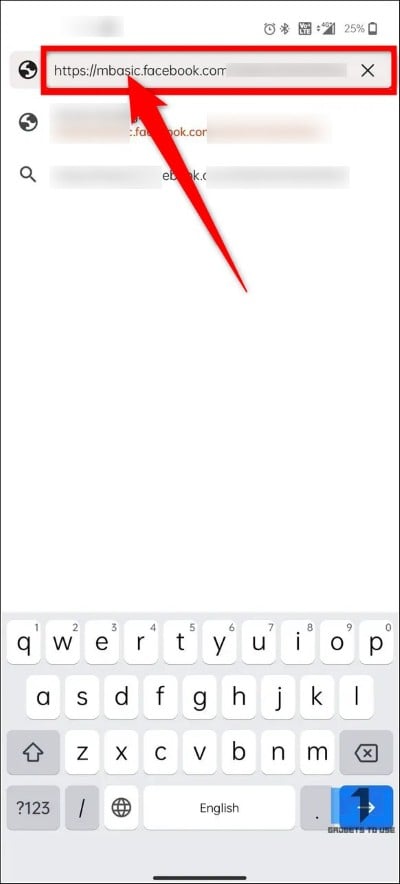
- Tap on the search bar at the top, and you will need to add “mbasic” before the Facebook keyword in the address bar. For instance, the URL will look like https://mbasic.facebook.com/XYZ, which will open the Facebook profile in basic mode.

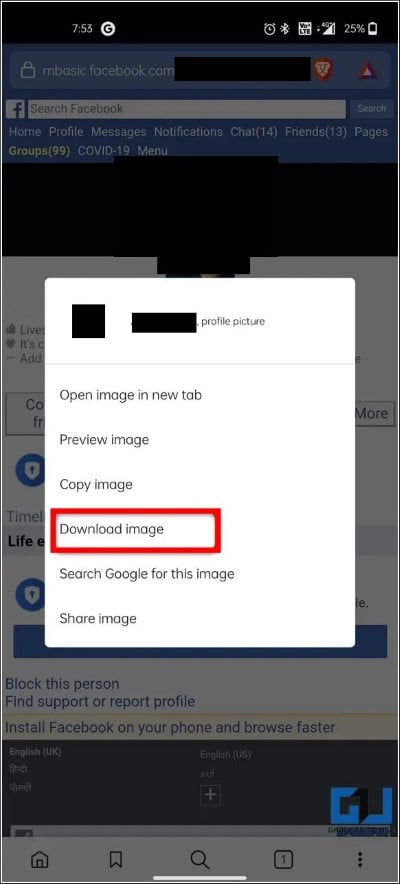
- Long-press on the profile image and tap the Download image option to save the locked Facebook profile image.

Better ways to view someone’s profile photo and cover image
Instead of following the above methods to view or download someone’s profile photo or cover image that is locked for security purposes, you can follow the legitimate ways.
- You can send a friend request to the person, and if accepted, you will be able to view the photos the person has shared on their Facebook profile.
- You can send a message on Facebook Messenger to the person and ask them politely, explaining why you would like to connect or want to view the image. Chances are that you are also in the image.
- If you feel odd sending someone a friend request using your original account, you can create a mock profile and send them a friend request from that account.
Final thoughts
The above-mentioned methods will help you view locked Facebook profile photos and cover images. We also have a guide that shares with you a trick to comment anonymously in a Facebook group. We have also explained what happens when you restrict someone on Facebook and what things stay visible to that person. Also, if you are done using Facebook or using someone else’s device to access your Facebook account, it is important to log out of that device.
If you have forgotten, then you can check out our guide, which explains how you can log out of Facebook on all devices. Users who are easily affected by the number of likes and dislikes on their Facebook posts can hide Facebook likes and share their content freely.

