

Quick Answer
Keepa and Edge Shopping both help track Amazon prices, but cater to different needs. Keepa excels with detailed price history and seller tools on Amazon, while Edge Shopping offers broader marketplace support, coupons, and cashback without needing an extension. If you’re focused on Amazon deals with data depth, Keepa is ideal; for a wider shopping assistant, Edge wins.
In the olden days, we used to buy the items or products we needed from physical stores. We may sometimes bargain the prices, or get them at a fixed discount as part of a promotion. It changed with the Internet. Now, we buy most of the items we need from the internet through marketplaces like Amazon. Amazon frequently offers discounts on products and sale days to encourage consumers to buy more. It is not possible to know the best price of a product if we rely solely on the Amazon listing.

Sometimes, the pricing on a sale day is listed as more than on regular days for certain products, as seen on social media posts. It makes it hard for us to make a decision. Here arises a need for third-party tools like Keepa. Keepa has been serving Amazon customers to help them find the best pricing of a product. It has been one of the most used extensions on Amazon as it supports the Amazon marketplace to track prices in many countries.
Microsoft has enabled Edge Shopping, a feature on the Microsoft Edge browser that helps users track prices on Amazon or other marketplaces. With the availability of Keepa as well as Edge Shopping, it becomes hard to choose between them. If you want to choose one among them, we have compared Keepa and Edge Shopping in this guide. Go through it and make a decision on what to use as your shopping partner to track prices and get deals.
Table of Contents
What is Keepa?
Keepa is a third-party tool that helps us track the prices of products on Amazon and make informed decisions. It lets us compare the prices and know the historical prices of more than 5 billion Amazon products worldwide. With the price trends in hand, we can choose to wait, buy a product, or look elsewhere to find it for better prices.
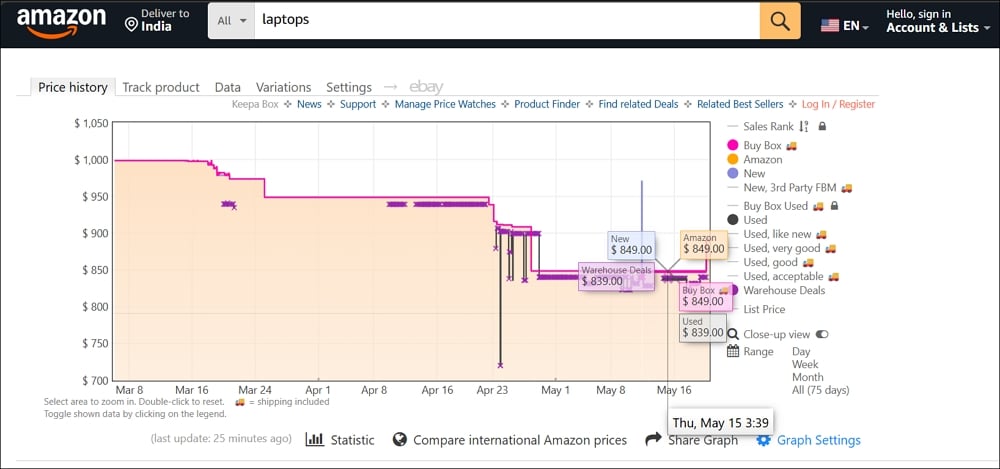
Keepa is available for both consumers and sellers. Its huge database of product price history makes it one of the best tools for Amazon. A consumer can see the historical pricing of a product, track price changes, and set price drop alerts. A seller can also use the same data along with sales rank tracking features.
What is Edge Shopping?
Edge Shopping is a built-in feature on the Microsoft Edge browser to help users shop wisely with better pricing on the required products. It works on almost every shopping platform and does not limit itself to Amazon.

Edge Shopping works in a way to make the online shopping experience efficient and money-saving with price comparison, coupons and discounts, price tracking, cashback, and other features to help users make an informed decision. Though it is available as a default feature on the Edge browser, we never see it intruding on our shopping pages unless we click on the Shopping icon in the address bar. It is not yet widely used compared to Keepa, as not all the features are widely available in many countries except the US.
Keepa vs Edge Shopping: Which Is Better to Track Prices on Amazon
Keepa and Edge Shopping both can influence a consumer’s shopping experience with their data. Let’s get into the details of each one and find out which one has the better features for our usage in online shopping.
Availability
Keepa is available as a browser extension for desktops. You can install and use the Keepa extension to track prices on Amazon in various Amazon locales like Japan, India, USA, UK, Canada, Brazil, Mexico, Germany, France, Italy, and Spain in eight international languages. Keepa extensions are available for Mozilla Firefox, Google Chrome, Opera, Microsoft Edge, and Safari. You can also install the extensions on other Chromium-based browsers like Brave from the Chrome Web Store.
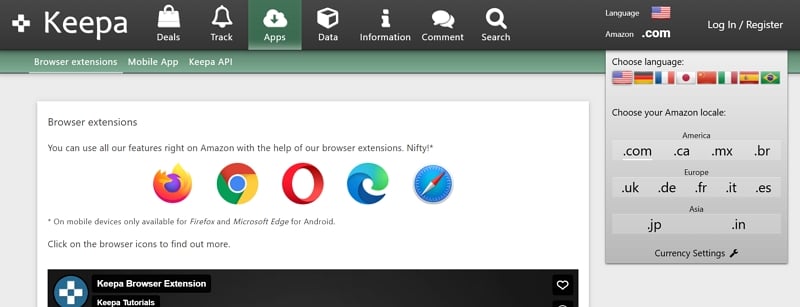
For Android and iOS, you can install the Keepa app available on the Google Play Store and App Store, respectively.
Coming to Edge Shopping, it is available on the Microsoft Edge browser on all platforms in 211 countries, like desktops and mobiles, as it is a default feature. You do not need to install an additional extension or app to use Edge Shopping features on the Edge browser. You just need to click on the Coupon icon on the Edge browser address bar to access the insights. If you do not see the Coupon icon, just click on the three-dot icon on the toolbar and select Shopping.
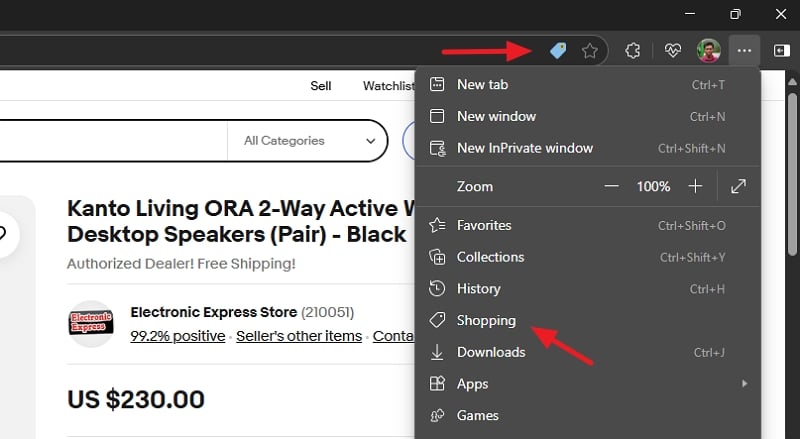
You can see the pricing and other insights of the product on the sidebar with Edge Shopping.
Edge Shopping does not have any premium plans, and it assists users for free, whereas some features on Keepa, mostly related to sellers, are behind a subscription.
Accessibility on Various Marketplaces
Keepa is solely made for Amazon. You cannot use it on other marketplaces like Target, Walmart, eBay, etc. You cannot rely on Keepa to track prices on places other than Amazon. Edge Shopping was developed as a shopping assistant on the Edge browser. It aims to provide value to consumers by giving price history, cashback, deals, etc., on all major marketplaces around the world.

While Edge Shopping is user-focused and provides insights on web marketplaces, Keepa is for Amazon customers and sellers. When you see insights of a product using Edge Shopping, you can also see the list of marketplaces where you can get the same product for a different cost.
Price Change Alerts
When you look for a product on Amazon and you think the price is too expensive or just not worth paying, you can easily track the price using both Keepa and Edge Shopping. When you install Keepa on your web browser and visit the Amazon marketplace, it will add a Keepa section under the product listing. On the Keepa section, select Track product to track the pricing.
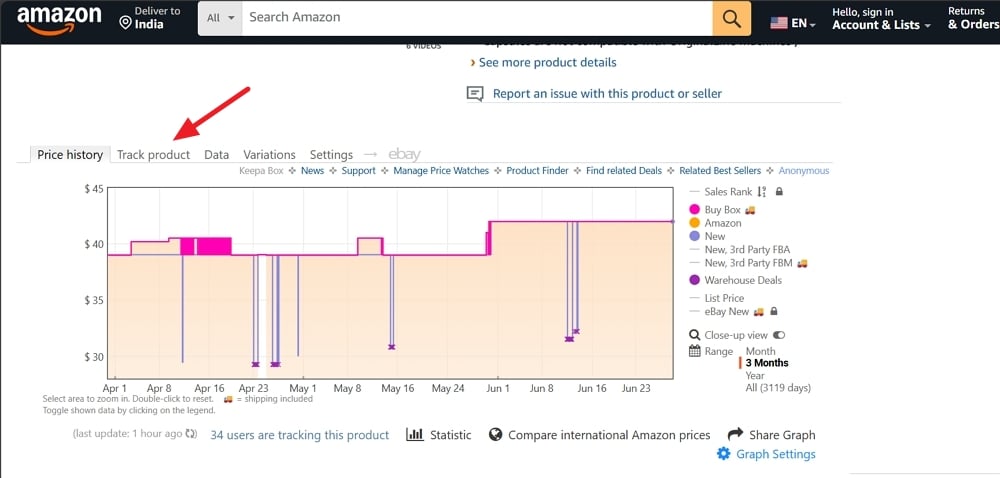
It asks you to enter your Email, Telegram Messenger, and other information to notify you to make sure you will not miss the price change of the product you are looking for.

The notifications may seem overwhelming, but they are worth it when you are looking to find expensive items at an affordable price. The only flipside of all these is that you just need to stick to Amazon to get the product, whereas Edge Shopping scouts all the marketplaces.
When you look for a product on any marketplace and see the insights using the Edge Shopping feature, you see a Track price button beside the product.
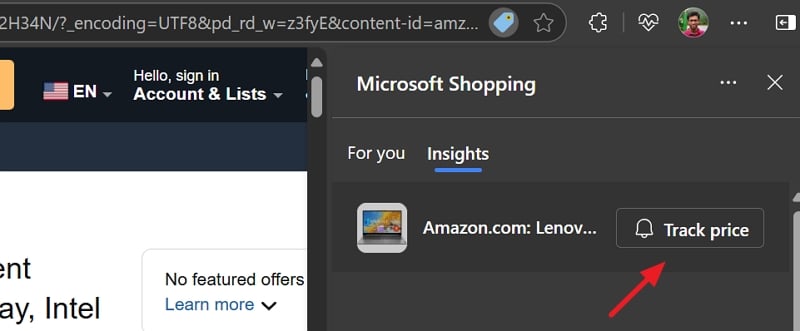
When you click on it, you will automatically get a push notification on your devices where you are using the Edge browser with the same Microsoft account, when the price falls by a minimum of 20% of the price or more.
Data Accuracy
Keepa has been in the price-tracking business on Amazon for many years. The data it scrapes from Amazon marketplaces continues to increase with every hour and makes it as accurate as possible, as the prices are directly obtained from Amazon listings themselves. Everything Keepa shows us is obtained from Amazon itself.
Edge Shopping, on the other hand, does not show price history for all the products on all marketplaces. We only see the price history on a few products. This can be seen as a sign of accuracy instead of providing made-up data.
Unique Features
Keepa has a solid history of pricing on the products listed on Amazon in different countries. In addition to price history and tracking, you can set the alerts for product availability, and to compare international prices of the same product.
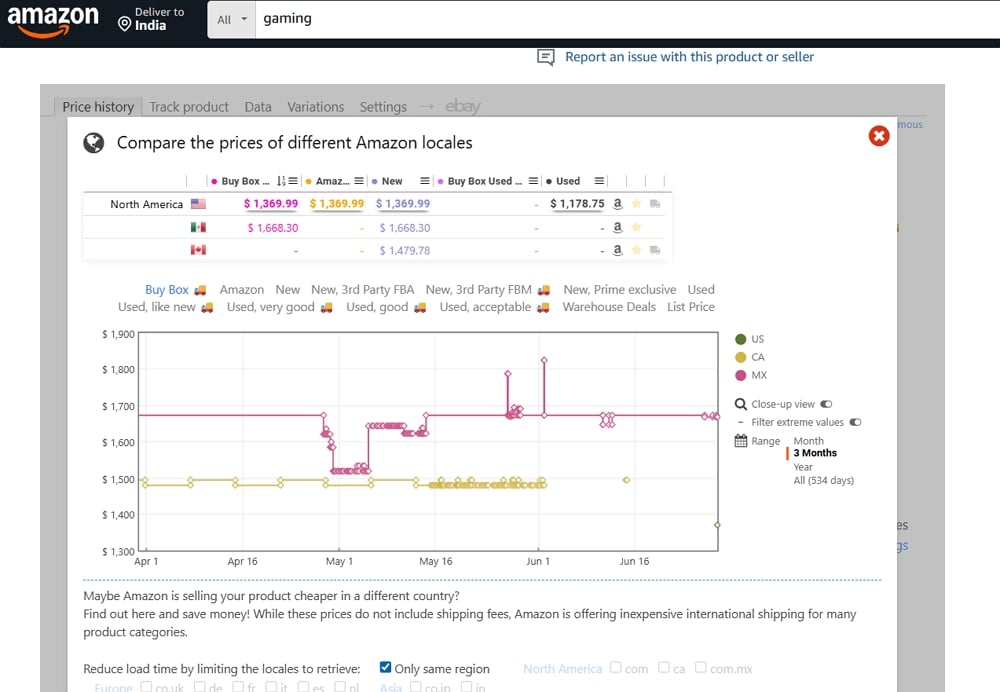
Edge Shopping does not show you the international prices of the same product. It only shows you the best prices, cashback, or coupons for the country you are looking for. While Keepa is limited to Amazon, Edge Shopping is for all the marketplaces.
To sum up, Keepa is all about Amazon for consumers as well as sellers. Edge Shopping is all about providing shopping assistance on the Edge browser to users.
How to track the lowest price on Amazon?
To track the lowest price on Amazon, you can use the Keepa web extension or the Edge Shopping feature on the Edge browser on your device. They both can track the prices, notify you when the price of the products you are looking for decreases, and help you grab the deal in time.
Final Words
Keepa and Edge Shopping are great at what they do. A normal consumer does not always look for price history. We only need the product we need at the best possible pricing now. To cater to this perfectly across all online shopping marketplaces, Edge Shopping gains the upper hand. While Keepa is good with Amazon, Edge Shopping can also track Amazon listing prices. When you use the Edge browser, you do not need to install an additional extension to track the prices. Personally, Edge Shopping is great for me as a shopping assistant, as I do not look for historical data or other features Keepa provides.

