

In Summary
- Ever since Apple released its most affordable MacBook, the MacBook Neo, there have been many who have been predicting that the new notebook will wipe out Chromebooks, which are very popular among college students.
- Introduced more than a decade ago, Chromebooks have gained a significant following, thanks to their affordability and ability to do browser-based tasks efficiently.
- While the MacBook Neo is the most affordable MacBook around and way more powerful than a Chromebook, we do not think it will replace, let alone remove, Chromebooks. We explain why.
Ever since Apple took the wraps off the MacBook Neo, the tech world has been packed with obituaries of the Chromebook, Google’s uber-affordable notebook that is the favorite of many college goers. The rationale is simple: the MacBook Neo is the most affordable notebook from Apple, is impressively powerful, and can do much more than any Chromebook, and also looks way better and is immensely more aspirational. So, with a way more affordable and yet gorgeous MacBook (the Neo is almost half the price of the new MacBook Air, which starts at USD 1099) in the market, surely the appeal of Chromebooks should fade.

Well, if only it were that simple. Speaking as someone who has been using Chromebooks for over a decade and has seen many others using them, I do not see them disappearing any time soon. The reason is simple: they fulfil a very different role from a MacBook Neo or even any Windows notebook, for that matter. If greater functionality and more power specs were all that mattered, Chromebooks should not have existed in the first place – there are a large number of Windows notebooks that are priced lower than a MacBook Neo, which have better specs and are capable of doing more than a Chromebook.
The truth is that the Chromebook does not exist because of its high-end performance or its cutting-edge design, but because of the basics it delivers at a very low price.
A notebook that runs on a browser
When Google introduced the Chromebook, it basically did so to make a very low-cost, basic computing option available to the masses. The Search Giant told us in an initial briefing that its research had shown that a very large number of users actually spent their time online within their browsers on notebooks. Whether it was social media, mail, or messaging, a lot of work was being done within a browser. Google, therefore, came out with the concept of an operating system that basically revolved around its Chrome browser and its online services. It was a “cloud notebook” as almost everything on it happened online.
As a Chromebook was designed mainly to run a browser, it did not require powerful or elaborate hardware, in terms of display, processor, RAM, or even storage (many Chromebooks came with special offers for online storage). It also made them extremely quick to start and shut down – most Chromebooks even today boot up and shut down in 10-15 seconds. This meant one could have extremely affordable notebooks that allowed one to do a number of basic tasks, as long as one had an Internet connection (some tasks could be done offline, too, but the Chromebook was at its best online). In fact, the first Chromebooks to arrive in the Indian market were priced at barely Rs 10,000 – Rs 12,000 (about USD 150 in 2013).
One could get more expensive Chromebooks too, with better processors, touchscreens, more storage and RAM, and sleek designs, but while they ran faster than lower-priced Chromebooks, they basically did the same tasks. It was a bit like the difference between a basic bicycle and a slightly more sporty one – both did exactly the same thing in broadly the same manner, but one was more comfortable and faster.
Great for working online, but useless for high-end work
Given their super affordable price tags and their ability to handle basics well, Chromebooks became a great option for those who wanted a simple, inexpensive notebook that could let them carry out online tasks. And as more of our lives went online (accelerated by the lockdown), the popularity of Chromebooks rose. They were particularly great for those who wanted an easy-to-carry and low-priced computer that only did the basics. Although one could install some Android apps on a Chromebook, the experience was not a great one. The Chromebook was never a device for resource-intensive tasks like video editing, gaming, or even high-end presentations. It was at its best for simple writing, reading, and research. It was a very basic notebook at the price of a mid-segment smartphone – even netbooks did more than Chromebooks.
If one wanted to do more than just online work, one simply went for a “proper” computer, with more powerful hardware and a “proper” OS like Windows, macOS, or Linux. Even those who bought more expensive Chromebooks did so mainly for better build quality and other basic features, rather than greater functionality – Google even ended Steam support on Chromebooks when it saw that hardly anyone was using their Chromebook for gaming. Yes, one CAN edit video on a Chromebook, but it is the equivalent of bringing a fork to a gunfight.
The Neo will take down Windows notebooks, but Chromebooks ain’t on its radar
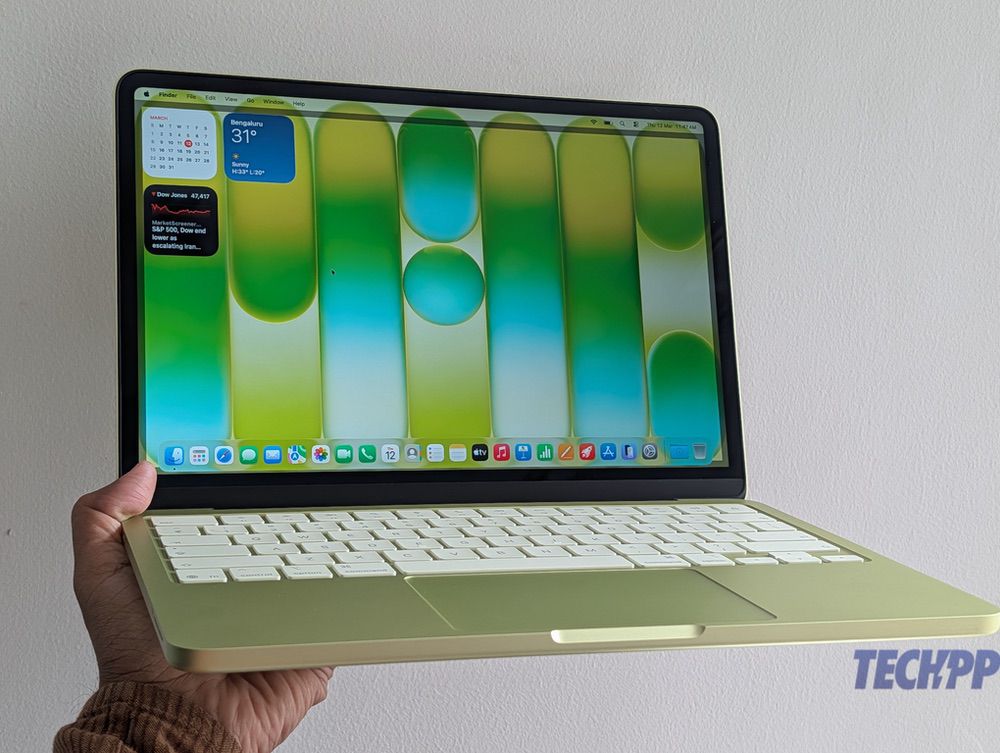
Which is why I don’t think the MacBook Neo will kill Chromebooks. The MacBook Neo is, for all intents and purposes, a “proper” notebook. It might be powered by a smartphone processor, but even that processor’s performance has been compared to Apple’s M1 chip, seen on the MacBook range. The MacBook Neo is not just about online tasks but can do a lot of heavy lifting, including video editing, multimedia presentations, and even reasonably high-end gaming. We can see it threatening every other Windows notebook in its price range, which does the same work it does.
But Chromebooks? Not only are most Chromebooks nowhere near the price point of the MacBook Neo (those that exist in that range have been designed for better utility, not high-end performance), but they do not even do the tasks that a MacBook Neo can do. In simple terms, it is very unlikely that someone who has arrived at a store to purchase a Chromebook will purchase a MacBook Neo. It is a bit like someone coming to a store to purchase a bicycle and then opting for a motorbike. Both have two wheels, and both help you travel, but they are very different. The Chromebook, for all its popularity, is basically a notebook designed to run a browser, and all that runs within it. The MacBook Neo can run a browser and so much more.
The MacBook Neo is likely to do to Windows notebooks in its segment what the iPhone does to Android flagships. But Chromebooks are likely to continue on their merry, basic, budget-friendly way. At least for now.

