

Vision Pro is Apple’s new and high-end VR headset (or spatial computing headset like Apple wants to call). At launch, Vision Pro supports 600+ apps along with support for iPad apps. However, popular apps like YouTube and Netflix are missing from the launch list. YouTube says an app for Vision Pro is in the works but hasn’t shared a timeline for the launch yet. If you just bought the shiny new gadget and miss the YouTube app, this guide will show you two ways to watch YouTube on the Apple Vision Pro.

Table of Contents
2 Ways to Use YouTube in the Vision Pro
Juno for YouTube ($4.99)

Juno for YouTube is a YouTube client and the best YouTube app for the Apple Vision Pro right now. It is natively compatible with Vision OS and offers all the essential functions for the best viewing experience.
Juno supports native controls like pinch gestures, maintaining the videos’ aspect ratios, and more. You can resize and reposition windows, dim the screen around the window, and more.
You don’t need to set up your account to watch the videos using Juno. It complies with YouTube policies, uses YouTube’s API, and displays YouTube ads. However, if you are a YouTube Premium subscriber, log in to your YouTube account for an ad-free experience and other Premium benefits.
Juno App is available on the Apple app store for $4.99. There is no free version of the app. The developer plans to add more features in the future, such as viewing comments and captions, support for multiple video views, and more.
Access YouTube on Safari
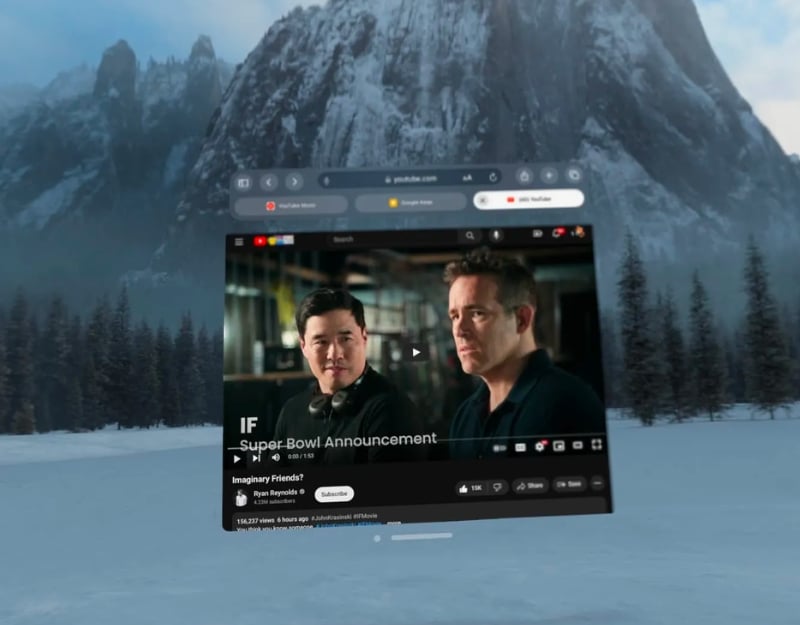
Another way to access YouTube is via the Safari browser. Watching videos with Safari is free. However, you will have to sacrifice a few things, such as the intuitive design and native app experience that Juno offers. YouTube Web doesn’t have Offline Viewing, meaning you cannot download and watch YouTube offline. You can open Safari, visit YouTube web (https://www.youtube.com), and start watching videos.
Which Method is the Best
Each method has its benefits and drawbacks. Using Juno is the best way to get the best YouTube viewing experience on Vison with support for native controls, and Safari is the best option if you want a free and reliable method.
Feature | Safari Browser | Juno Youtube Client |
|---|---|---|
Account Required | Optional (for personalized content) | Not required |
Ad Viewing | Shows Ads, Ad-free experience for premium subscribers | Shows Ads, Ad-free experience for premium subscriber |
Video Player Controls | Standard YouTube controls | Enhanced controls for resizing, repositioning, and dimming Windows |
Aspect Ratio Detection | Depends on YouTube’s web player | Automatically detects and adjusts for different video sizes |
Speed Adjustments | Available in YouTube settings | Easy adjustments for video speed |
Captions | It can be toggled in YouTube settings | Easy toggling of captions |
Price | Free (web access) | $4.99 for the app |
Navigating YouTube on the Vision Pro
You can use those two methods to Watch YouTube videos on the Apple Vision Pro. Play. In a statement to the Verge, a YouTube spokesperson said that the YouTube Vision Pro app is in the works but hasn’t shared any detailed timeline about the launch. Currently, Juno for YouTube and YouTube Web are the only options. While Google has not officially commented on Juno, It has the power to pull the plugin anytime. Till then, enjoy the native YouTube experience on Youtube.
FAQs about Watching YouTube on Apple Vision Pro
1. How do I ensure the best video quality when watching YouTube on the Apple Vision Pro?
The Apple Vision Pro is equipped with high-resolution displays. When you watch YouTube on the Vision Pro via the app or the web, the video quality is the best. However, other factors such as the quality of your internet connection can also affect the video quality.
2. Can I access and manage my YouTube subscriptions and playlists on the Apple Vision Pro?
Yes, you can access and manage your YouTube subscriptions and playlists with Apple Vision Pro, just like on your smartphone.
3. What are the limitations or challenges of using YouTube on the Apple Vision Pro?
The YouTube app is not officially available for Vision Pro. You can access YouTube videos via third-party YouTube clients such as Juno.
Other restrictions are tied to individual methods. Juno is the only YouTube client available for the Apple Vision Pro and costs $4.99. YouTube clients typically have limitations such as limited features, update dependency, performance issues, privacy concerns, account synchronization, and more. Juno complies with YouTube guidelines but is still an unofficial method. On the other hand, using Safari to watch YouTube has some limitations, such as no offline view, YouTube’s user interface in the browser may not be as smooth and intuitive as in the app, and more.

