

Since ChatGPT hit the market, it has revolutionized the field of AI and natural language. It can generate human-like content and be used in various applications, such as drafting emails, writing articles and blogs, answering questions, creating chatbots, and much more.

With the latest multimodal ChatGPT-4 update, users can do much more by getting more creative and diverse responses, higher accuracy and speed, image analysis, and so on. However, GPT-4 is not free. But that doesn’t mean you can’t use ChatGPT-4 for free!
Table of Contents
How to Use ChatGPT-4 Without Subscription?
OpenAI launched ChatGPT-4 in March 2023, and since then, every AI fanatic has wanted to try this tool. Although there is no direct way to use ChatGPT-4 without a ChatGPT Plus subscription, there are many chatbots and extensions built into GPT-4 that allow you to use GPT-4 for free.
If you are an AI lover but are unable to try this tool due to the price, you can access GPT-4 for free using the following methods.
Method 1: Using Microsoft Bing
Microsoft has partnered with OpenAI to gain early access to the generative artificial intelligence technology developed by OpenAI. The company has also invested billions in GPT-4, which allows it to use the latest version of GPT-4 in the Bing AI chatbot.

Here’s how you can use GPT-4 for free using Bing AI:
A. On Desktop
- Download and install the latest version of Microsoft Edge on your computer.
- Launch the Microsoft Edge app.
- Click on the BingAI Chatbot icon in the search bar.
- A new window will open with a ChatGPT-like interface.

You can also use BingAI on other browsers such as Chrome, Firefox, and others. Simply go to https://www.bing.com/new, and you can start using ChatGPT-4 powered BingAI. However, the Microsoft Edge application offers some additional features, such as image creation and the compose function.
B. On Smartphone
- Install the Microsoft Edge app from the Play Store/ Apple Store.
- Launch the app and tap the chat button at the bottom of the screen.
- Turn ON the GPT-4 button and you can use GPT-4 for free on your smartphone.

To use GPT-4 without restrictions for BingAI, you need to sign in with your Microsoft account. This way, you can also save your chat history.
Method 2: Using Microsoft Copilot
If you’re running the latest Windows 11 (23H2) on your computer, you may have seen a copilot in your taskbar. Microsoft recently launched the latest version of Windows 11 (23H2) and introduced the Microsoft Copilot. The Microsoft Copilot uses the GPT-4 model from OpenAI, which means that you can access GPT-4 for free with the Copilot. In addition, Copilot is integrated with Microsoft applications such as Outlook, Paint, and Photos, further enhancing its capabilities.

To launch Copilot on your system, click on the Copilot icon on your taskbar or press the Win+C shortcut key.
Method 3: Using Merlin Extension
Merlin is one of the best AI extensions for Chrome. It is powered by ChatGPT and supports the GPT-4, GPT-3.5, and other AI models. Not only can you access GPT-4 with Merlin, but you can also generate YouTube videos and AI art, summarize videos and web pages, and improve your overall browsing experience.
Here’s how you can use GPT-4 for free using Merlin Extension:
- Go to getmerlin.in and download the Merlin extension for your browser. You can also download it from the Chrome Web Store. Once you’ve downloaded it, pin the extension icon to the extension bar so you can easily reach it.
- Now tap on the Merlin extension or press the Ctrl+M shortcut key and a chat box will open.

- Then select GPT-4 from the drop-down menu. Now, you can use GPT-4 for free on your desktop.

The platform awards 102 query tokens every day, and for each GPT-4 query, you need 30 tokens, i.e., you are looking for 3x GPT-4 queries for free.
Related Read: How to Build Your Own Custom GPT with ChatGPT
Method 4: Using Nat.dev
Nat.dev is a free platform that allows you to use a wide range of AI models, including GPT-4. It provides limited access to the advanced language model of GPT-4 and allows you to freely experiment with its API. Up to 10 GPT-4 queries are offered every day.
The best thing about this platform is that it’s an Open Playground tool, and you can use a variety of AI models in one place. Also, there are no restrictions on using certain models, making it a paradise for AI enthusiasts.
Here’s how you can use GPT-4 for free using Nat.dev:
- Go to Nat.dev and create your account.
- Once you’re logged in, the Net.dev Playground interface will open. Select GPT-4 from the drop-down menu on the right. As with ChatGPT-4, you can also make other settings here, e.g., the temperature, the maximum length of the output, and the number of outputs generated.
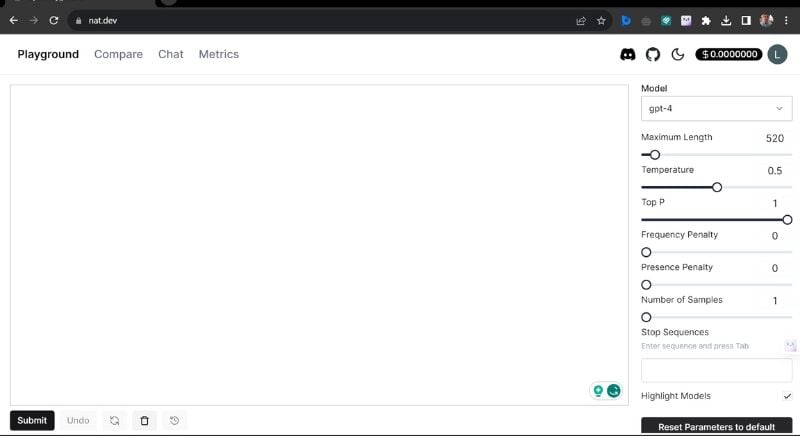
- Put your prompt on the left side chat box and hit enter to use GPT-4 for free.
Wrap Up – Use GPT-4 for Free
With the platforms mentioned above, you can use GPT-4 freely. These platforms offer different ways to use GPT-4 and interact with its advanced language model. In addition, there are other platforms that have offered free access to GPT-4 so far, such as Ora, Forefront, Quora Poe, etc.
However, if you want to use GPT-4 to its full extent and make the most of its possibilities, you should opt for the ChatGPT Plus subscription. With ChatGPT Plus, you can use a wide range of AI tools and features and get high-quality and fast responses. However, if you don’t use it frequently but only occasionally, then the platforms mentioned above will suffice.
FAQs about ChatGPT-4
1. Is ChatGPT-4 free?
No, ChatGPT-4 is a premium tool, and you need to subscribe to OpenAI’s ChatGPT Plus subscription, which costs $20 per month. However, there are some free platforms, such as Bing AI, Merlin, and Hugging Face, that allow you limited free use of GPT-4.
2. How much does ChatGPT Plus cost?
The ChatGPT Plus subscription costs 20 US dollars per month and allows you to use the GPT-4 model. With a ChatGPT Plus subscription, you get faster and higher quality responses and access to new features and improvements. In addition, the platform also offers free access to GPT-3.5 and its predecessors, making it the best free AI tool for content creation.
3. What are the features of ChatGPT-4?
ChatGPT-4 is OpenAI’s multimodal AI tool that offers many advanced features and capabilities. The ChatGPT-Plus subscription gives users access to these new features and enhancements, including:
- Enhanced AI responses
- Enhanced Image Analysis
- More creative and diverse response
- Up to 25,000 words of support
- Enhanced accuracy and speed
- Greater context awareness
- Better conversational management
- Better narrative construction
- Support for multiple languages
- Improved reasoning and logic
- Plugin support

